

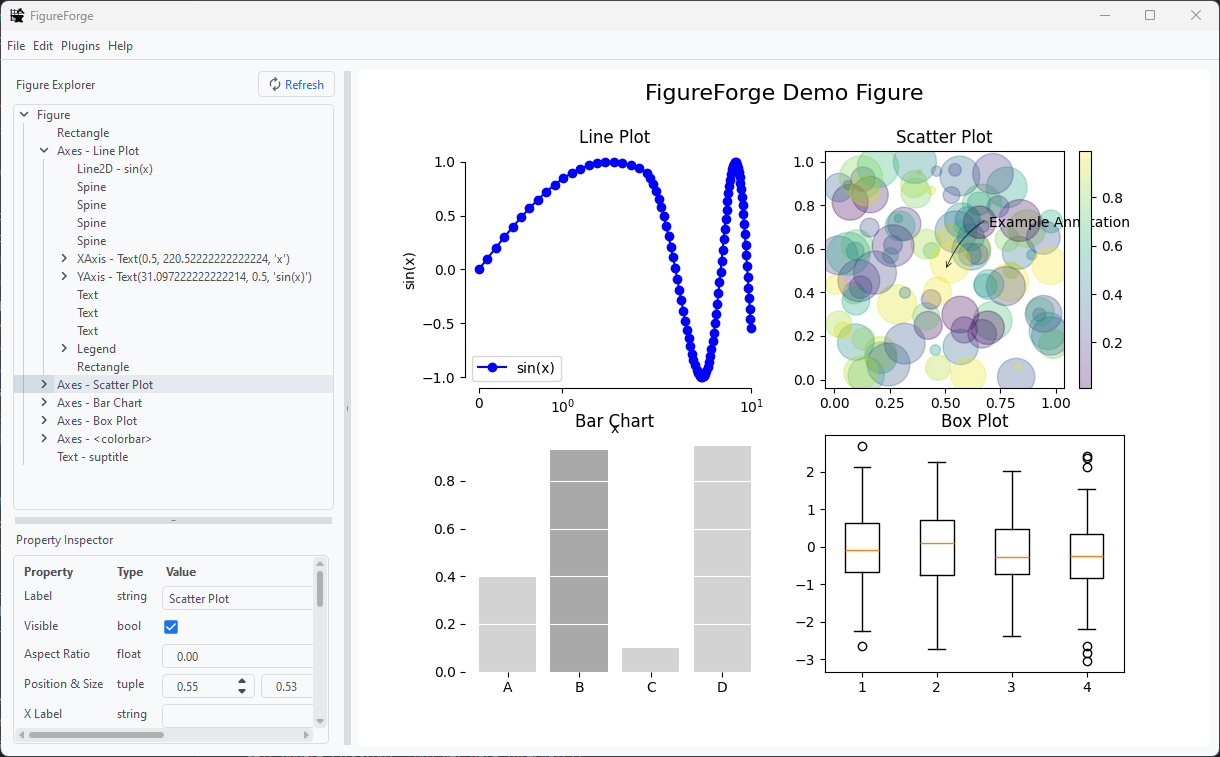
A Python GUI application for interactive creation and editing of matplotlib figures.
Features
- Edit matplotlib figures via a graphical interface.
- Adjust text labels, size, fonts, etc.
- Change colors of lines, text, symbols, etc.
- Adjust size of markers, lines
- And more!
- Save figures to a pickle file for use in other Python projects or to share (and load figures from a pickle file, too!).
- Use custom plugins to automate figure styling.
Installation
-
Open a terminal or command prompt.
-
Optionally, create a virtual environment.
-
Run the following command to install FigureForge:
pip install FigureForgeYou may need to uninstall FigureForge before upgrading.
-
Start FigureForge from the terminal:
FigureForgeor from within a script:
import matplotlib.pyplot as plt
import FigureForge

fig, ax = plt.subplots()
ax.plot([1,2,3,4],[1,4,9,16])

# Do edits with FigureForge...
fig = FigureForge.run(fig)
# Continue your script after FigureForge closes...
Help
The documentation for FigureForge is available on the project's wiki -- it is still a work in progress, but in the meantime you might find the FAQ & Troubleshooting page helpful. Consider also creating a new issue, or ask a question in the discussions.
Contributing
Obviously, FigureForge is still early in development. Correspondingly, there are many opportunities to implement features and fix bugs. If you want to pitch in, you are welcome to fork the project and make a pull request.
Truth be told, I am an aerospace engineer and not a software developer; I don't know how to develop professional software, but am doing my best - especially because FigureForge is solving one of my own problems. If you would like to contribute, I would be grateful. There is no formal development philosophy: I just recently learned that git tags are a thing. The closest thing to a development roadmap is this Kanban board, granted, these features are to some extent aspirational: FigureForge Project.
Acknowledgements
FigureForge is possible only because of the open source technologies and resources from which FigureForge stands on shoulders. Specifically, I wish to thank:
- The developers of matplotlib who are responsible for the very foundation of this project.
- The GUI framework for FigureForge is the Qt platform, specifically PySide6.
- The menu icons used in FigureForge were made by Google.
See Also
A unique function of FigureForge is its ability to work on matplotlib figures as part of any Python workflow. However, if you are looking for something more polished and are not so concerned with the serialization/data format of your figure, you might find the following projects of interest.
1 maintainer

Release files for FigureForge 0.3.3
For a detailed explanation of source distributions (sdists) and built distributions (wheels), please see the package formats documentation.
Source distribution (sdist)
| File | Size | Uploaded | |
|---|---|---|---|
| figureforge-0.3.3.tar.gz | 712.8 kB | Details |
Built distribution (wheel)
| File | Interpreter | ABI | Platform | Reset |
|---|---|---|---|---|
| figureforge-0.3.3-py3-none-any.whl | Python 3 | none | any | Details |
Total release size:1.4 MB
Release files / figureforge-0.3.3.tar.gz
| Download URL | figureforge-0.3.3.tar.gz |
|---|---|
| Size | 712.8 kB |
| Tags | Source |
|
SHA-256 checksum How to use checksums |
c55051e307795e3391a7285677440311a189d3c5c64d13662641e8df91cfb6b5
|
|
BLAKE2b-256 checksum How to use checksums |
50baa897741dfbf3efb48c79e332d17cb9d31240fbb074c26bc2f94e51523de8
|
| Upload date | |
|
Uploaded using Trusted Publishing? What is trusted publishing? |
Yes |
| Uploaded via |
twine/6.1.0 CPython/3.12.9
|
Provenance
Provenance describes where a file came from. On PyPI, provenance is shared via attestations, which provide a verifiable record of the build or publishing details. View details, limitations and caveats.


PyPI Publish Attestation
PyPI verified that this artifact, at this checksum, originated from the publisher listed below.
Signed by GitHub Actions, verified by PyPI on Aug 10, 2025.
Transparency logRelease files / figureforge-0.3.3-py3-none-any.whl
| Download URL | figureforge-0.3.3-py3-none-any.whl |
|---|---|
| Size | 724.9 kB |
| Tags | Python 3 |
|
SHA-256 checksum How to use checksums |
6ceb38443adcfeec49786b4922109189fcbf738e094e1f3080879f0978d3ba58
|
|
BLAKE2b-256 checksum How to use checksums |
9bb3517ed214cc787b97e284580281c6c81b8b0172d100e40db391dd5a38a550
|
| Upload date | |
|
Uploaded using Trusted Publishing? What is trusted publishing? |
Yes |
| Uploaded via |
twine/6.1.0 CPython/3.12.9
|
Provenance
Provenance describes where a file came from. On PyPI, provenance is shared via attestations, which provide a verifiable record of the build or publishing details. View details, limitations and caveats.
PyPI Publish Attestation
PyPI verified that this artifact, at this checksum, originated from the publisher listed below.
Signed by GitHub Actions, verified by PyPI on Aug 10, 2025.
Transparency log













