
Finds and prints function definitions/signatures in source code files. It currently handles JavaScript, Shell, Python (classes too, since they’re just functions anyway :smile:), and C-style function definitions, as well as Makefile targets. It will highlight the body of the functions for readability.
Dependencies
These are installable with pip:
Name |
Description |
|---|---|
Terminal colors. |
|
Command line argument parsing. |
|
Debug printing for command line tools. |
|
Source code highlighting. |
Installation:
This package is listed on PyPi, and is installable with pip:
pip install findfuncUsage
Usage:
    findfunc -h | -v
    findfunc PAT -p [-a] [--color] [-d] [-D...] [-S] [-s]
             [-c pat] [-C pat] [-e pat] [-f pat] [-l num] [-m num]
    findfunc PAT [PATH...] [-a] [--color] [-d] [-D...] [-S] [-s]
             [-c pat] [-C pat] [-e pat] [-f pat] [-l num] [-m num]

Options:
    PATH                   : Zero or more file paths to search.
                             If the path is a directory it will be walked.
                             Default: stdin
    PAT                    : Function name or regex pattern to search for.
    -a,--any               : Matches anywhere in the name.
                             This is the same as: (.+?pattern|pattern.+?)
    --color                : Always use color.
    -c pat,--contains pat  : Only show definitions that contain this
                             pattern in the body.
    -C pat,--without pat   : Only show definitions that do not contain
                             this pattern in the body.
                             This cancels out any -c pattern.
    -D,--debug             : Print some debugging info while running.
                             If given more than once, the verbosity
                             increases.
    -d,--defines           : Allow `#define` macros to match.
    -e pat,--exclude pat   : Regex pattern to exclude file paths.
    -f pat,--filter pat    : Regex pattern to include file paths.
    -h,--help              : Show this help message.
    -l num,--length num    : Show definitions that match this line length.
                             Tests can be prepended:
                                 >N  : More than N lines.
                                 <N  : Less than N lines.
                                >=N  : More than or equal to N lines.
                                <=N  : Less than or equal to N lines.
                                 =N  : Exactly N lines.
                                ==N  : Exactly N lines.
                                  N  : Exactly N lines.
    -m num,--maxcount num  : Maximum number of definitions to show.
    -p,--paths             : Search all directories found in the config
                             file.
    -S,--signature         : Just print the signatures found.
    -s,--short             : Use shorter output mode.
    -v,--version           : Show version.

Any file with a name like '[Mm]akefile' will trigger makefile-mode.
Unfortunately that mode doesn't work for stdin data.

JSON config can be loaded from: ~/findfunc.json
Demo
Here is a recording showing FindFunc’s output when ran multiple times for various file types:
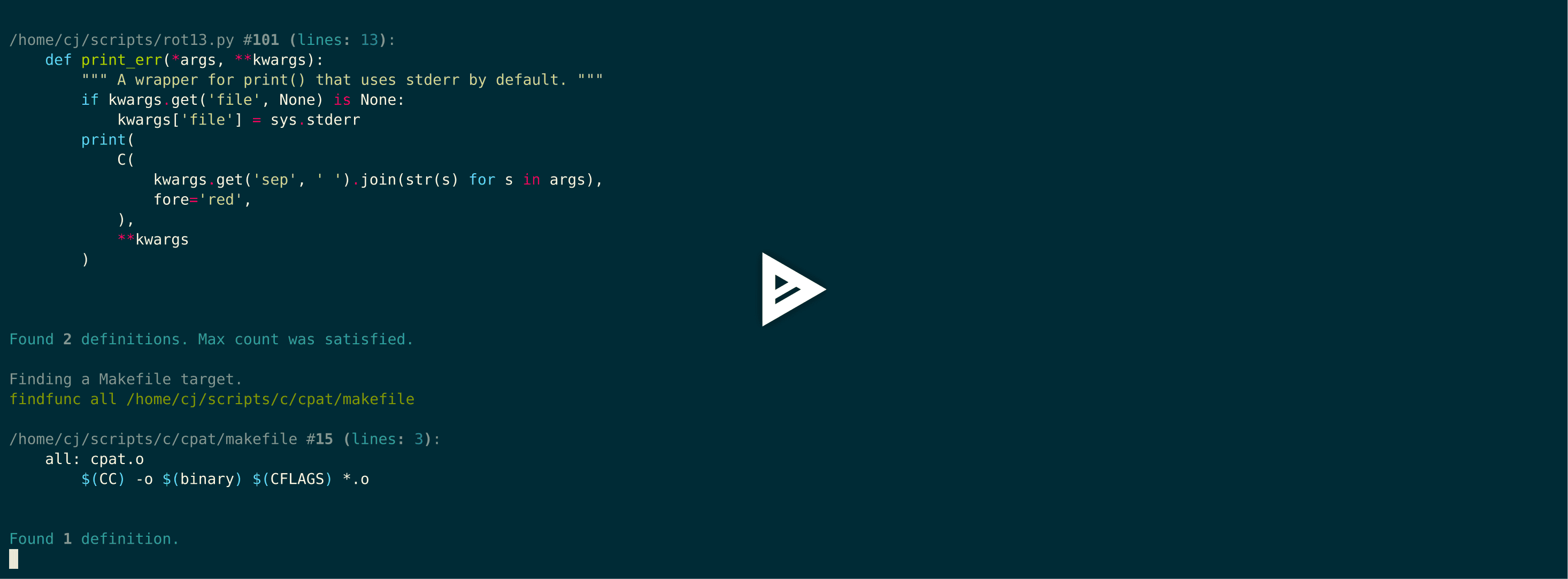
Instead of typing each command, I made a script to do it for me. So it may seem a little fast. It’s running findfunc PATTERN DIR_OR_FILE with or without a --maxcount or --signature flag set.
Config
Config is a JSON file that can be loaded from CWD, ~/findfunc.json, or ~/.local/share/findfunc.json.
It’s format is:
{
    "default_paths": ["my_dir1", "my_file1", "/home/me/scripts"]
}
default_paths is a list of directory or file paths to search when the -p flag is given.
1 maintainer

Metadata
1 maintainer
Release files for FindFunc 0.4.5
For a detailed explanation of source distributions (sdists) and built distributions (wheels), please see the package formats documentation.
Source distribution (sdist)
| File | Size | Uploaded | |
|---|---|---|---|
| FindFunc-0.4.5.tar.gz | 13.9 kB | Details |
Release files / FindFunc-0.4.5.tar.gz
| Download URL | FindFunc-0.4.5.tar.gz |
|---|---|
| Size | 13.9 kB |
| Tags | Source |
|
SHA-256 checksum How to use checksums |
f929cb315d0300d02737501618bd35a8aacf54c7713c3b75d3a8539739d08585
|
|
BLAKE2b-256 checksum How to use checksums |
501cab18ee91a4beea8fc9a6118a1d1983b94c0f690bb1e58530b7ce812517bb
|
| Upload date | |
|
Uploaded using Trusted Publishing? What is trusted publishing? |
No |
| Uploaded via |
Python-urllib/3.6
|














