
FirePoint prepares your images for laser engraving
Command line program to convert an image to a more "engraver ready" image. Default values should provide decent results, many different effects can be achieved my using the numerous parameters.
Examples

this color image is the input which have been used to generate the following 4x4cm wooden squares from those images:
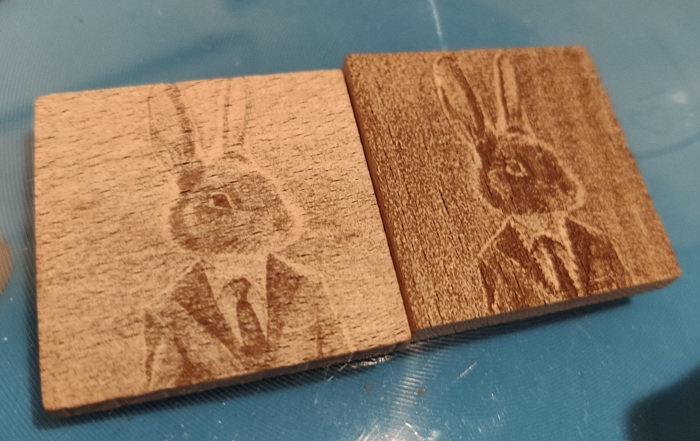
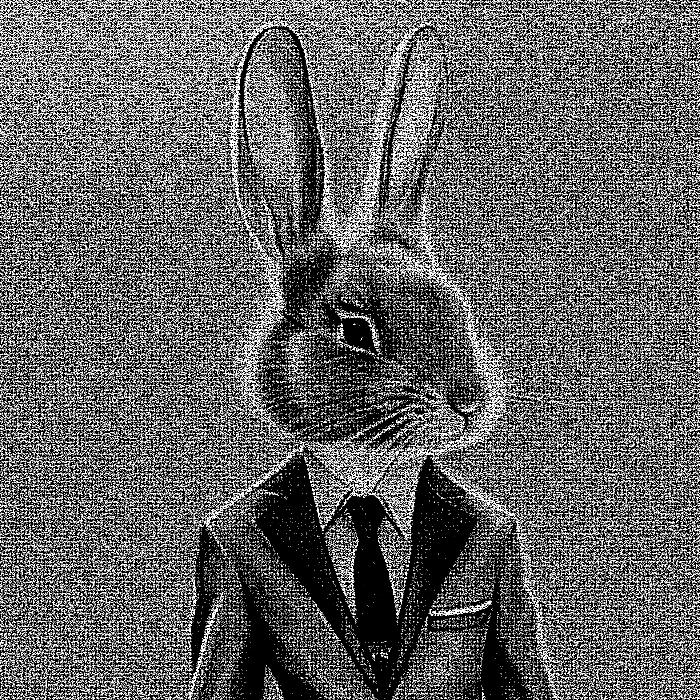
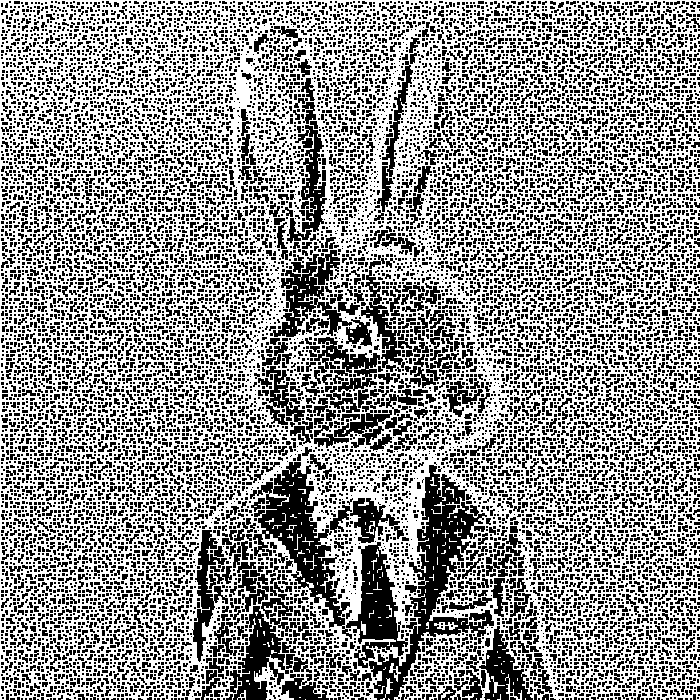
Note: such output image is too bright / requires high power (not ideal):

Syntax
firepoint [options] <source image> <output image>
Installation
pip install firedot
Options
--use_squaresdraws squares instead of circles, sometimes provides better results--widthforces a specific width (in pixels) for the output image--multiplymakes the image more dark (<1) or brighter (>1)--normalizeperforms a normalization of the colors,0to disable up to1(100% normalized)--sharpensharpens the image,0to disable up to1(100% sharper)--hypersampleWhen > 1, will work on a higher definition image and will re-scale it down at the end. Generally increasing the quality drastically, but can lead to weird effects with some values3and5can provide spectacular results but1leads to more consistent output across laser settings (outputs a pure black & white image).
Advanced options
Check firepoint --help
Typical usage
Check the following apps for a complete engraving ecosystem:
- https://github.com/johannesnoordanus/image2gcode can be used to convert firepoint images to gcode use the
--pixelsizematching your machine - https://github.com/johannesnoordanus/grblhud allows sending the gcode & controlling the machine
1 maintainer

Metadata
1 maintainer
Release files for firepoint 1.0.0
For a detailed explanation of source distributions (sdists) and built distributions (wheels), please see the package formats documentation.
Source distribution (sdist)
| File | Size | Uploaded | Provenance | Actions |
|---|---|---|---|---|
| firepoint-1.0.0.tar.gz | 10.6 kB | Without provenance | Details for firepoint-1.0.0.tar.gz |
Built distribution (wheel)
| File | Interpreter | ABI | Platform | Actions Reset |
|---|---|---|---|---|
| firepoint-1.0.0-py3-none-any.whl | Python 3 | none | any | Details for firepoint-1.0.0-py3-none-any.whl |
Total release size: 21.2 kB
Release files / firepoint-1.0.0.tar.gz
| Download URL | firepoint-1.0.0.tar.gz |
|---|---|
| Size | 10.6 kB |
| Tags | Source |
|
SHA-256 checksum How to use checksums |
ed8629f2d4e182ab4c60ffc6b7760bd433061ee5ceed84ed81dabb735a6d4ce0
|
|
BLAKE2b-256 checksum How to use checksums |
82e51ab6d46bbf27a2e79ac63628c0f39984914dc0d56fc31721f4d3104f49e6
|
| Upload date | |
|
Uploaded using Trusted Publishing? What is trusted publishing? |
No |
| Uploaded via |
poetry/1.6.1 CPython/3.11.5 Linux/6.5.3-zen1-1-zen
|
Release files / firepoint-1.0.0-py3-none-any.whl
| Download URL | firepoint-1.0.0-py3-none-any.whl |
|---|---|
| Size | 10.7 kB |
| Tags | Python 3 |
|
SHA-256 checksum How to use checksums |
4061e7bb60b1270075ff089005a1d1777c128d72521f5deb08e49cde349ba36e
|
|
BLAKE2b-256 checksum How to use checksums |
0e4ed45c00eb644bbaf3ea575d08110caaaa27b9cb377d854637cb06c7eba8af
|
| Upload date | |
|
Uploaded using Trusted Publishing? What is trusted publishing? |
No |
| Uploaded via |
poetry/1.6.1 CPython/3.11.5 Linux/6.5.3-zen1-1-zen
|
Security for firepoint 1.0.0
Provenance
Provenance describes where a file came from. On PyPI, provenance is shared via attestations, which provide a verifiable record of the build or publishing details. View details, limitations and caveats.
No provenance found
None of the files in this release were uploaded with provenance metadata.
A note on package security
PyPI is a repository for distributing packages, not a service for auditing them. While third-party security researchers and our staff do their best to detect and remove malicious packages, PyPI cannot guarantee the quality, security or suitability of any given package.
To learn more about protecting yourself from malicious actors, visit our package security documentation.














