
Flag Slurper
Utility for grabbing CDC flags from machines.
Auto PWN
Flag slurper contains a utility for automatically attempting default credentials against team's SSH hosts. This works by grabbing the team list from IScorE and a list of all the services. The default credentials it uses are:
root:cdccdc:cdc
Requirements
AutoPWN requires a database. For many cases sqlite will do, but in order to use parallel AutoPWN a server-based database (such as postgres) is required. This is due to sqlite only allowing one writer at a time. The database can be configured in your flagrc file:
[database]
; For sqlite (default)
url=sqlite:///{{ project }}/db.sqlite

; For postgres
url=postgres:///slurper
The {{ project }} variable is the file path to the current project and is optional.
Usage
You first need to create a project and result database:
flag-slurper project init -b ~/cdcs/isu2-18 --name "ISU2 2018"
flag-slurper project create_db
To generate the team and service list you can simply run:
flag-slurper autopwn generate
This will cache the team an service lists into the database. This will be used by other autopwn commands so they
don't need to keep hitting the IScorE API during the attack phase when the API is getting hammered.
After generating the local files, you can then pwn all the things!
flag-slurper autopwn pwn
This will print out what credentials worked on which machines and any flags found. These results are recorded in the database and can be viewed like this:
flag-slurper autopwn results
Projects
Flag slurper has the concept of "projects". These projects tell flag slurper where to find various files such as the
teams.yml and services.yml files. It may also contain other configuration options such as where flags are
located. The primary purpose of the project system is to keep data from different CDCs separate.
To create a project run:
flag-slurper project init --base ~/cdcs/isu2-18 --name "ISU2 2018"
This will create a project named "ISU2 2018" in the folder ~/cdcs/isu2-18. You can then run the following command to
activate the project.
eval $(flag-slurper project env ~/cdcs/isu2-18)
When you want to deactivate a project, run the unslurp command.
Alternatively, you can specify --project PATH on each command. For example:
flag-slurper --project ~/cdcs/isu2-18/ autopwn generate
The above command will generate the local cache data and store it in the project.
Flags
The Auto PWN feature will automatically look in common directories for flags that look like a flag. You can also specify locations to check. The following project file defines the "Web /root flag"
_version: "1.0"
project: ISU2 2018
base: ~/cdcs/isu2-18
flags:
  - service: WWW SSH
    type: blue
    location: /root
    name: team{{ num }}_www_root.flag
    search: yes
You can specify as many flags as you want. All of the following fields are required:
- service: The name of the service this flag is associated with. Auto PWN matches against this when determining what flags it should look for when attacking a service.
- type: Which flag type this is
blue(read) orred(write). Currently onlyblueis supported. - location: The directory the flag is supposed to be located in.
- name: The expected file name of the flag. Pay close attention to
{{ num }}. This is a placeholder that will be replaced with the team number during the attack. - search: Whether Auto PWN should search
locationfor any files that are roughly the correct file size. A search is only performed if the flag is not found at it's exact name{{ location }}/{{ name }}.
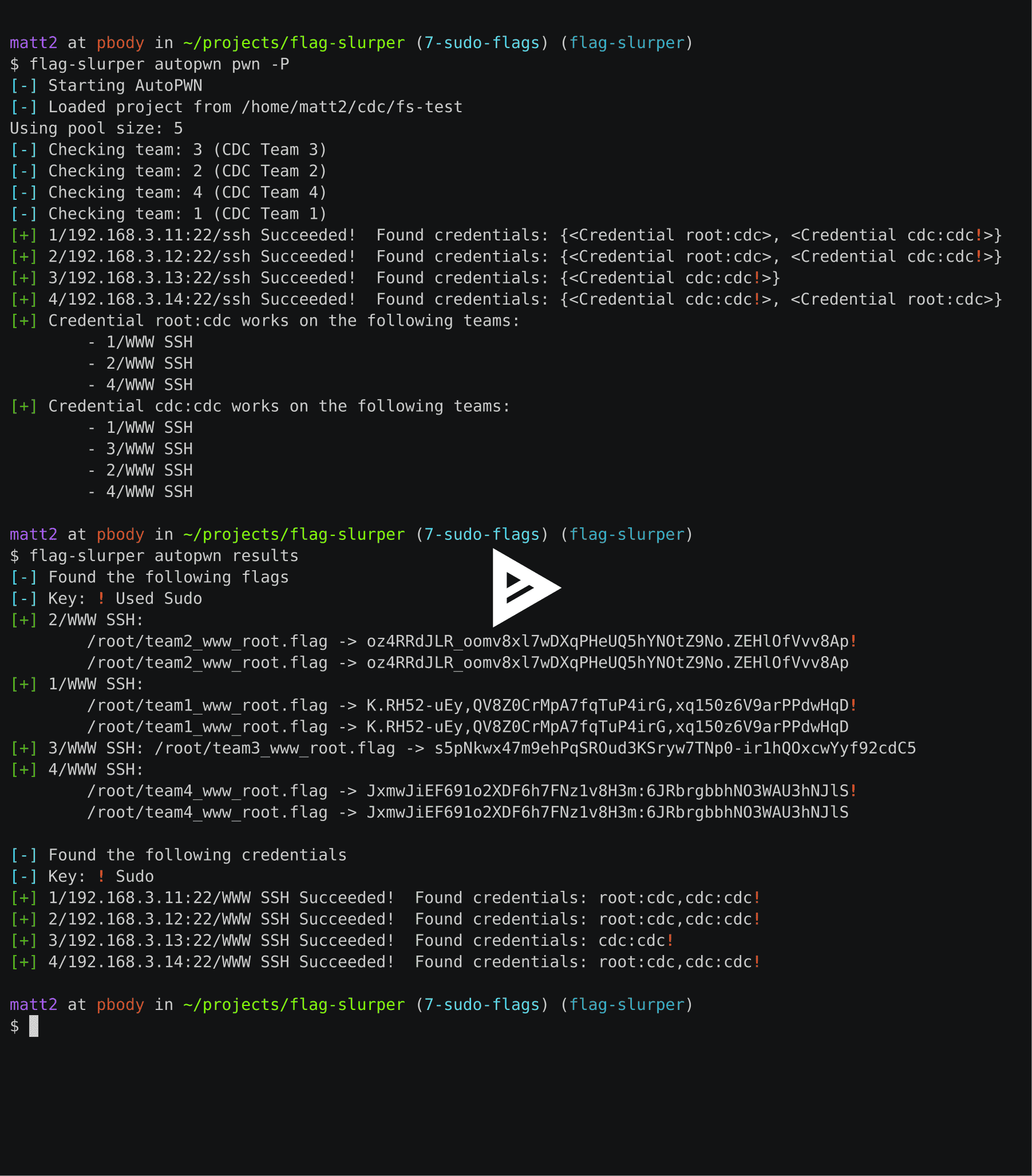
Here's an example of an Auto PWN run that obtained flags:
Credentials
Credentials can be managed through the creds subcommand. To add a credential:
flag-slurper creds add root cdc
List credentials:
flag-slurper creds ls
Remove credential:
flag-slurper creds rm root cdc
Show details for a credential:
flag-slurper creds show root:cdc
1 maintainer

Metadata
1 maintainer
Release files for flag-slurper 0.9.0
For a detailed explanation of source distributions (sdists) and built distributions (wheels), please see the package formats documentation.
Source distribution (sdist)
| File | Size | Uploaded | |
|---|---|---|---|
| flag_slurper-0.9.0.tar.gz | 6.8 MB | Details |
Built distribution (wheel)
| File | Interpreter | ABI | Platform | Reset |
|---|---|---|---|---|
| flag_slurper-0.9.0-py3-none-any.whl | Python 3 | none | any | Details |
Total release size: 6.9 MB
Release files / flag_slurper-0.9.0.tar.gz
| Download URL | flag_slurper-0.9.0.tar.gz |
|---|---|
| Size | 6.8 MB |
| Tags | Source |
|
SHA-256 checksum How to use checksums |
7154351e9c5a60aa7d54b893b4adce680bce6f7f501b77055eb19a7a4b269c33
|
|
BLAKE2b-256 checksum How to use checksums |
9a0517ef4da8a255d41f971dd5a1bd8c967de9467ca8315a5b938e09bb581d6a
|
| Upload date | |
|
Uploaded using Trusted Publishing? What is trusted publishing? |
No |
| Uploaded via |
twine/1.15.0 pkginfo/1.5.0.1 requests/2.22.0 setuptools/41.0.1 requests-toolbelt/0.9.1 tqdm/4.32.1 CPython/3.7.3
|
Release files / flag_slurper-0.9.0-py3-none-any.whl
| Download URL | flag_slurper-0.9.0-py3-none-any.whl |
|---|---|
| Size | 52.3 kB |
| Tags | Python 3 |
|
SHA-256 checksum How to use checksums |
fc090c79669297c3be44761835be4da09628014c065ad4e42ec94480984b5721
|
|
BLAKE2b-256 checksum How to use checksums |
ce4a3f99b4b93d55611c688e3727cb7a0952b42596a1e65fe878f8b5d930b7ed
|
| Upload date | |
|
Uploaded using Trusted Publishing? What is trusted publishing? |
No |
| Uploaded via |
twine/1.15.0 pkginfo/1.5.0.1 requests/2.22.0 setuptools/41.0.1 requests-toolbelt/0.9.1 tqdm/4.32.1 CPython/3.7.3
|














