
⏱️ flexi
Track working hours, leave, and your flexitime balance from the terminal. Built for UK flexitime schemes: bank holidays come from GOV.UK (England & Wales, Scotland or Northern Ireland). Your records stay in a local SQLite database. No account required.




Install
Flexi needs Python 3.12 or newer, but with uv you don't need to install it yourself: uv downloads one if your system's is older (macOS ships 3.9, Debian 12 has 3.11). Tested on Python 3.12–3.14 with macOS, Linux, and Windows. Use a terminal with Unicode and colour support and a UTF-8 locale; on Windows, Windows Terminal is recommended.
With uv, in a new terminal once uv is installed:
uv tool install flexi
flexi
It prints Opening Flexi… straight away. The first launch after installing or
upgrading can take several seconds while Python prepares its files; later
launches open in about a second.
Try it with sample data:
uvx flexi --demo
The first run downloads Flexi's packages, and Python where yours is older, so it
can take up to half a minute; later runs open in a second or two. The demo says
it holds sample data, and deletes it when you quit, or on macOS and Linux when
you close the window. Without --demo, Flexi sets up your own records.
To update an installed copy, quit Flexi and run uv tool upgrade flexi. On
Windows, uv cannot replace or remove Flexi while a copy is open and reports os
error 32 or 5: quit every copy and run the same command again. If your shell
cannot find the command, run uv tool update-shell and restart the terminal.
Other installation methods
pipx and pip use a Python you already have, which must be 3.12 or newer; on older systems, use uv.
With pipx:
pipx install flexi
If your shell cannot find flexi, run pipx ensurepath and open a new
terminal.
With pip, inside a virtual environment created with Python 3.12 or newer:
python -m pip install flexi
From source:
git clone https://github.com/ellsphillips/flexi
cd flexi
uv sync
uv run flexi
First run
Run flexi (or flexi init) and answer six questions: your leave-year start,
annual entitlement, working days, hours a day, UK bank-holiday division, and the
time to close sessions left running overnight. If an answer can't be used, the
error is titled with its question and the cursor goes back to it. Cancel with
escape and none of your answers are saved; run Flexi again to finish.
Hours a day default to 7:24 and accept 7:30, 7h30 or 7.5. A decimal is
hours, so 7.5 is 7:30; 7.30, which reads either way, is refused. One figure
applies to every working day.
The leave-year start is offered as 6 Apr and takes a day and month, such as
1 Apr, 1 April, 6th April or April 6; the note beside it reads the date
back as you type. As with 7.30, numbers that read both ways are refused:
01/04 could be 1 April or 4 January, where 30/09 can only be 30 September.
Tracking starts that day; earlier days do not create a deficit. To record an
earlier day, move to it in Records and press n; it then counts against your
contracted day.
Starting with a balance? Run flexi balance adjust +5:30 --reason "Brought forward",
or choose Adjust balance… from the command palette (ctrl+p or :).
Press f4 to change settings or set each leave year's entitlement. It opens
with the cursor in the leave-year start, written in words. A new leave year
needs its own allowance. New hours a day recalculate every day already tracked,
not only the days ahead, so f4 asks before saving them.
The flexi balance restarts each leave year. Automatic balance carry and import/export are not available yet.
Working with Flexi
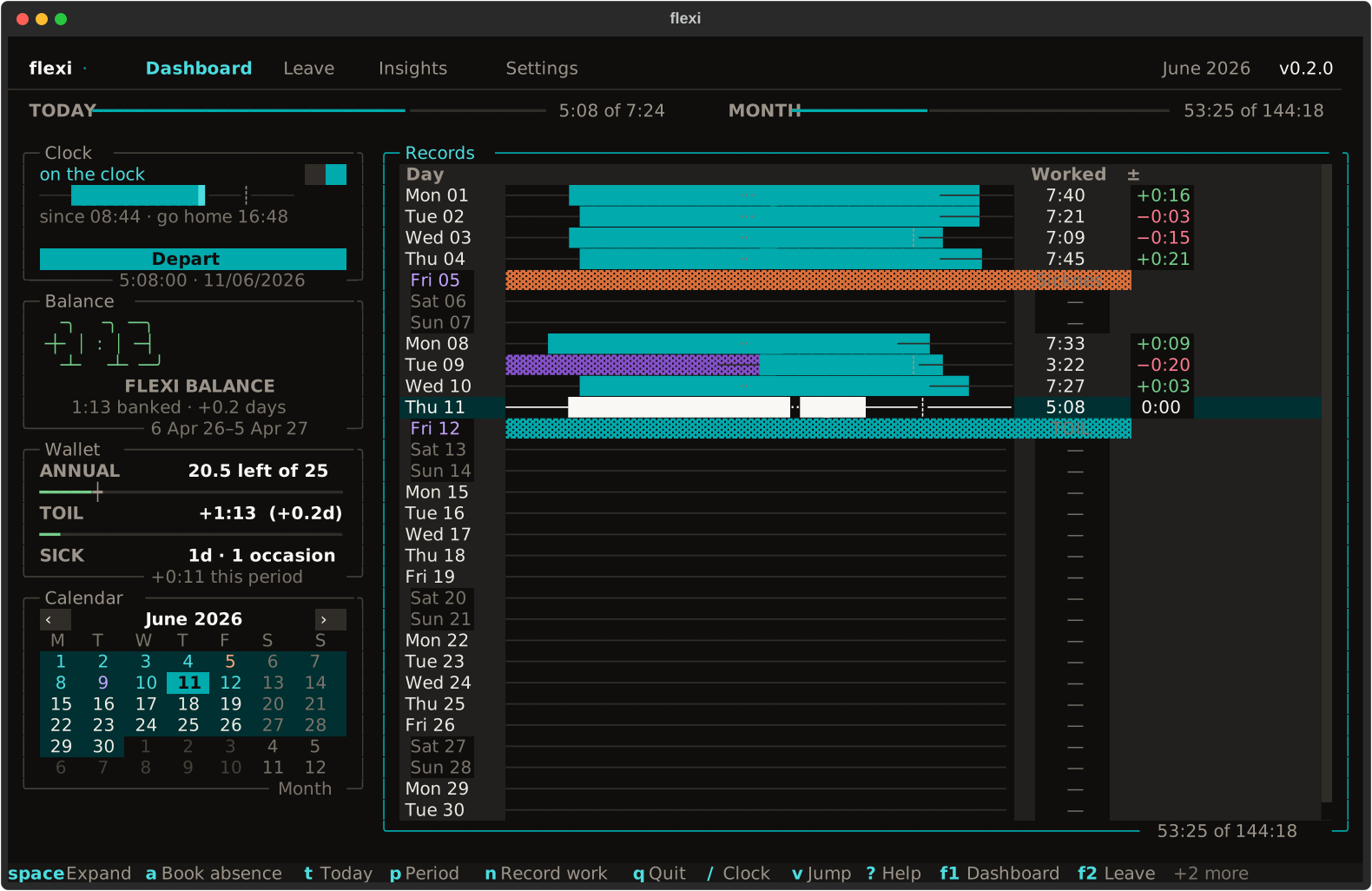
The records table has the keyboard when the dashboard opens: ↑ ↓ or j k
move between days, and space, x, a and n act on the day under the
cursor. tab moves between the panels, and v then r brings you back.
- Clock in and out with
/. The dashboard shows worked time, expected hours, breaks, and your running balance. Today's surplus counts as soon as you work it; a shortfall waits until the day ends. - Add missed work with
n. Enter a completed session; overlapping work is refused.Nlists these corrections. - Fix a wrong session with
x, thenn.xon a session, in a day opened withspace, voids it: it stops counting, and its clock record is kept. The cursor stays in that day, sonadds the real hours there. A session you leave running is closed at your auto-close time, and Flexi tells you what it counted. - Inspect a day with
space. Expand its sessions, absences, and balance. - Book leave with
f2. Annual, sick, TOIL, unpaid, or other absence, in whole or half days. Extend a selection withshiftand an arrow. - Review trends with
f3. See running balances, weekly comparisons, leave usage, and the year at a glance. The annual leave panel sets what is booked against the pace, the days an even spread of the allowance would have used by today.
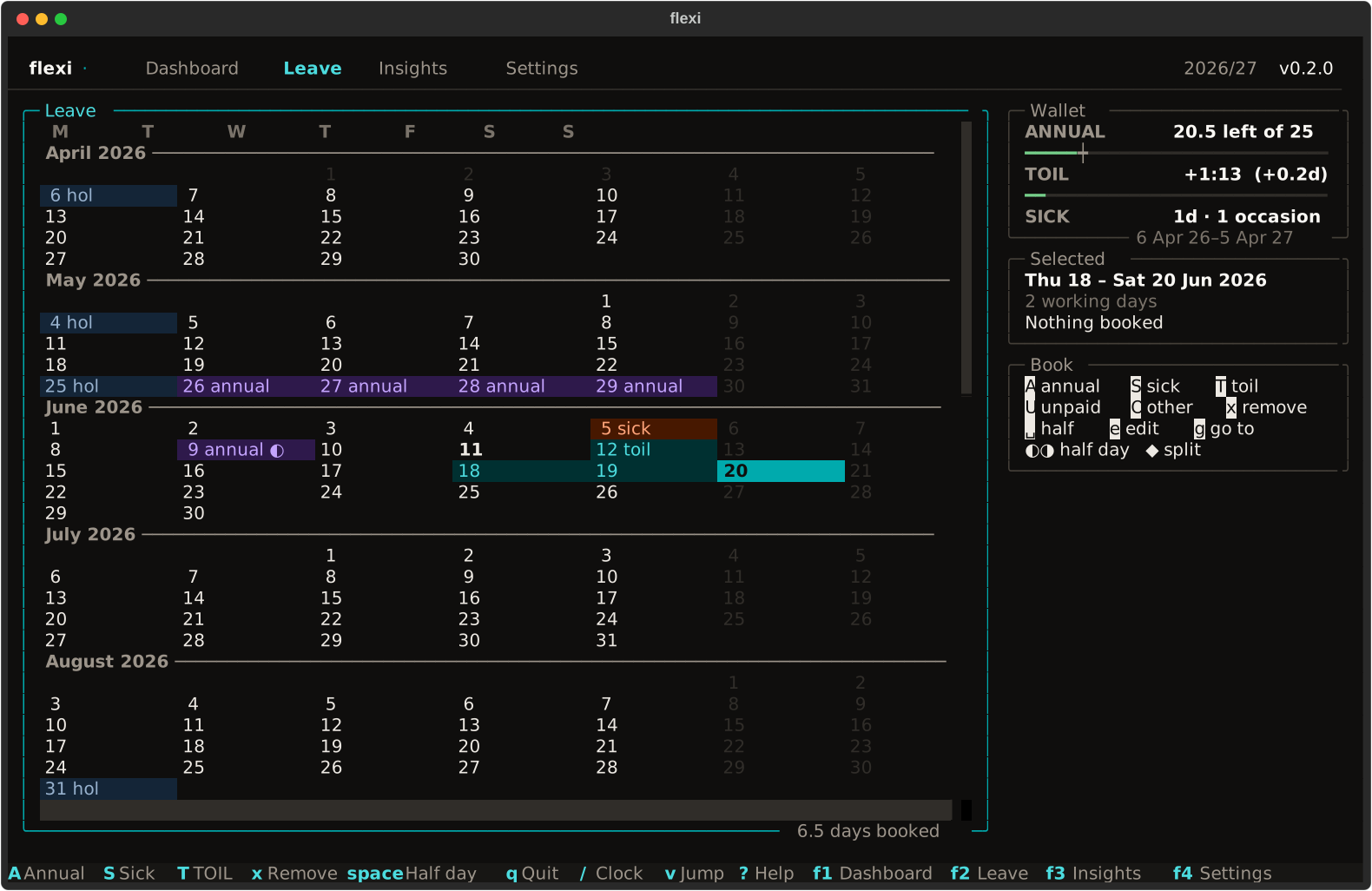
TOIL draws from your flexi balance. Working-day rules and GOV.UK bank holidays are checked before booking. Two different half-day absences can share a date.
| Key | Action |
|---|---|
f1 · f2 · f3 · f4 |
Dashboard · Leave · Insights · Settings |
/ |
Clock in or out |
d · w · m · y |
Day · week · month · leave year on the dashboard |
[ · ] · t · g |
Previous period · next period · today · go to date |
A · S · T · U · O |
Annual · sick · TOIL · unpaid · other leave |
v · ? · ctrl+p or : |
Jump mode · help · command palette |
q or ctrl+q |
Quit (q on the dashboard, Leave and Insights) |
The keymap
lists every shortcut and explains remapping. Dates in commands and the
go-to-date box accept forms such as 12, 12 Jun, 2026-06-12, +3d, and
-2w.
In VS Code or Cursor, the editor takes some keys before Flexi sees them:
ctrl+q on macOS and Windows, ctrl+p on Windows and Linux, and f1 and f3.
Press q to quit from the dashboard, Leave or Insights, and : for the command
palette, which offers Quit too and reaches every screen. To send those keys to
Flexi instead, add "terminal.integrated.sendKeybindingsToShell": true to your
settings, or release only these four:
"terminal.integrated.commandsToSkipShell": [
  "-workbench.action.quickOpenView",
  "-workbench.action.quickOpen",
  "-workbench.action.showCommands",
  "-workbench.action.terminal.findNext"
]
From the shell
The same records, from a script or another terminal. These examples write to
your real records, as --demo takes no command. On a new install they run in
this order on an ordinary working day; near a bank holiday, or on the first day
of your leave year, one may have nothing to do and exits 1 saying why:
flexi clock in
flexi clock out
flexi leave annual next monday to friday
flexi leave sick last wednesday pm
flexi leave cancel next monday to friday
flexi balance show
flexi balance adjust -0:45 --on yesterday --reason "Long lunch"
flexi balance zero --reason "Balance agreed with my manager"
flexi balance log
flexi balance undo 2
flexi holidays refresh
Leave commands show a plan, such as 5 working days, 5 days of annual leave,
and ask before writing; --dry-run shows the plan and stops. Every yes-or-no
question defaults to No, so enter declines, and declining exits with status 1.
--yes skips confirmation; use it where nothing can answer, such as cron or
Task Scheduler. Without it there, a command that would ask says --yes is
needed and exits 1.
In flexi leave, a date with no year is the next one to come: 15 jun typed
in October is next June, so give the year, 2026-06-15, for a day already
past. The plan shows the year of a date in another year, and says how many days
fall outside the current leave year.
balance adjust moves the balance by a signed amount, such as +5:30 or
-1:30, from today or an earlier day of the leave year given with --on.
That day has to come after any settlement, and after any adjustment that was
itself given an earlier day, since Flexi cannot tell the two apart. It shows
the balance before and after and asks first. Quote a date with a space in it,
as in --on "last friday"; a bare friday means the next one, which has not
happened yet. balance log lists every adjustment with its id, and
balance undo shows the one whose id you give and asks before removing it.
balance zero settles through yesterday by default, under the reason settled
unless you give one; on your first day there is nothing to settle yet, and it
says so. A half day off halves the hours a day expects, whichever side of noon
you work the rest; only a day booked off in full refuses work. Clock records are
retained as an audit trail. A session left running overnight is closed at your
auto-close time by the next command, which says so on stderr.
An open Flexi window picks up what these commands write within about two
seconds, and t on the dashboard catches up at once. Press / before it has
caught up and Flexi says what changed instead of doing the opposite of what the
Clock panel shows: Clocked in elsewhere at 09:12; press again to clock out.
Your data
| Platform | Records | Optional preferences |
|---|---|---|
| macOS / Linux | ~/.local/share/flexi/db.db |
~/.config/flexi/config.yaml |
| Windows | %LOCALAPPDATA%\flexi\db.db |
%APPDATA%\flexi\config.yaml |
In PowerShell these are $env:LOCALAPPDATA\flexi\db.db and
$env:APPDATA\flexi\config.yaml; the %…% form works in Command Prompt, the
Run dialog and File Explorer's address bar. Absolute XDG_DATA_HOME and
XDG_CONFIG_HOME values override these locations. Flexi never writes the
preferences file and reports invalid settings at startup.
To uninstall, quit Flexi and run uv tool uninstall flexi (or
pipx uninstall flexi). Your records stay where the table shows; to remove them
as well, delete the folder that holds db.db, backups included, and the
preferences file if you created one.
Flexi does not back up your records on a schedule. It takes a snapshot
before a schema upgrade and keeps the newest ten. On a machine that is already
set up, flexi init can also reset: it asks for confirmation, then writes and
verifies a protected backup before removing all records, prints its path, and
keeps it until you remove it. Both go to the backups folder beside db.db, on
the same disk, so include the folder that holds db.db in your own backups, or
close Flexi and copy db.db somewhere else.
To restore: close every copy of Flexi, copy a .bak file over db.db, and
start Flexi. A name such as pre-init_db_<time>.bak carries the UTC time the
copy was taken. An older schema is upgraded automatically, with another snapshot
first.
Flexi reads the system clock and time zone. Containers and many cloud servers
run on UTC, so set your zone first, for example export TZ=Europe/London
(Ubuntu images also need apt install tzdata).
Each time the app opens (setup and --demo included, but not the flexi
subcommands), Flexi asks PyPI for the latest version number. It downloads
GOV.UK's bank-holiday list when the cached copy is more than a week old, and
flexi holidays refresh fetches it on demand. Neither request includes your
timesheet or settings, and the update check cannot be turned off yet. Records
and backups are unencrypted; see the
security policy
for details and vulnerability reporting.
Development
just runs the project's named development tasks. You need Git, uv 0.9.26 or
newer, and just 1.46 or newer. uv downloads the Python this project pins (3.13)
when it is needed, so you don't have to install Python; 3.12–3.14 are
supported. To start:
git clone https://github.com/ellsphillips/flexi
cd flexi
uv tool install "rust-just>=1.46"
just setup
setup installs the locked development dependencies and Git hooks that check
your changes when you commit. If your shell cannot find just, run
uv tool update-shell and restart the terminal.
| Command | What it does |
|---|---|
just |
List all available tasks with short descriptions. |
just demo |
Run your local code with temporary sample records. |
just run |
Run your local code with your real records. |
just dev |
Run with Textual's development tools and your real records; use just console in another terminal to see logs. |
just check |
Check formatting, lint, types, the lockfile, and GitHub workflows. |
just test |
Run the test suite; add a path, such as just test tests/domain, to run a smaller set. |
just fix |
Apply automated code fixes and formatting; review the resulting diff. |
just audit |
Check dependencies against the online database of known security advisories. |
just shots |
Update the screenshots and text snapshots in docs/shots/. |
just package-check |
Build local code as flexi and flexi-test, install each temporarily, and check it. Uploads nothing. |
Run just check and just test before pushing changes. The
full recipe reference
covers coverage, dependency-floor tests, builds, and release preparation.
Maintainers stage and try releases with just try-release; see
Releasing.
See Contributing for the workflow, the documentation for architecture and testing, and the changelog for release notes.
Licence
MIT © Elliott Phillips
1 maintainer

Metadata
1 maintainer
Release files for flexi 0.2.0
For a detailed explanation of source distributions (sdists) and built distributions (wheels), please see the package formats documentation.
Source distribution (sdist)
| File | Size | Uploaded | |
|---|---|---|---|
| flexi-0.2.0.tar.gz | 893.7 kB | Details |
Built distribution (wheel)
| File | Interpreter | ABI | Platform | Reset |
|---|---|---|---|---|
| flexi-0.2.0-py3-none-any.whl | Python 3 | none | any | Details |
Total release size: 1.2 MB
Release files / flexi-0.2.0.tar.gz
| Download URL | flexi-0.2.0.tar.gz |
|---|---|
| Size | 893.7 kB |
| Tags | Source |
|
SHA-256 checksum How to use checksums |
a807b4f91b9f97da905f7a4098f7cdee0007fdc4682f6586da4d5dd26a1e004b
|
|
BLAKE2b-256 checksum How to use checksums |
95a48744a46696da8b9bf5040dcfe4a523b2c308e567b79d91c9c164b36b7549
|
| Upload date | |
|
Uploaded using Trusted Publishing? What is trusted publishing? |
Yes |
| Uploaded via |
uv/0.9.26 {"installer":{"name":"uv","version":"0.9.26","subcommand":["publish"]},"python":null,"implementation":{"name":null,"version":null},"distro":{"name":"Ubuntu","version":"24.04","id":"noble","libc":null},"system":{"name":null,"release":null},"cpu":null,"openssl_version":null,"setuptools_version":null,"rustc_version":null,"ci":true}
|
Release files / flexi-0.2.0-py3-none-any.whl
| Download URL | flexi-0.2.0-py3-none-any.whl |
|---|---|
| Size | 318.4 kB |
| Tags | Python 3 |
|
SHA-256 checksum How to use checksums |
90487fb1bbc2a75d5ddb828e1b266bbb6d16a14cd1216d7042a9c33f6989933c
|
|
BLAKE2b-256 checksum How to use checksums |
7fe96b164632e92b37cbc2e2db9ffede48449bd66878e4e39774bef1371f28dc
|
| Upload date | |
|
Uploaded using Trusted Publishing? What is trusted publishing? |
Yes |
| Uploaded via |
uv/0.9.26 {"installer":{"name":"uv","version":"0.9.26","subcommand":["publish"]},"python":null,"implementation":{"name":null,"version":null},"distro":{"name":"Ubuntu","version":"24.04","id":"noble","libc":null},"system":{"name":null,"release":null},"cpu":null,"openssl_version":null,"setuptools_version":null,"rustc_version":null,"ci":true}
|














