

A pomodoro timer that grows procedurally generated trees and flowers while you're studying.
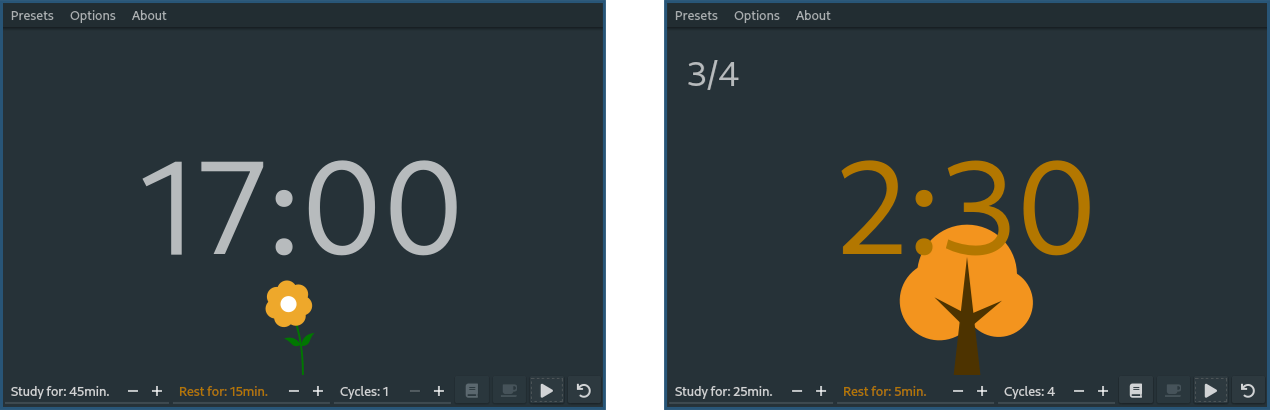
Running Florodoro
First, install the app by running
pip install florodoro
To launch the application, simply run the florodoro command from a terminal of your choice.
If you'd like to use the latest (unstable) version, install from TestPyPI using
pip install --index-url https://test.pypi.org/simple/ --extra-index-url https://pypi.org/simple florodoro
Controls
Top bar
- Presets – contains common pomodoro timings for study/break/cycle
- Options
- Notify – notification options (sound/pop-ups)
- Plants – plant settings (which ones to grow)
- Overstudy – enables breaks and studies longer than set
- Statistics – shows statistics + an interactive plant gallery
- About – a small TLDR about the project
Bottom bar
- Study for ... – how long to study for
- Break for ... – how long to break after study
- Cycles: ... – how many times to repeat study-break (0 means infinite)
- Icon: Book – start the study session
- Icon: Coffee – start a break
- Icon: Pause/continue – pause/continue an ongoing study/break
- Icon: Reset – reset everything
Local development
Setup
- create virtual environment:
python3 -m venv venv - activate it
. venv/bin/activate(assuming you use Bash) - install the package locally:
python3 -m pip install -e .- the
-eflag ensures local changes are used when running the package
- the
- develop
- run
florodoro(make sure thatvenvis active)
Note: this might not work when the path to the cloned reposity contains whitespace. I didn't look into the reason why (likely a bug in venv), just something to try if something fails.
Publishing
All tagged commits in the x.y.z format are automatically published on PyPi using GitGub Actions.
If the commit is on the testing branch, the test PyPi instance is used.
The project follows Semver for version numbers and is currently under MAJOR version 0 (under rapid prototyping).
For as long as this is the case, the master branch will only contain MINOR versions, while the testing branch will contain PATCH versions.
1 maintainer

Metadata
1 maintainer
Release files for florodoro 0.8
For a detailed explanation of source distributions (sdists) and built distributions (wheels), please see the package formats documentation.
Source distribution (sdist)
| File | Size | Uploaded | Provenance | Actions |
|---|---|---|---|---|
| florodoro-0.8.tar.gz | 503.3 kB | Without provenance | Details for florodoro-0.8.tar.gz |
Built distribution (wheel)
| File | Interpreter | ABI | Platform | Actions Reset |
|---|---|---|---|---|
| florodoro-0.8-py3-none-any.whl | Python 3 | none | any | Details for florodoro-0.8-py3-none-any.whl |
Total release size: 1.0 MB
Release files / florodoro-0.8.tar.gz
| Download URL | florodoro-0.8.tar.gz |
|---|---|
| Size | 503.3 kB |
| Tags | Source |
|
SHA-256 checksum How to use checksums |
1d97fbbe5e88a2ef250f60096c094df305a9a69109b205f682e7318bb87ed024
|
|
BLAKE2b-256 checksum How to use checksums |
99ef9c796375b4c303d8e47f8013efacaee30e0d31d94f0364108d9c52735e6a
|
| Upload date | |
|
Uploaded using Trusted Publishing? What is trusted publishing? |
No |
| Uploaded via |
twine/4.0.2 CPython/3.11.1
|
Release files / florodoro-0.8-py3-none-any.whl
| Download URL | florodoro-0.8-py3-none-any.whl |
|---|---|
| Size | 516.4 kB |
| Tags | Python 3 |
|
SHA-256 checksum How to use checksums |
623e27679046887f581dab92c8244ef506e725b13b96cdb343888ab6d29b8b36
|
|
BLAKE2b-256 checksum How to use checksums |
ddc7405b4aea55a90259215ffd3ea3d89020835b859c180b2e6ebe0355fee79e
|
| Upload date | |
|
Uploaded using Trusted Publishing? What is trusted publishing? |
No |
| Uploaded via |
twine/4.0.2 CPython/3.11.1
|
Security for florodoro 0.8
Provenance
Provenance describes where a file came from. On PyPI, provenance is shared via attestations, which provide a verifiable record of the build or publishing details. View details, limitations and caveats.
No provenance found
None of the files in this release were uploaded with provenance metadata.
A note on package security
PyPI is a repository for distributing packages, not a service for auditing them. While third-party security researchers and our staff do their best to detect and remove malicious packages, PyPI cannot guarantee the quality, security or suitability of any given package.
To learn more about protecting yourself from malicious actors, visit our package security documentation.














