
fluffy: a file sharing web app that doesn't suck.
| Overall build status |   |
|---|---|
fluffy-server |
 |
fluffy |
 |
What is fluffy?
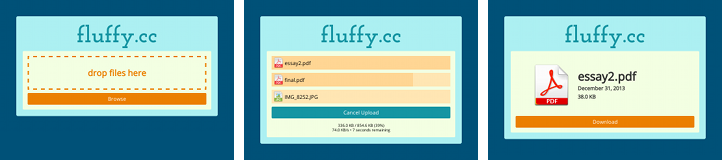
fluffy is a Flask-based web application that allows you to upload arbitrary files to the web. Once you upload the files, you get a link to the file which you can share.
The reference instance of fluffy is online at fluffy.cc. You can also run your own!
What isn't fluffy?
- fluffy isn't social. Files are given a long, random (unguessable) name. There's no upload feed or list of files.
- fluffy isn't intrusive. Your files aren't resized, compressed, stripped, or modified in any way.
- fluffy isn't annoying. A simple, modern page for uploading your files. No ads, no memes, and no comments.
Philosophy and motivation
fluffy was created out of frustration from seeing hundreds of files (mostly images) be lost or deleted over the years from popular image hosts such as imageshack which either deleted files or closed their doors entirely. Fluffy is designed so that it is easy to stop accepting uploads while still serving existing files, with the hope being that a "shut down" would involve no longer accepting uploads, but still continuing to serve existing uploads.
fluffy only handles uploading and storing your files. There's no database, and it's up to you to figure out how you serve the uploaded files. Once fluffy stores a file, it forgets about it.
This not only makes the code simple, but also makes maintenance easy. If you wish to stop accepting uploads, you can easily throw the existing uploads on S3 or any web server to ensure their continued availability.
This does make some features hard or impossible to implement, however, so if you want to do anything post-upload at the application level, fluffy probably isn't for you.
Storing files
fluffy hands off uploaded files to a storage backend, which is responsible for saving the file. The following backends are currently available:
- File. Storage on the local filesystem. You can easily serve these with any web server.
- Amazon S3. Storage on Amazon S3. You can serve these with S3 static websites or with CloudFront (if you want a CDN).
Writing a storage backend is dead simple and requires you to implement only a single method. The current backends are both about ten lines of code.
Serving files
fluffy won't serve your files, period. It's up to you to figure this part out. Depending on which backend you use, you may get it easily. For example, Amazon S3 makes it easy to serve uploaded files via the web.
Run your own fluffy
There's a public "reference implementation" of fluffy at fluffy.cc.
To host your own copy of fluffy, just adjust settings.py to your needs, being
sure to uncomment whichever storage backend you wish to use. There's no
database, so setup is very simple.
Once you've adjusted the configuration, you can deploy fluffy the way you deploy any Flask app. fluffy is tested with Python versions 3.5 and 3.6.
Command-line uploading tools
Two tools, fput and fpb, are provided. They can be installed with pip install fluffy and used from the command line. Use --help with either tool
for more information.
Additionally, Debian packages for the command-line tools are available in the GitHub releases tab. These packages contain no binary components and should be compatible with most releases of Debian and Ubuntu.
Contributing, license, and credits
Contributions to fluffy are welcome! Send your pull requests or file an issue. Thanks for the help!
fluffy is released under the MIT license; see LICENSE for full details.
Running locally for development
To run fluffy during development, run make dev.
You should now have fluffy running at http://localhost:5000.
FAQ
Why are there only certain languages in the dropdown? Can I add more?
Since it's just a normal <option> dropdown now, I didn't want to have all
hundreds of languages that Pygments supports, as I thought that would make the
UI worse for little benefit. Instead, currently there's a hand-picked list of
languages that I thought were most popular (but it's definitely biased toward
what I use!).
In the long term, I'd love to replace the dropdown with something smarter (maybe a JS dropdown with all the possible languages, featuring the most popular at the top, but with all available below, or with autocomplete or something).
In the medium term, definitely feel free to open an issue or send a PR to add another language. I'll happily merge it.
As a workaround, note that the "automatically detect" can detect languages not
in the dropdown (but it's not very accurate much of the time, unfortunately).
Additionally, if you use the CLI, you can pass -l <language> and use any
language supported by Pygments.
Why are there only a few themes to choose from in the pastebin?
Mostly it's just lack of time to add more. If you have a Pygments theme you like, please open an issue or PR, I'll definitely help get it added.
Primarily the reasons are:
-
There are a lot of Pygments themes and many of them are (imo) low-quality or extremely similar. I thought it was better to hand-curate them and have a small-ish number, rather than a large number where it's hard to find the really good themes.
-
It's not quite as easy as just adding the style name to a list. Fluffy also needs to know colors to use for borders, line numbers, highlights, diff highlights, hover versions of all of these, ANSI color codes that work, etc. There's something like 30 constants to set per theme.
-
With the current implementation, every new theme bloats the CSS a little more. (There's probably a technical solution to this.)
fluffy uses awesome icon sets developed by FatCow.
1 maintainer

Metadata
1 maintainer
Release files for fluffy-server 1.41.1
For a detailed explanation of source distributions (sdists) and built distributions (wheels), please see the package formats documentation.
Source distribution (sdist)
| File | Size | Uploaded | Provenance | |
|---|---|---|---|---|
| fluffy_server-1.41.1.tar.gz | 92.7 kB | Without provenance | Details |
Built distribution (wheel)
| File | Interpreter | ABI | Platform | Reset |
|---|---|---|---|---|
| fluffy_server-1.41.1-py3-none-any.whl | Python 3 | none | any | Details |
Total release size: 216.1 kB
Release files / fluffy_server-1.41.1.tar.gz
| Download URL | fluffy_server-1.41.1.tar.gz |
|---|---|
| Size | 92.7 kB |
| Tags | Source |
|
SHA-256 checksum How to use checksums |
35b85d42f9fcd8edcecab5879c1d7cac3e665eb2076008e28308d52849f5dddc
|
|
BLAKE2b-256 checksum How to use checksums |
88d843343a24ffffbf6bb7f67df423508b3398673a4c5c39a0e07f7f6a3e47df
|
| Upload date | |
|
Uploaded using Trusted Publishing? What is trusted publishing? |
No |
| Uploaded via |
twine/6.1.0 CPython/3.13.7
|
Release files / fluffy_server-1.41.1-py3-none-any.whl
| Download URL | fluffy_server-1.41.1-py3-none-any.whl |
|---|---|
| Size | 123.4 kB |
| Tags | Python 3 |
|
SHA-256 checksum How to use checksums |
0ad4da9f7a0c72776c1c751ad85691c5110ee66e865593423021a2af0228c836
|
|
BLAKE2b-256 checksum How to use checksums |
f86a7b82c6b51fba7f476cce7a6583cbf49d482d5ddd4db2092855055c1e76ea
|
| Upload date | |
|
Uploaded using Trusted Publishing? What is trusted publishing? |
No |
| Uploaded via |
twine/6.1.0 CPython/3.13.7
|
Security for fluffy-server 1.41.1
Provenance
Provenance describes where a file came from. On PyPI, provenance is shared via attestations, which provide a verifiable record of the build or publishing details. View details, limitations and caveats.
No provenance found
None of the files in this release were uploaded with provenance metadata.
A note on package security
PyPI is a repository for distributing packages, not a service for auditing them. While third-party security researchers and our staff do their best to detect and remove malicious packages, PyPI cannot guarantee the quality, security or suitability of any given package.














