
Flyr
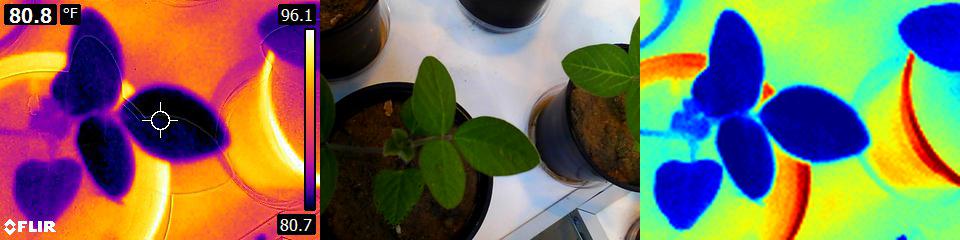
Flyr is a library for extracting thermal data from FLIR images written fully in Python, without depending on ExifTool.
Other solutions are wrappers around ExifTool to actually do the hard part of extracting the thermal data. Flyr is a reimplementation of the ExifTool's FLIR parser. Practically, this offers the following benefits:
- Faster decoding because no new process needs to be started and in-memory data does not need to be communicated to this other process
- More accurate, because Flyr uses all of the metadata to translate the raw values into Kelvin, while other projects have a certain set hardcoded. The differences are often about 0.1°C, but can be as high as 0.6°C.
- Easier and robust installation and deployment, because
flyris completely installable from PyPI. - Arguably simpler use: no need to create a superfluous extraction object; simply call
thermogram = flyr.unpack(flir_file_path)and done - Extra features (see feature section) such as different units, built-in rendering and adjustable thermal data.
Installation
Flyr is installable from PyPi:
pip install flyr
Latest additional features
These features appeared in 3.0.0. Also see the CHANGELOG.md for feature history.
- Support for many more cameras, specifically those storing thermal data as raw data, such as the SC660, ThermaCAM B400, E30, E30BX, E40, E50, E60BX and more
- Extraction of the palette embedded in the FLIR file
- Rendering by default with the embedded palette
- Extraction of the original render range embedded in the file.
- Default render range is now this range.
- Added an executable called
flyrto render, print the camera info or extract the palette
Upcoming features
These are features already implemented and merged into the master branch, but not released yet. Also see the CHANGELOG.md for feature history.
Currently there are none.
Usage and features
Different units
Thermal data is available in kelvin, celsius and fahrenheit.
import flyr

flir_path = "thermograms/flir_e5_2.jpg"
thermogram = flyr.unpack(flir_path)

thermal = thermogram.kelvin  # As kelvin
thermal = thermogram.celsius  # As celsius
thermal = thermogram.fahrenheit  # As fahrenheit
Optical data can be read
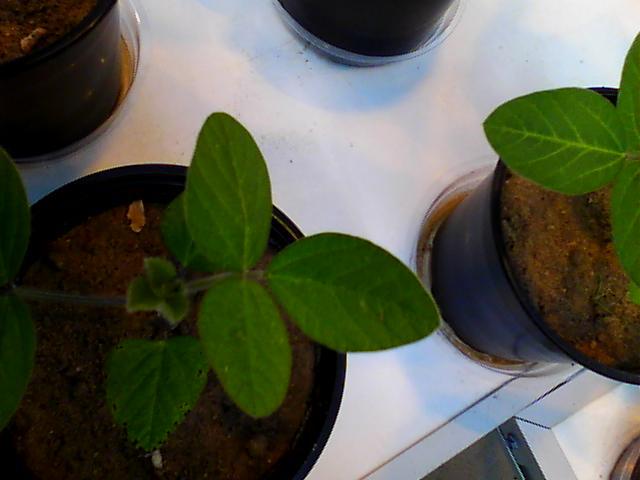
To read the embedded photo, access either optical or optical_pil to respectively get a 3D numpy or Pillow Image object with the photo.
import flyr

flir_path = "thermograms/flir_e5_2.jpg"
thermogram = flyr.unpack(flir_path)
optical_arr = thermogram.optical  # Also works
thermogram.optical_pil.save("optical.jpg")
Built-in support for rendering

Flyr has built-in support to render thermal data to RGB images. It is possible to use the embedded palette or one of the provides palettes. Normalization can be done by percentiles or absolute values.
import flyr

flir_path = "thermograms/flir_e5_2.jpg"
thermogram = flyr.unpack(flir_path)
# render = thermogram.render()  # Use to get raw RGB array
render = thermogram.render_pil()  # Returns Pillow Image object
render.save(f"render-embedded.png")
palettes = ["turbo", "cividis", "inferno", "grayscale", "hot"]
for p in palettes:
    # The below call returns a Pillow Image object.
    # A sibling method called `render` returns a numpy array.
    render = thermogram.render_pil(
        min_v=27.1,
        max_v=35.6,
        unit="celsius",
        palette=p,
    )
    render.save(f"render-{p}.png")
To render by percentiles, call as below. This approach is useful when it isn't know what temperature range to render.
thermogram.render_pil(
    min_v=0.0,
    max_v=1.0,
    unit="percentiles",
    palette="copper",
).save(f"render-percentiles.png")
Adjustable camera settings

It is possible to update the camera settings / parameters with which the thermal data is calculated. A typical value to adjust would be emissivity, but object_distance, relative_humidity and others are also configurable. See the parameters of FlyrThermogam.__raw_to_kelvin() for which.
import flyr

flir_path = "thermograms/flir_e5_2.jpg"
thermogram = flyr.unpack(flir_path)

emissivities = [0.6, 0.7, 0.8, 0.9, 1.0]
for e in emissivities:
    thermogram = thermogram.adjust_metadata(emissivity=e)
    # thermal = thermogram.celsius  # Access updated data as normal
    render = thermogram.render_pil(
        min_v=27.1,
        max_v=35.6,
        unit="celsius",
        palette="viridis",
    )
    render.save(f"render-{e}.png")
Read from file, from file handle or binary stream
Call flyr.unpack on a filepath to receive a numpy array with the thermal data. Alternatively, first open the file in binary mode for reading and and pass the the file handle to flyr.unpack.
import flyr

# From file path
flir_path = "thermograms/flir_e5_2.jpg"
thermogram = flyr.unpack(flir_path)  # From file path

# From file handle / binary stream
with open(flir_path, "rb") as flir_handle:  # In binary mode!
    thermogram = flyr.unpack(flir_handle)
Supported cameras
Currently this library has been tested to work with:
- FLIR C5
- FLIR E4, E5, E6, E8, E8XT, E30, E30BX, E40, E50, E50BX, E53, E60BX, E75
- FLIR I5
- FLIR ONE, ONE Pro, ONE Pro Next Gen
- FLIR P60 (PAL)
- FLIR SC660
- FLIR T630SC, T660
- FLIR ThermaCAM B400
Contributing
Pull requests are welcome. For major changes, please open an issue first to discuss what you would like to change. Most help is currently needed supporting more models and testing against more pictures. Testing and developing for your own camera's images or FLIR Tools' samples is recommended.
Acknowledgements
This code would not be possible without ExifTool's efforts to document the FLIR format. tomas123's work is similarly important to mention. Previous work in Python must also be acknowledged for creating a workable solution.
License
Flyr is licensed under The European Union Public License 1.2. The English version is included in the license file. Translations for all EU languages, each fully legally valid, can be found at the EUPL website.
1 maintainer

Metadata
1 maintainer
Release files for flyr 3.0.3
For a detailed explanation of source distributions (sdists) and built distributions (wheels), please see the package formats documentation.
Source distribution (sdist)
| File | Size | Uploaded | Provenance | Actions |
|---|---|---|---|---|
| flyr-3.0.3.tar.gz | 42.1 kB | Without provenance | Details for flyr-3.0.3.tar.gz |
Release files / flyr-3.0.3.tar.gz
| Download URL | flyr-3.0.3.tar.gz |
|---|---|
| Size | 42.1 kB |
| Tags | Source |
|
SHA-256 checksum How to use checksums |
bccfacb94885ab9ffea75fbbe234e2145adeac4c81530fd37b77582a2dd92ca8
|
|
BLAKE2b-256 checksum How to use checksums |
a18bcf0d75db37947bcbac3f4c02c8b79b168323af172a8847e5f3e6e4eba5c7
|
| Upload date | |
|
Uploaded using Trusted Publishing? What is trusted publishing? |
No |
| Uploaded via |
twine/3.6.0 importlib_metadata/4.6.3 pkginfo/1.7.1 requests/2.26.0 requests-toolbelt/0.9.1 tqdm/4.62.1 CPython/3.10.1
|
Security for flyr 3.0.3
Provenance
Provenance describes where a file came from. On PyPI, provenance is shared via attestations, which provide a verifiable record of the build or publishing details. View details, limitations and caveats.
No provenance found
None of the files in this release were uploaded with provenance metadata.
A note on package security
PyPI is a repository for distributing packages, not a service for auditing them. While third-party security researchers and our staff do their best to detect and remove malicious packages, PyPI cannot guarantee the quality, security or suitability of any given package.
To learn more about protecting yourself from malicious actors, visit our package security documentation.














