
Fog and edge computing emulation platform.

Project description


Fogbed
Fogbed is a framework and toolset integration for rapid prototyping of fog components in virtualized environments using a desktop or distributed approach. Its design meets the postulated requirements of low cost, flexible setup and compatibility with real world technologies. The components are based on Mininet/Containernet network emulator with Docker container instances as fog virtual nodes.
Install
You can install Fogbed directly from the GitHub repository in a single step by using the following command:
wget https://raw.githubusercontent.com/larsid/fogbed/main/install-fogbed.sh && chmod +x install-fogbed.sh && sudo ./install-fogbed.sh
The install-fogbed.sh script automates the installation of the Fogbed tool and its dependencies on Ubuntu-based Linux systems. This command uses wget to retrieve the script from the main branch and saves it to the current directory as install-fogbed.sh. Then, it uses chmod (change mode) to add execute permissions to the installation script. The +x flag grants execution rights, allowing the script to be run as a program rather than just being read as a text file. Finally, it executes the installation script with superuser privileges using sudo, where the ./ prefix indicates that the script is located in the current directory. Administrator privileges are required because the script needs to install system packages, create directories in /opt, and configure system services. Below, we detail the steps executed by the installation script.
Installation Steps
The Fogbed installation script was tested only on Ubuntu 24.04. If you are facing errors while installing on a different system, or if you wish to modify the proposed configuration, you can review the steps performed by the script. The installation process is divided into the following stages:
1. System Dependencies Installation
The script begins by updating the system package list and installing essential dependencies through apt-get. The installed packages include:
- Network Tools:
net-tools,iproute2,iputils-ping,tcpdump,iperf. - Development Tools:
python3,python3-pip,git,curl,ansible. - Python Virtual Environment: The
python3.x-venvpackage corresponding to the installed Python version.
2. Working Directory Setup
A working directory is created at /opt/fogbed. If an existing directory is found, it is removed to ensure a clean installation.
3. Containernet Installation
The script clones the Containernet repository to the /opt/fogbed/containernet directory and then uses an Ansible playbook to install Containernet and its system dependencies, which include Docker, Mininet, and Open vSwitch.
4. Fogbed and Containernet Installation in Virtual Environment
Containernet installation as root is no longer possible starting from Ubuntu 24.04, and it is non-functional on Ubuntu 22.04 due to a setuptools issue. This Containernet limitation also requires that Fogbed be installed inside a Python virtual environment. Therefore, a Python virtual environment is created at /opt/fogbed/venv. This environment isolates Fogbed's Python libraries from system libraries, avoiding version conflicts. Inside the virtual environment, the script installs the fogbed and containernet libraries using pip.
5. System Commands Configuration
To facilitate the use of the Fogbed, the script performs the following actions:
- Creates a wrapper script at
/usr/local/bin/fogbedthat allows executing Python scripts with Fogbed's virtual environment from any directory. - Creates a symbolic link to Mininet's
mnexecutable at/usr/local/bin/mn, making it globally accessible. This can be particularly useful after a Fogbed experiment finishes with an error, allowing you to run thesudo mn -c(clean) command from any system path.
6. Systemd Service Configuration
By default, the script configures a systemd service called fogbed-worker.service. This service turns your machine into a "worker node" that can be remotely controlled by a Fogbed distributed emulation experiment. It ensures that the Fogbed worker process runs as root in the background and is automatically restarted in case of failures. This service is not necessary if you only intend to run local experiments or if your machine is used only to control a distributed experiment (rather than acting as a worker node). The creation of this service can be disabled with the -systemd-disabled flag.
Fogbed Installation Script Options
The Fogbed installation script accepts the following parameters:
| Parameter | Description |
|---|---|
| (none) | Executes the complete installation process. |
-remove |
Removes the Fogbed installation, including the working directory and the systemd service. |
-systemd-disabled |
Installs Fogbed but skips the systemd service configuration step. |
-h, --help |
Displays a help message with available options. |
Get Started
After installing Fogbed, you can start an example topology. First, clone the Fogbed repository locally:
git clone https://github.com/larsid/fogbed
Then, run the example script from the fogbed/examples/sensors/ directory (e.g., sensors.py) with:
fogbed run sensors.py
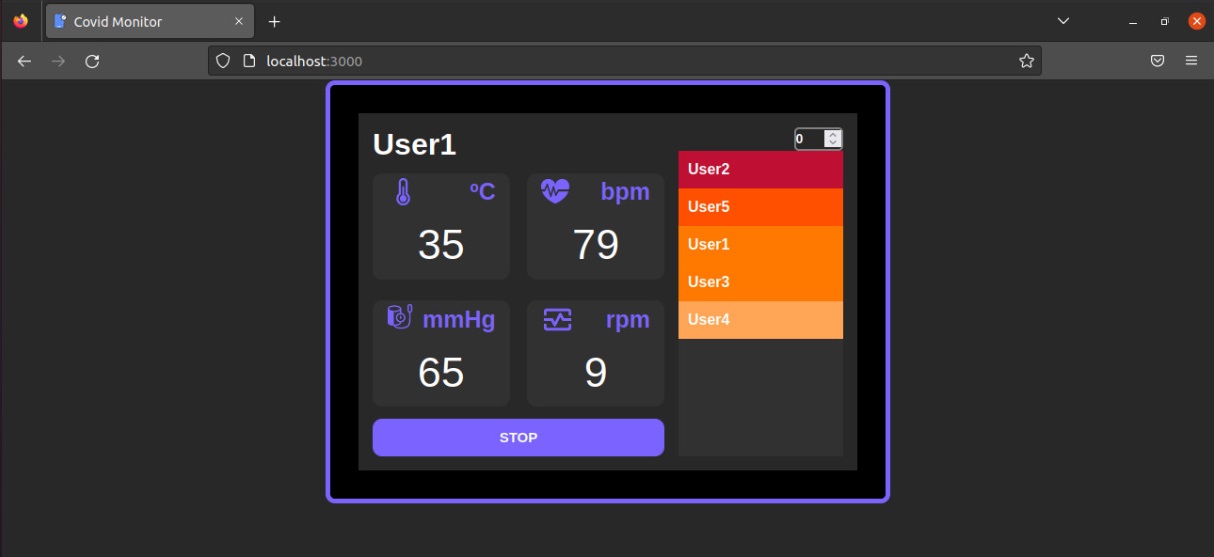
Then access the url http://localhost:3000 on your browser to visualize a React application consuming a REST API what monitor some devices which send health random data.
Documentation
Project documentation is available at https://larsid.github.io/fogbed/
Publications
A. Coutinho, U. Damasceno, E. Mascarenhas, A. C. Santos, J. E. B. T. da Silva and F. Greve, "Rapid-Prototyping of Integrated Edge/Fog and DLT/Blockchain Systems with Fogbed," ICC 2023 - IEEE International Conference on Communications, Rome, Italy, 2023, pp. 622-627, doi: 10.1109/ICC45041.2023.10279234.
Project details


Download files
Download the file for your platform. If you're not sure which to choose, learn more about installing packages.
Source Distribution
Built Distribution
Filter files by name, interpreter, ABI, and platform.
If you're not sure about the file name format, learn more about wheel file names.
Copy a direct link to the current filters
File details
Details for the file fogbed-1.3.0.tar.gz.
File metadata
- Download URL: fogbed-1.3.0.tar.gz
- Upload date:
- Size: 19.8 kB
- Tags: Source
- Uploaded using Trusted Publishing? Yes
- Uploaded via: twine/6.1.0 CPython/3.13.7
File hashes
| Algorithm | Hash digest | |
|---|---|---|
| SHA256 |
1d2ecc3ae9dd618a35578e05bf4fc95875eba22868d7af22ba474bc1e0b33248
|
|
| MD5 |
66bf544d2a53708a656c275ca1bd3f89
|
|
| BLAKE2b-256 |
47e586fabdd6d4ebfed44694667a8662132ba67079f0b7b8af7aeccdbe82c8ad
|
Provenance
The following attestation bundles were made for fogbed-1.3.0.tar.gz:
Publisher:
python-publish.yml on larsid/fogbed
-
Statement:
-
Statement type:
https://in-toto.io/Statement/v1 -
Predicate type:
https://docs.pypi.org/attestations/publish/v1 -
Subject name:
fogbed-1.3.0.tar.gz -
Subject digest:
1d2ecc3ae9dd618a35578e05bf4fc95875eba22868d7af22ba474bc1e0b33248 - Sigstore transparency entry: 629131365
- Sigstore integration time:
-
Permalink:
larsid/fogbed@23e0e4e11181816a2ed9780f020848787ee39ac2 -
Branch / Tag:
refs/tags/v1.3.0 - Owner: https://github.com/larsid
-
Access:
public
-
Token Issuer:
https://token.actions.githubusercontent.com -
Runner Environment:
github-hosted -
Publication workflow:
python-publish.yml@23e0e4e11181816a2ed9780f020848787ee39ac2 -
Trigger Event:
push
-
Statement type:
File details
Details for the file fogbed-1.3.0-py3-none-any.whl.
File metadata
- Download URL: fogbed-1.3.0-py3-none-any.whl
- Upload date:
- Size: 25.9 kB
- Tags: Python 3
- Uploaded using Trusted Publishing? Yes
- Uploaded via: twine/6.1.0 CPython/3.13.7
File hashes
| Algorithm | Hash digest | |
|---|---|---|
| SHA256 |
fd9ece879838e421d9c608a648871f4b3217631a8fc8fc1aa12cfc72d7d284b6
|
|
| MD5 |
943828f56d3f41767f636a381edf5193
|
|
| BLAKE2b-256 |
92d6a6e73020f3eeba6ad77847d1670ea2c94114602cc48b1c4878daeaa28522
|
Provenance
The following attestation bundles were made for fogbed-1.3.0-py3-none-any.whl:
Publisher:
python-publish.yml on larsid/fogbed
-
Statement:
-
Statement type:
https://in-toto.io/Statement/v1 -
Predicate type:
https://docs.pypi.org/attestations/publish/v1 -
Subject name:
fogbed-1.3.0-py3-none-any.whl -
Subject digest:
fd9ece879838e421d9c608a648871f4b3217631a8fc8fc1aa12cfc72d7d284b6 - Sigstore transparency entry: 629131373
- Sigstore integration time:
-
Permalink:
larsid/fogbed@23e0e4e11181816a2ed9780f020848787ee39ac2 -
Branch / Tag:
refs/tags/v1.3.0 - Owner: https://github.com/larsid
-
Access:
public
-
Token Issuer:
https://token.actions.githubusercontent.com -
Runner Environment:
github-hosted -
Publication workflow:
python-publish.yml@23e0e4e11181816a2ed9780f020848787ee39ac2 -
Trigger Event:
push
-
Statement type:






