
Folder Archaeologist
Overview
Folder Archaeologist is an advanced command-line utility built for digital explorers, developers, and data professionals who want to analyze, categorize, and manage large folders and file collections. Harnessing the power of Python and the rich library, Folder Archaeologist turns directory scanning and file forensics into an accessible, visual, and highly interactive process.
Features
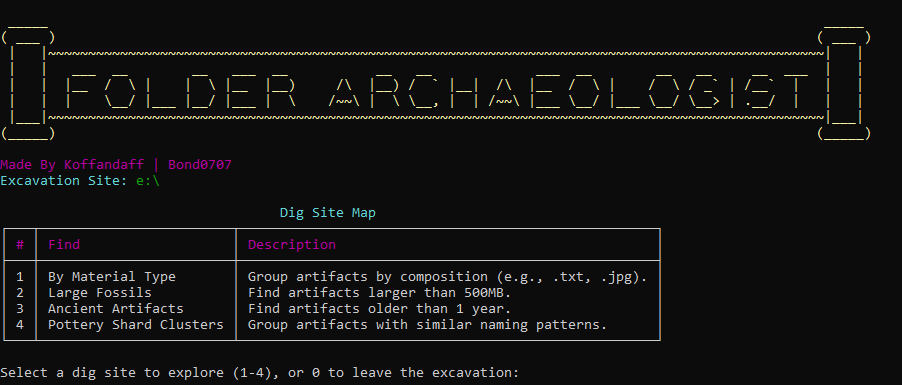
- Categorize by Extension: Instantly group files by type to discover common or rare digital “materials.”
- Search by Size: Find and display files exceeding custom size thresholds, complete with live scanning progress.
- Filter by Age: Locate “ancient” files using flexible date/age queries.
- Detect Naming Patterns: Uncover file name patterns and clusters, revealing related artifacts or dataset outliers.
- Interactive CLI: Visually navigate results through rich menus, colored tables, and text-based dashboards.
- Progress Bars Everywhere: User feedback for every scan, so you’re never left guessing about progress.
- Cross-Platform: Supports Linux, macOS, and Windows out of the box.
- Safe, Efficient, and Modern: No destructive defaults, modular design, and beautiful output for real work.
Installation
Install via pip:
pip install folderarchaeologist
Or install directly from source:
git clone https://github.com/koffandaff/folderarchaeologist.git
cd folderarchaeologist
pip install -r requirements.txt
Quick Start
Simply run from your terminal:
python main.py directory\
Or, if installed as a package:
folderarchaeologist directory\
Select a directory, pick your exploration mode, and follow the prompts to scan, filter, and interact with your files—all in style.
Usage
- Choose a target folder when prompted.
- Pick an exploration mode:
- By extension
- By file size (with user-defined thresholds)
- By age (custom year cutoff)
- By naming pattern (clusters)
- View and filter results using the rich terminal UI.
- Export, archive, or perform next actions—with confidence.
Screenshots
Categories Menu
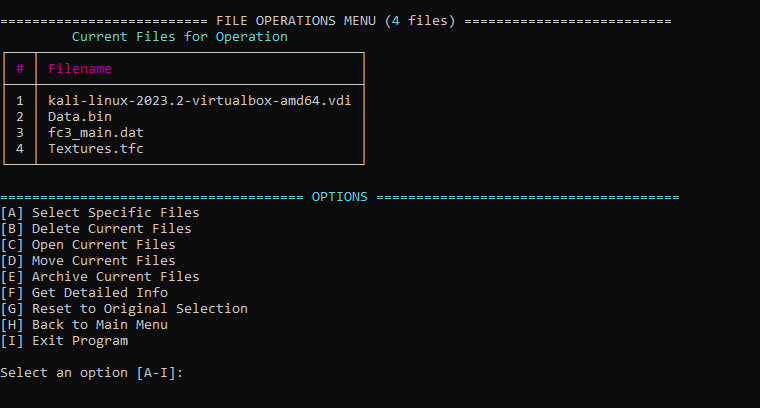
File Operations Menu
Development
- Completely written in Python.
- Modular, extensible code structure (
main.py,categories.py,features.py,utilities.py). - Clean separation of UI and data logic.
- Powered by
richfor all terminal visualization.
Contributions
Contributions and suggestions are welcome! Please open issues or submit pull requests via GitHub. See the issues page for outstanding tasks.
License
This project is licensed under the MIT License.
Authors & Contributors
This project is made by:
- Dhruvil (
koffandaff) - Kirtan (
bond0707)
It is submitted in "for the love of code 2025" hackathon.
1 maintainer

Metadata
1 maintainer
Release files for FolderArchaeologist 1.0.1
For a detailed explanation of source distributions (sdists) and built distributions (wheels), please see the package formats documentation.
Source distribution (sdist)
| File | Size | Uploaded | |
|---|---|---|---|
| folderarchaeologist-1.0.1.tar.gz | 13.6 kB | Details |
Built distribution (wheel)
| File | Interpreter | ABI | Platform | Reset |
|---|---|---|---|---|
| folderarchaeologist-1.0.1-py3-none-any.whl | Python 3 | none | any | Details |
Total release size: 27.2 kB
Release files / folderarchaeologist-1.0.1.tar.gz
| Download URL | folderarchaeologist-1.0.1.tar.gz |
|---|---|
| Size | 13.6 kB |
| Tags | Source |
|
SHA-256 checksum How to use checksums |
f84beb1c69c8486f92c711845ef65254b81c04e61c6618f11dfe4f8c5f86e323
|
|
BLAKE2b-256 checksum How to use checksums |
8f62759b3274df87a1451872f7a630deee3c03b16997c09c493e8ab59decb130
|
| Upload date | |
|
Uploaded using Trusted Publishing? What is trusted publishing? |
No |
| Uploaded via |
twine/6.2.0 CPython/3.11.6
|
Release files / folderarchaeologist-1.0.1-py3-none-any.whl
| Download URL | folderarchaeologist-1.0.1-py3-none-any.whl |
|---|---|
| Size | 13.6 kB |
| Tags | Python 3 |
|
SHA-256 checksum How to use checksums |
a6499f7d5b91b4b7f3503e96c8a76e7a284106451a69210c6cd474fee3f791d6
|
|
BLAKE2b-256 checksum How to use checksums |
e284f2e8e235b4ee0b014d89809374e3fcc0b0a7c8c0144def42a9382dab3eda
|
| Upload date | |
|
Uploaded using Trusted Publishing? What is trusted publishing? |
No |
| Uploaded via |
twine/6.2.0 CPython/3.11.6
|













