



fontpreview: Python library for font previews
This is a library that allows you to create preview images from one or more selected fonts.
Full docs is here: ReadTheDocs
Test
If you want to test the package before installing, use the test:
$ git clone https://github.com/MatteoGuadrini/fontpreview.git
$ cd fontpreview
$ python -m unittest test_fp.py
Installation
Use Pypi:
$ pip install --user fontpreview
Note: If you want to use the command line tool, you need to install the system-wide library:
pip install fontpreview
Simple usage
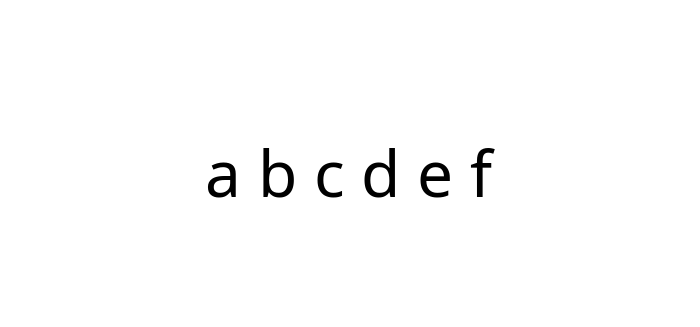
Preview example:
from fontpreview import FontPreview

fp = FontPreview('/tmp/noto.ttf')
fp.save('/tmp/fp.png')
Banner example:
from fontpreview import FontBanner

fb = FontBanner('/tmp/noto.ttf', 'landscape', bg_color=(153, 153, 255), mode='fontname')
fb.save('/tmp/fb.png')

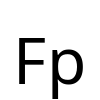
Logo example:
from fontpreview import FontLogo

fl = FontLogo('/tmp/noto.ttf', 'Fp')
fl.save('/tmp/fl.png')
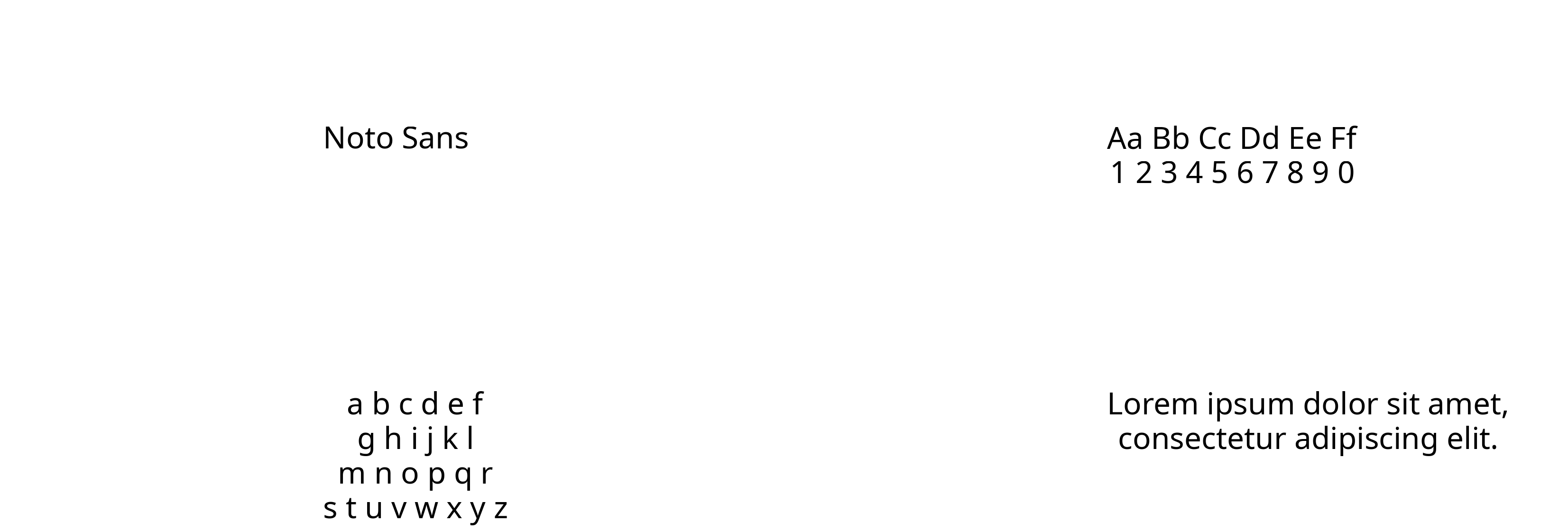
Font wall example:
from fontpreview import FontBanner, FontWall

# Define the various parts of wall
fb = FontBanner('/tmp/noto.ttf', 'landscape' , mode='fontname')
fb2 = FontBanner('/tmp/noto.ttf', 'landscape' , mode='alpha')
fb3 = FontBanner('/tmp/noto.ttf', 'landscape' , mode='letter')
fb4 = FontBanner('/tmp/noto.ttf', 'landscape' , mode='paragraph')
fw = FontWall([fb,fb2,fb3,fb4])
fw.save('/tmp/fw.png')
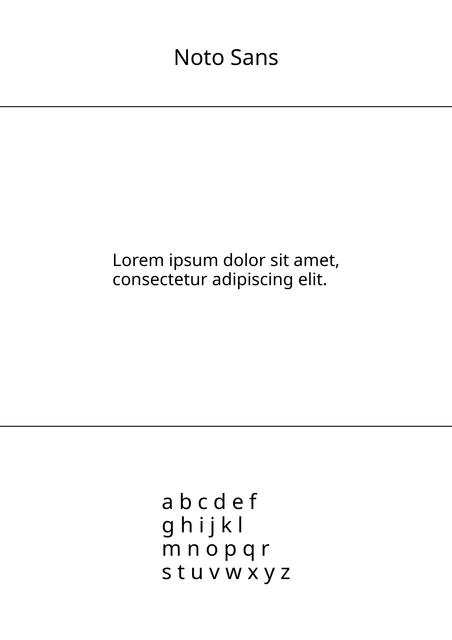
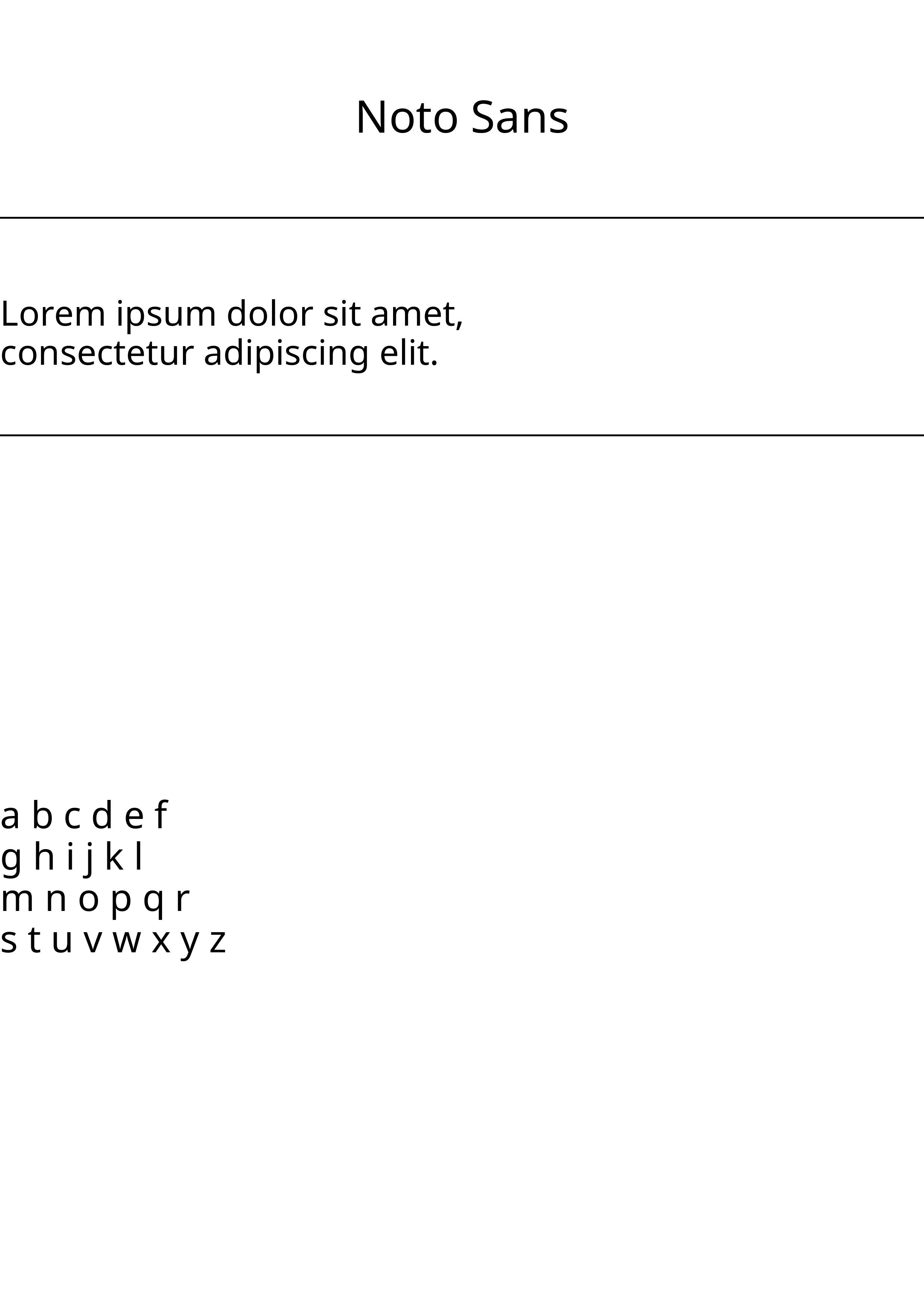
Font page example:
from fontpreview import FontPage, FontBanner

# Define the various parts of page
header = FontBanner('/tmp/noto.ttf', 'landscape' , mode='fontname')
body = FontBanner('/tmp/noto.ttf', 'landscape' , mode='paragraph')
footer = FontBanner('/tmp/noto.ttf', 'landscape' , mode='letter')
# Create FontPage object
fpage = FontPage()
fpage.set_header(header)
fpage.set_body(body)
fpage.set_footer(footer)
# Design all parts
fpage.draw()
fpage.save('/tmp/fpage.png')
Font page with template example:
from fontpreview import FontPage, FontPageTemplate, FontBanner

# Define the various parts of page
header = FontBanner('/tmp/noto.ttf', 'landscape' , mode='fontname')
body = FontBanner('/tmp/noto.ttf', 'landscape' , mode='paragraph')
footer = FontBanner('/tmp/noto.ttf', 'landscape' , mode='letter')
# Create font page template
template = FontPageTemplate(3508)
template.set_body(170, 1, 'lcenter')
template.set_footer(100, 4, 'lcenter')
# Create FontPage object
fpage = FontPage(template=template)
fpage.set_header(header)
fpage.set_body(body)
fpage.set_footer(footer)
# Design all parts
fpage.draw()
fpage.save('/tmp/fpage_template.png')
Font booklet example:
from fontpreview import FontPage, FontBanner, FontBooklet

# Define the various parts of page
header = FontBanner('/tmp/noto.ttf', 'landscape' , mode='fontname')
body = FontBanner('/tmp/noto.ttf', 'landscape' , mode='paragraph')
footer = FontBanner('/tmp/noto.ttf', 'landscape' , mode='letter')
# Create FontPage object
fpage1 = FontPage(header=header, body=body, footer=footer)
fpage2 = FontPage(header=header, body=body, footer=footer)
# Design all parts
fpage1.draw()
fpage2.draw()
# Create book
book = FontBooklet(fpage1, fpage2)
book.save('/tmp/noto_book/')        # save page1.png, page2.png in /tmp/noto_book/ folder
Advanced usage
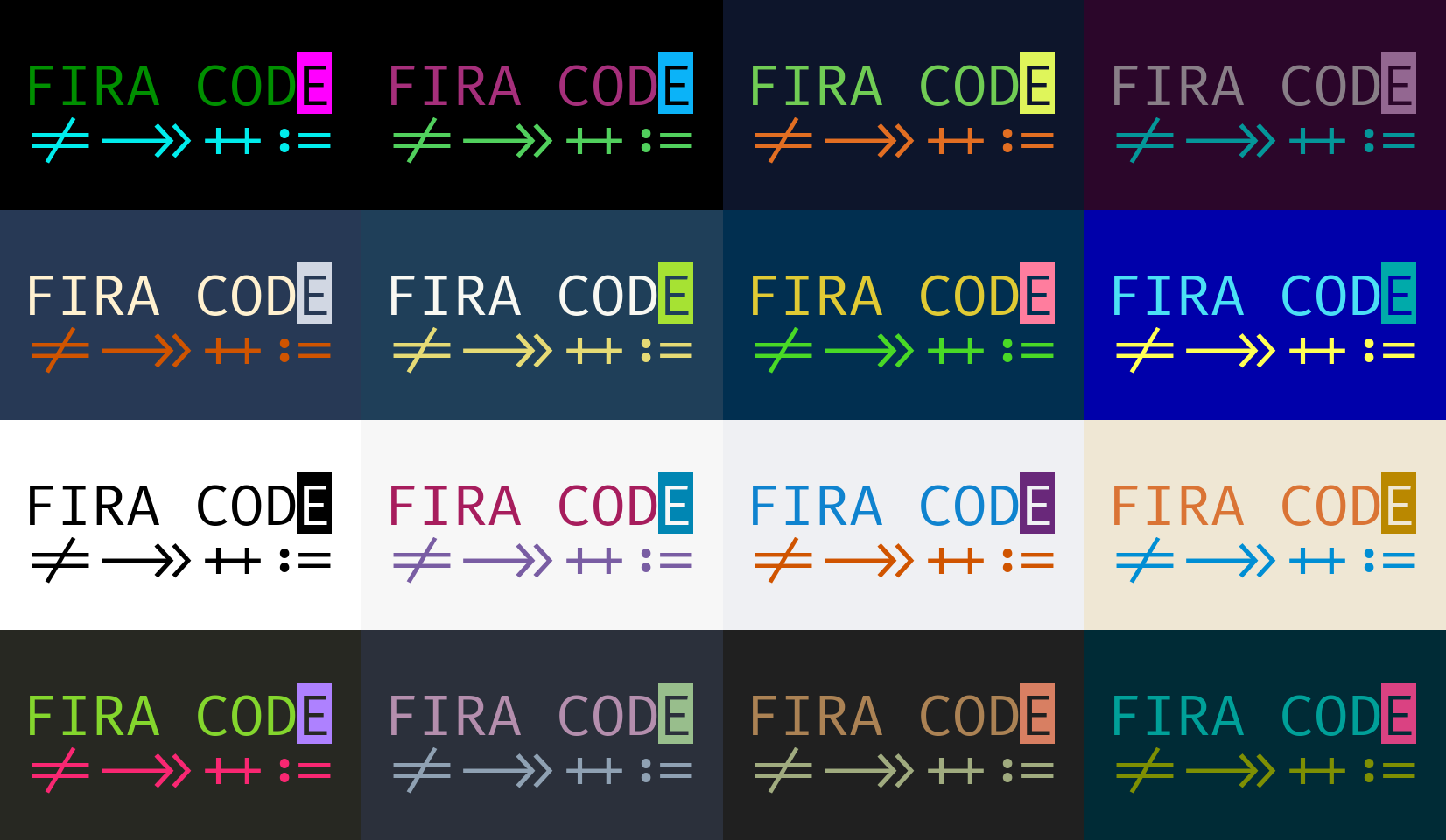
Below is an example of various previews of the "Fira Code regular" font. Does it remind you of anything? Fira code original
# FIRA CODE WALL
from fontpreview import FontBanner, FontWall
fira_code = '/tmp/firacode.ttf'
# RGB group = ('background', 'FIRA COD color', 'Ligature color', 'E color background')
colors_group = [
                ('black', (0, 143, 0), (0, 236, 236), (255, 0, 255)),
                ('black', (166, 47, 123), (81, 208, 93), (11, 179, 248)),
                ((13, 21, 43), (112, 204, 84), (226, 110, 34), (223, 245, 90)),
                ((43, 6, 42), (136, 126, 135), (4, 150, 153), (147, 103, 145)),
                ((39, 57, 85), (255, 241, 208), (208, 84, 0), (209, 215, 227)),
                ((31, 63, 89), (248, 248, 242), (230, 219, 117), (166, 226, 51)),
                ((1, 47, 80), (224, 202, 52), (73, 217, 38), (255, 125, 158)),
                ((0, 0, 170), (75, 224, 245), (255, 255, 85), (0, 170, 170)),
                ('white', 'black', 'black', 'black'),
                ((247, 247, 247), (167, 29, 93), (121, 93, 163), (0, 134, 179)),
                ((239, 240, 243), (15, 131, 207), (208, 84, 0), (105, 40, 122)),
                ((239, 231, 212), (218, 116, 53), (0, 142, 212), (186, 136, 0)),
                ((39, 40, 34), (132, 214, 45), (249, 39, 114), (174, 129, 255)),
                ((43, 48, 59), (180, 142, 173), (143, 161, 179), (152, 190, 140)),
                ((32, 32, 32), (171, 130, 84), (160, 171, 127), (216, 127, 98)),
                ((0, 43, 54), (0, 160, 153), (126, 143, 3), (218, 66, 130))
                ]
banners = []
# Create banners
for colors in colors_group:
    # Create a FontBanner objects
    fb = FontBanner(fira_code, (413, 240))
    liga = FontBanner(fira_code, (413, 240))
    E = FontBanner(fira_code, (40, 70))
    # Set background colors
    fb.bg_color = liga.bg_color = colors[0]
    E.bg_color = colors[3]
    # Set foreground colors
    fb.fg_color = colors[1]
    liga.fg_color = colors[2]
    E.fg_color = colors[0]
    # Set text
    fb.font_text = 'FIRA COD'
    liga.font_text = "!=->>++:="
    E.font_text = 'E'
    # Set text position
    E.set_text_position('ltop')
    fb.set_text_position((25, 60))
    liga.set_text_position('top')
    # Adding image on fb
    fb.add_image(liga, (0, 122))
    fb.add_image(E, (339, 60))
    # Add to list of banners
    banners.append(fb)

# Create a wall
fw = FontWall(banners, max_tile=4)
fw.save('/tmp/fira_code.png')
Command line interface
Along with the package, a command line tool based on this python package is installed.
The class used for command line previews is FontPreview. For all the options of this tool,
see the docs, otherwise run fp -h.
$ fp /tmp/noto.ttf
This command save a fontpreview.png in a current directory.
Open source
fontpreview is a open source project. Any contribute, It's welcome.
A great thanks.
For donations, press this
For me

For Telethon
The Telethon Foundation is a non-profit organization recognized by the Ministry of University and Scientific and Technological Research. They were born in 1990 to respond to the appeal of patients suffering from rare diseases. Come today, we are organized to dare to listen to them and answers, every day of the year.

Acknowledgments
Thanks to Mark Lutz for writing the Learning Python and Programming Python books that make up my python foundation.
Thanks to Kenneth Reitz and Tanya Schlusser for writing the The Hitchhiker’s Guide to Python books.
Thanks to Dane Hillard for writing the Practices of the Python Pro books.
Special thanks go to my wife, who understood the hours of absence for this development. Thanks to my children, for the daily inspiration they give me and to make me realize, that life must be simple.
Thanks Python!
1 maintainer

Metadata
1 maintainer
Release files for fontpreview 1.2.0
For a detailed explanation of source distributions (sdists) and built distributions (wheels), please see the package formats documentation.
Source distribution (sdist)
| File | Size | Uploaded | Provenance | Actions |
|---|---|---|---|---|
| fontpreview-1.2.0.tar.gz | 16.2 kB | Without provenance | Details for fontpreview-1.2.0.tar.gz |
Release files / fontpreview-1.2.0.tar.gz
| Download URL | fontpreview-1.2.0.tar.gz |
|---|---|
| Size | 16.2 kB |
| Tags | Source |
|
SHA-256 checksum How to use checksums |
43842bc99529742c78aa40ed64b1097dc86b24279a2d219a42775ef33d56c976
|
|
BLAKE2b-256 checksum How to use checksums |
da8f7ed7872db884f98b7460485504b0c9dd1ab873e9255bcbef20d740d60bff
|
| Upload date | |
|
Uploaded using Trusted Publishing? What is trusted publishing? |
No |
| Uploaded via |
twine/3.2.0 pkginfo/1.6.1 requests/2.25.0 setuptools/50.3.2 requests-toolbelt/0.9.1 tqdm/4.52.0 CPython/3.9.0
|
Security for fontpreview 1.2.0
Provenance
Provenance describes where a file came from. On PyPI, provenance is shared via attestations, which provide a verifiable record of the build or publishing details. View details, limitations and caveats.
No provenance found
None of the files in this release were uploaded with provenance metadata.
A note on package security
PyPI is a repository for distributing packages, not a service for auditing them. While third-party security researchers and our staff do their best to detect and remove malicious packages, PyPI cannot guarantee the quality, security or suitability of any given package.
To learn more about protecting yourself from malicious actors, visit our package security documentation.















