
FSA Food Alerts API Python Wrapper
This is a Python wrapper for the FSA Food Alerts API, created with the aim of making interactions with the API much simpler so developers can focus on processing and analysing the data it provides.
This Python 3 wrapper is created using the requests package. It abstracts the details of HTTP requests away so that the user can just interact with API data. Using the wrapper, developers can access data from the API by simply calling intuitive functions, such as getAlerts() and searchAlerts().
These functions also parse the HTTP response, so the user can simply access the response data as Python objects.
Example
from foodAlertsAPI import foodAlertsAPI

f = foodAlertsAPI()

yearAgo = (datetime.now() - timedelta(days=365)).isoformat()
alerts = f.getAlerts(yearAgo)

allergenCounts = defaultdict(int)

alert: Alert  # type hinting for code completion
for alert in alerts:
    allergens = alert.allergenLabels()
    for allergen in allergens:
        allergenCounts[allergen] += 1

# get the 10 most frequently occurring allergens
sortedAllergens = [
    (k, v)
    for k, v in sorted(
        allergenCounts.items(), key=lambda item: item[1], reverse=True
    )][:10]

labels = [k for (k, v) in sortedAllergens]
heights = [v for k, v in sortedAllergens]

plt.bar(labels, heights, color="green")
plt.xticks(rotation="vertical")
plt.title("10 Most Common Allergens in the Past Year")
plt.tight_layout()
plt.show()
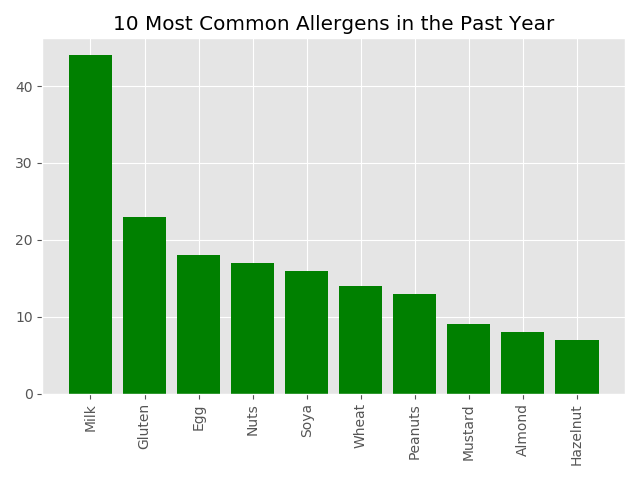
The example above plots a column chart of the 10 most frequently occurring allergens in alerts over the past year. The entirety of data acquisition and parsing has been accomplished using only getAlerts() and allergenLabels(), allowing for succinct and readable code.
Documentation Summary
The two most important classes in the wrapper are foodAlertsAPI and Alert. Below is an excerpt of the documentation relevant to these two classes.
foodAlertsAPI
Methods:
getAlert(ID)
Get a specific alert based on its notation, e.g. (FSA-AA-01-2018)
Parameters
- ID (string) – the alert ID
Returns
an Alert object
Raises
ValueError – occurs when an invalid value for the notation is provided
getAlerts(quantifier=None, detailed=False, limit=None, offset=None, sortBy=None, filters={})
Gets alerts from the FSA Food Alerts API
Parameters
-
quantifier – the quantifier can be an int n, in which case the function returns the last n alerts. The quantifier can also be a date string in ISO format, in which case the function returns the alerts published since the given date
-
detailed (bool, optional) – determines whether the Alert objects returned will contain all properties. When this is set to false, only the summary properties are included. Defaults to False if unspecified
-
limit (int, optional) – specifies the maximum number of Alert objects that can be returned
-
offset (int, optional) – return the list of items starting with the nth item, together with limit this enables paging through a long set of results
-
sortBy (string, optional) – reorder the list of results in ascending order of the given property (or property chain). To sort in descending order use sortBy=-prop. More than one sort can be included in which case they will be applied in order
-
filters (dict, optional) – filters based on alert object properties, e.g. {“type”:”AA”}
Returns
a list of Alert objects
Raises
ValueError – occurs when an invalid value for the quantifier or optional arguments is provided
searchAlerts(query, detailed=False, limit=None, offset=None, sortBy=None, filters={})
Search for query in alerts from the FSA Food Alerts API
Parameters
-
query (string) – the search query
-
detailed (bool, optional) – determines whether the Alert objects returned will contain all properties. When this is set to false, only the summary properties are included. Defaults to False if unspecified
-
limit (int, optional) – specifies the maximum number of Alert objects that can be returned
-
offset (int, optional) – return the list of items starting with the nth item, together with limit this enables paging through a long set of results
-
sortBy (string, optional) – reorder the list of results in ascending order of the given property (or property chain). To sort in descending order use sortBy=-prop. More than one sort can be included in which case they will be applied in order
-
filters (dict, optional) – filters based on alert object properties, e.g. {“type”:”AA”}
Returns
list of Alert objects
Raises
ValueError – occurs when an invalid value for the query or optional arguments is provided
Alert
Methods:
id()
Returns
(string) url to alert in the FSA page, same as the alertURL attribute.
title()
Returns
(string) alert title
modified()
Returns
(string) datetime when the alert is last modified in ISO format
notation()
Returns
(string) unique identifier for alert used in the foodAlertsAPI.foodAlertsAPI getAlert() function
type()
Returns
(string) one of “AA”, “FAFA”, or “PRIN”
1 maintainer

Metadata
1 maintainer
Release files for food-alerts-wrapper 0.1.1
For a detailed explanation of source distributions (sdists) and built distributions (wheels), please see the package formats documentation.
Source distribution (sdist)
| File | Size | Uploaded | Provenance | Actions |
|---|---|---|---|---|
| food-alerts-wrapper-0.1.1.tar.gz | 11.2 kB | Without provenance | Details for food-alerts-wrapper-0.1.1.tar.gz |
Built distribution (wheel)
| File | Interpreter | ABI | Platform | Actions Reset |
|---|---|---|---|---|
| food_alerts_wrapper-0.1.1-py3-none-any.whl | Python 3 | none | any | Details for food_alerts_wrapper-0.1.1-py3-none-any.whl |
Total release size: 26.7 kB
Release files / food-alerts-wrapper-0.1.1.tar.gz
| Download URL | food-alerts-wrapper-0.1.1.tar.gz |
|---|---|
| Size | 11.2 kB |
| Tags | Source |
|
SHA-256 checksum How to use checksums |
c54d1b7452e53585f489c74ea50439217a190d46d5969b55dbc688f09e3eaa90
|
|
BLAKE2b-256 checksum How to use checksums |
3196fc51554a4cf22323ef52c2cb7f8cfc83458edaff2f23cbbfabcc0e81139c
|
| Upload date | |
|
Uploaded using Trusted Publishing? What is trusted publishing? |
No |
| Uploaded via |
twine/2.0.0 pkginfo/1.5.0.1 requests/2.23.0 setuptools/47.1.1 requests-toolbelt/0.9.1 tqdm/4.47.0 CPython/3.8.3
|
Release files / food_alerts_wrapper-0.1.1-py3-none-any.whl
| Download URL | food_alerts_wrapper-0.1.1-py3-none-any.whl |
|---|---|
| Size | 15.6 kB |
| Tags | Python 3 |
|
SHA-256 checksum How to use checksums |
688ef4b58589a0a3a7a0e83918316cd739582b48e572586cbab0340db098e02b
|
|
BLAKE2b-256 checksum How to use checksums |
fdcb7818f446b1450d48d037440b42ae71a29058854b312c9acdb08eacff8ed2
|
| Upload date | |
|
Uploaded using Trusted Publishing? What is trusted publishing? |
No |
| Uploaded via |
twine/2.0.0 pkginfo/1.5.0.1 requests/2.23.0 setuptools/47.1.1 requests-toolbelt/0.9.1 tqdm/4.47.0 CPython/3.8.3
|
Security for food-alerts-wrapper 0.1.1
Provenance
Provenance describes where a file came from. On PyPI, provenance is shared via attestations, which provide a verifiable record of the build or publishing details. View details, limitations and caveats.
No provenance found
None of the files in this release were uploaded with provenance metadata.
A note on package security
PyPI is a repository for distributing packages, not a service for auditing them. While third-party security researchers and our staff do their best to detect and remove malicious packages, PyPI cannot guarantee the quality, security or suitability of any given package.
To learn more about protecting yourself from malicious actors, visit our package security documentation.














