
Forest Visualizer
forest-visualizer is a Python package that provides tools for building and visualizing forest data structures using Turtle Graphics. This package allows users to perform operations like inserting nodes, tree traversal (pre-order, post-order, and level-order), deleting nodes, and drawing the forest structure visually.
Background
This package implements a forest visualization algorithm based on the paper Novel Static Multi-Layer Forest Approach and Its Applications published in MDPI. The paper provides detailed insights into the theoretical foundations of the algorithm.
Features
- Tree Insertion: Insert parent-child relationships to build a forest structure.
- Tree Traversal: Perform pre-order, post-order, and level-order traversals of the forest.
- Node Deletion: Remove nodes and automatically adjust the tree structure.
- Visual Representation: Use Turtle Graphics to draw the forest with customizable node sizes and gaps.
- Path Finding: Find the path from any node to the root.
Installation
You can install the forest-visualizer package directly from PyPI:
pip install forest-visualizer
Example Python Code
from forest_visualizer import Forest
# Example usage
forest = Forest()

# Inserting nodes
forest.insert('40', 'N/A')
forest.insert('50', '40')
forest.insert('30', '40')
forest.insert('35', '30')
forest.insert('25', '30')
forest.insert('28', '25')
forest.insert('15', '25')
forest.insert('60', '50')
forest.insert('45', '50')
forest.insert('70', '60')
forest.insert('55', '60')


forest.level_traversal()
forest.display()
print(forest.find_parent('25'))
print(forest.find_path_to_root('15'))
#Perform pre-order traversal and print the result
pre_order_result = forest.pre_order_traversal('40')
print("Pre-order traversal result:", pre_order_result)

#Perform pre-order traversal and print the result
post_order_result = forest.post_order_traversal('40')
print("Post-order traversal result:", post_order_result)
forest.draw_tree()
forest.delete_node('25')
forest.draw_tree()
forest.insert('90', '35')
forest.draw_tree()
Output File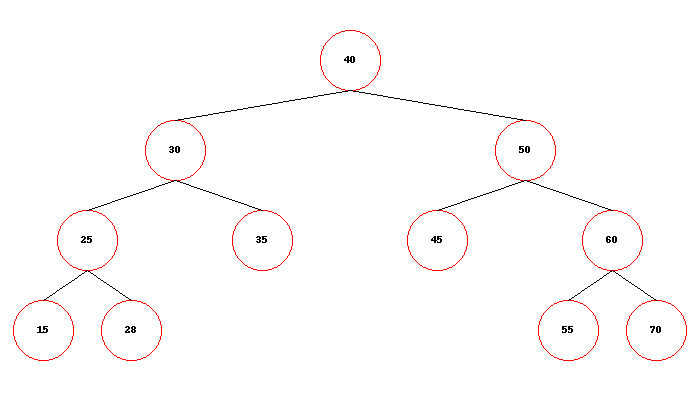
1 maintainer

Metadata
1 maintainer
Release files for forest-visualization 0.1.3
For a detailed explanation of source distributions (sdists) and built distributions (wheels), please see the package formats documentation.
Source distribution (sdist)
| File | Size | Uploaded | Provenance | |
|---|---|---|---|---|
| forest-visualization-0.1.3.tar.gz | 5.5 kB | Without provenance | Details |
Built distribution (wheel)
| File | Interpreter | ABI | Platform | Reset |
|---|---|---|---|---|
| forest_visualization-0.1.3-py3-none-any.whl | Python 3 | none | any | Details |
Total release size: 11.8 kB
Release files / forest-visualization-0.1.3.tar.gz
| Download URL | forest-visualization-0.1.3.tar.gz |
|---|---|
| Size | 5.5 kB |
| Tags | Source |
|
SHA-256 checksum How to use checksums |
7ca5bceb088dd904096c9a15b4e0b84c372cd5760f535aa30e4a2b7d77e57faf
|
|
BLAKE2b-256 checksum How to use checksums |
3f3d3b91c71b00ebd50d3f3093ee497ebe915f4dc44bd004f09249ea721d17b1
|
| Upload date | |
|
Uploaded using Trusted Publishing? What is trusted publishing? |
No |
| Uploaded via |
twine/3.8.0 pkginfo/1.10.0 readme-renderer/34.0 requests/2.27.1 requests-toolbelt/1.0.0 urllib3/1.26.18 tqdm/4.43.0 importlib-metadata/3.10.1 keyring/23.4.1 rfc3986/1.5.0 colorama/0.4.5 CPython/3.6.9
|
Release files / forest_visualization-0.1.3-py3-none-any.whl
| Download URL | forest_visualization-0.1.3-py3-none-any.whl |
|---|---|
| Size | 6.3 kB |
| Tags | Python 3 |
|
SHA-256 checksum How to use checksums |
d8eb22d1d2c6e7cc50dc2665d6864186475f923f255942b8a416c4368020a26b
|
|
BLAKE2b-256 checksum How to use checksums |
0ab61f1115a3632ca42416778de6be0689a7a586e5a0dc528840030191002624
|
| Upload date | |
|
Uploaded using Trusted Publishing? What is trusted publishing? |
No |
| Uploaded via |
twine/3.8.0 pkginfo/1.10.0 readme-renderer/34.0 requests/2.27.1 requests-toolbelt/1.0.0 urllib3/1.26.18 tqdm/4.43.0 importlib-metadata/3.10.1 keyring/23.4.1 rfc3986/1.5.0 colorama/0.4.5 CPython/3.6.9
|
Security for forest-visualization 0.1.3
Provenance
Provenance describes where a file came from. On PyPI, provenance is shared via attestations, which provide a verifiable record of the build or publishing details. View details, limitations and caveats.
No provenance found
None of the files in this release were uploaded with provenance metadata.
A note on package security
PyPI is a repository for distributing packages, not a service for auditing them. While third-party security researchers and our staff do their best to detect and remove malicious packages, PyPI cannot guarantee the quality, security or suitability of any given package.
To learn more about protecting yourself from malicious actors, visit our package security documentation.













