
FreeCAD Simple Animation Workbench

Project description
Inbetweening




Inbetweening (abbreviated as i10g) is a WYSIWYG (What You See Is What You Get) animation workbench for FreeCAD. It enables you to save the current placement, visibility and color of an assembly, composed of App:::Link objects, as an animation "step". The workbench interpolates between steps to create smooth transitions. It can be used to create exploded-view animations.
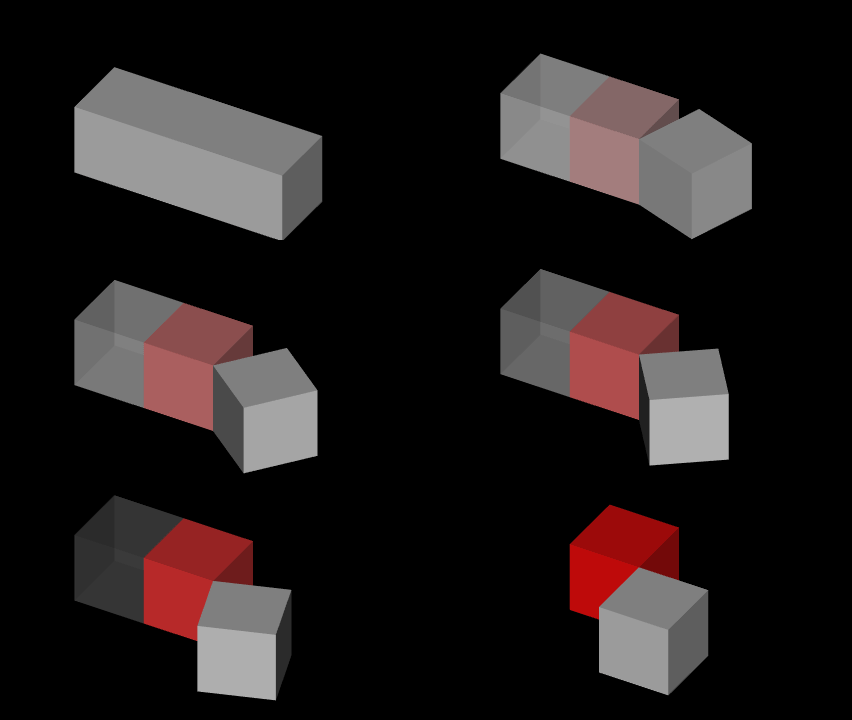
Example of a GIF exported using i10g
If you find this workbench useful, please consider supporting my work on Liberapay or PayPal. Starring and sharing also helps! Thanks!
Features
- Create transitions between different states of visibility, placement and color
- Preview animation in realtime
- Export images, videos and gifs
Note: Object rotation is simplified to the shorter path
Getting Started
Prerequisites
If you have problems with the exported video/GIF, please check your ffmpeg version. For me
4.3.2(bundled with the flatpak build) and the latest4.4version produce artifacts in the outputed GIF or doesn't have support for the parameterimage2pipe
Tested on linux
Installing
Python pip
Please check if the current python environment is the same used in your installation of FreeCAD
python3 -m pip install i10g
or
python3 -m pip install https://github.com/anderson-/inbetweening/archive/refs/heads/main.zip
Linux
wget -qO- https://github.com/anderson-/inbetweening/archive/refs/heads/main.zip | busybox unzip -d ~/.FreeCAD/Mod -
Usage
Before starting, I reccommend to backup your work, and consider creating an extra file for the main assembly, importing each part as an App::Link by using the Std LinkMake button.
Toolbar Overview

Animation folder object to the current document, the current scene is set as the first step of the animation


In the tree view
represents the current selected step, the other steps should have the icon


Controls the animation preview

Animation folder

Animation folder

Animation folder

Example
This example can be created automagically using the
-
Create a
Part::Box, add it to aApp::Part, and make it not visible -
Create 3
App::Link, and position them side by side, this will be the first animation step -
Select the i10g workbench and click
Animationfolder, it should already set the current scene as the first step
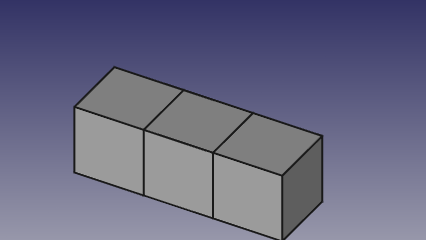
First step
- Move all the cubes, 10mm up
- Set
Visibility = Falsefor the first one - For the second one:
- Set
OverrideMaterial = True - Change
ShapeMaterialcolor to red
- Set
- Rotate the third one by 90°
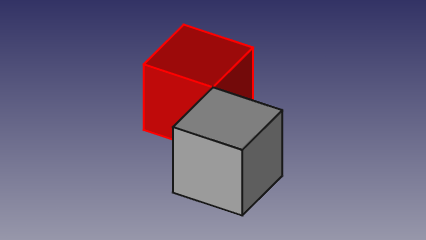
Second step
-
Click
-
Click
-
Select
Animationfolder in the tree, setFFmpegpath and setResolutionto426x240 -
Click
Result
Example of a 4k/2160p (3840x2160) 60fps video export: https://www.youtube.com/watch?v=RZUoOqqV1uE
Development
To reload the workbench for easy development, use the folowing command in the python console:
Gui.activateWorkbench('Inbetweening'); App.DEV=1; Gui.runCommand('ReloadWorkbench')
Acknowledgments
Special thanks to Lorenz Lechner - @looooo for his work on the workbench_starterkit and freecad.gears
Release history Release notifications | RSS feed

Download files
Download the file for your platform. If you're not sure which to choose, learn more about installing packages.
Source Distribution
Built Distribution
Filter files by name, interpreter, ABI, and platform.
If you're not sure about the file name format, learn more about wheel file names.
Copy a direct link to the current filters
File details
Details for the file freecad.i10g-0.0.1.tar.gz.
File metadata
- Download URL: freecad.i10g-0.0.1.tar.gz
- Upload date:
- Size: 27.2 kB
- Tags: Source
- Uploaded using Trusted Publishing? No
- Uploaded via: twine/3.4.1 importlib_metadata/4.0.1 pkginfo/1.7.0 requests/2.23.0 requests-toolbelt/0.9.1 tqdm/4.60.0 CPython/3.8.6
File hashes
| Algorithm | Hash digest | |
|---|---|---|
| SHA256 |
72d7888e8a8669ba9f9649e285abe27b690666577de09717635ced1e70a1f151
|
|
| MD5 |
2f2c2aa999c8e9ed161a427a09bebe0e
|
|
| BLAKE2b-256 |
f2d2344e4090de5d688ac174847db364c4694c5eff16c09da6122b4786608019
|
File details
Details for the file freecad.i10g-0.0.1-py3-none-any.whl.
File metadata
- Download URL: freecad.i10g-0.0.1-py3-none-any.whl
- Upload date:
- Size: 36.0 kB
- Tags: Python 3
- Uploaded using Trusted Publishing? No
- Uploaded via: twine/3.4.1 importlib_metadata/4.0.1 pkginfo/1.7.0 requests/2.23.0 requests-toolbelt/0.9.1 tqdm/4.60.0 CPython/3.8.6
File hashes
| Algorithm | Hash digest | |
|---|---|---|
| SHA256 |
0305456ac7ed7471caa5558db5d2ea23c25a6fb270af1cbcd80d79870a3fa6f5
|
|
| MD5 |
747388026230fce0d10824a843b6c737
|
|
| BLAKE2b-256 |
a2cc6fd916c18771cd2152f0d0e79978afa9fdfc4c833dece3b2b6fd2a5c3307
|






