
FSTrent Colors



Enhanced terminal color library providing extensive color combinations and utilities for Python applications.
Features
- 🎨 16 Base colors (including light variants)
- 🖼️ Background colors for all combinations
- 🌈 Color on color support (e.g., red text on blue background)
- 🛠️ Utility functions for string coloring
- 📝 Simple API for color manipulation
- 🔧 Cross-platform support via colorama
Demo
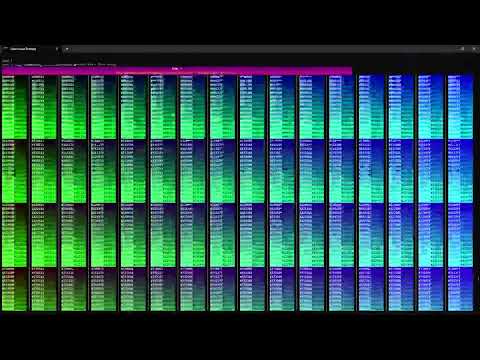
Check out the demo video to see FSTrent Colors in action:
Installation
pip install fstrent_colors
Basic Usage
from fstrent_colors import (
    # Utility functions
    cs, cp,

    # Basic colors
    R, G, B, W  # Red, Green, Blue, White
)

# Print colored text
cp("This is red text", R)
cp("This is green text", G)
cp("This is blue text", B)

# Create colored strings
colored_text = cs("Custom colored text", B)
print(colored_text)
Available Colors
Basic Colors
from fstrent_colors import (
    K,    # Black
    R,    # Red
    G,    # Green
    Y,    # Yellow
    B,    # Blue
    M,    # Magenta
    C,    # Cyan
    W,    # White
    LGy,  # Light Gray
    DGy,  # Dark Gray
    LR,   # Light Red
    LG,   # Light Green
    LY,   # Light Yellow
    LB,   # Light Blue
    LM,   # Light Magenta
    LC,   # Light Cyan
)
Color on Color Examples
from fstrent_colors import (
    # White on Multi-color Backgrounds
    WoR,  # White on Red
    WoG,  # White on Green
    WoM,  # White on Magenta

    # Colors on White Background
    RoW,  # Red on White
    GoW,  # Green on White
    BoW,  # Blue on White

    # Colors on Blue Background
    RoB,  # Red on Blue
    GoB,  # Green on Blue
    WoB,  # White on Blue
)

# Many more combinations available!
Color Utility Functions
from fstrent_colors import cs, cp, CLR

# Color string  and returnfunction
text = cs("Colored text", R)

# Color print function
cp("Directly print colored text", B)

# Access color palette
my_color = pallette['RED']

# Use color lookup
dynamic_color = CLR['BLUE']
Demo Functions
The package includes several demo functions to showcase different color combinations:
from fstrent_colors import (
    demo1,  # Basic colors
    demo2,  # Bright colors
    demo3,  # Background colors
    demo4,  # Color combinations
    demo5,  # Styles
    demo6,  # Rainbow effects
    demo7,  # Gradient effects
    demo8,  # Patterns
    demo9,  # Full spectrum
)

# Run demos
demo1()  # Shows basic colors
demo9()  # Shows full color spectrum
Advanced Usage
Combining Colors and Backgrounds
from fstrent_colors import R, G, B, W, RoK, WoB

# Multiple styles in one line
print(RoK + "Red on Black" + W + " Normal " + WoB + "White on Blue" + W)
Using with String Formatting
from fstrent_colors import R, G, W

name = "World"
print(f"{R}Hello {G}{name}{W}!")
Development
- Clone the repository:
git clone https://github.com/wrm3/fstrent_colors.git
cd fstrent_colors
- Install development dependencies:
pip install -e ".[dev]"
- Run tests:
pytest
License
MIT License - see LICENSE file for details.
Author
Warren R Martel III (wrmartel3@gmail.com)
Contributing
Contributions are welcome! Please feel free to submit a Pull Request.
1 maintainer

Metadata
1 maintainer
Release files for fstrent-colors 1.0.12
For a detailed explanation of source distributions (sdists) and built distributions (wheels), please see the package formats documentation.
Source distribution (sdist)
| File | Size | Uploaded | Provenance | Actions |
|---|---|---|---|---|
| fstrent_colors-1.0.12.tar.gz | 20.8 kB | Without provenance | Details for fstrent_colors-1.0.12.tar.gz |
Built distribution (wheel)
| File | Interpreter | ABI | Platform | Actions Reset |
|---|---|---|---|---|
| fstrent_colors-1.0.12-py3-none-any.whl | Python 3 | none | any | Details for fstrent_colors-1.0.12-py3-none-any.whl |
Total release size: 39.6 kB
Release files / fstrent_colors-1.0.12.tar.gz
| Download URL | fstrent_colors-1.0.12.tar.gz |
|---|---|
| Size | 20.8 kB |
| Tags | Source |
|
SHA-256 checksum How to use checksums |
cb0b80080a04169f005f37d33972537746d0cfec3b98edfcd0e4a7e6bb9b6451
|
|
BLAKE2b-256 checksum How to use checksums |
efa531db59a063f0f0b5f3a7cf9cb369ae6648e60c78264cbaaee838768e4f5f
|
| Upload date | |
|
Uploaded using Trusted Publishing? What is trusted publishing? |
No |
| Uploaded via |
twine/6.0.1 CPython/3.12.7
|
Release files / fstrent_colors-1.0.12-py3-none-any.whl
| Download URL | fstrent_colors-1.0.12-py3-none-any.whl |
|---|---|
| Size | 18.8 kB |
| Tags | Python 3 |
|
SHA-256 checksum How to use checksums |
48c486376fdcfa991d1718816d86f336b568b373160208ef2d6ca9a6b700005a
|
|
BLAKE2b-256 checksum How to use checksums |
976cedec7e08c2b94ee20a8ba88aba0ffb7b70aa6e9f0e4361bbc06bd940c1c2
|
| Upload date | |
|
Uploaded using Trusted Publishing? What is trusted publishing? |
No |
| Uploaded via |
twine/6.0.1 CPython/3.12.7
|
Security for fstrent-colors 1.0.12
Provenance
Provenance describes where a file came from. On PyPI, provenance is shared via attestations, which provide a verifiable record of the build or publishing details. View details, limitations and caveats.
No provenance found
None of the files in this release were uploaded with provenance metadata.
A note on package security
PyPI is a repository for distributing packages, not a service for auditing them. While third-party security researchers and our staff do their best to detect and remove malicious packages, PyPI cannot guarantee the quality, security or suitability of any given package.
To learn more about protecting yourself from malicious actors, visit our package security documentation.














