
Introduction
ftw.contentstats is a Plone add-on for collecting and displaying content statistics.
Compatibility
Plone 4.3.x
Installation
Add the package to your buildout configuration:
[instance]
eggs +=
    ...
    ftw.contentstats
Usage
Visit the @@content-stats view on a Plone site (requires the cmf.ManagePortal permission by default).
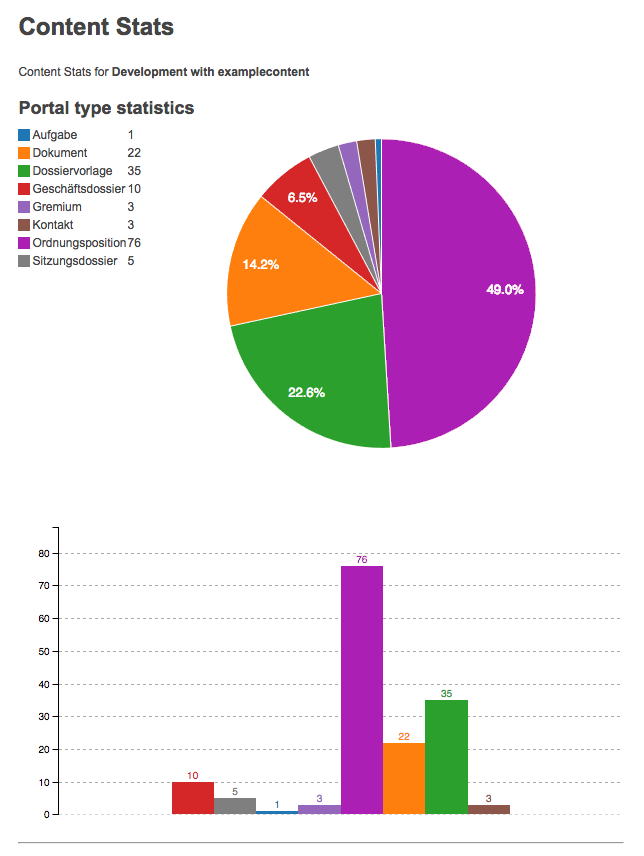
Collected stats
Out of the box, ftw.contentstats will collect statistics for
Types (distinct portal_type’s and their counts)
Workflow states (distinct review_state’s and their counts)
Disk Usage (total disk usage of the deployment directory, filestorage and blobstorage)
Add-on packages can have additional statistics collected by providing an IStatsProvider adapter (see interface description for details).
If ftw.monitor is installed, its performance metrics will also be included, grouped by instance.
Logging content stats over time
In order to log content stats to a file, you can use the provided bin/dump-content-stats script to have stats dumped to a logfile that contains on JSON entry per line, containing the raw stats for that time.
Usage:
bin/dump-content-stats -s <plone_site_id>
The script will cause the stats to be dumped by making a request to the @@dump-content-stats view. This view is accessible to Anonymous (zope.Public), but only when requested from localhost!
So in order for this script to work, you’ll have to invoke it on the same machine where your Zope instances run, and make sure the Plone site is up and running, and reachable from localhost.
The logfile location will be in the same directory as the Z2 log, and the log will be named contentstats-json.log.
Note: In order to figure out the appropriate log directory, ftw.contentstats needs to derive this information from the eventlog location. It’s therefore important to have an eventlog configured, otherwise ftw.contentstats will not be able to log any content stats, and complain noisily through the root logger.
Logging to Fluentd
Instead of logging to a logfile, ftw.contentstats can also be configured to log to a Fluentd instance.
If the environment variable FLUENT_HOST is set, it will log to that fluent host using the Fluentd Forward Protocol, instead of logging to a local file. FLUENT_PORT (optional) allows to specify the port, and defaults to 24224 if not set.
In order for ftw.contentstats to use a proper tag for events logged to Fluentd, the Pod namespace needs to be exposed in the KUBERNETES_NAMESPACE env var.
Development
Fork this repo
Clone your fork
Shell: ln -s development.cfg buildout.cfg
Shell: python boostrap.py
Shell: bin/buildout
Run bin/test to test your changes.
Or start an instance by running bin/instance fg.
Links
Copyright
This package is copyright by 4teamwork.
ftw.contentstats is licensed under GNU General Public License, version 2.
Changelog
1.4.1 (2024-08-22)
Fix passing args to console command which was broken in 1.4.0. [buchi]
1.4.0 (2024-04-04)
Add Python implementation for calculating disk usage. [buchi]
Add option to specify data path for disk usage calculation. [buchi]
Add zopectl command for dumping content stats. [buchi]
Make filestorage (Data.fs) and blobstorage path for disk usage configurable. [buchi]
1.3.0 (2023-04-04)
Add support for logging to Fluentd. [lgraf]
1.2.0 (2020-05-04)
Add perf_metrics provider that gathers performance metrics from ftw.monitor. [lgraf]
1.1.1 (2018-12-28)
Fixed test temp file isolation issues. [Rotonen]
1.1.0 (2018-11-05)
Include disk usage (Data.fs and blobstorage) in stats. [lgraf]
Add Plone 5 compatibility. [phgross]
1.0.3 (2017-09-08)
Make determining buildout path independent of working directory. [lgraf]
1.0.2 (2017-09-04)
Properly build ++resource++ URLs by prefixing them with portal_url instead of just a slash. [lgraf]
1.0.1 (2017-09-04)
Fail gracefully if eventlog config can’t be found in order to derive log location from it. Instead of potentially preventing instance startup, log a noticeable error message using the root logger. [lgraf]
1.0.0 (2017-09-03)
Introduce IStatsCollector component and implement portal_types collector. [mathias.leimgruber]
Rework ContenStats integration. Move “getting the content stats” from the view to it’s own module/class. [mathias.leimgruber]
Initial implementation. [lgraf]


Release files for ftw.contentstats 1.4.1
For a detailed explanation of source distributions (sdists) and built distributions (wheels), please see the package formats documentation.
Source distribution (sdist)
| File | Size | Uploaded | |
|---|---|---|---|
| ftw.contentstats-1.4.1.tar.gz | 177.2 kB | Details |
Release files / ftw.contentstats-1.4.1.tar.gz
| Download URL | ftw.contentstats-1.4.1.tar.gz |
|---|---|
| Size | 177.2 kB |
| Tags | Source |
|
SHA-256 checksum How to use checksums |
f6680308d6b4e4dd200ab899425322f2dd807557486feadb5dcd633d401be0ef
|
|
BLAKE2b-256 checksum How to use checksums |
c757f41c8c769b31ae31acbe8cf334b14018c2012a24567b090190d28e1be36a
|
| Upload date | |
|
Uploaded using Trusted Publishing? What is trusted publishing? |
No |
| Uploaded via |
twine/5.0.0 CPython/3.12.4
|














