







| Tutorials | API Documentation | Chat with us on slack! |
|---|---|---|
 |
 |
 |
Fugue is a unified interface for distributed computing that lets users execute Python, Pandas, and SQL code on Spark, Dask, and Ray with minimal rewrites.
Fugue is most commonly used for:
- Parallelizing or scaling existing Python and Pandas code by bringing it to Spark, Dask, or Ray with minimal rewrites.
- Using FugueSQL to define end-to-end workflows on top of Pandas, Spark, and Dask DataFrames. FugueSQL is an enhanced SQL interface that can invoke Python code.
To see how Fugue compares to other frameworks like dbt, Arrow, Ibis, PySpark Pandas, see the comparisons
Fugue API
The Fugue API is a collection of functions that are capable of running on Pandas, Spark, Dask, and Ray. The simplest way to use Fugue is the transform() function. This lets users parallelize the execution of a single function by bringing it to Spark, Dask, or Ray. In the example below, the map_letter_to_food() function takes in a mapping and applies it on a column. This is just Pandas and Python so far (without Fugue).
import pandas as pd
from typing import Dict

input_df = pd.DataFrame({"id":[0,1,2], "value": (["A", "B", "C"])})
map_dict = {"A": "Apple", "B": "Banana", "C": "Carrot"}

def map_letter_to_food(df: pd.DataFrame, mapping: Dict[str, str]) -> pd.DataFrame:
    df["value"] = df["value"].map(mapping)
    return df
Now, the map_letter_to_food() function is brought to the Spark execution engine by invoking the transform() function of Fugue. The output schema and params are passed to the transform() call. The schema is needed because it's a requirement for distributed frameworks. A schema of "*" below means all input columns are in the output.
from pyspark.sql import SparkSession
from fugue import transform

spark = SparkSession.builder.getOrCreate()
sdf = spark.createDataFrame(input_df)

out = transform(sdf,
               map_letter_to_food,
               schema="*",
               params=dict(mapping=map_dict),
               )
# out is a Spark DataFrame
out.show()
+---+------+
| id| value|
+---+------+
|  0| Apple|
|  1|Banana|
|  2|Carrot|
+---+------+
PySpark equivalent of Fugue transform()
from typing import Iterator, Union
from pyspark.sql.types import StructType
from pyspark.sql import DataFrame, SparkSession

spark_session = SparkSession.builder.getOrCreate()

def mapping_wrapper(dfs: Iterator[pd.DataFrame], mapping):
  for df in dfs:
      yield map_letter_to_food(df, mapping)

def run_map_letter_to_food(input_df: Union[DataFrame, pd.DataFrame], mapping):
  # conversion
  if isinstance(input_df, pd.DataFrame):
      sdf = spark_session.createDataFrame(input_df.copy())
  else:
      sdf = input_df.copy()

  schema = StructType(list(sdf.schema.fields))
  return sdf.mapInPandas(lambda dfs: mapping_wrapper(dfs, mapping),
                          schema=schema)

result = run_map_letter_to_food(input_df, map_dict)
result.show()
This syntax is simpler, cleaner, and more maintainable than the PySpark equivalent. At the same time, no edits were made to the original Pandas-based function to bring it to Spark. It is still usable on Pandas DataFrames. Fugue transform() also supports Dask and Ray as execution engines alongside the default Pandas-based engine.
The Fugue API has a broader collection of functions that are also compatible with Spark, Dask, and Ray. For example, we can use load() and save() to create an end-to-end workflow compatible with Spark, Dask, and Ray. For the full list of functions, see the Top Level API
import fugue.api as fa

def run(engine=None):
    with fa.engine_context(engine):
        df = fa.load("/path/to/file.parquet")
        out = fa.transform(df, map_letter_to_food, schema="*")
        fa.save(out, "/path/to/output_file.parquet")

run()                 # runs on Pandas
run(engine="spark")   # runs on Spark
run(engine="dask")    # runs on Dask
All functions underneath the context will run on the specified backend. This makes it easy to toggle between local execution, and distributed execution.
FugueSQL
FugueSQL is a SQL-based language capable of expressing end-to-end data workflows on top of Pandas, Spark, and Dask. The map_letter_to_food() function above is used in the SQL expression below. This is how to use a Python-defined function along with the standard SQL SELECT statement.
from fugue.api import fugue_sql
import json

query = """
    SELECT id, value
      FROM input_df
    TRANSFORM USING map_letter_to_food(mapping={{mapping}}) SCHEMA *
    """
map_dict_str = json.dumps(map_dict)

# returns Pandas DataFrame
fugue_sql(query,mapping=map_dict_str)

# returns Spark DataFrame
fugue_sql(query, mapping=map_dict_str, engine="spark")
Installation
Fugue can be installed through pip or conda. For example:
pip install fugue
In order to use Fugue SQL, it is strongly recommended to install the sql extra:
pip install fugue[sql]
It also has the following installation extras:
- sql: to support Fugue SQL. Without this extra, the non-SQL part still works. Before Fugue 0.9.0, this extra is included in Fugue's core dependency so you don't need to install explicitly. But for 0,9.0+, this becomes required if you want to use Fugue SQL.
- spark: to support Spark as the ExecutionEngine.
- dask: to support Dask as the ExecutionEngine.
- ray: to support Ray as the ExecutionEngine.
- duckdb: to support DuckDB as the ExecutionEngine, read details.
- polars: to support Polars DataFrames and extensions using Polars.
- ibis: to enable Ibis for Fugue workflows, read details.
- cpp_sql_parser: to enable the CPP antlr parser for Fugue SQL. It can be 50+ times faster than the pure Python parser. For the main Python versions and platforms, there is already pre-built binaries, but for the remaining, it needs a C++ compiler to build on the fly.
For example a common use case is:
pip install "fugue[duckdb,spark]"
Note if you already installed Spark or DuckDB independently, Fugue is able to automatically use them without installing the extras.
Getting Started
The best way to get started with Fugue is to work through the 10 minute tutorials:
For the top level API, see:
The tutorials can also be run in an interactive notebook environment through binder or Docker:
Using binder

Note it runs slow on binder because the machine on binder isn't powerful enough for a distributed framework such as Spark. Parallel executions can become sequential, so some of the performance comparison examples will not give you the correct numbers.
Using Docker
Alternatively, you should get decent performance by running this Docker image on your own machine:
docker run -p 8888:8888 fugueproject/tutorials:latest
Jupyter Notebook Extension
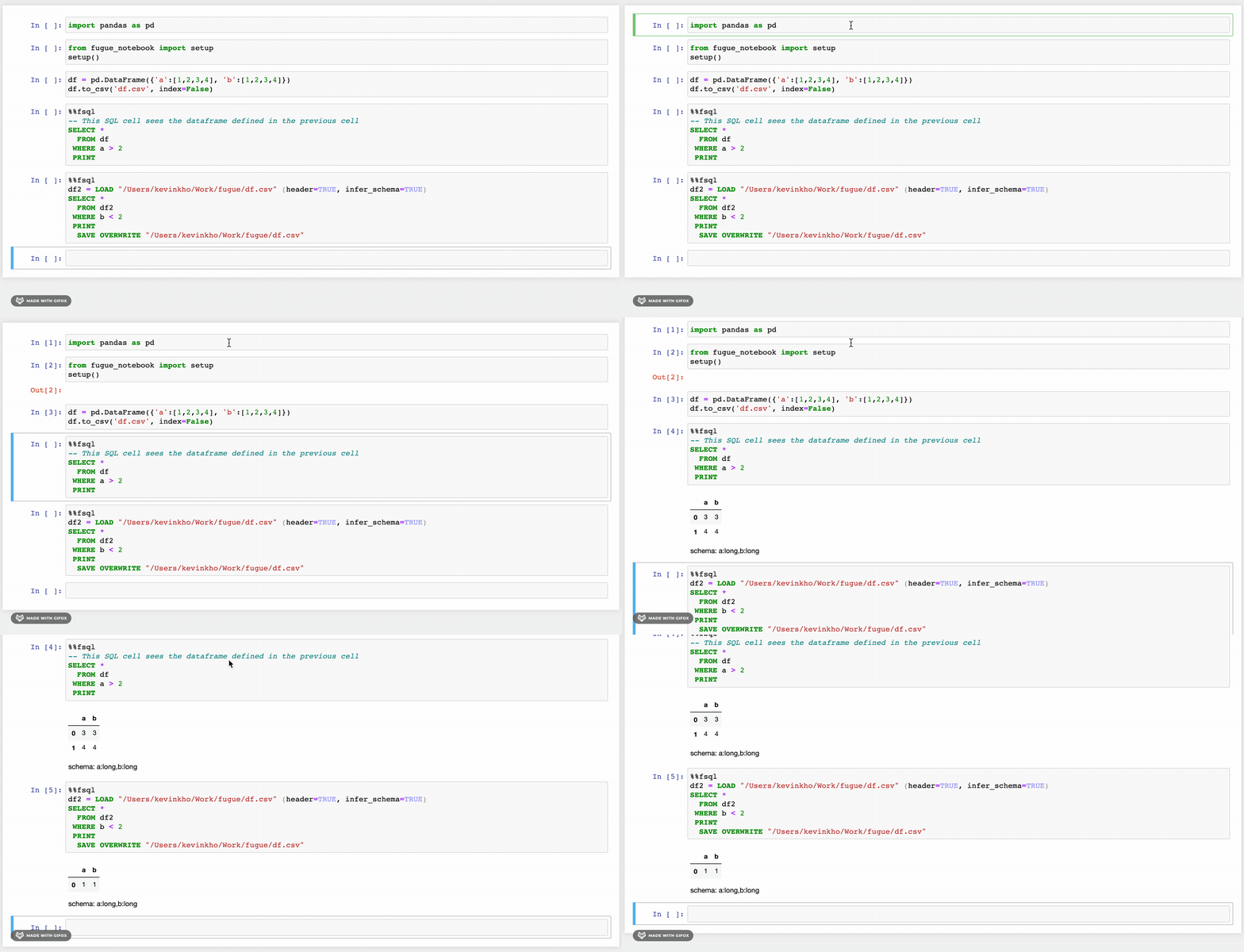
There is an accompanying notebook extension for FugueSQL that lets users use the %%fsql cell magic. The extension also provides syntax highlighting for FugueSQL cells. It works for both classic notebook and Jupyter Lab. More details can be found in the installation instructions.
Ecosystem
By being an abstraction layer, Fugue can be used with a lot of other open-source projects seamlessly.
Python backends:
FugueSQL backends:
- Pandas - FugueSQL can run on Pandas
- Duckdb - in-process SQL OLAP database management
- dask-sql - SQL interface for Dask
- SparkSQL
- BigQuery
- Trino
Fugue is available as a backend or can integrate with the following projects:
- WhyLogs - data profiling
- PyCaret - low code machine learning
- Nixtla - timeseries modelling
- Prefect - workflow orchestration
- Pandera - data validation
- Datacompy (by Capital One) - comparing DataFrames
Registered 3rd party extensions (majorly for Fugue SQL) include:
- Pandas plot - visualize data using matplotlib or plotly
- Seaborn - visualize data using seaborn
- WhyLogs - visualize data profiling
- Vizzu - visualize data using ipyvizzu
Community and Contributing
Feel free to message us on Slack. We also have contributing instructions.
Case Studies
- How LyftLearn Democratizes Distributed Compute through Kubernetes Spark and Fugue
- Clobotics - Large Scale Image Processing with Spark through Fugue
- Architecture for a data lake REST API using Delta Lake, Fugue & Spark (article by bitsofinfo)
Mentioned Uses
- Productionizing Data Science at Interos, Inc. (LinkedIn post by Anthony Holten)
- Multiple Time Series Forecasting with Fugue & Nixtla at Bain & Company (LinkedIn post by Fahad Akbar)
Further Resources
View some of our latest conferences presentations and content. For a more complete list, check the Content page in the tutorials.
Blogs
- Why Pandas-like Interfaces are Sub-optimal for Distributed Computing
- Introducing FugueSQL — SQL for Pandas, Spark, and Dask DataFrames (Towards Data Science by Khuyen Tran)
Conferences
2 maintainers


Metadata
2 maintainers
Release files for fugue 0.9.7
For a detailed explanation of source distributions (sdists) and built distributions (wheels), please see the package formats documentation.
Source distribution (sdist)
| File | Size | Uploaded | Provenance | Actions |
|---|---|---|---|---|
| fugue-0.9.7.tar.gz | 227.3 kB | Without provenance | Details for fugue-0.9.7.tar.gz |
Built distribution (wheel)
| File | Interpreter | ABI | Platform | Actions Reset |
|---|---|---|---|---|
| fugue-0.9.7-py3-none-any.whl | Python 3 | none | any | Details for fugue-0.9.7-py3-none-any.whl |
Total release size: 508.3 kB
Release files / fugue-0.9.7.tar.gz
| Download URL | fugue-0.9.7.tar.gz |
|---|---|
| Size | 227.3 kB |
| Tags | Source |
|
SHA-256 checksum How to use checksums |
3e38d43ffc4bcdca78ed80628d4fb8bb707ca1fdf3b2abe9b8793e80ac968970
|
|
BLAKE2b-256 checksum How to use checksums |
0f9924283b424e7aa85825613f45f2b5db91904661aec719bc0108cac05307a6
|
| Upload date | |
|
Uploaded using Trusted Publishing? What is trusted publishing? |
No |
| Uploaded via |
uv/0.10.4 {"installer":{"name":"uv","version":"0.10.4","subcommand":["publish"]},"python":null,"implementation":{"name":null,"version":null},"distro":{"name":"Ubuntu","version":"24.04","id":"noble","libc":null},"system":{"name":null,"release":null},"cpu":null,"openssl_version":null,"setuptools_version":null,"rustc_version":null,"ci":true}
|
Release files / fugue-0.9.7-py3-none-any.whl
| Download URL | fugue-0.9.7-py3-none-any.whl |
|---|---|
| Size | 281.0 kB |
| Tags | Python 3 |
|
SHA-256 checksum How to use checksums |
2eaab8aa709044a77b9f83b3fa79f83bd509205893824f27302082913a46f1fe
|
|
BLAKE2b-256 checksum How to use checksums |
ec5d0d3cd8dbd9368fc22b4a11ee1dee93e3ce16842afd15ec2d37e434c6b8d2
|
| Upload date | |
|
Uploaded using Trusted Publishing? What is trusted publishing? |
No |
| Uploaded via |
uv/0.10.4 {"installer":{"name":"uv","version":"0.10.4","subcommand":["publish"]},"python":null,"implementation":{"name":null,"version":null},"distro":{"name":"Ubuntu","version":"24.04","id":"noble","libc":null},"system":{"name":null,"release":null},"cpu":null,"openssl_version":null,"setuptools_version":null,"rustc_version":null,"ci":true}
|
Security for fugue 0.9.7
Provenance
Provenance describes where a file came from. On PyPI, provenance is shared via attestations, which provide a verifiable record of the build or publishing details. View details, limitations and caveats.
No provenance found
None of the files in this release were uploaded with provenance metadata.
A note on package security
PyPI is a repository for distributing packages, not a service for auditing them. While third-party security researchers and our staff do their best to detect and remove malicious packages, PyPI cannot guarantee the quality, security or suitability of any given package.
To learn more about protecting yourself from malicious actors, visit our package security documentation.














