
FVS
File Versioning System with hash comparison and data storage to create unlinked states that can be deleted


⚠️ This is currently a Beta.
Why FVS?
The main reason for this project is for the purpose of personal knowledge and understanding of the versioning system. The second reason is to make a simple and easy-to-implement versioning system for Bottles.
There are plenty of other versioning systems out there, but all of these provide features that I wouldn't need in my projects. The purpose of FVS is to always remain as clear and simple as possible, providing only the functionality of organizing file versions into states, ie recovery points that take advantage of deduplication to minimize space consumption.
Dependencies
FVS only need the orjson python package.
Concept
With the following images, we can see the basic concept of FVS and how it works.
In the following examples we will investigate only the first file cell, the others follow the same concept and should be easy to understand.
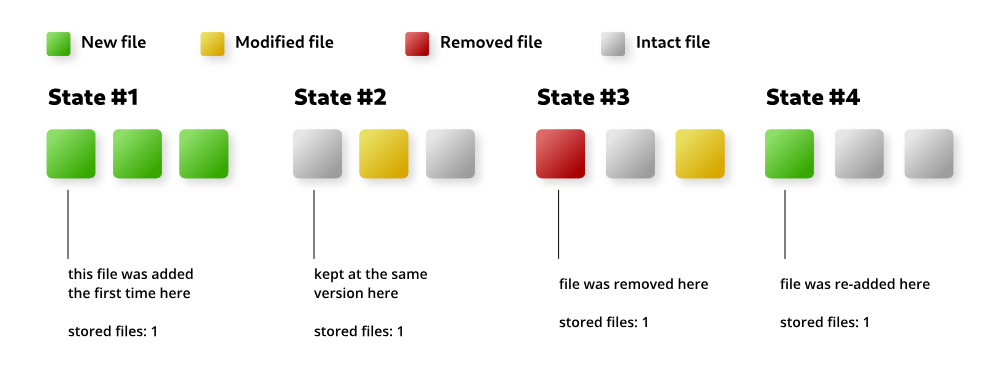
As you can see, the first file was added, removed and re-added but FVS always kept only one copy of that file as it was always the same version.
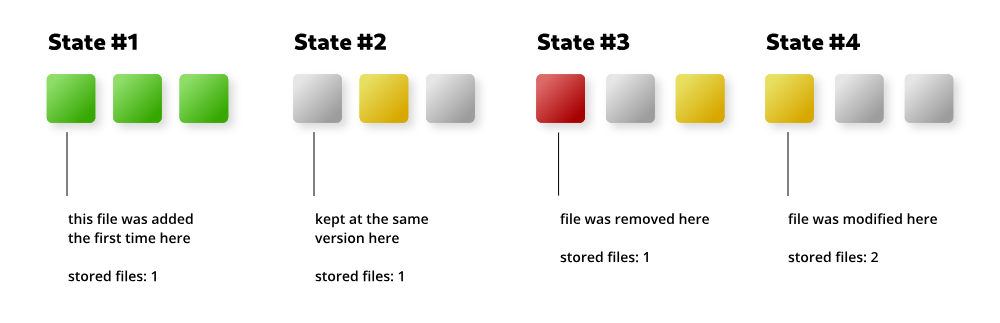
The example above shows a different timeline. In State #4 a new file has been added in the same place as the one in State #1 but since it is a different file, FVS is keeping two files in its storage.
Since the second version of the file is used only by State #4, if we were to restore one of the previous States, FVS will permanently delete that file as it is not necessary for the other States, this is because FVS per concept does not allow travel to the future, so all the States after the restored one are deleted.
Install
python setup.py install # --user for user-local install
CLI usage
> mkdir repo ; cd repo
> fvs init
# with custom path: fvs init --path <path>
# with compression turned on: fvs init --use-compression
Initialized FVS repository in /your/location/repo

> touch hello.txt
> fvs commit -m "First state"  # -i=<pattern> -i=<pattern2> to ignore files
Committing...
Committed state 0

> echo "Hello world!" >> hello.txt
> fvs commit -m "Second state"
Committing...
Committed state 1

> fvs states
-   0 First state
- ➔ 1 Second state

> fvs restore -s 0
Restored state 0

> fvs active
Active state is 0
Lib usage
from fvs.repo import FVSRepo

# create a new repo or point to an existing one
repo = FVSRepo("just/one/path")

# add some new files
with open("test/hello.txt", "w") as f:
    f.write("Hello world!")

with open("test/ciao.txt", "w") as f:
    f.write("Ciao!")

# commit the changes
repo.commit("My first state!")

# add some more files
with open("test/test.txt", "w") as f:
    f.write("Hello world again!")

with open("test/test.ignore", "w") as f:
    f.write("This time nobody will see this!")

# commit the changes ignoring files with .ignore extension
repo.commit("My second state!", ignore=["*.ignore"])

# restore the state 1
repo.restore_state(1)
1 maintainer

Release files for FVS 0.3.4
For a detailed explanation of source distributions (sdists) and built distributions (wheels), please see the package formats documentation.
Source distribution (sdist)
| File | Size | Uploaded | |
|---|---|---|---|
| FVS-0.3.4.tar.gz | 14.3 kB | Details |
Release files / FVS-0.3.4.tar.gz
| Download URL | FVS-0.3.4.tar.gz |
|---|---|
| Size | 14.3 kB |
| Tags | Source |
|
SHA-256 checksum How to use checksums |
c987741f37706ea07d91ec498c145162676ca16b59b5c8c2351cf464954ce422
|
|
BLAKE2b-256 checksum How to use checksums |
f72fcc09899755f94b36e7f570b9f9ca19a5fdff536e2614fd3ac1c28bb777f6
|
| Upload date | |
|
Uploaded using Trusted Publishing? What is trusted publishing? |
No |
| Uploaded via |
twine/4.0.1 CPython/3.10.5
|














