



GEDICorrect
GEDICorrect is a scalable Python framework for correcting GEDI geolocation at the orbit, beam, or footprint level using small-footprint airborne laser scanning (ALS) data. It combines waveform, terrain, and relative-height matching criteria with parallel processing and the gediRat and gediMetric programs from GEDI Simulator.
GEDICorrect provides:
- A local browser interface for guided operation.
- The
gedicorrectcommand-line program. - An importable Python API.
The accompanying paper is GEDICorrect: A Scalable Python Tool for Orbit-, Beam-, and Footprint-Level GEDI Geolocation Correction.
Supported platforms
The Python package targets Python 3.11 and 3.12. GEDI Simulator is a compiled Linux dependency, so these are the supported execution paths:
| Platform | Recommended method |
|---|---|
| Linux | Native installation or Docker |
| Windows 10/11 | Docker Desktop; WSL2 for advanced users |
| macOS | Docker Desktop (WARNING: not tested yet) |
Docker is the easiest option for most users because it packages Python, GEDICorrect, GEDI Simulator, and the local web UI together. All input data and output data stays on the user's computer.
Data requirements
GEDICorrect requires:
- An ALS dataset in
.lasfiles with a defined projected CRS, or an EPSG code supplied by the user. - Intersecting GEDI L1B and L2A products merged into GeoPackage (
.gpkg) files.
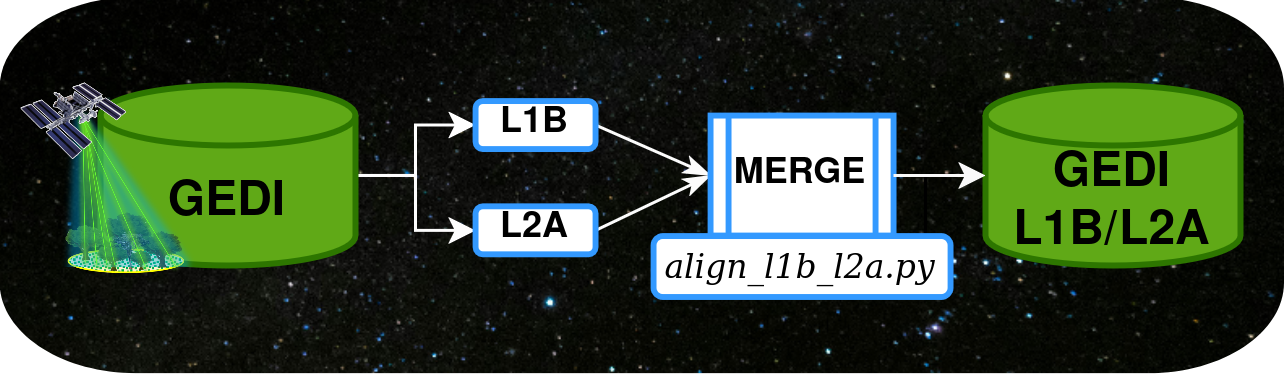
The packaged preparation commands merge L1B/L2A inputs and convert LAZ files when the optional LAZ dependencies are installed.
Merge L1B and L2A data products:
gedicorrect prepare align --l1b-dir "/path/to/L1B" --l2a-dir "/path/to/L2A" --out-dir "/path/to/merged"
Convert .LAZ to .LAS (required to run the framework):
gedicorrect prepare las --las-dir "/path/to/point-clouds"
To download GEDI L1B and L2A data, please check out GEDI-Pipeline or its QGIS plugin, both are unified workflows to download GEDI data in Geopackage format, which are entirely compatible with GEDICorrect.
Quick start on Windows
Install and start Docker Desktop, then download or clone GEDICorrect into a normal Windows folder. Double-click:
Start-GEDICorrect.cmd
You can also create a shortcut to your desired location on Windows.
On the first run, GEDICorrect displays native Windows dialogs for selecting:
- The folder containing uncompressed ALS
.lasfiles. - The folder containing merged GEDI
.gpkgfiles. - The folder where results should be saved.
The launcher writes the Docker configuration, starts Docker Desktop when necessary, checks the application image, and opens the UI http://localhost:8501.
You can double-click Start-GEDICorrect.cmd again for later sessions. GEDICorrect will display saved ALS, GEDI, and output folders, type and ENTER Y/Yes to reuse them, N/No to open the folder selectors again, or Q/Quit to exit. Pressing Enter accepts the saved folders. To stop the application, double-click:
Stop-GEDICorrect.cmd
also located in the cloned repository's folder.
Tip: Keep the complete GEDICorrect source folder on a normal Windows drive such as
C:\Users\name\GEDICorrect. Do not start the Windows launcher from\\wsl.localhost\..., a network share, or an administrator window. The launcher can select data from other local Windows drives.
Quick start with Docker Compose
The command-line workflow remains available on Linux, macOS (presumably, not tested), WSL2, and Windows terminals. Install Docker Desktop on Windows or Docker Engine with the Compose plugin on Linux.
Clone the repository and create default data directories:
git clone https://github.com/leonelluiscorado/GEDICorrect.git
cd GEDICorrect
and then:
docker compose up --build
Open http://localhost:8501. In the interface, these container paths are automatically mounted:
ALS directory:    /data/als
GEDI directory:   /data/input
Output directory: /data/output
Results and job logs appear in the host's data/output directory. ALS and GEDI inputs are mounted read-only; only the output directory is writable.
You can stop the service with:
docker compose down
Advanced manual folder configuration
Before Docker Compose, edit .env and use absolute paths:
cp .env.example .env
Inside .env:
GEDICORRECT_ALS_DIR=/path/to/ALS
GEDICORRECT_INPUT_DIR=/path/to/merged/GEDI
GEDICORRECT_OUTPUT_DIR=/path/to/results
GEDICORRECT_CPUS=8.0
GEDICORRECT_MEMORY=24g
On Windows, the launcher creates this file automatically. For manual Docker Desktop configuration, paths such as C:/GEDI/ALS can be used. Docker Desktop may ask for permission to share the selected folders.
On native Linux, set GEDICORRECT_UID and GEDICORRECT_GID in .env to the output of id -u and id -g before building. This lets the non-root container user write results with the correct host ownership.
The worker selector in the UI observes the container CPU quota. Native numerical libraries are limited to one thread per worker to avoid oversubscribing the CPU.
Native installation on Linux or WSL2
Install GEDI Simulator and its system dependencies:
chmod +x install_hancock_tools.bash
./install_hancock_tools.bash
Create the provided Conda environment:
conda env create -f environment.yml
conda activate GEDICorrect
gedicorrect check
For development, an existing Python environment can instead install the repository directly:
python -m pip install -e ".[ui,laz,raster,dev]"
To install the released Python package:
python -m pip install "GEDICorrect[ui]==1.0.0"
This installs the Python application but not the external GEDI Simulator programs. Run gedicorrect check to diagnose them.
Browser UI
Start the local interface after a native installation:
gedicorrect ui
The default address is http://127.0.0.1:8501.
Command-line use
View the complete interface:
gedicorrect run --help
Run footprint-level correction using KL divergence:
gedicorrect run \
  --las-dir "/path/to/als" \
  --granules-dir "/path/to/merged-gedi" \
  --out-dir "/path/to/results" \
  --mode footprint \
  --criteria "kl"
Run beam-level correction with eight worker processes:
gedicorrect run \
  --las-dir "/path/to/als" \
  --granules-dir "/path/to/merged-gedi" \
  --out-dir "/path/to/results" \
  --mode beam \
  --criteria "wave_pearson kl" \
  --parallel \
  --n-processes 8
Run random candidate correction on one GEDI file:
gedicorrect run \
  --las-dir "/path/to/als" \
  --input-file "/path/to/granule.gpkg" \
  --out-dir "/path/to/results" \
  --mode footprint \
  --random \
  --n-points 100 \
  --radius 12.5 \
  --min-dist 1.0
Python API
from gedicorrect import CorrectionConfig, run_correction

config = CorrectionConfig(
    las_dir="/path/to/als",
    granules_dir="/path/to/merged-gedi",
    out_dir="/path/to/results",
    mode="footprint",
    criteria="kl rh_distance",
    parallel=True,
    n_processes=8,
)

result = run_correction(config)
print(result.output_files)
print(result.elapsed_seconds)
Advanced callers may continue to import the correction class directly:
from gedicorrect import GEDICorrect
Correction settings
Modes:
orbit: chooses one offset for an entire orbit.beam: chooses one offset for each GEDI beam.footprint: chooses offsets using temporal footprint clustering, or independent random candidates.
Metrics:
wave_pearsonwave_spearmanwave_distanceklrh_distanceterrainall(all compatible criteria, using Pearson correlation)
Pearson and Spearman waveform correlations cannot be selected together.
Example dataset
The GEDICorrect example dataset contains a merged L1B/L2A GEDI orbit for a small study area in Portugal and the corresponding ALS point cloud. Follow the dataset instructions before running it. Its expanded .las data may require approximately 200 GB of storage.
Troubleshooting
Check the runtime before processing:
gedicorrect check
If gediRat or gediMetric is missing, use the Docker workflow or rerun install_hancock_tools.bash on Debian/Ubuntu. If Docker processing is unexpectedly slow on Windows, keep large datasets in the WSL2/Linux filesystem when possible.
If Docker reports a missing
/run/guest-services/distro-services/...sock, the Windows launcher was started from a\\wsl.localhost\...folder. Copy or extract the complete repository to a local Windows directory and start it there.
Docker on WSL2 may report
WARNING: No blkio throttle.read_bps_device support. This only means that optional per-device disk throttling is unavailable; GEDICorrect does not request it, so the warning can be ignored.
Development
Run the tests and build distributions with:
make test
make build
Contributions are welcome through documented issues and pull requests. Please include reproducible inputs or a minimal test case for correction problems.
Citation
Corado, L., Godinho, S., Silva, C. A., Pascual, A., Guerra-Hernández, J., Valério, F., Gonçalves, T., & Salgueiro, P. (2026). GEDICorrect: A Scalable Python Tool for Orbit-, Beam-, and Footprint-Level GEDI Geolocation Correction. https://doi.org/10.1016/j.srs.2026.100469
Software releases can additionally be cited as:
Corado, L., & Godinho, S. (2026). GEDICorrect (Version 1.0.0) [Computer software]. https://github.com/leonelluiscorado/GEDICorrect
References
- Dubayah, R., et al. (2020). The Global Ecosystem Dynamics Investigation: High-resolution laser ranging of the Earth's forests and topography. Science of Remote Sensing. https://doi.org/10.1016/j.srs.2020.100002
- Hancock, S., et al. (2019). The GEDI simulator: A large-footprint waveform lidar simulator for calibration and validation of spaceborne missions. Earth and Space Science. https://doi.org/10.1029/2018EA000506
- Hancock, S. (2026). gediSimulator [Computer software]. https://bitbucket.org/StevenHancock/gedisimulator/src/master/
- GEDI L1B Geolocated Waveform Data
- GEDI L2A Elevation and Height Metrics Data
Funding
This work was conducted within the framework of the GEDI4SMOS project (Combining LiDAR, radar, and multispectral data to characterize the three-dimensional structure of vegetation and produce land cover maps), financially supported by the Directorate-General for Territory (DGT) with funds from the Recovery and Resilience Plan (Investimento RE-C08-i02: Cadastro da Propriedade Rústica e Sistema de Monitorização da Ocupação do Solo).
License
GEDICorrect is distributed under the GNU General Public License v3.0.
1 maintainer

Metadata
1 maintainer
Release files for GEDICorrect 1.0.0
For a detailed explanation of source distributions (sdists) and built distributions (wheels), please see the package formats documentation.
Source distribution (sdist)
| File | Size | Uploaded | |
|---|---|---|---|
| gedicorrect-1.0.0.tar.gz | 92.8 kB | Details |
Built distribution (wheel)
| File | Interpreter | ABI | Platform | Reset |
|---|---|---|---|---|
| gedicorrect-1.0.0-py3-none-any.whl | Python 3 | none | any | Details |
Total release size: 163.2 kB
Release files / gedicorrect-1.0.0.tar.gz
| Download URL | gedicorrect-1.0.0.tar.gz |
|---|---|
| Size | 92.8 kB |
| Tags | Source |
|
SHA-256 checksum How to use checksums |
d362d0347c95ec9103699141401368abb5e5cdd8959adb2495292f2c742d40f6
|
|
BLAKE2b-256 checksum How to use checksums |
68ceecddc7702a02eeac7b24dc43307633355715ec888cc85b8da9f335655d35
|
| Upload date | |
|
Uploaded using Trusted Publishing? What is trusted publishing? |
Yes |
| Uploaded via |
twine/7.0.0 CPython/3.13.14
|
Provenance
Provenance describes where a file came from. On PyPI, provenance is shared via attestations, which provide a verifiable record of the build or publishing details. View details, limitations and caveats.


PyPI Publish Attestation
PyPI verified that this artifact, at this checksum, originated from the publisher listed below.
Signed by GitHub Actions, verified by PyPI on Sep 9, 2026.
Transparency logRelease files / gedicorrect-1.0.0-py3-none-any.whl
| Download URL | gedicorrect-1.0.0-py3-none-any.whl |
|---|---|
| Size | 70.4 kB |
| Tags | Python 3 |
|
SHA-256 checksum How to use checksums |
e8f24ff96d0c66412ada974eea59322d8ccf57e67c0260e6f5ff93772e5a3978
|
|
BLAKE2b-256 checksum How to use checksums |
7555bb4ce133979e6ffab5fa4808595a68cfba1b01b72eb0b4453515b6b03e56
|
| Upload date | |
|
Uploaded using Trusted Publishing? What is trusted publishing? |
Yes |
| Uploaded via |
twine/7.0.0 CPython/3.13.14
|
Provenance
Provenance describes where a file came from. On PyPI, provenance is shared via attestations, which provide a verifiable record of the build or publishing details. View details, limitations and caveats.
PyPI Publish Attestation
PyPI verified that this artifact, at this checksum, originated from the publisher listed below.
Signed by GitHub Actions, verified by PyPI on Sep 9, 2026.
Transparency log












