
GeoJSON Modelica Translator (GMT)


The GeoJSON Modelica Translator (GMT) is a one-way trip from GeoJSON in combination with a well-defined instance of the system parameters schema to a Modelica package with multiple buildings loads, energy transfer stations, distribution networks, and central plants. The project will eventually allow multiple paths to build up different district heating and cooling system topologies; however, the initial implementation is limited to 4GDHC and 5GDHC.
Documentation can be found at https://docs.urbanopt.net/geojson-modelica-translator/
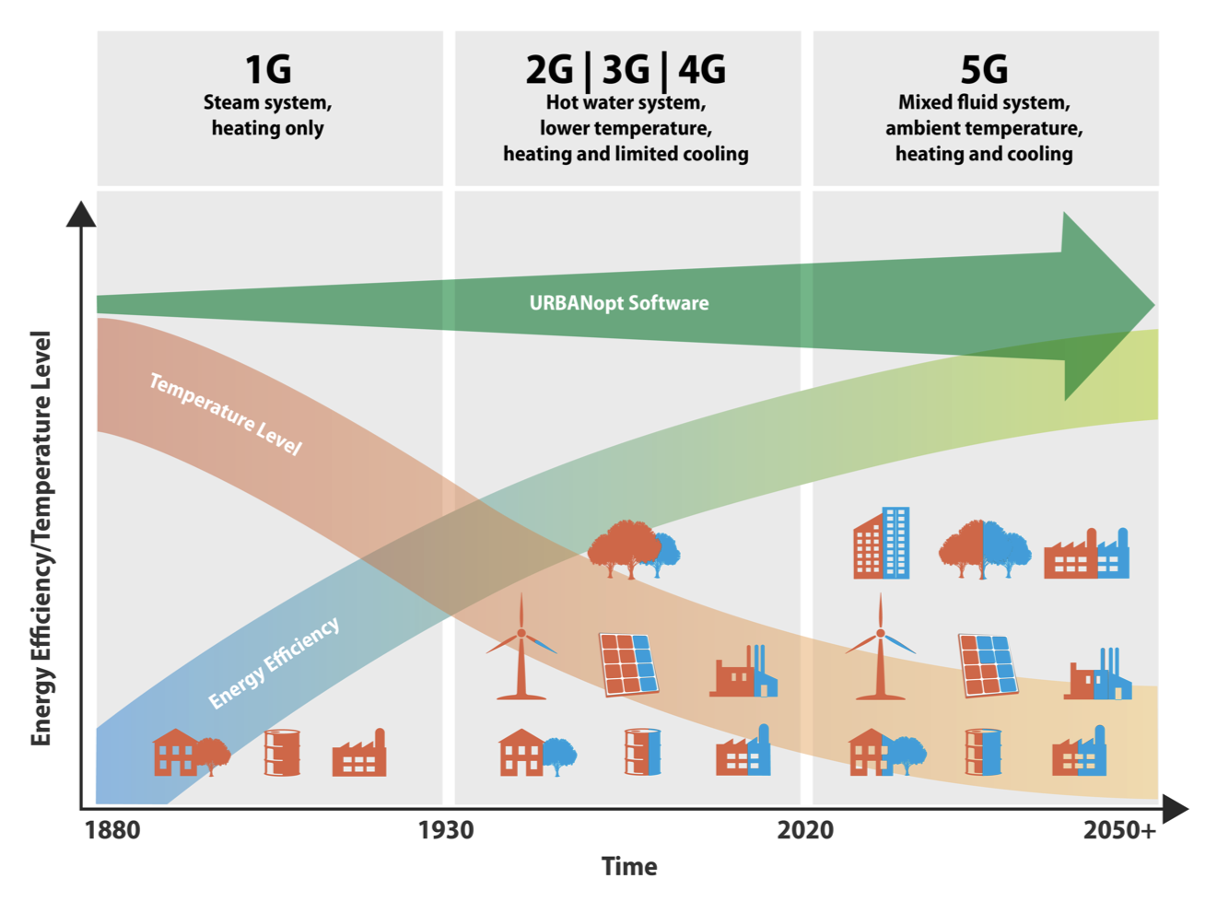
The project is motivated by the need to easily evaluate district energy systems. The goal is to eventually cover the various generations of heating and cooling systems as shown in the figure below. The need to move towards 5GDHC systems results in higher efficiencies and greater access to additional waste-heat sources.
Getting Started
It is possible to test the GeoJSON to Modelica Translator (GMT) by simply installing the Python package and running the command line interface (CLI) with results from and URBANopt SDK set of results. However, to fully leverage the functionality of this package (e.g., running simulations), then you must also install the Modelica Buildings library (MBL) and Docker. Instructions for installing and configuring the MBL and Docker are available at the getting started page.
To simply scaffold out a Modelica package that can be inspected in a Modelica environment (e.g., Dymola, OpenModelica) then run the following code below up to the point of run-model. The example generates a complete 4th Generation District Heating and Cooling (4GDHC) system with time series loads that were generated from the URBANopt SDK using OpenStudio/EnergyPlus simulations.
pip install geojson-modelica-translator

# from the simulation results within a checkout of this repository
# in the ./tests/management/data/sdk_project_scraps path.

# generate the system parameter from the results of the URBANopt SDK and OpenStudio Simulations
uo_des build-sys-param sys_param.json baseline_scenario.csv example_project.json

# create the modelica package (requires installation of the MBL)
uo_des create-model sys_param.json example_project.json model_from_sdk

# test running the new Modelica package (requires installation of Docker)
uo_des run-model model_from_sdk
More example projects are available in an accompanying example repository.
Architecture Overview
The GMT is designed to enable "easy" swapping of building loads, district systems, and network topologies. Some of these functionalities are more developed than others, for instance swapping building loads between Spawn and RC models (using TEASER) is fleshed out; however, swapping between a first and fifth generation heating system has yet to be fully implemented.
The diagram below is meant to illustrate the future proposed interconnectivity and functionality of the GMT project.

As shown in the image, there are multiple building loads that can be deployed with the GMT and are described in the Building Load Models section below. These models, and the associated design parameters, are required to create a fully runnable Modelica model. The GMT leverages two file formats for generating the Modelica project and are the GeoJSON feature file and a System Parameter JSON file. See the more comprehensive documentation on the GMT or the documentation on URBANopt SDK.
Building Load Models
The building loads can be defined multiple ways depending on the fidelity of the required models. Each of the building load models are easily replaced using configuration settings within the System Parameters file. The 4 different building load models include:
- Time Series in Watts: This building load is the total heating, cooling, and domestic hot water loads represented in a CSV type file (MOS file). The units are Watts and should be reported at an hour interval; however, finer resolution is possible. The load is defined as the load seen by the ETS.
- Time Series as mass flow rate and delta temperature: This building load is similar to the other Time Series model but uses the load as seen by the ETS in the form of mass flow rate and delta temperature. The file format is similar to the other Time Series model but the columns are mass flow rate and delta temperature for heating and cooling separately.
- RC Model: This model leverages the TEASER framework to generate an RC model with the correct coefficients based on high level parameters that are extracted from the GeoJSON file including building area and building type.
- Spawn of EnergyPlus: This model uses EnergyPlus models to represent the thermal zone heat balance portion of the models while using Modelica for the remaining components. Spawn of EnergyPlus is still under development and currently only works on Linux-based systems.
Release Instructions
- Create a branch named
Release 0.x.y - Update version in pyproject.toml
- Update CHANGELOG using GitHub's "Autogenerate Change Log" feature, using
developas the target - After tests pass, merge branch into develop
- From local command line, merge develop into main with:
git switch main; git pull; git merge --ff-only origin develop; git push - In GitHub, tag the release against main. Copy and paste the changelog entry into the notes. Verify the release is posted to PyPI.
Build and release the documentation
During development we can serve docs locally and view updates as they are made.
- Start a documentation update branch:
git switch -c <branch_name> poetry run mkdocs serve- Point browser to http://127.0.0.1:8000/
- To deploy, push a commit in the
docsfolder to themainbranch - Wait a few minutes, then verify the new documentation on the docs website


Release files for geojson-modelica-translator 0.15.0
For a detailed explanation of source distributions (sdists) and built distributions (wheels), please see the package formats documentation.
Source distribution (sdist)
| File | Size | Uploaded | Provenance | |
|---|---|---|---|---|
| geojson_modelica_translator-0.15.0.tar.gz | 575.6 kB | With provenance | Details |
Built distribution (wheel)
| File | Interpreter | ABI | Platform | Reset |
|---|---|---|---|---|
| geojson_modelica_translator-0.15.0-py3-none-any.whl | Python 3 | none | any | Details |
Total release size: 1.3 MB
Release files / geojson_modelica_translator-0.15.0.tar.gz
| Download URL | geojson_modelica_translator-0.15.0.tar.gz |
|---|---|
| Size | 575.6 kB |
| Tags | Source |
|
SHA-256 checksum How to use checksums |
bd6c9626bb47ab6c7cca0ab225d5ebad2e63a53251d150aba4857122329f4e8d
|
|
BLAKE2b-256 checksum How to use checksums |
a428951a7d93f974424f66fe0ab9dba341ada61d8e67fd4a8c86be593078bb4c
|
| Upload date | |
|
Uploaded using Trusted Publishing? What is trusted publishing? |
Yes |
| Uploaded via |
twine/6.1.0 CPython/3.13.12
|
Provenance
Provenance describes where a file came from. On PyPI, provenance is shared via attestations, which provide a verifiable record of the build or publishing details. View details, limitations and caveats.


PyPI Publish Attestation
PyPI verified that this artifact, at this checksum, originated from the publisher listed below.
Signed by GitHub Actions, verified by PyPI on Jul 15, 2026.
Transparency logRelease files / geojson_modelica_translator-0.15.0-py3-none-any.whl
| Download URL | geojson_modelica_translator-0.15.0-py3-none-any.whl |
|---|---|
| Size | 748.8 kB |
| Tags | Python 3 |
|
SHA-256 checksum How to use checksums |
d9fd9c9f5cb0e1de77ee9a1984c555492dc38f37d10cd5f5c9df944a977ef2f4
|
|
BLAKE2b-256 checksum How to use checksums |
4979c6c71347495fb318422893a593413795ccad6c03d7f0790146ca6e5c9bc2
|
| Upload date | |
|
Uploaded using Trusted Publishing? What is trusted publishing? |
Yes |
| Uploaded via |
twine/6.1.0 CPython/3.13.12
|
Provenance
Provenance describes where a file came from. On PyPI, provenance is shared via attestations, which provide a verifiable record of the build or publishing details. View details, limitations and caveats.
PyPI Publish Attestation
PyPI verified that this artifact, at this checksum, originated from the publisher listed below.
Signed by GitHub Actions, verified by PyPI on Jul 15, 2026.
Transparency logSecurity for geojson-modelica-translator 0.15.0
Provenance
Provenance describes where a file came from. On PyPI, provenance is shared via attestations, which provide a verifiable record of the build or publishing details. View details, limitations and caveats.
Full provenance
All 2 files in this release have been uploaded with provenance metadata.
Attestation for geojson_modelica_translator-0.15.0.tar.gz
PyPI Publish Attestation
PyPI verified that this artifact, at this checksum, originated from the publisher listed below.
Signed by GitHub Actions, verified by PyPI on Jul 15, 2026.
Transparency logA note on package security
PyPI is a repository for distributing packages, not a service for auditing them. While third-party security researchers and our staff do their best to detect and remove malicious packages, PyPI cannot guarantee the quality, security or suitability of any given package.
To learn more about protecting yourself from malicious actors, visit our package security documentation.














