
Geometallurgy



Geometallurgy is a python package that allows geoscientists and metallurgists to easily work with, and visualise mass-compositional data.
Geoscientific disciples, like Metallurgy, Geometallurgy, Geology, and Mining Engineering, rely on the analysis of data based on mass, moisture and chemistry. The data is collected from drill-holes, samples, and process streams. The data is used to model the behaviour of the material in the ground, and the material as it is processed.
The Geometallurgy package supports the geometallurgical workflow from drill-hole planning and data analysis, sample fractionation and mass balanced process simulation, through to 3D block model visualisation. The is designed to handle large datasets and provide the necessary visualisations to support the workflow. Plots are generally interactive to maximise context and insight. Assurance of data integrity is a key objective.
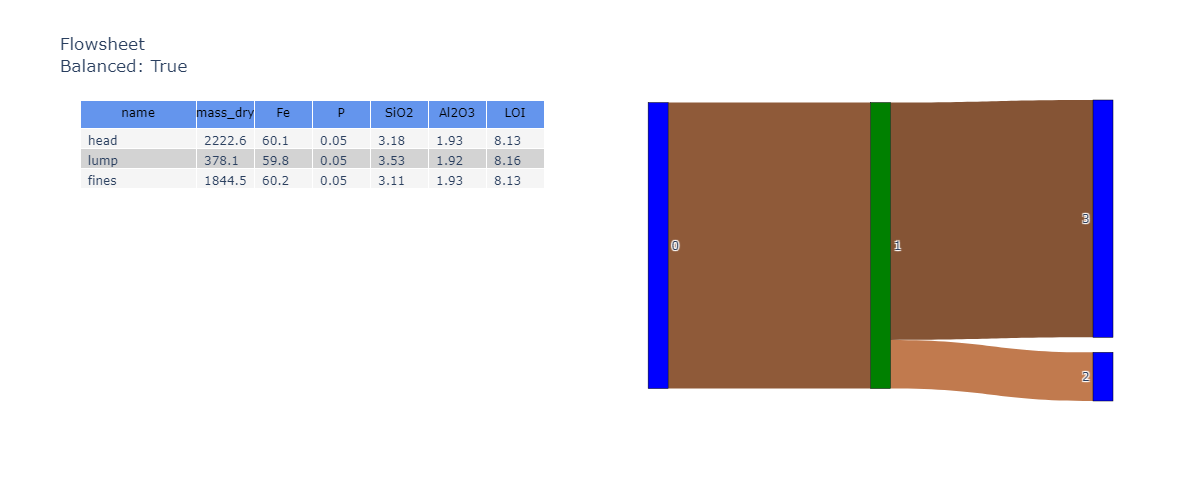
The package not only supports individual Samples, but collections of objects that are mathematically related in a Directional Graph (a.k.a. network or flowsheet).
This package is a rewrite of the mass-composition package (based on pandas only instead of pandas/xarray).
Prerequisites
Before you begin, ensure you have met the following requirements:
- You have installed the latest version of the mass-composition python package.
- You have a Windows/Linux/Mac machine.
- You have read the docs.
Installing Geometallurgy
To install Geometallurgy, follow these steps:
pip install geometallurgy
Or, if poetry is more your flavour.
poetry add "geometallurgy"
Using Geometallurgy
To use GeoMetallurgy to create a Sample object, follow these steps:
There are some basic requirements that the incoming DataFrame must meet. We'll use a sample DataFrame here.
df_data = sample_data()
Create the object
sample = Sample(df_data)
It is then trivial to calculate the weight average aggregate of the dataset.
sample.aggregate()
Multiple composition analytes can be viewed in a single interactive parallel coordinates plot.
sample = Sample(df_data.reset_index().set_index(['DHID', 'interval_from', 'interval_to']),
                name=name)

fig = sample.plot_parallel(color='Fe')
fig
Network visualisations and other plots are interactive.
For full examples, see the gallery.
License
This project uses the following license: MIT.
1 maintainer

Metadata
1 maintainer
Release files for geometallurgy 0.4.19
For a detailed explanation of source distributions (sdists) and built distributions (wheels), please see the package formats documentation.
Source distribution (sdist)
| File | Size | Uploaded | Provenance | Actions |
|---|---|---|---|---|
| geometallurgy-0.4.19.tar.gz | 70.4 kB | Without provenance | Details for geometallurgy-0.4.19.tar.gz |
Built distribution (wheel)
| File | Interpreter | ABI | Platform | Actions Reset |
|---|---|---|---|---|
| geometallurgy-0.4.19-py3-none-any.whl | Python 3 | none | any | Details for geometallurgy-0.4.19-py3-none-any.whl |
Total release size: 155.2 kB
Release files / geometallurgy-0.4.19.tar.gz
| Download URL | geometallurgy-0.4.19.tar.gz |
|---|---|
| Size | 70.4 kB |
| Tags | Source |
|
SHA-256 checksum How to use checksums |
48085bfa4de8e499a43cacdd66751abf799a54c8528c90ca51bbac3f125f99ee
|
|
BLAKE2b-256 checksum How to use checksums |
863a5ee82f4b5364fec1acd8d38332e879b55459842cf7728141ca78b96cdbcf
|
| Upload date | |
|
Uploaded using Trusted Publishing? What is trusted publishing? |
No |
| Uploaded via |
twine/6.2.0 CPython/3.9.25
|
Release files / geometallurgy-0.4.19-py3-none-any.whl
| Download URL | geometallurgy-0.4.19-py3-none-any.whl |
|---|---|
| Size | 84.8 kB |
| Tags | Python 3 |
|
SHA-256 checksum How to use checksums |
6437bf453cec28f0df3b84c03d4584664b3afe8a42bb820bd3e378cf42788f6f
|
|
BLAKE2b-256 checksum How to use checksums |
cf63d113b16756de338ad6c6b7edc07130a9086ed35e0440c14136f7915505ef
|
| Upload date | |
|
Uploaded using Trusted Publishing? What is trusted publishing? |
No |
| Uploaded via |
twine/6.2.0 CPython/3.9.25
|
Security for geometallurgy 0.4.19
Provenance
Provenance describes where a file came from. On PyPI, provenance is shared via attestations, which provide a verifiable record of the build or publishing details. View details, limitations and caveats.
No provenance found
None of the files in this release were uploaded with provenance metadata.
A note on package security
PyPI is a repository for distributing packages, not a service for auditing them. While third-party security researchers and our staff do their best to detect and remove malicious packages, PyPI cannot guarantee the quality, security or suitability of any given package.
To learn more about protecting yourself from malicious actors, visit our package security documentation.














