
GFX HAT
https://shop.pimoroni.com/products/gfx-hat
Combining a 128x64 pixel monochrome LCD, 6 touch buttons, a 6 zone RGB backlight and 6 button LEDs the GFX HAT has everything you need to turn your Pi into a controller and status display.
Installing
Full install (recommended):
We’ve created an easy installation script that will install all pre-requisites and get your Pan-Tilt HAT up and running with minimal efforts. To run it, fire up Terminal which you’ll find in Menu -> Accessories -> Terminal on your Raspberry Pi desktop, as illustrated below:
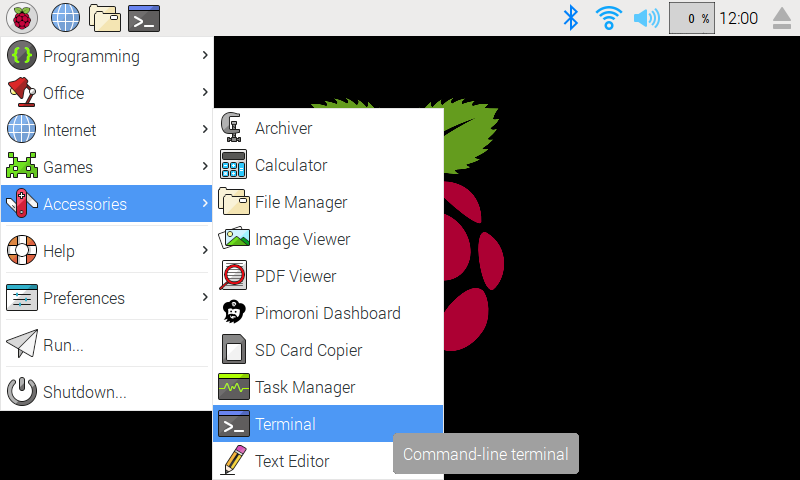
Finding the terminal
In the new terminal window type the command exactly as it appears below (check for typos) and follow the on-screen instructions:
curl https://get.pimoroni.com/gfxhat | bashIf you choose to download examples you’ll find them in /home/pi/Pimoroni/gfxhat/.
Manual install:
Library install for Python 3:
sudo pip3 install gfxhatLibrary install for Python 2:
sudo pip2 install gfxhatDevelopment:
If you want to contribute, or like living on the edge of your seat by having the latest code, you should clone this repository, cd to the library directory, and run:
sudo python3 setup.py install(or sudo python setup.py install whichever your primary Python environment may be)
In all cases you will have to enable the i2c and spi buses.
Licensing
Files under library/gfxhat/fonts are licensed according supplied OFL licenses.
Bitbuntu and Bitocra fonts from: https://github.com/ninjaaron/bitocra
Documentation & Support
Guides and tutorials - https://learn.pimoroni.com/gfx-hat
Function reference - http://docs.pimoroni.com/gfxhat/
GPIO Pinout - https://pinout.xyz/pinout/gfx_hat
Get help - http://forums.pimoroni.com/c/support
0.0.1
Initial Release
1 maintainer

Metadata
1 maintainer
Release files for gfxhat 0.0.1
For a detailed explanation of source distributions (sdists) and built distributions (wheels), please see the package formats documentation.
Source distribution (sdist)
| File | Size | Uploaded | Provenance | Actions |
|---|---|---|---|---|
| gfxhat-0.0.1.tar.gz | 240.2 kB | Without provenance | Details for gfxhat-0.0.1.tar.gz |
Built distributions (wheels)
| File | Interpreter | ABI | Platform | Actions Reset |
|---|---|---|---|---|
| gfxhat-0.0.1-py3-none-any.whl | Python 3 | none | any | Details for gfxhat-0.0.1-py3-none-any.whl |
| gfxhat-0.0.1-py2-none-any.whl | Python 2 | none | any | Details for gfxhat-0.0.1-py2-none-any.whl |
Total release size: 721.3 kB
Release files / gfxhat-0.0.1.tar.gz
| Download URL | gfxhat-0.0.1.tar.gz |
|---|---|
| Size | 240.2 kB |
| Tags | Source |
|
SHA-256 checksum How to use checksums |
60aa0f576ffc54277eda772b914b2047e062210337a3b1299e1ae829b200af48
|
|
BLAKE2b-256 checksum How to use checksums |
48ca4ffef1e20a9235516df9e79feb1af7f6c613a32816119b056aaf980adb71
|
| Upload date | |
|
Uploaded using Trusted Publishing? What is trusted publishing? |
No |
| Uploaded via |
twine/1.9.1 pkginfo/1.4.1 requests/2.19.1 setuptools/39.2.0 requests-toolbelt/0.8.0 tqdm/4.15.0 CPython/2.7.9
|
Release files / gfxhat-0.0.1-py3-none-any.whl
| Download URL | gfxhat-0.0.1-py3-none-any.whl |
|---|---|
| Size | 240.6 kB |
| Tags | Python 3 |
|
SHA-256 checksum How to use checksums |
973aefcdafa903c8bcbeb53a0771718e735e6a497eb9d6c2bb15d712c8885a18
|
|
BLAKE2b-256 checksum How to use checksums |
a529c04d56b51e7aad72671a72247459d3e05fff9a7c827a7cebcb2af35e1c94
|
| Upload date | |
|
Uploaded using Trusted Publishing? What is trusted publishing? |
No |
| Uploaded via |
twine/1.9.1 pkginfo/1.4.1 requests/2.19.1 setuptools/39.2.0 requests-toolbelt/0.8.0 tqdm/4.15.0 CPython/2.7.9
|
Release files / gfxhat-0.0.1-py2-none-any.whl
| Download URL | gfxhat-0.0.1-py2-none-any.whl |
|---|---|
| Size | 240.6 kB |
| Tags | Python 2 |
|
SHA-256 checksum How to use checksums |
5af23531db878d1d34a1b1c4aca291ac3fd97cee463b1fa764add69c3b3a54be
|
|
BLAKE2b-256 checksum How to use checksums |
e1bfdecc90cb5252ead4145a70c782f366194db0fb43322d51222abf1c877509
|
| Upload date | |
|
Uploaded using Trusted Publishing? What is trusted publishing? |
No |
| Uploaded via |
twine/1.9.1 pkginfo/1.4.1 requests/2.19.1 setuptools/39.2.0 requests-toolbelt/0.8.0 tqdm/4.15.0 CPython/2.7.9
|
Security for gfxhat 0.0.1
Provenance
Provenance describes where a file came from. On PyPI, provenance is shared via attestations, which provide a verifiable record of the build or publishing details. View details, limitations and caveats.
No provenance found
None of the files in this release were uploaded with provenance metadata.
A note on package security
PyPI is a repository for distributing packages, not a service for auditing them. While third-party security researchers and our staff do their best to detect and remove malicious packages, PyPI cannot guarantee the quality, security or suitability of any given package.
To learn more about protecting yourself from malicious actors, visit our package security documentation.













