
git-pulse







Measure how much of your codebase your AI coding agents actually wrote — and what it cost you in rework, risk, and ownership concentration.
Installed from PyPI as
gitpulse-ai; the command isgit-pulse.
git-pulse reads your commit history and produces a full engineering-health report: agent-versus-human attribution, per-file churn, true per-line rework rates, code ownership and bus factor, temporal coupling, Kaplan-Meier line survival, bug-introduction tracing (SZZ), risk quadrants, and indentation-based complexity. It works on any git repo, runs entirely offline, and needs no API key.
What It Measures
| Measurement | What you get |
|---|---|
| Attribution | Every commit scored as human, mixed, or agent, with the signal that decided it and the provider it came from |
| Churn | Insertions and deletions per file, with the agent share of each file's churn |
| File rework | How often files come back for another edit, split by agent and human |
| Per-line rework | True line-level rework — surviving lines written by commits that overwrote earlier content |
| Velocity | Commits per day, active days, files per commit, and the peak day |
| Sessions | Work clustered per author by commit gap, so two people committing in the same hour aren't merged |
| Hotspots | Edits close in both line position and time, classified by who touched the region last |
| Temporal coupling | File pairs that always change together — hidden dependencies your architecture diagram doesn't show |
| Ownership & bus factor | Per-file and repo-wide: who wrote which lines, and how many people need to leave before knowledge is lost |
| Line survival | Kaplan-Meier survival curves for code lines, with right-censoring — how long do agent-written vs. human-written lines last? |
| Bug introduction (SZZ) | Traces fix commits back to the commits that introduced the bug, via git blame |
| Risk quadrants | High-churn + single-owner files flagged as "hot risk" — the ones most likely to cause problems |
| Complexity | Indentation-depth proxy — no language parser needed, works on any text file |
| Revert/fix detection | Classifies commits as reverts or fixes from message patterns, feeding the SZZ analysis |
Everything above runs locally with no API key and no network access. Pass --llm to add an interpretive narrative on top.
Agent-Aware Analysis
git-pulse detects coding-agent attribution from commit metadata alone — Co-Authored-By: Claude, the copilot-swe-agent[bot] identity, [cursor] subject tags, aider: prefixes, Generated-by trailers, and git notes — across 11 providers: Claude Code, GitHub Copilot, Cursor, aider, OpenAI Codex, Devin, Windsurf, Sourcegraph Cody, Continue, Sweep, and gpt-engineer.
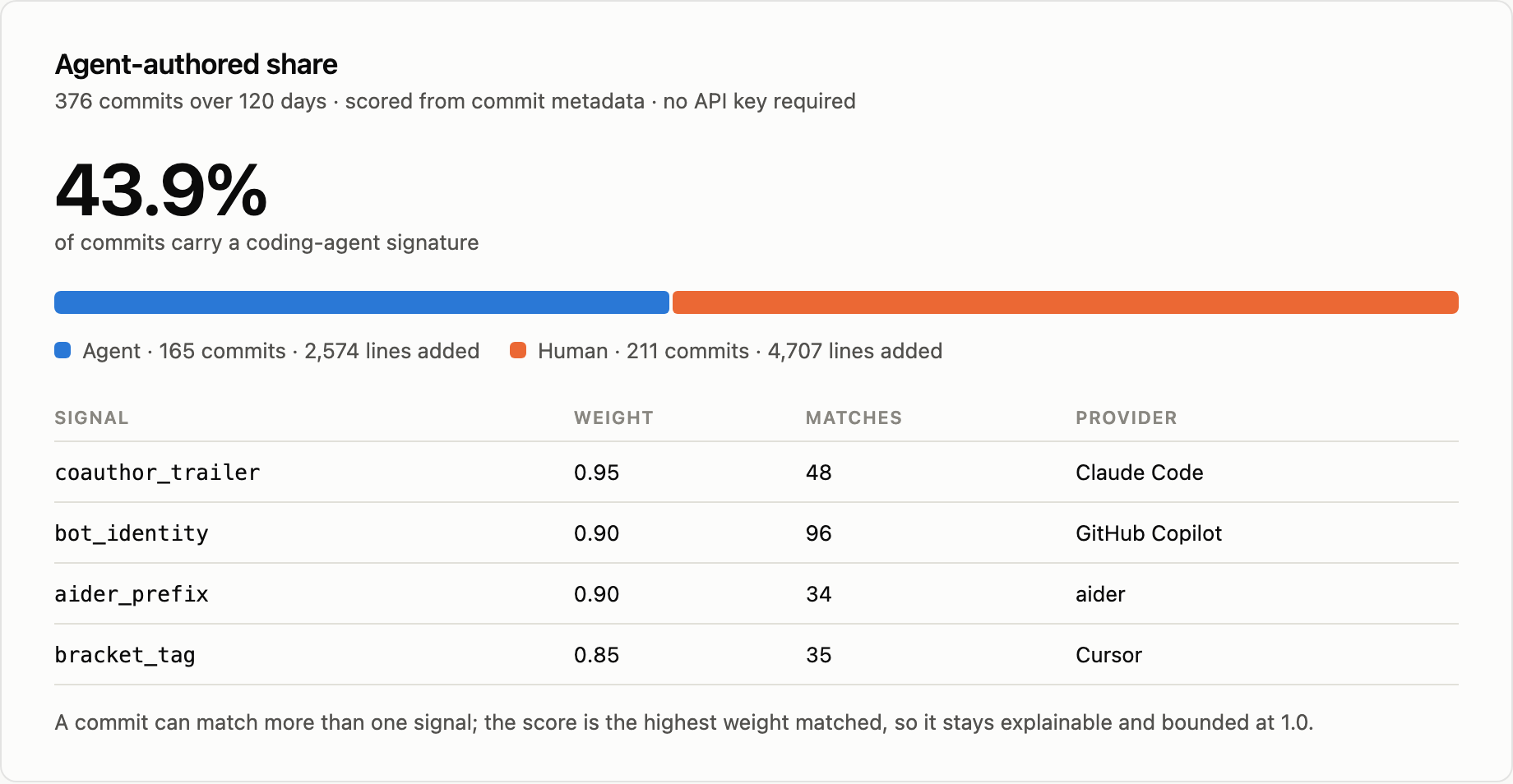
Every signal carries a weight, and a commit's score is the highest weight it matched — so a classification is always traceable to the one line of metadata that caused it. Nothing is inferred from the diff, and nothing is guessed.
Same figure as text
Agent-authored share — 43.9% of 376 commits carry a coding-agent signature

  agent    165 commits    2,574 lines added
  human    211 commits    4,707 lines added

  signal            weight   matches   provider
  coauthor_trailer    0.95        48   Claude Code
  bot_identity        0.90        96   GitHub Copilot
  aider_prefix        0.90        34   aider
  bracket_tag         0.85        35   Cursor
matches counts signal instances, not commits — bot_identity fires on both the
author and the committer field, so 96 matches is 48 commits.
Churn, ranked
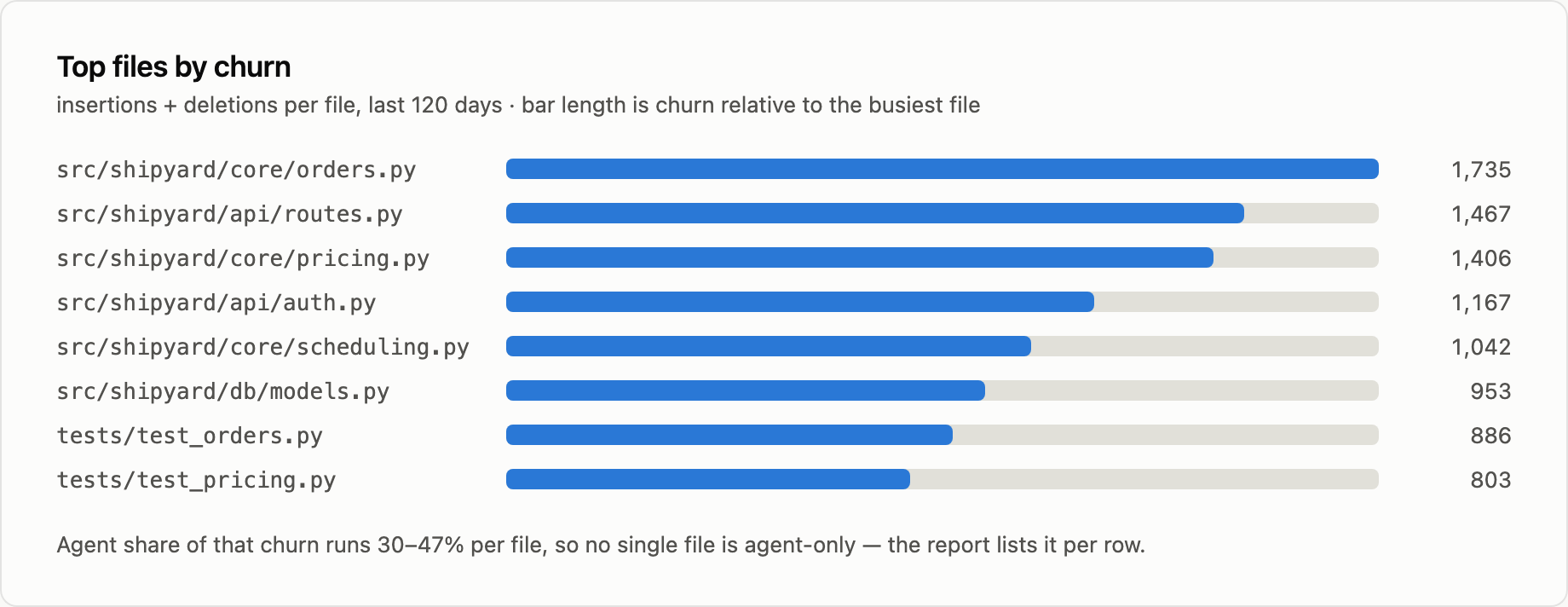
Insertions plus deletions per file. Churn on its own is not a defect signal, but it tells you which files the next question is about.
Same figure as text
Top files by churn (insertions + deletions, 120 days)

  src/shipyard/core/orders.py       1,735
  src/shipyard/api/routes.py        1,467
  src/shipyard/core/pricing.py      1,406
  src/shipyard/api/auth.py          1,167
  src/shipyard/core/scheduling.py   1,042
  src/shipyard/db/models.py           953
  tests/test_orders.py                886
  tests/test_pricing.py               803
Agent share of that churn runs 30–47% per file, so no single file is agent-only.
Velocity over time
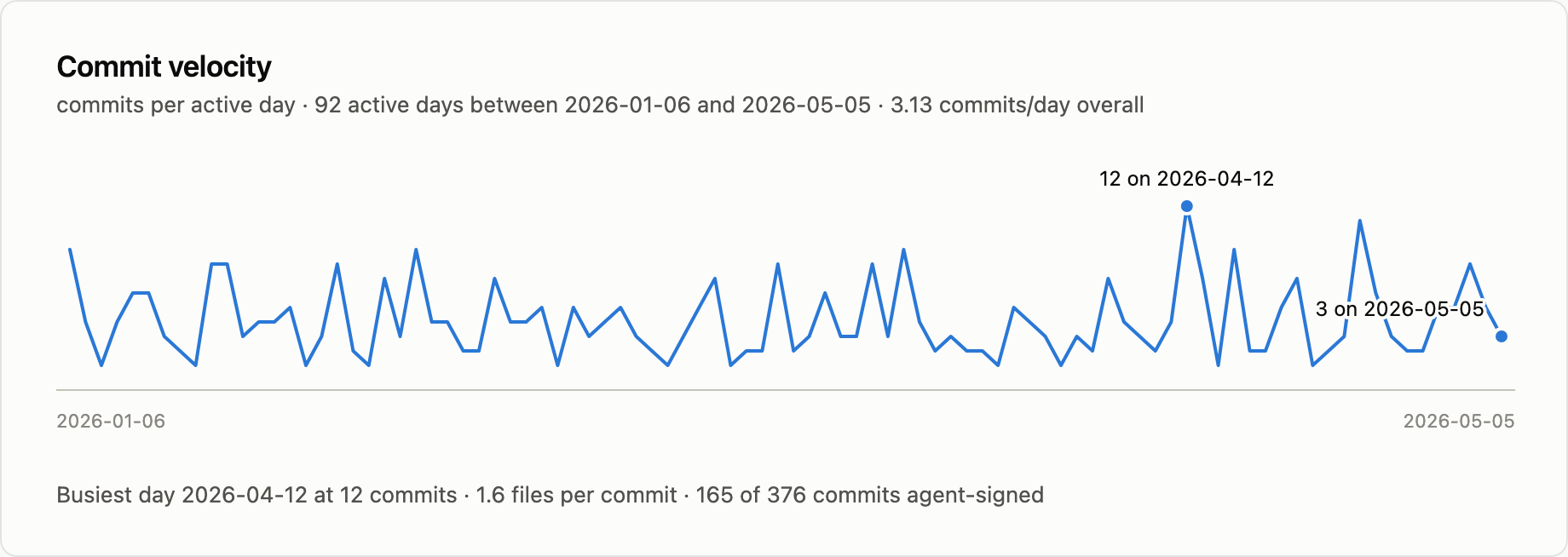
Commits per day across the window, with the peak and the last day labelled — enough to see whether the work is steady or arrives in bursts.
Same figure as text
Commit velocity — 376 commits over 120 days

  active days        92 of 120
  commits per day    3.13
  files per commit   1.62
  peak               12 commits on 2026-04-12
  last day            3 commits on 2026-05-05
Spatiotemporal hotspots
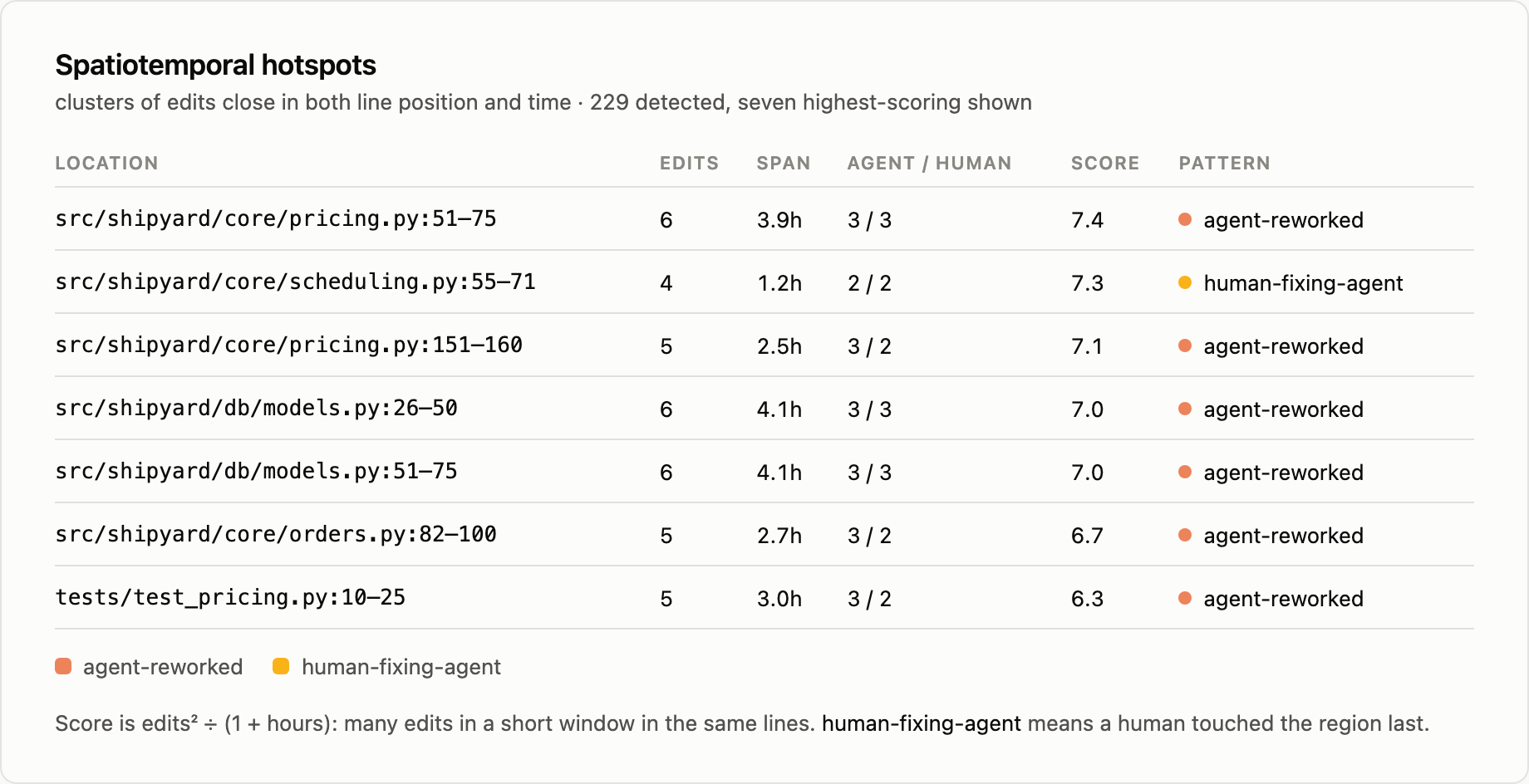
A hotspot is a cluster of edits close together in both line position and time. The classification says who touched the region and in what order, which is the part that tells you whether an agent is being reworked or is doing the reworking.
Same figure as text
Spatiotemporal hotspots — 229 detected, seven highest-scoring shown

  location                              edits  span  agent/human  score  pattern
  src/shipyard/core/pricing.py:51-75        6  3.9h        3 / 3    7.4  agent-reworked
  src/shipyard/core/scheduling.py:55-71     4  1.2h        2 / 2    7.3  human-fixing-agent
  src/shipyard/core/pricing.py:151-160      5  2.5h        3 / 2    7.1  agent-reworked
  src/shipyard/db/models.py:26-50           6  4.1h        3 / 3    7.0  agent-reworked
  src/shipyard/db/models.py:51-75           6  4.1h        3 / 3    7.0  agent-reworked
  src/shipyard/core/orders.py:82-100        5  2.7h        3 / 2    6.7  agent-reworked
  tests/test_pricing.py:10-25              5  3.0h        3 / 2    6.3  agent-reworked
Score is edits² ÷ (1 + hours). human-fixing-agent means a human touched the
region last; agent-reworked means an agent did.
About the numbers in these figures. git-pulse's own history is entirely human-authored, so it cannot demonstrate agent attribution. Every figure above is a real
git-pulse analyzerun against a synthetic repository built with a fixed seed, so the numbers are reproducible rather than illustrative.
Install
pip install gitpulse-ai
Requires Python 3.11+. The installed command is git-pulse.
Quick Start
# Analyze the current repo (last 30 days) — no API key required
git-pulse analyze

# A specific repo, last 14 days
git-pulse analyze /path/to/repo --days 14

# Last 50 commits, or an explicit date range
git-pulse analyze --commits 50
git-pulse analyze --since 2026-01-01 --until 2026-03-31

# JSON output, for CI or further processing
git-pulse analyze --json
git-pulse analyze --output report.json

# Markdown for pasting into a PR
git-pulse analyze --markdown

# CSV for spreadsheets
git-pulse analyze --csv

# Self-contained HTML report with SVG charts
git-pulse analyze --html

# Save a report in any format (auto-detects from extension)
git-pulse report --path /path/to/repo report.json
git-pulse report --path /path/to/repo report.md
git-pulse report --path /path/to/repo report.html

# Compare two reports
git-pulse compare before.json after.json

# Add an LLM narrative (requires a provider key)
export ANTHROPIC_API_KEY=sk-...
git-pulse analyze --llm

# Scaffold a config file
git-pulse config init

# Inspect or clear the history cache
git-pulse cache info
git-pulse cache clear
Output Formats
| Format | Flag / extension | Use case |
|---|---|---|
| Terminal | (default) | Interactive exploration with rich tables |
| JSON | --json / .json |
CI pipelines, compare, gate, programmatic consumption |
| Markdown | --markdown / .md |
Paste into a PR, wiki, or Slack |
| CSV | --csv / .csv |
Spreadsheets, pandas, further analysis |
| HTML | --html / .html |
Self-contained report with SVG charts and dark mode |
The JSON shape is a versioned contract (schema_version: 1) — see docs/json-schema.md. Adding a key does not bump the version; renaming or removing one does. Pin on schema_version if you parse the output.
CI Integration
GitHub Action
Add git-pulse to any GitHub Actions workflow:
- uses: srikanth1003/git-pulse@v0.6.0
  with:
    days: 30
    max-agent-share: "0.60"   # fail if >60% agent
    min-bus-factor: "2"       # fail if bus factor < 2
    comment: "true"           # post markdown report as PR comment
The action installs git-pulse, runs analysis, posts a PR comment with the markdown report, and runs gate checks. It outputs report-json, agent-share, bus-factor, and gate-result for downstream steps.
Threshold Gates
git-pulse gate checks metrics against thresholds and exits non-zero if any fail. Designed for CI:
# Run analysis and check thresholds in one step
git-pulse gate --path . --max-agent-share 0.60 --min-bus-factor 2

# Or check an existing report
git-pulse analyze --json > report.json
git-pulse gate --report report.json \
  --max-agent-share 0.60 \
  --max-rework 0.50 \
  --min-bus-factor 2 \
  --max-hot-risk 5
Available thresholds:
| Flag | Fails when |
|---|---|
--max-agent-share |
Agent commit share exceeds this (0.0–1.0) |
--max-rework |
File rework rate exceeds this |
--max-line-rework |
Per-line rework rate exceeds this |
--min-bus-factor |
Repository bus factor is below this |
--max-hot-risk |
Number of hot-risk files exceeds this |
SVG Badges
Generate shields.io-compatible badge SVGs from a report:
git-pulse badge --report report.json --output badges/
This creates agent-share.svg, bus-factor.svg, and hot-risk.svg in the output directory. Colors follow standard conventions (green = healthy, yellow = warning, red = critical).
Example Output
git-pulse analyze prints attribution, authors, churn, velocity, sessions,
hotspots, ownership, risk, and more. No API key is involved — this is git metadata, counted.
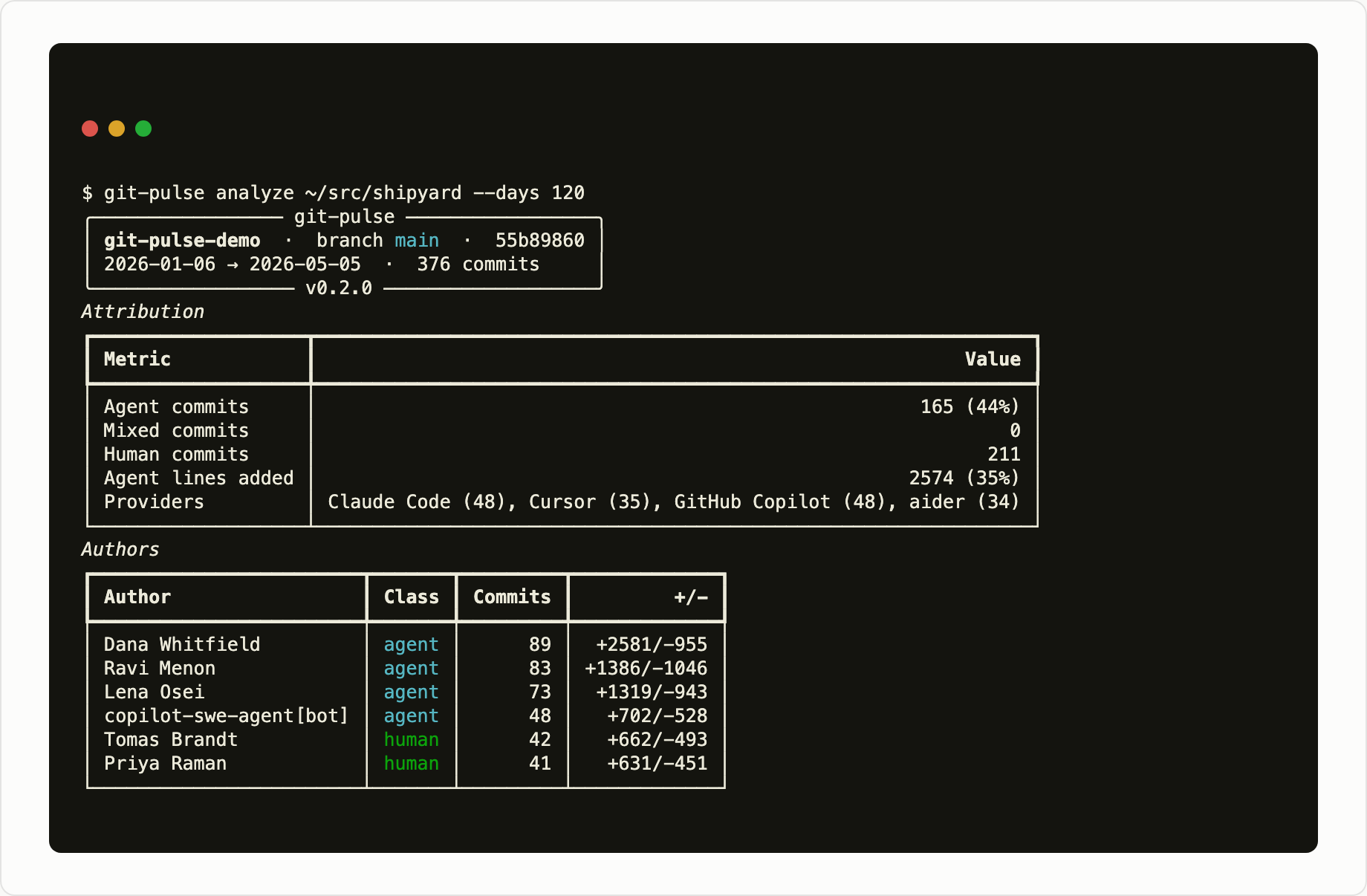
Same output as text
$ git-pulse analyze ~/src/shipyard --days 120
╭───────────────── git-pulse ─────────────────╮
│ git-pulse-demo  ·  branch main  ·  55b89860 │
│ 2026-01-06 → 2026-05-05  ·  376 commits     │
╰───── v0.2.0 ─────╯
Attribution
┏━━━━━━━━━━━━━━━━━━━┳━━━━━━━━━━━━━━━━━━━━━━━━━━━━━━━━━━━━━━━━━━━━━━━━━━━━━━━━━━━━━━━━┓
┃ Metric            ┃                                                          Value ┃
┡━━━━━━━━━━━━━━━━━━━╇━━━━━━━━━━━━━━━━━━━━━━━━━━━━━━━━━━━━━━━━━━━━━━━━━━━━━━━━━━━━━━━━┩
│ Agent commits     │                                                      165 (44%) │
│ Mixed commits     │                                                              0 │
│ Human commits     │                                                            211 │
│ Agent lines added │                                                     2574 (35%) │
│ Providers         │ Claude Code (48), Cursor (35), GitHub Copilot (48), aider (34) │
└───────────────────┴────────────────────────────────────────────────────────────────┘
Authors
┏━━━━━━━━━━━━━━━━━━━━━━━━┳━━━━━━━┳━━━━━━━━━┳━━━━━━━━━━━━━┓
┃ Author                 ┃ Class ┃ Commits ┃         +/- ┃
┡━━━━━━━━━━━━━━━━━━━━━━━━╇━━━━━━━╇━━━━━━━━━╇━━━━━━━━━━━━━┩
│ Dana Whitfield         │ agent │      89 │  +2581/-955 │
│ Ravi Menon             │ agent │      83 │ +1386/-1046 │
│ Lena Osei              │ agent │      73 │  +1319/-943 │
│ copilot-swe-agent[bot] │ agent │      48 │   +702/-528 │
│ Tomas Brandt           │ human │      42 │   +662/-493 │
│ Priya Raman            │ human │      41 │   +631/-451 │
└────────────────────────┴───────┴─────────┴─────────────┘
Churn, velocity, session, hotspot, ownership, risk, and complexity tables follow.
Optional: LLM Narrative
Every metric git-pulse reports is computed locally. The --llm flag adds a
written interpretation on top, and only that flag needs a provider key. If the
call fails or no key is set, git-pulse prints a warning and the metrics are
unaffected.
git-pulse uses LiteLLM under the hood, so it works with 100+ LLM providers out of the box. Set the appropriate environment variable for your provider:
# Anthropic (default model: claude-sonnet-4-20250514)
export ANTHROPIC_API_KEY=sk-ant-...
git-pulse analyze --llm

# OpenAI
export OPENAI_API_KEY=sk-...
git-pulse analyze --llm --model openai/gpt-4o

# AWS Bedrock
export AWS_PROFILE=my-profile
git-pulse analyze --llm --model bedrock/us.anthropic.claude-sonnet-4-20250514-v1:0

# Any LiteLLM-supported provider
git-pulse analyze --llm --model <provider>/<model-id>
There is deliberately no key auto-detection: git-pulse analyze must produce the
same output on a laptop with keys in the environment as it does in CI without
them.
Configuration
git-pulse looks for TOML config files in this order:
--configflag (explicit path).gitpulse.tomlin the repo root~/.config/gitpulse/config.toml- Built-in defaults
Run git-pulse config init to write a commented starter file, or
git-pulse config show to print the effective configuration and where each
section came from.
Example .gitpulse.toml:
[analysis]
default_days = 30
max_hotspots = 20
exclude = ["*.lock", "package-lock.json", "*.generated.*"]

[sessions]
# Commits by the same author closer together than this belong to one session.
# 0.1.0 used 30, which split a session on any coffee break.
gap_minutes = 90

[llm]
# Equivalent to passing --llm on every run. Off by default.
enabled = false
model = "anthropic/claude-sonnet-4-20250514"
Commands
git-pulse analyze [PATH]           The report. Default output is terminal; add
                                   --json, --markdown, --csv, or --html.
git-pulse report OUTPUT [--path]   Save a report to a file (.json, .md, .csv, .html).
git-pulse compare BEFORE AFTER     Diff two JSON reports and show metric deltas.
git-pulse gate [--report FILE]     Check thresholds; exit 1 if any fail. For CI.
git-pulse badge --report FILE      Generate SVG badge files (agent-share, bus-factor, risk).
git-pulse version                  Installed version.
git-pulse cache info               Cache location, entry count, size.
git-pulse cache clear              Delete every cached entry.
git-pulse config show              Effective config and where each section came from.
git-pulse config init              Write a commented starter config.
How It Works
gitlayer collects and caches history → attribution scores each commit →
analysis computes all metrics → render emits terminal, JSON, markdown, CSV,
or HTML → an optional analyst narrative sits on top.
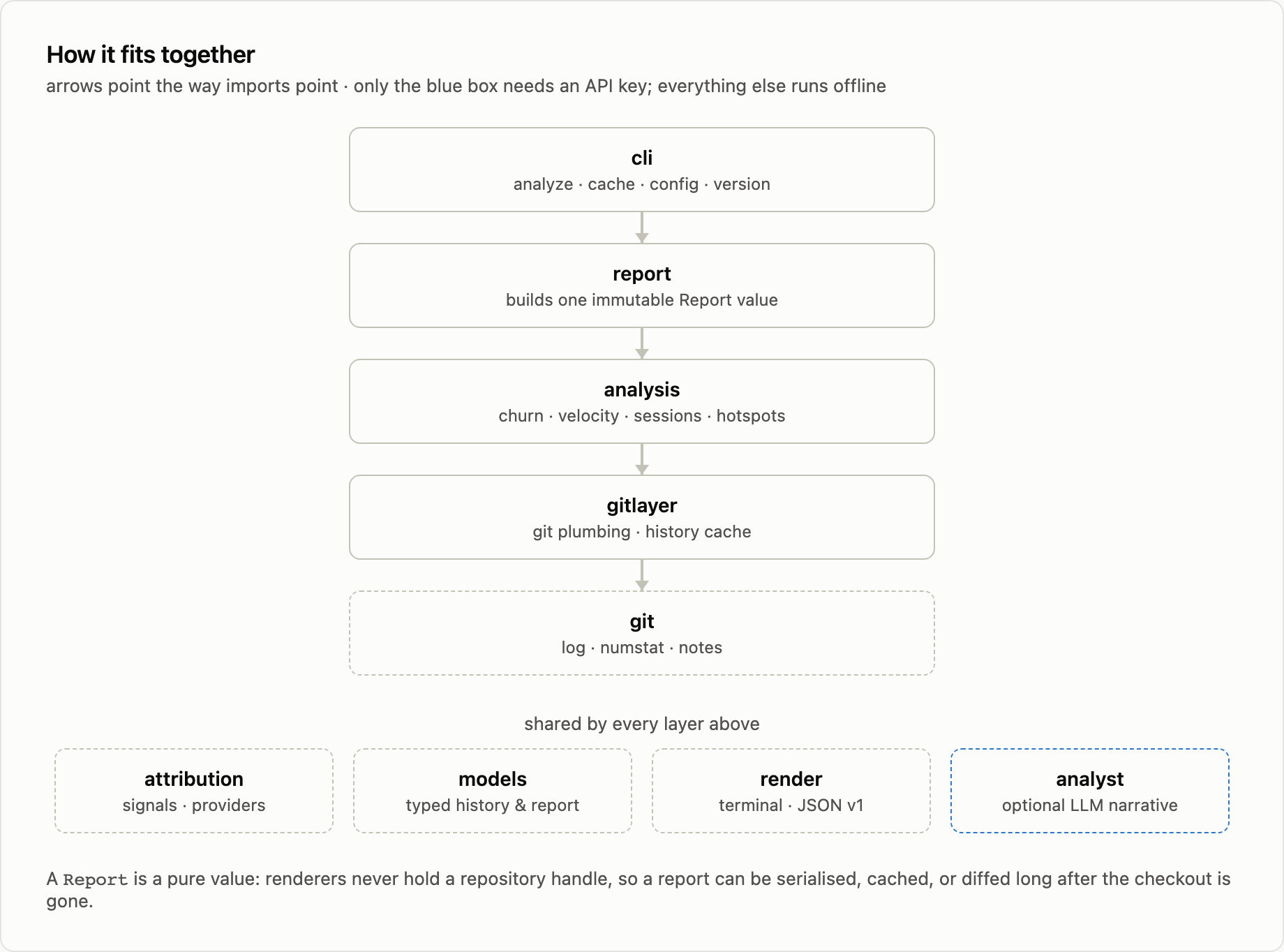
Same diagram as text
cli         analyze · report · compare · gate · badge · cache · config · version
 ↓
report      builds one immutable Report value
 ↓
analysis    churn · velocity · sessions · hotspots · coupling · ownership
            line-lifetime · line-rework · survival · SZZ · risk · complexity
            commit-classification
 ↓
gitlayer    git plumbing · history cache · patch collection · diff parsing
 ↓
git         log · numstat · blame · notes

shared by every layer above:
  attribution   signals · providers (11 agents)
  models        typed history & report
  render        terminal · JSON v1 · markdown · CSV · HTML+SVG
  analyst       optional LLM narrative  ← the only part that needs an API key
Deterministic layer (no LLM, no network):
gitlayerreads history throughgit log --numstat -z, unified-diff parsing, andgit blame --porcelain, caching results on disk keyed by HEAD and collection optionsattributionscores each commit against 11 provider signatures — trailers, bot identities, subject prefixes, message markers, and git notes — and records which signal matchedanalysiscomputes per-file churn, file and per-line rework, velocity, sessions, hotspots, temporal coupling, ownership/bus factor, Kaplan-Meier survival, SZZ bug-introduction tracing, risk quadrants, indentation complexity, and revert/fix classificationrenderemits terminal, JSON, markdown, CSV, or self-contained HTML with inline SVG charts
Optional analyst layer (--llm):
- Receives the same JSON a user gets from
--json, minus the per-day series, raw SHAs, and any narrative from an earlier run — a model must not launder its own prior output back in as evidence - Returns a summary, categorised insights with evidence and a recommendation, and up to three prioritised actions
- Every failure path degrades to a warning; the metrics are never affected
A Report is a pure value. Renderers never hold a repository handle, so a report
can be serialised, cached, or diffed long after the checkout is gone. The JSON
shape is a versioned contract — see docs/json-schema.md.
Methodology and assumptions are documented in METHODOLOGY.md.
Releases & Downloads
Latest release: 

| PyPI package | pypi.org/project/gitpulse-ai |
| Release history | All versions on PyPI · Git tags |
| Download stats | pepy.tech (totals, by version) · pypistats.org (daily, by Python version) |
Versioning follows Semantic Versioning. While the project is pre-1.0, minor versions may include breaking changes to the CLI and output schemas; pin an exact version if you depend on either.
Development
# Clone and install in dev mode
git clone https://github.com/srikanth1003/git-pulse.git
cd git-pulse
pip install -e ".[dev]"

# Run tests (334 and counting)
pytest

# Run on any repo
git-pulse analyze /path/to/any/repo --days 14
Cutting a release
The version is derived from the git tag by hatch-vcs — there is no version string to edit. Tag, then build and upload:
git tag -a v0.7.0 -m "git-pulse 0.7.0"
git push origin v0.7.0
python -m build && twine upload dist/*
Builds from an untagged or dirty tree produce a local dev version (e.g. 0.6.1.dev0+g8a37b1f), which PyPI rejects by design — release only from a clean tagged commit.
License
MIT
1 maintainer

Metadata
1 maintainer
Release files for gitpulse-ai 0.7.0
For a detailed explanation of source distributions (sdists) and built distributions (wheels), please see the package formats documentation.
Source distribution (sdist)
| File | Size | Uploaded | |
|---|---|---|---|
| gitpulse_ai-0.7.0.tar.gz | 99.3 kB | Details |
Built distribution (wheel)
| File | Interpreter | ABI | Platform | Reset |
|---|---|---|---|---|
| gitpulse_ai-0.7.0-py3-none-any.whl | Python 3 | none | any | Details |
Total release size: 185.5 kB
Release files / gitpulse_ai-0.7.0.tar.gz
| Download URL | gitpulse_ai-0.7.0.tar.gz |
|---|---|
| Size | 99.3 kB |
| Tags | Source |
|
SHA-256 checksum How to use checksums |
9f0d5f063f05b4f50afd22a4409ca5dfd1df9f6dc610afbf2479ff0fe45a1d74
|
|
BLAKE2b-256 checksum How to use checksums |
c00be5da9aec88e409a94e61512f902b8ee83aef46e8b9f1624ed8b0a7d9f714
|
| Upload date | |
|
Uploaded using Trusted Publishing? What is trusted publishing? |
No |
| Uploaded via |
twine/7.0.0 CPython/3.12.12
|
Release files / gitpulse_ai-0.7.0-py3-none-any.whl
| Download URL | gitpulse_ai-0.7.0-py3-none-any.whl |
|---|---|
| Size | 86.3 kB |
| Tags | Python 3 |
|
SHA-256 checksum How to use checksums |
66f89c7c143b74d3a051542f1db96bf0a1fd1faa4569f4af53e41acf46746c34
|
|
BLAKE2b-256 checksum How to use checksums |
d4a322899a206216fda6e2b552cb78ce916eb65e7380b9d4d4f85014711152d1
|
| Upload date | |
|
Uploaded using Trusted Publishing? What is trusted publishing? |
No |
| Uploaded via |
twine/7.0.0 CPython/3.12.12
|














