
K Immediate Neighbors
K Immediate Neighbors or KIN is a machine learning algorithm inspired by KNN (K Nearest Neighbors) which has been adjusted to graph-structured data. Instead of asking k nearest neighbors of a test sample in euclidean space about the label, it asks the k immidiate neighbors of a test node in graph.
You can use KIN in problems where it is possible to model your data as graph and classify the nodes.
Installation:
You can install the package using pip with the following commad:
pip install GML_KIN
Usage:
class KIN(k=0, num_edge_types=1, edge_weights=[1], validation_size=0.1, random_state=42)
Parameters:
k: int, default=0
Maximum number of immediate neighbors to ask about the label. In case of num_neighbors > k, asks the ones with the highest weight on their respective edge.
If k=0, asks all immediate neighbors.
num_edge_types: int, default=1
You can define multiple edge types with KIN. For example if you want to classify books, you might have edge types: same_author, same_genre, same_price_range, belonging_to_same_series, ...
This parameter represents the count of your different edge types.
Note that later these types will be identified with numbers ranging from 0 to num_edge_types-1
edge_weights: list, default=[1]
This shows the importance of different edge types in terms of classification.
If you leave this parameter with its default value, KIN will learn these weights based on your training input graph. Its highly recommended to leave this parameter as is, but if you want to input customized weights of importance for your edge types feel free to use it.
Note that each weight is a float, len(edge_weights) should be equal to num_edge_types and sum(edge_weights) should be 1.0
Do not confuse this with actual weights of edges.
validation_size: float, default=0.1
This parameter will be ignored if you use edge_weights manually. If not, will be used to select a portion of nodes to evaluate edge_weights based on your training input graph. Gives best answer when set to 1.0 and applied to a balanced dataset.
random_state: int, default=42
Controls the pseudo random number generation for choosing the validation nodes.
Methods:
fit(X_train, y_train)
Fits the KIN model according to the given training data.
X_train: 3 dimensional list, second dimension represents nodes and the third one represents the edges. The first 2 dimensional list represents the node with index=0, the second one represents the node with index=1 and so on. Inside these 2 dimensional lists which represent nodes, there are 1 dimensional lists which represent edges connected from the respective node to the other nodes in this format: [destination_node, edge_weight, edge_type]
Overall, the shape of X_train looks like this: (N, Mi, 3)
N: Total count of nodes.
Mi: Count of exiting edges from Node with index i.
Please refer to the example below for better understanding.
Note that if you want to implement an undirected edge between nodes p and q, you should create one edge from p to q and one edge from q to p.
y_train: 1 dimensional list representing the respective labels of nodes in X_train. Please use numbers as representatives.
predict(X_test)
Performs classification on samples in X_test. X_test has same the structure as X_train.
score(X_test, y_test, measure='accuracy')
Returns the accuracy on the given test data and labels.
In this version only accuracy is supported, I'll add more measures in later releases.
Example:
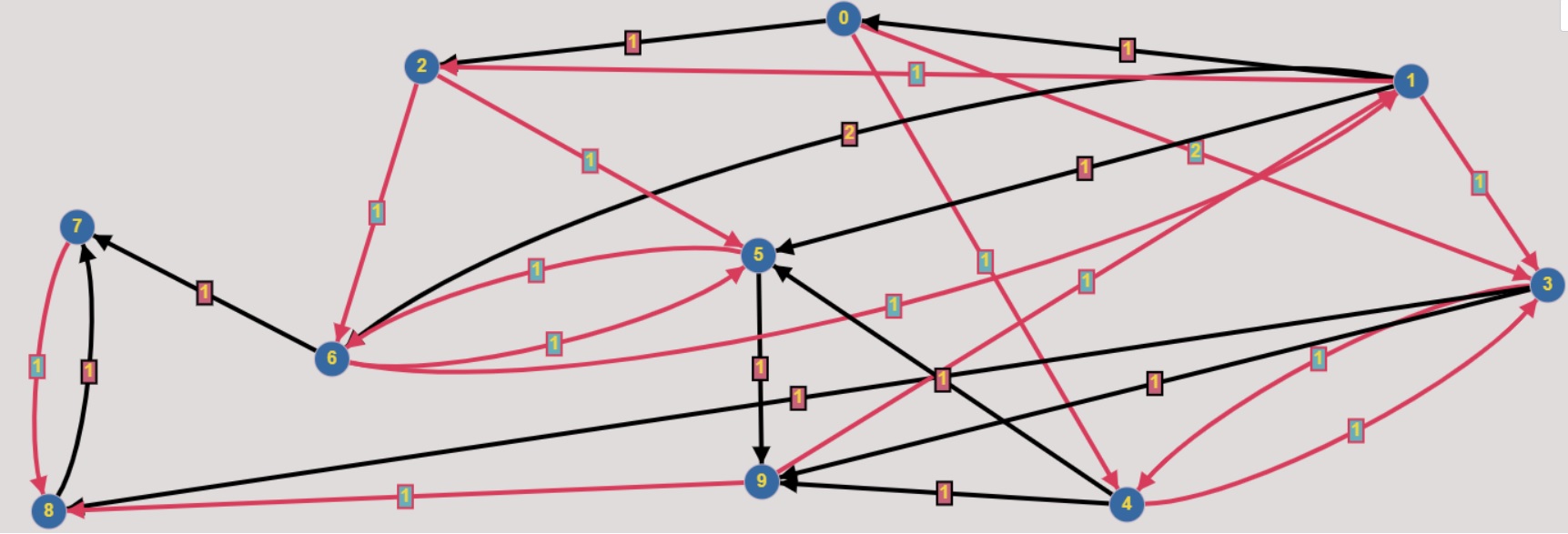
You can see the code represtation of this graph in the section below.
Sample code:
from GML_KIN import KIN


X_train = [[[2, 1, 0], [3, 2, 1], [4, 1, 1]],                       #node 0
           [[0, 1, 0], [2, 1, 1], [5, 1, 0], [6, 2, 0]],            #node 1
           [[5, 1, 1], [6, 1, 1]],                                  #node 2
           [[4, 1, 1], [8, 1, 0], [9, 1, 0]],                       #node 3
           [[3, 1, 1], [5, 1, 0], [9, 1, 0]],                       #node 4
           [[6, 1, 1], [9, 1, 0]],                                  #node 5
           [[1, 1, 1], [5, 1, 1], [7, 1, 0]],                       #node 6
           [[8, 1, 1]],                                             #node 7
           [[7, 1, 0]],                                             #node 8
           [[1, 1, 1], [8, 1, 1]]]                                  #node 9
y_train = [0, 1, 1, 0, 0, 1, 1, 0, 0, 1]

X_test = [[[1, 1, 1], [7, 1, 0]],                                   #test node 10
          [[0, 1, 1], [4, 1, 0], [9, 1, 1]]]                        #test node 11
y_test = [1, 0]

kin_clf = KIN(k=2, num_edge_types=2, validation_size=0.3, random_state=42)
kin_clf.fit(X_train, y_train)
print('Accuracy: ', kin_clf.score(X_test, y_test, measure='accuracy'))
1 maintainer

Metadata
1 maintainer
Release files for GML-KIN 0.0.2
For a detailed explanation of source distributions (sdists) and built distributions (wheels), please see the package formats documentation.
Source distribution (sdist)
| File | Size | Uploaded | |
|---|---|---|---|
| GML_KIN-0.0.2.tar.gz | 4.6 kB | Details |
Built distribution (wheel)
| File | Interpreter | ABI | Platform | Reset |
|---|---|---|---|---|
| GML_KIN-0.0.2-py3-none-any.whl | Python 3 | none | any | Details |
Total release size: 9.8 kB
Release files / GML_KIN-0.0.2.tar.gz
| Download URL | GML_KIN-0.0.2.tar.gz |
|---|---|
| Size | 4.6 kB |
| Tags | Source |
|
SHA-256 checksum How to use checksums |
faed02f4944c551114eba911b6ec874621118c6633fcf9fac85c95b2c5b00f7f
|
|
BLAKE2b-256 checksum How to use checksums |
638f8653c57aa7e840cb831d92d50e6b7757c106e86638efb16d25535bbe9855
|
| Upload date | |
|
Uploaded using Trusted Publishing? What is trusted publishing? |
No |
| Uploaded via |
twine/3.2.0 pkginfo/1.6.1 requests/2.24.0 setuptools/50.3.2 requests-toolbelt/0.9.1 tqdm/4.53.0 CPython/3.8.4
|
Release files / GML_KIN-0.0.2-py3-none-any.whl
| Download URL | GML_KIN-0.0.2-py3-none-any.whl |
|---|---|
| Size | 5.2 kB |
| Tags | Python 3 |
|
SHA-256 checksum How to use checksums |
9a7526485bb2fb069c8ae65b9ddb99dc7323f0f16dd60ba68f1112815f7a9959
|
|
BLAKE2b-256 checksum How to use checksums |
4d916f990cfcf1bbe2c4a078e878d32b5ec67456e1a9fbe75ee4efa0670dd339
|
| Upload date | |
|
Uploaded using Trusted Publishing? What is trusted publishing? |
No |
| Uploaded via |
twine/3.2.0 pkginfo/1.6.1 requests/2.24.0 setuptools/50.3.2 requests-toolbelt/0.9.1 tqdm/4.53.0 CPython/3.8.4
|














