
GNS3 Copilot







An AI-powered network automation assistant designed specifically for GNS3 network simulator, providing intelligent network device management and automated operations.
Project Overview
GNS3 Copilot is a powerful network automation tool that integrates multiple AI models and network automation frameworks. It can interact with users through natural language and perform tasks such as network device configuration, topology management, and fault diagnosis.

Installation Guide
Environment Requirements
- Python 3.10+
- GNS3 Server (running on http://localhost:3080 or remote host)
- Supported operating systems: Windows, macOS, Linux
Installation Steps
- Create virtual environment
python -m venv venv
source venv/bin/activate  # Linux/macOS
# or
venv\Scripts\activate     # Windows
- Install GNS3 Copilot
pip install gns3-copilot
or
pip install git+https://github.com/yueguobin/gns3-copilot
-
Start GNS3 Server Ensure GNS3 Server is running and can be accessed via its API interface:
http://x.x.x.x:3080 -
Launch the application
gns3-copilot
Usage Guide
Configure on Settings Page
GNS3 Copilot configuration is managed through a Streamlit interface, with all settings persisted in a SQLite database for reliable data storage.
🔧 Main Configuration Content
1. GNS3 Server Configuration
- GNS3 Server Host: GNS3 server host address (e.g., 127.0.0.1)
- GNS3 Server URL: Complete GNS3 server URL (e.g., http://127.0.0.1:3080)
- API Version: GNS3 API version (supports v2 and v3)
- GNS3 Server Username: GNS3 server username (required only for API v3)
- GNS3 Server Password: GNS3 server password (required only for API v3)
2. LLM Model Configuration
🌟 Recommended Models:
- Best:
deepseek-chat(via DeepSeek API) ordeepseek/deepseek-v3.2(via OpenRouter) - Other Recommended:
x-ai/grok-3,anthropic/claude-sonnet-4,z-ai/glm-4.7
Note: These models have been tested and verified to provide excellent performance for network automation tasks.
- Model Provider: Model provider (supports: openai, anthropic, deepseek, xai, openrouter, etc.)
- Model Name: Specific model name (e.g., deepseek-chat, gpt-4o-mini, etc.)
- Model API Key: Model API key
- Base URL: Base URL for model service (required when using third-party platforms like OpenRouter)
- Temperature: Model temperature parameter (controls output randomness, range 0.0-1.0)
3. Calibre & Reading Settings
- Calibre Server URL: URL for Calibre Content Server (e.g., http://localhost:8080)
- Start Calibre Content Server via Calibre GUI: Preferences → Sharing over the net → Start Server
- Or start from command line:
calibre-server --port 8080
4. Other Settings
- Linux Console Username: Linux console username (for Debian devices in GNS3)
- Linux Console Password: Linux console password
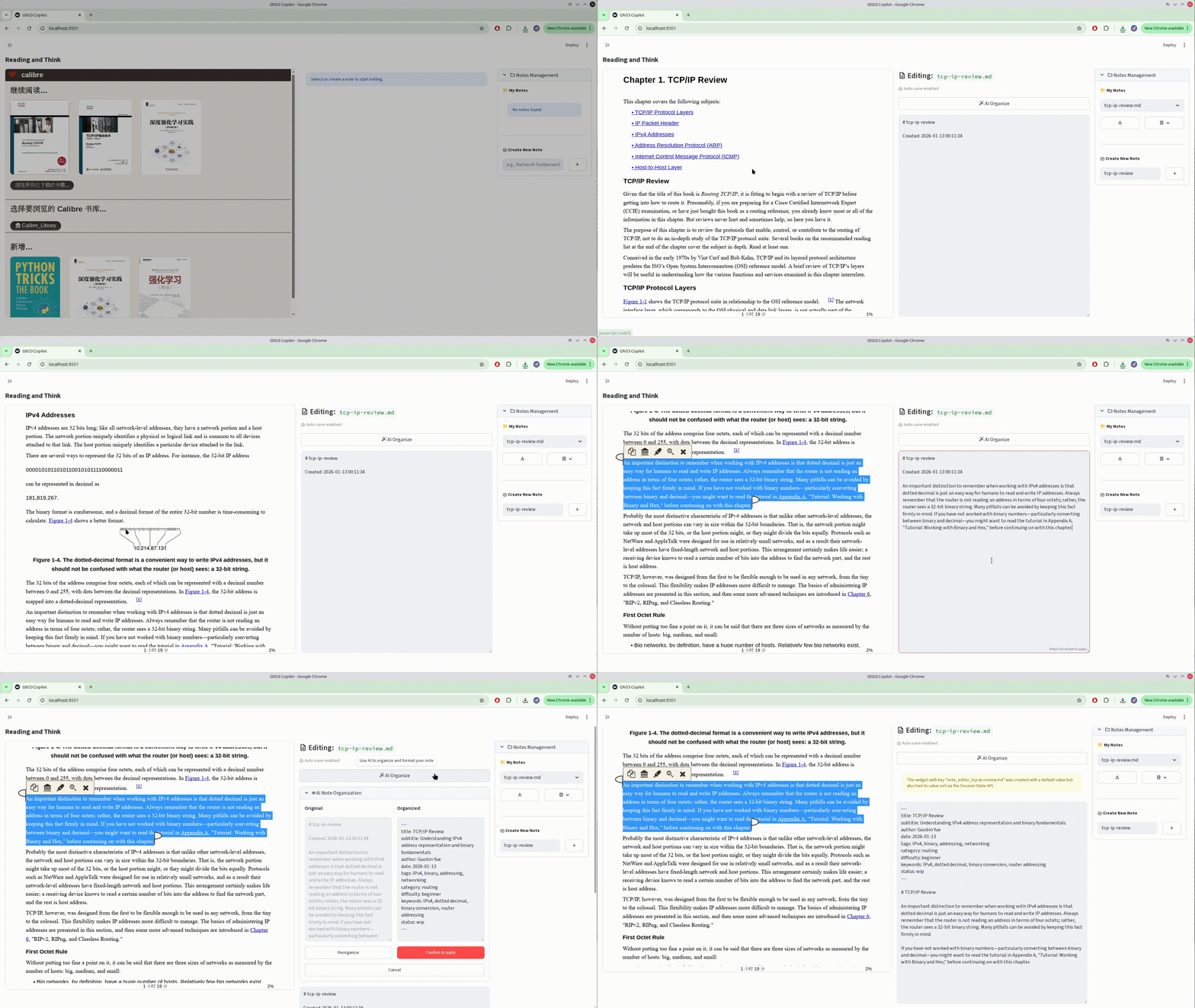
📚 Reading & Notes
GNS3 Copilot includes a dedicated reading interface integrated with Calibre Content Server:
- Calibre Ebook Viewer: Embedded iframe viewer to access and read ebooks from your Calibre library
- Multi-Note Management: Create, select, and delete reading notes for organizing your thoughts
- Markdown Notes: All notes are saved as Markdown files with download functionality
- 🤖 AI-Powered Note Organization: Use AI to automatically refine and organize your notes
- Click the "AI Organize" button to let the AI format and structure your notes
- Compare original vs organized content side-by-side before accepting
- Reorganize as needed until satisfied with the result
To access the reading interface:
- Configure Calibre Server URL in Settings
- Start Calibre Content Server (port 8080 by default)
- Navigate to the Reading page in the application
Documentation
See docs/ directory for detailed documentation including user guides, development guides, and technical documentation.
🤝 Contributing
We welcome contributions from the community! To keep the project stable, please follow our branching strategy:
-
Target Branch: Always submit your Pull Requests to the
Developmentbranch (notmaster). -
Feature Branches: Create a new branch for each feature or bug fix:
git checkout -b feature/your-feature-name Development. -
Workflow: Fork -> Branch -> Commit -> Push -> Pull Request to
Development.
🧠 Practical Insights
From our extensive testing with gns3-copilot, here are some hard-earned lessons on how to effectively use AI as your network co-pilot:
-
The Power of "Why", Not Just "How": Don't just ask for the config. Ask the AI to build a Diagnostic Tree. It's a 24/7 mentor that never gets tired of your "Active" BGP status.
-
Mind the Gap (Vendor Specifics): While LLMs excel at standard RFC protocols (OSPF, BGP), they might hallucinate when it comes to Proprietary Protocols or bleeding-edge features. Always verify vendor-specific syntax.
-
Modular Approach for Complex Topologies: For networks with 20+ nodes, break down your requests. AI works best when focusing on specific segments rather than trying to memorize the entire routing table at once.
-
Simulation != Reality: GNS3 is a perfect sandbox, but it doesn't simulate faulty transceivers or hardware bugs. Use the Copilot to master logic, but keep your hands on the "real world" troubleshooting tools.
Security Considerations
-
API Key Protection:
- API keys are stored in SQLite database (currently in plaintext)
- Regularly rotate API keys
- Use principle of least privilege
- Do not commit the database file to version control
-
Database Security:
- Important: The database currently stores passwords and API keys in plaintext
- The configuration database is stored locally on your machine
- Ensure proper file permissions are set on the database directory
- Backup the database regularly to prevent data loss
- Restrict access to the database file to authorized users only
-
Environment Security:
- Run GNS3 Copilot in a trusted environment
- Consider using encrypted filesystems for storing sensitive data
- Be cautious when sharing database backups
License
This project uses MIT License - see LICENSE file for details.
Acknowledgements
This project was inspired by the following resources, which provided the foundation for Python programming, network automation, and AI applications:
- 《网络工程师的 Python 之路》 - Network engineering automation with Python
- 《网络工程师的 AI 之路》 - AI applications for network engineering
Special thanks to these resources for their technical inspiration and guidance.
Contact
- Project Homepage: https://github.com/yueguobin/gns3-copilot
- Issue Reporting: https://github.com/yueguobin/gns3-copilot/issues
1 maintainer

Metadata
1 maintainer
Release files for gns3-copilot 0.3.0
For a detailed explanation of source distributions (sdists) and built distributions (wheels), please see the package formats documentation.
Source distribution (sdist)
| File | Size | Uploaded | Provenance | Actions |
|---|---|---|---|---|
| gns3_copilot-0.3.0.tar.gz | 1.1 MB | With provenance | Details for gns3_copilot-0.3.0.tar.gz |
Built distribution (wheel)
| File | Interpreter | ABI | Platform | Actions Reset |
|---|---|---|---|---|
| gns3_copilot-0.3.0-py3-none-any.whl | Python 3 | none | any | Details for gns3_copilot-0.3.0-py3-none-any.whl |
Total release size: 1.4 MB
Release files / gns3_copilot-0.3.0.tar.gz
| Download URL | gns3_copilot-0.3.0.tar.gz |
|---|---|
| Size | 1.1 MB |
| Tags | Source |
|
SHA-256 checksum How to use checksums |
81896fb6ff95536bcf6851dd1c7c84045d39742f49fd84e1d1c6c7cf1532936b
|
|
BLAKE2b-256 checksum How to use checksums |
f29a4a15133d7e89d7c45b0a91fb72f05c530df6566b04187b782462cdc8fe42
|
| Upload date | |
|
Uploaded using Trusted Publishing? What is trusted publishing? |
Yes |
| Uploaded via |
twine/6.1.0 CPython/3.13.7
|
Provenance
Provenance describes where a file came from. On PyPI, provenance is shared via attestations, which provide a verifiable record of the build or publishing details. View details, limitations and caveats.


PyPI Publish Attestation
PyPI verified that this artifact, at this checksum, originated from the publisher listed below.
Signed by GitHub Actions, verified by PyPI on Jan 13, 2026.
Transparency logRelease files / gns3_copilot-0.3.0-py3-none-any.whl
| Download URL | gns3_copilot-0.3.0-py3-none-any.whl |
|---|---|
| Size | 215.2 kB |
| Tags | Python 3 |
|
SHA-256 checksum How to use checksums |
36cf0ad6f88db3d09fd4961429a9f4306009c027fe4823fc1aada2c90bf24d8d
|
|
BLAKE2b-256 checksum How to use checksums |
f4628f546bb5f8e87202f83b9db88dc51929c0c05ee8ea6d962c6461b99d1f4f
|
| Upload date | |
|
Uploaded using Trusted Publishing? What is trusted publishing? |
Yes |
| Uploaded via |
twine/6.1.0 CPython/3.13.7
|
Provenance
Provenance describes where a file came from. On PyPI, provenance is shared via attestations, which provide a verifiable record of the build or publishing details. View details, limitations and caveats.
PyPI Publish Attestation
PyPI verified that this artifact, at this checksum, originated from the publisher listed below.
Signed by GitHub Actions, verified by PyPI on Jan 13, 2026.
Transparency logSecurity for gns3-copilot 0.3.0
Provenance
Provenance describes where a file came from. On PyPI, provenance is shared via attestations, which provide a verifiable record of the build or publishing details. View details, limitations and caveats.
Full provenance
All 2 files in this release have been uploaded with provenance metadata.
Attestation for gns3_copilot-0.3.0.tar.gz
PyPI Publish Attestation
PyPI verified that this artifact, at this checksum, originated from the publisher listed below.
Signed by GitHub Actions, verified by PyPI on Jan 13, 2026.
Transparency logA note on package security
PyPI is a repository for distributing packages, not a service for auditing them. While third-party security researchers and our staff do their best to detect and remove malicious packages, PyPI cannot guarantee the quality, security or suitability of any given package.
To learn more about protecting yourself from malicious actors, visit our package security documentation.














