
gpmtop
See what your NVIDIA GPU is bound by, live.
nvidia-smi and nvitop tell you the GPU is "98% utilized". That number only
means some kernel was running, not that the GPU was doing useful work.
gpmtop reads the GPU's hardware activity counters (GPM), shows where you sit
on a speed-of-light map, and tells you what to fix.
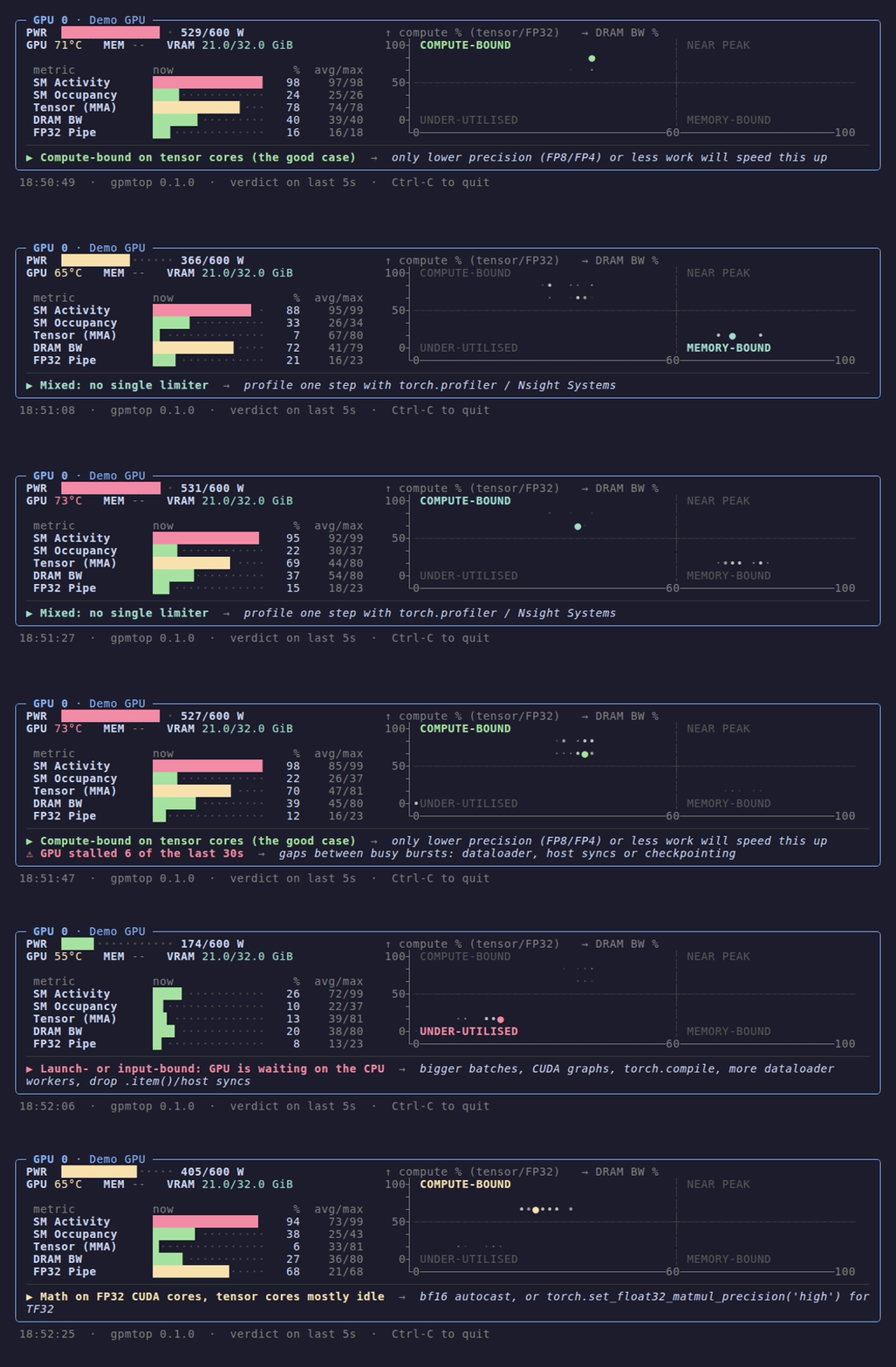
Recorded with gpmtop --demo, played at 2× speed.
Install
pipx install gpmtop        # or: uv tool install gpmtop
gpmtop
gpmtop --demo              # no GPU? replay synthetic data
You need Linux, nvidia-smi on your PATH, Python 3.9+, and a GPU and driver
that support GPM (see Requirements).
Reading the map
The map plots two numbers, both as a percentage of the hardware's peak:
- x: DRAM bandwidth. How close you are to the memory limit.
- y: compute. Whichever of the tensor-core pipe or the FP32 pipe is busier.
The bright dot is the current second. The fading trail is the last 30 seconds, so a dot jumping between regions means the job alternates between two states.
| Region | What it means | What usually helps |
|---|---|---|
| COMPUTE-BOUND | Tensor cores are busy. This is the good case. | Lower precision (FP8/FP4), or doing less work |
| MEMORY-BOUND | DRAM is saturated and the math pipes wait on it. Typical of element-wise ops, norms and unfused attention. | Fuse ops: torch.compile, fused or custom kernels |
| UNDER-UTILISED | Neither compute nor memory is busy. | See the verdict line below |
| NEAR PEAK | Compute and memory are both busy. | You're close to the hardware limits |
Under the map, a verdict line gives the diagnosis. It uses the last 5 seconds:
| Verdict | Signal | What usually helps |
|---|---|---|
| Launch- or input-bound | SM Activity < 50% | Bigger batches, CUDA graphs, torch.compile, more dataloader workers, removing .item() / .cpu() syncs |
| Memory-bound | SM busy, DRAM ≥ 60% | Fusion |
| Math on FP32 CUDA cores | SM busy, FP32 ≥ 40%, tensor low | bf16 autocast, or torch.set_float32_matmul_precision("high") for TF32 |
| Latency-bound | SM busy, but pipes and DRAM are quiet | Small grids, syncs or atomics. Profile the top kernels in Nsight Compute |
| Compute-bound | Tensor ≥ 50% | Lower precision or less work |
| ⚠ Stalled N of the last 30s | Busy bursts separated by idle gaps | Dataloader, host syncs, checkpointing |
The thresholds are rules of thumb. They're constants at the top of
src/gpmtop/__init__.py if you want to tune them.
Honest caveats
- This is not a roofline. GPM reports how busy each pipe is, not FLOPs or bytes, so arithmetic intensity can't be computed. The map shows how close you are to each limit, like the Speed of Light section in Nsight Compute.
- "Tensor 80%" means the tensor pipe was busy 80% of the time. It does not mean 80% of peak FLOPs. Precision and tile efficiency also matter.
- Samples are 1-second averages over many kernels. Use gpmtop to find which problem you have, then use Nsight Systems or Nsight Compute to find where it is.
- SM Occupancy isn't used in the verdicts. Efficient GEMMs often run at low occupancy by design, so a low value isn't a problem on its own.
Options
gpmtop --metrics 2,3,5,10,12   # GPM metric IDs, see `nvidia-smi dmon -h`
gpmtop --history 60            # window for avg/max, in samples (default 300)
The map needs metric 10 (DRAM) and at least one of 5 (tensor) or 12 (FP32).
Requirements
GPM needs a recent NVIDIA GPU and driver. It is confirmed on an RTX 5090 (Blackwell) with driver 580. It should also work on Hopper (H100/H200), but that is untested. If your GPU doesn't support GPM, gpmtop tells you after a few seconds. Reports of other GPUs that work (or don't) are welcome in an issue.
License
MIT
1 maintainer

Metadata
1 maintainer
Release files for gpmtop 0.1.0
For a detailed explanation of source distributions (sdists) and built distributions (wheels), please see the package formats documentation.
Source distribution (sdist)
| File | Size | Uploaded | |
|---|---|---|---|
| gpmtop-0.1.0.tar.gz | 9.5 kB | Details |
Built distribution (wheel)
| File | Interpreter | ABI | Platform | Reset |
|---|---|---|---|---|
| gpmtop-0.1.0-py3-none-any.whl | Python 3 | none | any | Details |
Total release size: 20.2 kB
Release files / gpmtop-0.1.0.tar.gz
| Download URL | gpmtop-0.1.0.tar.gz |
|---|---|
| Size | 9.5 kB |
| Tags | Source |
|
SHA-256 checksum How to use checksums |
ef54a877008ed1ab0efea77acb536398e2e65fa6a2ae2650e766c8a42c774441
|
|
BLAKE2b-256 checksum How to use checksums |
38711979d4fe47a94f5f9727c34095a934c1ab7cc5716699c14f426d8fe5f739
|
| Upload date | |
|
Uploaded using Trusted Publishing? What is trusted publishing? |
Yes |
| Uploaded via |
twine/7.0.0 CPython/3.13.14
|
Provenance
Provenance describes where a file came from. On PyPI, provenance is shared via attestations, which provide a verifiable record of the build or publishing details. View details, limitations and caveats.


PyPI Publish Attestation
PyPI verified that this artifact, at this checksum, originated from the publisher listed below.
Signed by GitHub Actions, verified by PyPI on Sep 27, 2026.
Transparency logRelease files / gpmtop-0.1.0-py3-none-any.whl
| Download URL | gpmtop-0.1.0-py3-none-any.whl |
|---|---|
| Size | 10.7 kB |
| Tags | Python 3 |
|
SHA-256 checksum How to use checksums |
a6f209bb63379f9ea2449f371f7aea4e7d8c4d86aa8be466297fbc3c1ed9c60d
|
|
BLAKE2b-256 checksum How to use checksums |
5e3dcc13b281a4b592948f998122c8b4dddd01363cf41bdff433f794a9f9d64a
|
| Upload date | |
|
Uploaded using Trusted Publishing? What is trusted publishing? |
Yes |
| Uploaded via |
twine/7.0.0 CPython/3.13.14
|
Provenance
Provenance describes where a file came from. On PyPI, provenance is shared via attestations, which provide a verifiable record of the build or publishing details. View details, limitations and caveats.
PyPI Publish Attestation
PyPI verified that this artifact, at this checksum, originated from the publisher listed below.
Signed by GitHub Actions, verified by PyPI on Sep 27, 2026.
Transparency log












