
GPUs



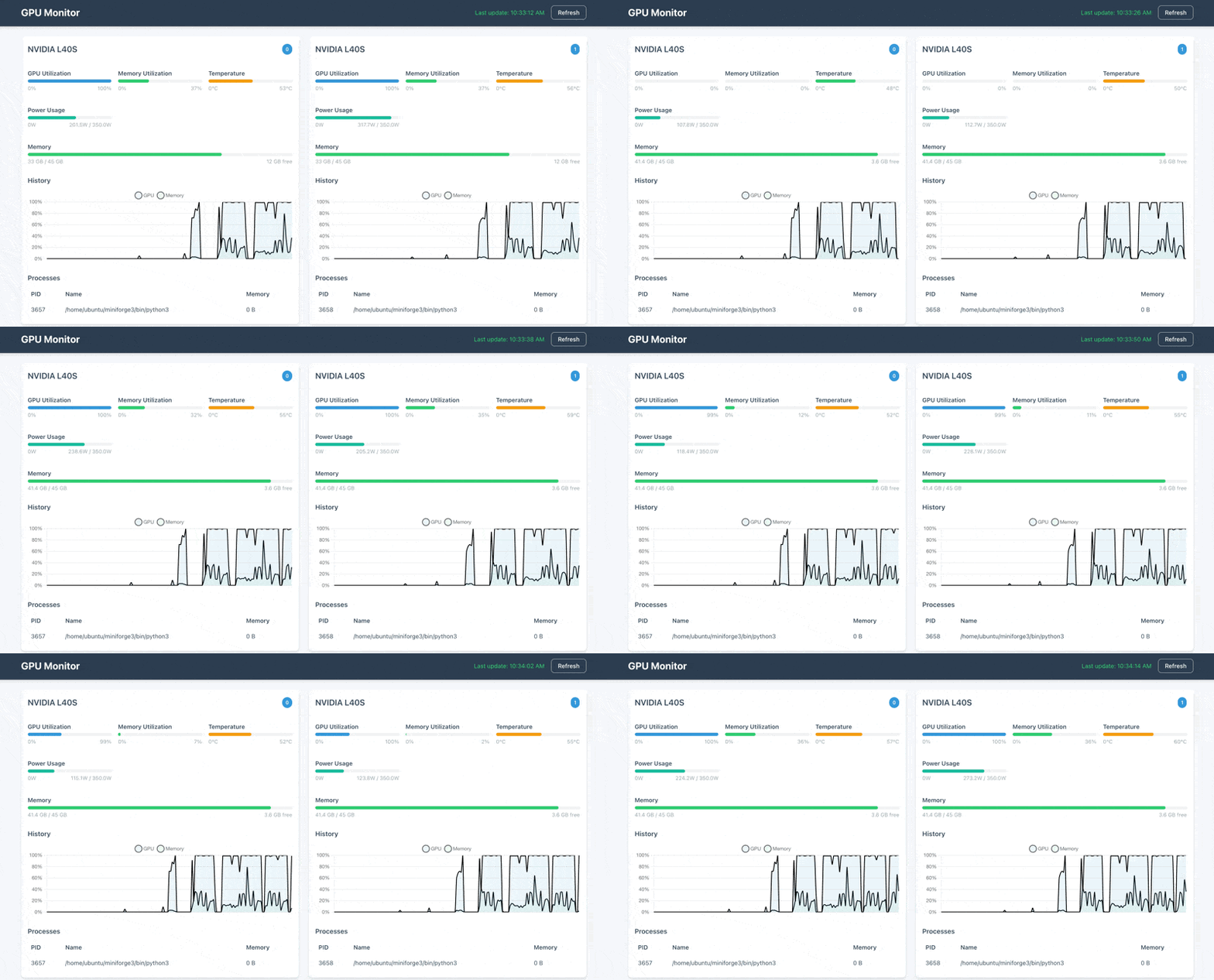
A real-time web interface for monitoring NVIDIA GPUs.
pip install gpus
gpus start
Features
- Real-time monitoring of NVIDIA GPU statistics
- Clean, modern, responsive web interface
- Historical utilization graphs
- Process monitoring
- Command-line interface
- Background server mode
Requirements
- Python 3.6+
- NVIDIA GPU with installed drivers
- NVIDIA Management Library (NVML)
Installation
pip install gpus
Usage
Starting the Web Interface
# Start the web interface in the foreground (default port 5000)
gpus

# Specify a different port
gpus --port 8080
# or with the short option
gpus -P 8080

# Specify update interval (in seconds)
gpus --update-interval 2.0
# or with the short option
gpus -U 2.0

# Specify history length (in seconds)
gpus --history-length 600
# or with the short option
gpus -L 600

# Specify history resolution (in seconds)
gpus --history-resolution 1.0
# or with the short option
gpus -R 1.0
Then open your web browser and navigate to http://localhost:5000 (or the port you specified).
Managing Background Server
You can run the server in the background and manage it with subcommands:
# Start the server in the background
gpus start

# Check if the server is running
gpus status

# Stop the background server
gpus stop
The background server uses the same command-line options as the foreground server:
# Start the background server on a specific port
gpus -P 8080 start
Using as a Python Package
from gpus.app import GPUMonitorApp

# Create the application
app = GPUMonitorApp(
    update_interval=2.0,
    history_length=300,
    history_resolution=1.0
)

# Run the application
app.run(host='0.0.0.0', port=5000)
Cloud
GPUs Cloud is a free cloud service that allows you to easily manage your GPUs on-the-go. Remotely monitor your GPUs from anywhere & get notified when your training runs fail (coming soon).
[!WARNING] GPUs Cloud is currently in a limited beta stage. If you want early access (highly unstable), please DM me on X for an invite code. Expect some bugs, limited features, and high downtime.
Getting Started
Sign up for a free account (using Hugging Face login) on the GPUs Cloud website. Enter your invite code and add a device. Then run the following command to login:
gpus cloud login
To start sending GPU metrics to the cloud (in the background), run the following command:
gpus cloud start
To stop sending GPU metrics to the cloud, run the following command:
gpus cloud stop
To check the status of the cloud client, run the following command:
gpus cloud status
To send metrics to the cloud (in the foreground), run the following command:
gpus cloud
To logout of the cloud, run the following command:
gpus cloud logout
Development
Setup Development Environment
# Clone the repository
git clone https://github.com/fakerybakery/gpus
cd gpus

# Create a virtual environment
python -m venv venv
source venv/bin/activate  # On Windows: venv\Scripts\activate

# Install in development mode
pip install -e .
Debugging
If you encounter issues, please check the logs in the ~/.gpus directory. If the problem persists, please create an issue on GitHub.
Note that GPUs has not been tested on Windows. Use at your own risk.
License
BSD-3-Clause
1 maintainer

Metadata
1 maintainer
Release files for gpus 0.2.0
For a detailed explanation of source distributions (sdists) and built distributions (wheels), please see the package formats documentation.
Source distribution (sdist)
| File | Size | Uploaded | Provenance | |
|---|---|---|---|---|
| gpus-0.2.0.tar.gz | 27.2 kB | Without provenance | Details |
Release files / gpus-0.2.0.tar.gz
| Download URL | gpus-0.2.0.tar.gz |
|---|---|
| Size | 27.2 kB |
| Tags | Source |
|
SHA-256 checksum How to use checksums |
d48732dc3fb303e7c46385ae6a94043dc322fe9eebf6d0e8321df85187bb5272
|
|
BLAKE2b-256 checksum How to use checksums |
6ec145c1e93f6b30c3fe4cea4f07db0551c870d550ad4f78764f398bd1b16a18
|
| Upload date | |
|
Uploaded using Trusted Publishing? What is trusted publishing? |
No |
| Uploaded via |
twine/6.0.1 CPython/3.12.5
|
Security for gpus 0.2.0
Provenance
Provenance describes where a file came from. On PyPI, provenance is shared via attestations, which provide a verifiable record of the build or publishing details. View details, limitations and caveats.
No provenance found
None of the files in this release were uploaded with provenance metadata.
A note on package security
PyPI is a repository for distributing packages, not a service for auditing them. While third-party security researchers and our staff do their best to detect and remove malicious packages, PyPI cannot guarantee the quality, security or suitability of any given package.














