
Graphviz










This package facilitates the creation and rendering of graph descriptions in the DOT language of the Graphviz graph drawing software (upstream repo) from Python.
Create a graph object, assemble the graph by adding nodes and edges, and retrieve its DOT source code string. Save the source code to a file and render it with the Graphviz installation of your system.
Use the view option/method to directly inspect the resulting (PDF, PNG, SVG, etc.) file with its default application. Graphs can also be rendered and displayed within Jupyter notebooks (formerly known as IPython notebooks, example, nbviewer) as well as the Jupyter QtConsole.
Links
Documentation: https://graphviz.readthedocs.io
Changelog: https://graphviz.readthedocs.io/en/latest/changelog.html
Issue Tracker: https://github.com/xflr6/graphviz/issues
Download: https://pypi.org/project/graphviz/#files
Installation
This package runs under Python 3.8+, use pip to install:
$ pip install graphvizTo render the generated DOT source code, you also need to install Graphviz (download page, archived versions, installation procedure for Windows).
Make sure that the directory containing the dot executable is on your systems’ PATH (sometimes done by the installer; setting PATH on Linux, Mac, and Windows).
Anaconda: see the conda-forge package conda-forge/python-graphviz (feedstock), which should automatically conda install conda-forge/graphviz (feedstock) as dependency.
Quickstart
Create a graph object:
>>> import graphviz  # doctest: +NO_EXE
>>> dot = graphviz.Digraph(comment='The Round Table')
>>> dot  #doctest: +ELLIPSIS
<graphviz.graphs.Digraph object at 0x...>
Add nodes and edges:
>>> dot.node('A', 'King Arthur')  # doctest: +NO_EXE
>>> dot.node('B', 'Sir Bedevere the Wise')
>>> dot.node('L', 'Sir Lancelot the Brave')

>>> dot.edges(['AB', 'AL'])
>>> dot.edge('B', 'L', constraint='false')
Check the generated source code:
>>> print(dot.source)  # doctest: +NORMALIZE_WHITESPACE +NO_EXE
// The Round Table
digraph {
    A [label="King Arthur"]
    B [label="Sir Bedevere the Wise"]
    L [label="Sir Lancelot the Brave"]
    A -> B
    A -> L
    B -> L [constraint=false]
}
Save and render the source code (skip/ignore any doctest_mark_exe() lines):
>>> doctest_mark_exe()  # skip this line

>>> dot.render('doctest-output/round-table.gv').replace('\\', '/')
'doctest-output/round-table.gv.pdf'
Save and render and view the result:
>>> doctest_mark_exe()  # skip this line

>>> dot.render('doctest-output/round-table.gv', view=True)  # doctest: +SKIP
'doctest-output/round-table.gv.pdf'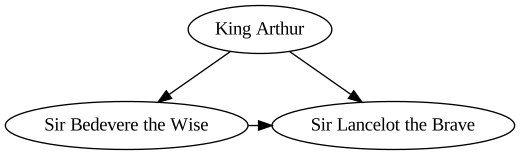
Caveat: Backslash-escapes and strings of the form <...> have a special meaning in the DOT language. If you need to render arbitrary strings (e.g. from user input), check the details in the user guide.
See also
pygraphviz – full-blown interface wrapping the Graphviz C library with SWIG
graphviz-python – official Python bindings (documentation)
pydot – stable pure-Python approach, requires pyparsing
License
This package is distributed under the MIT license.
Development
Development documentation: https://graphviz.readthedocs.io/en/latest/development.html
Release process: https://graphviz.readthedocs.io/en/latest/release_process.html


Release files for graphviz 0.20.3
For a detailed explanation of source distributions (sdists) and built distributions (wheels), please see the package formats documentation.
Source distribution (sdist)
| File | Size | Uploaded | Provenance | Actions |
|---|---|---|---|---|
| graphviz-0.20.3.zip | 256.5 kB | Without provenance | Details for graphviz-0.20.3.zip |
Built distribution (wheel)
| File | Interpreter | ABI | Platform | Actions Reset |
|---|---|---|---|---|
| graphviz-0.20.3-py3-none-any.whl | Python 3 | none | any | Details for graphviz-0.20.3-py3-none-any.whl |
Total release size: 303.6 kB
Release files / graphviz-0.20.3.zip
| Download URL | graphviz-0.20.3.zip |
|---|---|
| Size | 256.5 kB |
| Tags | Source |
|
SHA-256 checksum How to use checksums |
09d6bc81e6a9fa392e7ba52135a9d49f1ed62526f96499325930e87ca1b5925d
|
|
BLAKE2b-256 checksum How to use checksums |
fa835a40d19b8347f017e417710907f824915fba411a9befd092e52746b63e9f
|
| Upload date | |
|
Uploaded using Trusted Publishing? What is trusted publishing? |
No |
| Uploaded via |
twine/5.0.0 CPython/3.12.2
|
Release files / graphviz-0.20.3-py3-none-any.whl
| Download URL | graphviz-0.20.3-py3-none-any.whl |
|---|---|
| Size | 47.1 kB |
| Tags | Python 3 |
|
SHA-256 checksum How to use checksums |
81f848f2904515d8cd359cc611faba817598d2feaac4027b266aa3eda7b3dde5
|
|
BLAKE2b-256 checksum How to use checksums |
00bed59db2d1d52697c6adc9eacaf50e8965b6345cc143f671e1ed068818d5cf
|
| Upload date | |
|
Uploaded using Trusted Publishing? What is trusted publishing? |
No |
| Uploaded via |
twine/5.0.0 CPython/3.12.2
|
Security for graphviz 0.20.3
Provenance
Provenance describes where a file came from. On PyPI, provenance is shared via attestations, which provide a verifiable record of the build or publishing details. View details, limitations and caveats.
No provenance found
None of the files in this release were uploaded with provenance metadata.
A note on package security
PyPI is a repository for distributing packages, not a service for auditing them. While third-party security researchers and our staff do their best to detect and remove malicious packages, PyPI cannot guarantee the quality, security or suitability of any given package.
To learn more about protecting yourself from malicious actors, visit our package security documentation.














