
Converter from AWS SageMaker Ground Truth Label Job Manifest file to VGG Image Annotator
Context
AWS SageMaker Ground Truth Label Job (GLT)
VGG Image Annotator (VIA)
- project: http://www.robots.ox.ac.uk/~vgg/software/via/
- code repo: https://gitlab.com/vgg/via/-/tree/master
Why do we need this?
The AWS SageMaker Ground Truth labelling jobs are very nice, especially when we want to out source the tedious labelling job to prepare for machine learning trainings. It also supports the job of adjust existing boxes, where some code/algorithm is already generating the bounding boxes for certain objects. In this case, we could use the Ground Truth jobs to view existing boxes and adjust them. However, the AWS system currently do not offer an easy way to preview all the existing boxes until all the objects are manually labelled (there is a $0.08/object charge for each labelling operation and it makes business for AWS to want to encourage that).
VIA offers a very powerful way to view all/multiple/selective images with their annotations and it works on any platform out of the box without much installation (just checkout the code and launch the index.html using broswer).
The idea here is to take a already generated AWS SageMaker manifest file and convert it into the annotation json file used by VIA.
Usage
usage: gtl2via.py [-h] -i INPUT -l LABEL -o OUTPUT -s S3_BUCKET

optional arguments:
  -h, --help            show this help message and exit
  -i INPUT, --input INPUT
                        input manifest file for AWS SageMaker GTL job
  -l LABEL, --label LABEL
                        use the label from the manifest file
  -o OUTPUT, --output OUTPUT
                        output json file of VIA
  -s S3_BUCKET, --s3-bucket S3_BUCKET
                        the S3 bucket used by AWS SageMaker (standard AWS partition only, ie, not working for China or US-Gov). It will be replaced to the corresponding https URL
Example
python gtl2via.py -i test/defect_boxes.manifest -o test/via.json -l zerobox-quick-detection -s zerobox-public
The input manifest file looks like this:
seki@seki-Surface-Book:~/src/gtl2via$ cat test/defect_boxes.manifest |jq
{
  "source-ref": "s3://zerobox-public/test/2020-08-13/good/Camera0_202008131130183_original.png",
  "zerobox-quick-detection": {
    "annotations": [
      {
        "class_id": 0,
        "width": 519,
        "top": 896,
        "height": 1024,
        "left": 512
      }
    ],
    "image_size": [
      {
        "width": 1080,
        "depth": 3,
        "height": 1920
      }
    ]
  },
The output json looks like this
seki@seki-Surface-Book:~/src/gtl2via$ cat test/via.json |jq
{
  "https://zerobox-public.s3.amazonaws.com/test/2020-08-13/good/Camera0_202008131130183_original.png-1": {
    "filename": "https://zerobox-public.s3.amazonaws.com/test/2020-08-13/good/Camera0_202008131130183_original.png",
    "size": -1,
    "regions": [
      {
        "shape_attributes": {
          "name": "rect",
          "x": 512,
          "y": 896,
          "width": 519,
          "height": 1024
        },
        "region_attributes": {}
      }
    ],
    "file_attributes": {}
  },
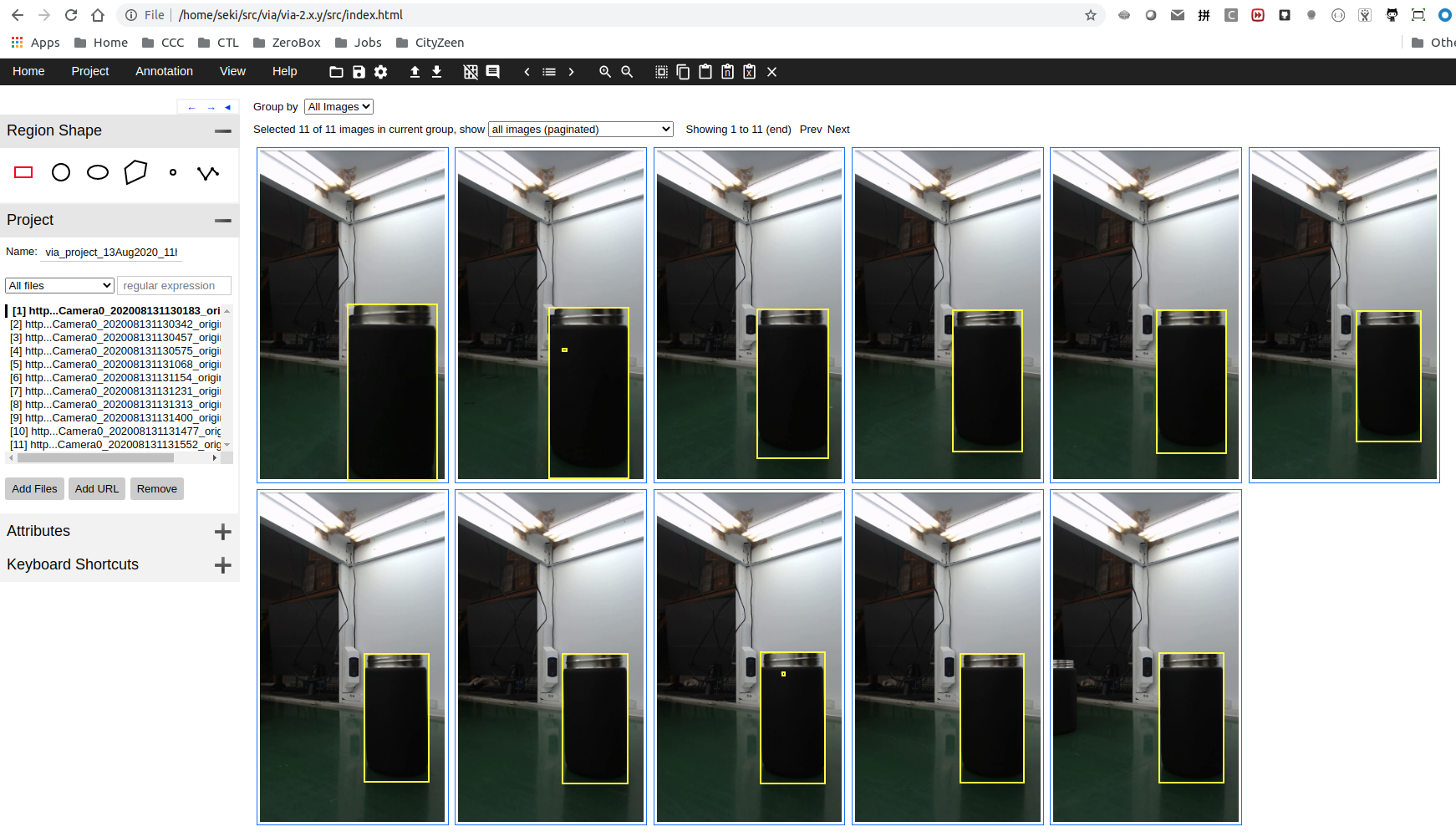
Loading the annoation json file into VIA-2 and we see a result like this
Known Limitations (ToDo)
- It only works with S3 in aws (Standard Regions), not for aws-cn (China Regions) or aws-us-gov (AWS GovCloud [US] Regions).
- It only works with one annotation type:
rect - No choice of box color yet for different classes in SageMaker
1 maintainer

Metadata
1 maintainer
Release files for gtl2via 0.0.1
For a detailed explanation of source distributions (sdists) and built distributions (wheels), please see the package formats documentation.
Source distribution (sdist)
| File | Size | Uploaded | |
|---|---|---|---|
| gtl2via-0.0.1.tar.gz | 4.0 kB | Details |
Built distribution (wheel)
| File | Interpreter | ABI | Platform | Reset |
|---|---|---|---|---|
| gtl2via-0.0.1-py3-none-any.whl | Python 3 | none | any | Details |
Total release size: 10.0 kB
Release files / gtl2via-0.0.1.tar.gz
| Download URL | gtl2via-0.0.1.tar.gz |
|---|---|
| Size | 4.0 kB |
| Tags | Source |
|
SHA-256 checksum How to use checksums |
0e5197536b9dd0d59779029c6035e01ddb9baef61251440236e2facb16b4b882
|
|
BLAKE2b-256 checksum How to use checksums |
44d7e16e6476a5fbf1c2170d79da3b748816432bddd0b13a50aab29cbc19be74
|
| Upload date | |
|
Uploaded using Trusted Publishing? What is trusted publishing? |
No |
| Uploaded via |
twine/3.2.0 pkginfo/1.5.0.1 requests/2.22.0 setuptools/45.2.0 requests-toolbelt/0.9.1 tqdm/4.48.0 CPython/3.8.2
|
Release files / gtl2via-0.0.1-py3-none-any.whl
| Download URL | gtl2via-0.0.1-py3-none-any.whl |
|---|---|
| Size | 6.0 kB |
| Tags | Python 3 |
|
SHA-256 checksum How to use checksums |
3ba9336a35a26a699cfbbd2963781d79fe91faeb7cee52d270c00d6afd9af23a
|
|
BLAKE2b-256 checksum How to use checksums |
d7570ea4d201f5832864bed0af1e23e64a5121322a80ac614867c2949365b04a
|
| Upload date | |
|
Uploaded using Trusted Publishing? What is trusted publishing? |
No |
| Uploaded via |
twine/3.2.0 pkginfo/1.5.0.1 requests/2.22.0 setuptools/45.2.0 requests-toolbelt/0.9.1 tqdm/4.48.0 CPython/3.8.2
|













