













News and Updates
- [Feb 12, 2025] We just launched Guardrails Index -- the first of its kind benchmark comparing the performance and latency of 24 guardrails across 6 most common categories! Check out the index at index.guardrailsai.com
What is Guardrails?
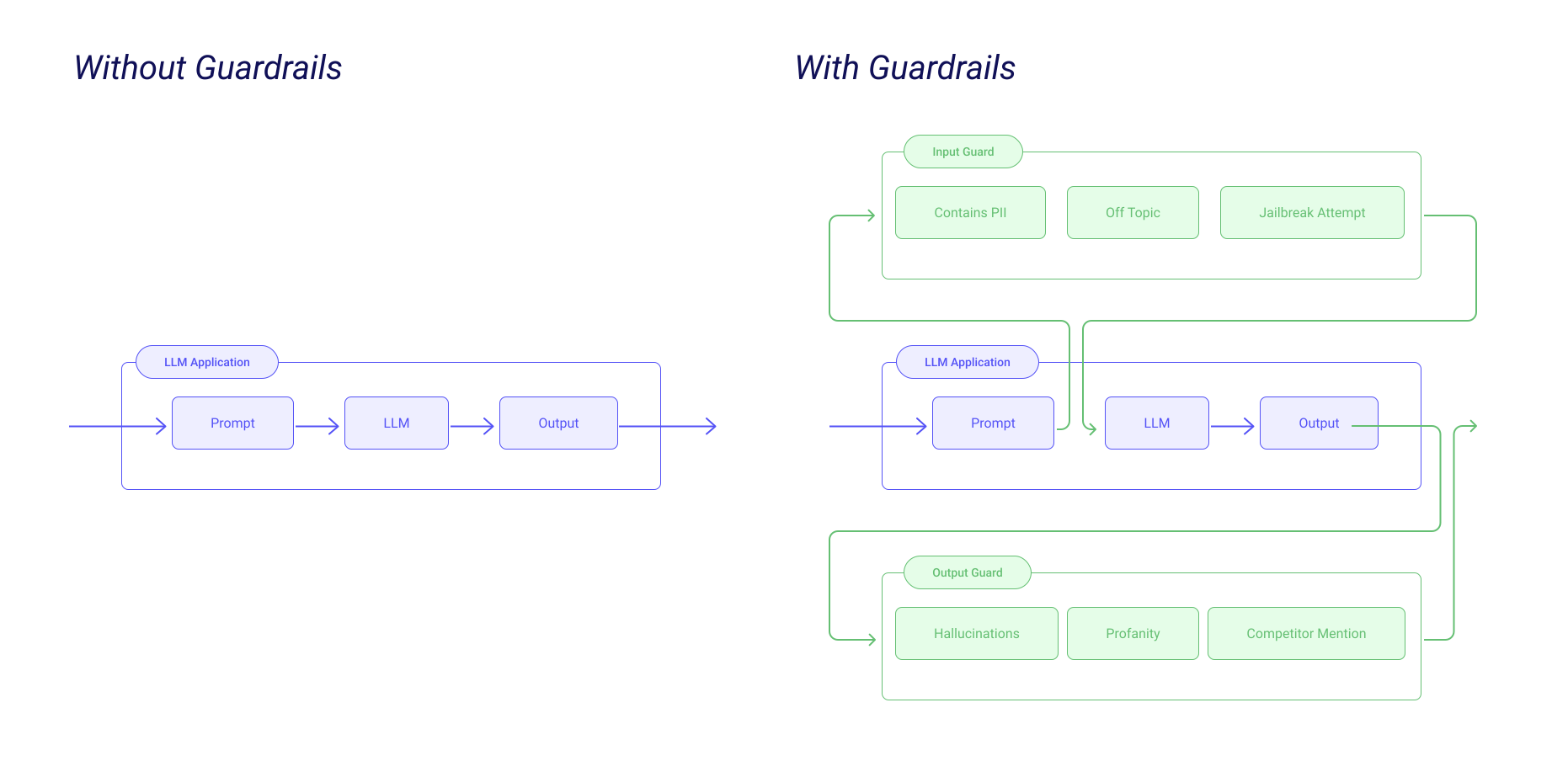
Guardrails is a Python framework that helps build reliable AI applications by performing two key functions:
- Guardrails runs Input/Output Guards in your application that detect, quantify and mitigate the presence of specific types of risks. To look at the full suite of risks, check out Guardrails Hub.
- Guardrails help you generate structured data from LLMs.
Guardrails Hub
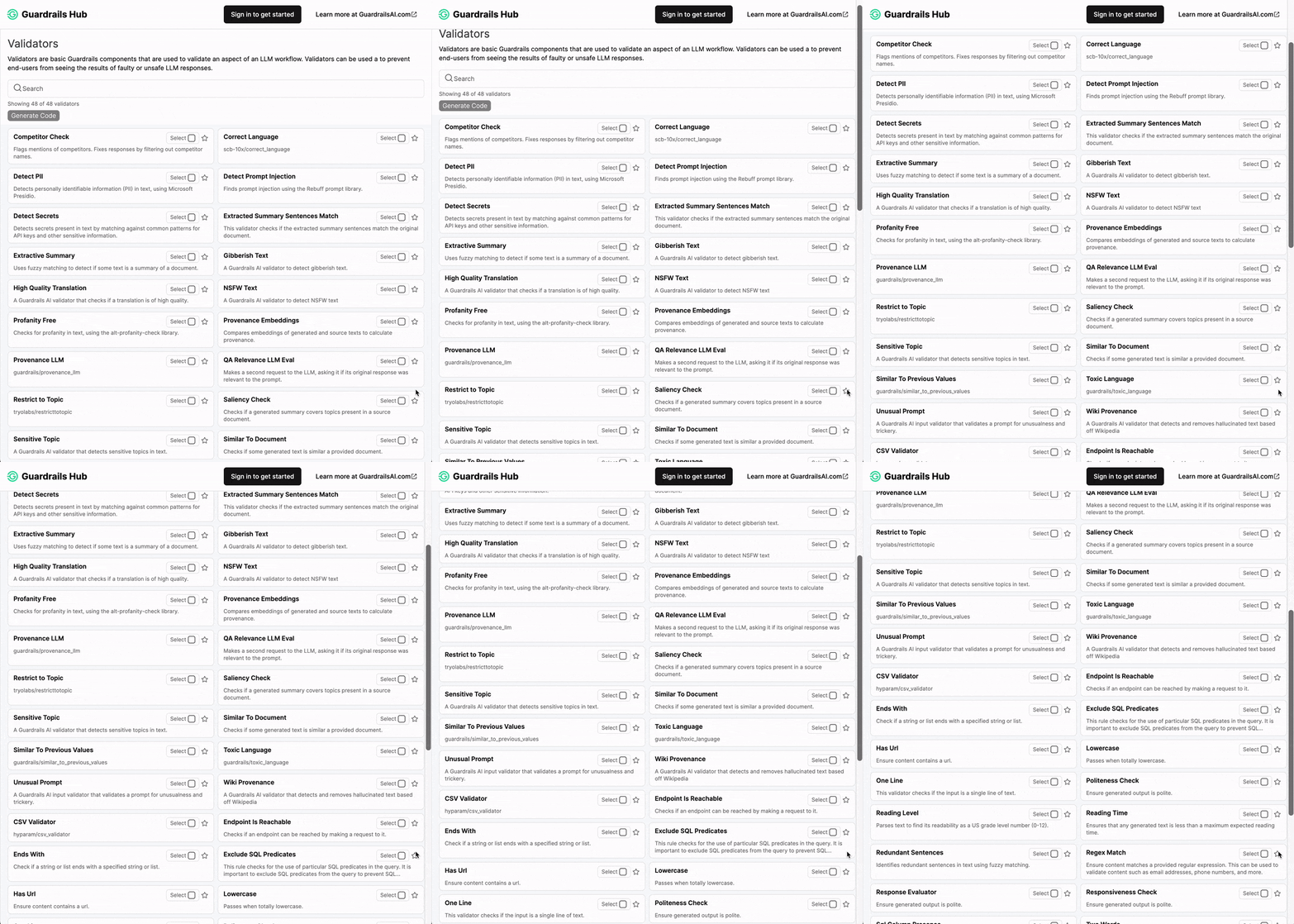
Guardrails Hub is a collection of pre-built measures of specific types of risks (called 'validators'). Multiple validators can be combined together into Input and Output Guards that intercept the inputs and outputs of LLMs. Visit Guardrails Hub to see the full list of validators and their documentation.
Installation
pip install guardrails-ai
Getting Started
Create Input and Output Guards for LLM Validation
-
Download and configure the Guardrails Hub CLI.
pip install guardrails-ai
guardrails configure
-
Install a guardrail from Guardrails Hub.
guardrails hub install hub://guardrails/regex_match
-
Create a Guard from the installed guardrail.
from guardrails import Guard, OnFailAction
from guardrails.hub import RegexMatch

guard = Guard().use(
    RegexMatch, regex="\(?\d{3}\)?-? *\d{3}-? *-?\d{4}", on_fail=OnFailAction.EXCEPTION
)

guard.validate("123-456-7890")  # Guardrail passes

try:
    guard.validate("1234-789-0000")  # Guardrail fails
except Exception as e:
    print(e)
Output:
Validation failed for field with errors: Result must match \(?\d{3}\)?-? *\d{3}-? *-?\d{4} -
Run multiple guardrails within a Guard. First, install the necessary guardrails from Guardrails Hub.
guardrails hub install hub://guardrails/competitor_check
guardrails hub install hub://guardrails/toxic_language
Then, create a Guard from the installed guardrails.
from guardrails import Guard, OnFailAction
from guardrails.hub import CompetitorCheck, ToxicLanguage

guard = Guard().use_many(
    CompetitorCheck(["Apple", "Microsoft", "Google"], on_fail=OnFailAction.EXCEPTION),
    ToxicLanguage(threshold=0.5, validation_method="sentence", on_fail=OnFailAction.EXCEPTION)
)

guard.validate(
    """An apple a day keeps a doctor away.
    This is good advice for keeping your health."""
)  # Both the guardrails pass

try:
    guard.validate(
        """Shut the hell up! Apple just released a new iPhone."""
    )  # Both the guardrails fail
except Exception as e:
    print(e)
Output:
Validation failed for field with errors: Found the following competitors: [['Apple']]. Please avoid naming those competitors next time, The following sentences in your response were found to be toxic:

- Shut the hell up!
Use Guardrails to generate structured data from LLMs
Let's go through an example where we ask an LLM to generate fake pet names. To do this, we'll create a Pydantic BaseModel that represents the structure of the output we want.
from pydantic import BaseModel, Field

class Pet(BaseModel):
    pet_type: str = Field(description="Species of pet")
    name: str = Field(description="a unique pet name")
Now, create a Guard from the Pet class. The Guard can be used to call the LLM in a manner so that the output is formatted to the Pet class. Under the hood, this is done by either of two methods:
- Function calling: For LLMs that support function calling, we generate structured data using the function call syntax.
- Prompt optimization: For LLMs that don't support function calling, we add the schema of the expected output to the prompt so that the LLM can generate structured data.
from guardrails import Guard
import openai

prompt = """
    What kind of pet should I get and what should I name it?

    ${gr.complete_json_suffix_v2}
"""
guard = Guard.for_pydantic(output_class=Pet, prompt=prompt)

raw_output, validated_output, *rest = guard(
    llm_api=openai.completions.create,
    engine="gpt-3.5-turbo-instruct"
)

print(validated_output)
This prints:
{
    "pet_type": "dog",
    "name": "Buddy
}
Guardrails Server
Guardrails can be set up as a standalone service served by Flask with guardrails start, allowing you to interact with it via a REST API. This approach simplifies development and deployment of Guardrails-powered applications.
- Install:
pip install "guardrails-ai" - Configure:
guardrails configure - Create a config:
guardrails create --validators=hub://guardrails/two_words --name=two-word-guard - Start the dev server:
guardrails start --config=./config.py - Interact with the dev server via the snippets below
# with the guardrails client
import guardrails as gr

gr.settings.use_server = True
guard = gr.Guard(name='two-word-guard')
guard.validate('this is more than two words')

# or with the openai sdk
import openai
openai.base_url = "http://localhost:8000/guards/two-word-guard/openai/v1/"
os.environ["OPENAI_API_KEY"] = "youropenaikey"

messages = [
        {
            "role": "user",
            "content": "tell me about an apple with 3 words exactly",
        },
    ]

completion = openai.chat.completions.create(
    model="gpt-4o-mini",
    messages=messages,
)
For production deployments, we recommend using Docker with Gunicorn as the WSGI server for improved performance and scalability.
FAQ
I'm running into issues with Guardrails. Where can I get help?
You can reach out to us on Discord or Twitter.
Can I use Guardrails with any LLM?
Yes, Guardrails can be used with proprietary and open-source LLMs. Check out this guide on how to use Guardrails with any LLM.
Can I create my own validators?
Yes, you can create your own validators and contribute them to Guardrails Hub. Check out this guide on how to create your own validators.
Does Guardrails support other languages?
Guardrails can be used with Python and JavaScript. Check out the docs on how to use Guardrails from JavaScript. We are working on adding support for other languages. If you would like to contribute to Guardrails, please reach out to us on Discord or Twitter.
Contributing
We welcome contributions to Guardrails!
Get started by checking out Github issues and check out the Contributing Guide. Feel free to open an issue, or reach out if you would like to add to the project!
Release files for guardrails-ai 0.6.4
For a detailed explanation of source distributions (sdists) and built distributions (wheels), please see the package formats documentation.
Source distribution (sdist)
| File | Size | Uploaded | |
|---|---|---|---|
| guardrails_ai-0.6.4.tar.gz | 168.1 kB | Details |
Built distribution (wheel)
| File | Interpreter | ABI | Platform | Reset |
|---|---|---|---|---|
| guardrails_ai-0.6.4-py3-none-any.whl | Python 3 | none | any | Details |
Total release size: 402.4 kB
Release files / guardrails_ai-0.6.4.tar.gz
| Download URL | guardrails_ai-0.6.4.tar.gz |
|---|---|
| Size | 168.1 kB |
| Tags | Source |
|
SHA-256 checksum How to use checksums |
1961ec6a3aa3f2871ca33935a4ac7d773b11793726404005e274e379cbc89e38
|
|
BLAKE2b-256 checksum How to use checksums |
080fee35497bbe07f6ea429f91e661dc569145f3eaf80f187ddf999eb53b4bec
|
| Upload date | |
|
Uploaded using Trusted Publishing? What is trusted publishing? |
No |
| Uploaded via |
poetry/2.1.1 CPython/3.11.11 Linux/6.8.0-1021-azure
|
Release files / guardrails_ai-0.6.4-py3-none-any.whl
| Download URL | guardrails_ai-0.6.4-py3-none-any.whl |
|---|---|
| Size | 234.4 kB |
| Tags | Python 3 |
|
SHA-256 checksum How to use checksums |
22bcf121f706d7c8befb3053843cde15ca132e4c6bc7fe15835f5b63280ccb2a
|
|
BLAKE2b-256 checksum How to use checksums |
9a50a5c9d8d7f070074969c93bbb4e675a05174827f4642072f38b172cf76269
|
| Upload date | |
|
Uploaded using Trusted Publishing? What is trusted publishing? |
No |
| Uploaded via |
poetry/2.1.1 CPython/3.11.11 Linux/6.8.0-1021-azure
|














