
Hangman

Description
Hangman is a command-line word-guessing game implemented in Python. Players guess a hidden word one letter at a time before running out of attempts. The game supports multiple difficulty levels, saved games, and a multiplayer challenge mode.
This project demonstrates object-oriented design, input validation, persistence
with pickle, modular architecture, and automated testing with pytest.
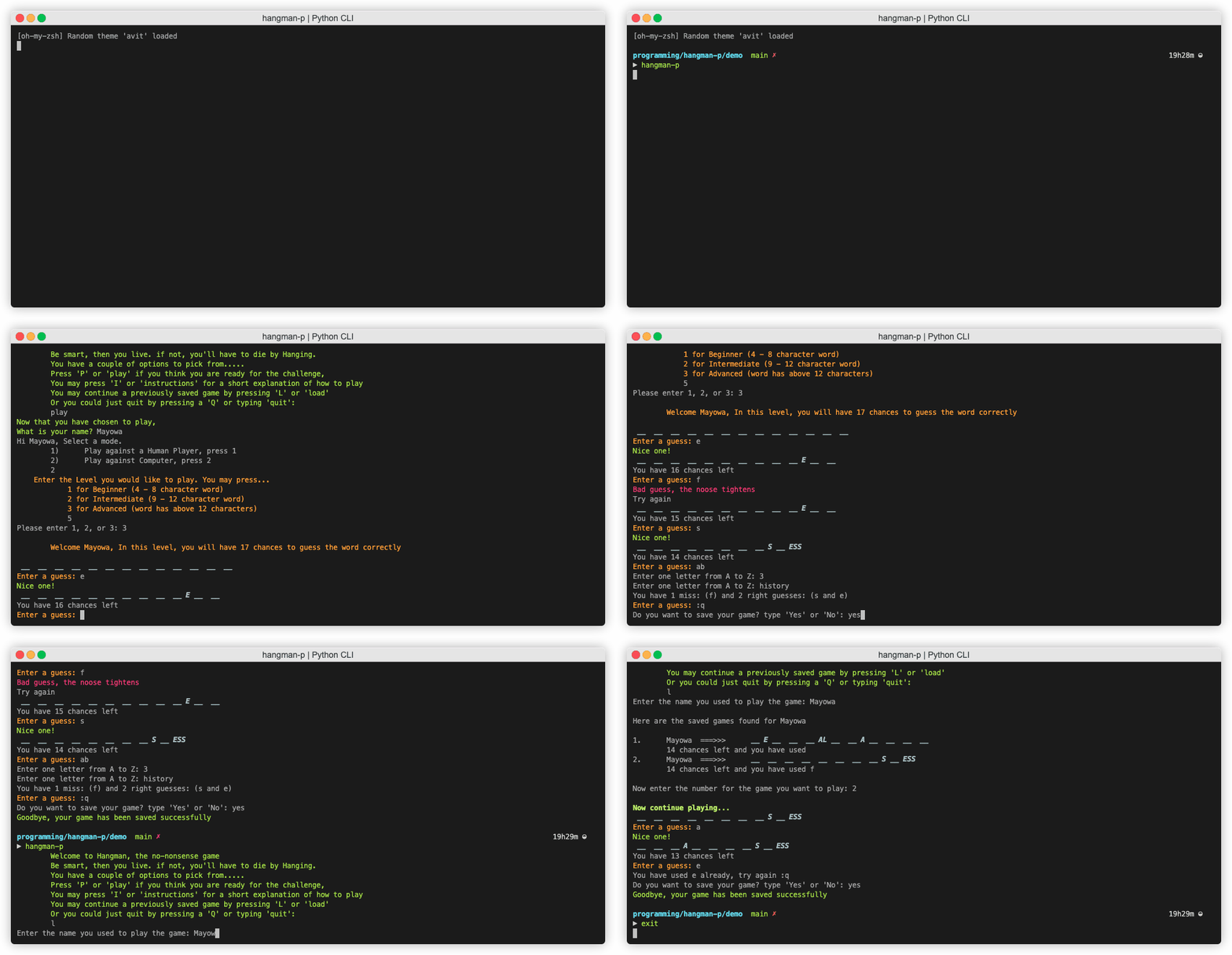
Demo
Features
- Three difficulty levels with different word lengths
- Single-player and multiplayer modes
- Game saving and loading in single-player mode
- Automatic deletion of completed saved games
- Input validation and error handling
- Automatic display of numbers, spaces, and punctuation in hidden words
- Automated tests with
pytest - Interactive command-line gameplay
Installation
To install the game with uv:
uv tool install hangman-p
This installs the game in an isolated environment and makes the hangman-p
command available on your PATH.
You can also try the game without permanently installing it:
uvx --from hangman-p hangman-p
To install it into your active Python environment with pip:
python -m pip install hangman-p
Usage
Hangman is an interactive terminal game. After installation, start it with:
hangman-p
You can also run it as a Python module:
python -m hangman_p
How to play
Welcome to Hangman, the no-nonsense game. Be smart, then you live. If not, you'll have to die by hanging.
The main menu gives you four options:
- Press
Por enterplayto start a game. - Press
Ior enterinstructionto read the instructions. - Press
Lor enterloadto continue a saved game. - Press
Qor enterquitto leave the game.
When you start a game, choose a difficulty level and either play against the computer or challenge another player. The hidden word is represented by underscores, with one underscore for each letter. Numbers, spaces, and punctuation are displayed automatically.
Guess one letter at a time. A correct guess reveals every matching position in the word. You win by revealing all the letters within the available number of attempts. Failure means death by hanging.
Multiplayer note
When the challenger enters the secret word, the input is masked so the guessing player cannot see it.
Extra commands
| Command | Action |
|---|---|
:c |
Reveal the secret word. This is a cheat, so use it wisely. |
:h or history |
Display your correct and incorrect guesses. |
:q or quit |
Quit the current game. In single-player mode, you can save before leaving. |
Project structure
project.py                     # Compatibility wrapper
hangman_p/project.py           # Packaged CLI entry point
hangman_p/level.py             # Difficulty configuration
hangman_p/game_engine.py       # Core gameplay logic
hangman_p/dictionary.txt       # Word list for single-player mode
hangman_p/game_persistence.py  # Saved-game handling
pyproject.toml                 # Package metadata and dependencies
test_project.py                # Automated tests
Design decisions
- Encapsulated game state: I selected an object-oriented design so each game engine can own and manage changing state, including the hidden word, guesses, remaining attempts, and player information.
- Object persistence: I chose
pickleto serialize complete game objects and restore them when a player continues a saved game. - Reusable input validation: I extracted the validation logic into the
reusable
cli-input-validatorpackage instead of duplicating it throughout the game. - Testable terminal input: I used dependency injection where the game needs
a custom input function, such as masked input, and
pytestmonkeypatching to test interactive input and output without requiring a live terminal session.
Project history
Hangman began as my CS50P final project and has since evolved into an installable, tested CLI package published on PyPI. You can watch the original project demo.
Contributing
Contributions are welcome. You do not need to build or publish distribution files to contribute.
-
Fork the repository on GitHub and clone your fork.
-
Create a branch for your change:
git switch -c feature/your-change
-
Install the project dependencies and run the game locally:
uv sync
uv run hangman-p
-
Run the tests before submitting your change:
uv run --with pytest pytest
-
Commit your changes, push your branch, and open a pull request against the
mainbranch of this repository.
Author
Mayowa Pitan
Enjoy your Hangman experience and try not to be hanged.
Good luck!
1 maintainer

Metadata
1 maintainer
Release files for hangman-p 0.1.7
For a detailed explanation of source distributions (sdists) and built distributions (wheels), please see the package formats documentation.
Source distribution (sdist)
| File | Size | Uploaded | Provenance | Actions |
|---|---|---|---|---|
| hangman_p-0.1.7.tar.gz | 139.7 kB | With provenance | Details for hangman_p-0.1.7.tar.gz |
Built distribution (wheel)
| File | Interpreter | ABI | Platform | Actions Reset |
|---|---|---|---|---|
| hangman_p-0.1.7-py3-none-any.whl | Python 3 | none | any | Details for hangman_p-0.1.7-py3-none-any.whl |
Total release size: 277.9 kB
Release files / hangman_p-0.1.7.tar.gz
| Download URL | hangman_p-0.1.7.tar.gz |
|---|---|
| Size | 139.7 kB |
| Tags | Source |
|
SHA-256 checksum How to use checksums |
3a52297528f5c796ba5714d1697914f813035795b9982209c9ac7f254a85559b
|
|
BLAKE2b-256 checksum How to use checksums |
165dc82a143616816cf574c7c193268e65ee2b616744b7b5450649da87660dbe
|
| Upload date | |
|
Uploaded using Trusted Publishing? What is trusted publishing? |
Yes |
| Uploaded via |
twine/7.0.0 CPython/3.13.14
|
Provenance
Provenance describes where a file came from. On PyPI, provenance is shared via attestations, which provide a verifiable record of the build or publishing details. View details, limitations and caveats.


PyPI Publish Attestation
PyPI verified that this artifact, at this checksum, originated from the publisher listed below.
Signed by GitHub Actions, verified by PyPI on Aug 30, 2026.
Transparency logRelease files / hangman_p-0.1.7-py3-none-any.whl
| Download URL | hangman_p-0.1.7-py3-none-any.whl |
|---|---|
| Size | 138.2 kB |
| Tags | Python 3 |
|
SHA-256 checksum How to use checksums |
0b37de0cdcf726c587da66bcbb6992d7de84ad93531517a65988681b044a36cf
|
|
BLAKE2b-256 checksum How to use checksums |
7768257d9780480b822ac99c80aa09cd465a7adc2a3fe693464e7d487f637c4b
|
| Upload date | |
|
Uploaded using Trusted Publishing? What is trusted publishing? |
Yes |
| Uploaded via |
twine/7.0.0 CPython/3.13.14
|
Provenance
Provenance describes where a file came from. On PyPI, provenance is shared via attestations, which provide a verifiable record of the build or publishing details. View details, limitations and caveats.
PyPI Publish Attestation
PyPI verified that this artifact, at this checksum, originated from the publisher listed below.
Signed by GitHub Actions, verified by PyPI on Aug 30, 2026.
Transparency logSecurity for hangman-p 0.1.7
Provenance
Provenance describes where a file came from. On PyPI, provenance is shared via attestations, which provide a verifiable record of the build or publishing details. View details, limitations and caveats.
Full provenance
All 2 files in this release have been uploaded with provenance metadata.
Attestation for hangman_p-0.1.7.tar.gz
PyPI Publish Attestation
PyPI verified that this artifact, at this checksum, originated from the publisher listed below.
Signed by GitHub Actions, verified by PyPI on Aug 30, 2026.
Transparency logA note on package security
PyPI is a repository for distributing packages, not a service for auditing them. While third-party security researchers and our staff do their best to detect and remove malicious packages, PyPI cannot guarantee the quality, security or suitability of any given package.
To learn more about protecting yourself from malicious actors, visit our package security documentation.














