
Python client for requests to heligeo API services

Project description
Project Description
Quickstart
About HELIWARE
Heliware is a Web-GL Powered Geo-Spatial Analytics Platform for developer ,analytics & data Scientist that provides GIS, Web Mapping, and spatial data science tools which help companies to get InSite in just few click using AI, Data Science & Advance Geo-Processing
Contact
For any query please contact rajan@heliware.co.in
Access Free Api-Key
Get free Api-key by sign-up on Heliware Visit Website
Description About heligeo module
heligeo module provides you high level Geoprocessing,Routing,Isochrone and Visualization services.
Routing and Isochrone
routesisochrone
Geoprocessing
polygon_unionpolygon_intersectionalias_multistringpoint_bufferline_bufferpoint_within_polygoncrop_geometry_dataPolygon_Grid_CreationFind_Polygon_Center_PointFind_Polygon_linestring_inside_a_polygon_or_notcrop_polygon_from_linestringdistance_between_pointboundingbox_geojson_geometryarea_of_multipolygonlinear_nearest_neighourpoint_within_polygon_based_on_polygon_propertiesline_arc_from_pointnearest_point_along_line
File conversion
shp_to_geojsonkml_to_geojsongeojson_to_kmlobj_to_geojsongeo_to_dxf
Visualization without filteration
hex_map_from_geojsonhex_map_from_csvscatter_map_from_geojsonscatter_map_from_csvline_map_from_geojsonfill_geo_map_from_geojsondensity_map_from_geojsondensity_map_from_csv
Visualization with filteration
visualization_from_geojsonvisualization_from_csv
Requirements
heligeo-py is tested over Python>=3.0
Installation
To install from PyPI, simply use pip: pip install heligeo
How to use
Most of the cases heligeo module accept Polygon,Point,Lisestring data that format must be geojson.
Usage
Basic Example Of Routing Service
By default heligeo support four type of transport mode
drivewalkbikecycling
Output format
Output always Geojson response
Isochrone Service
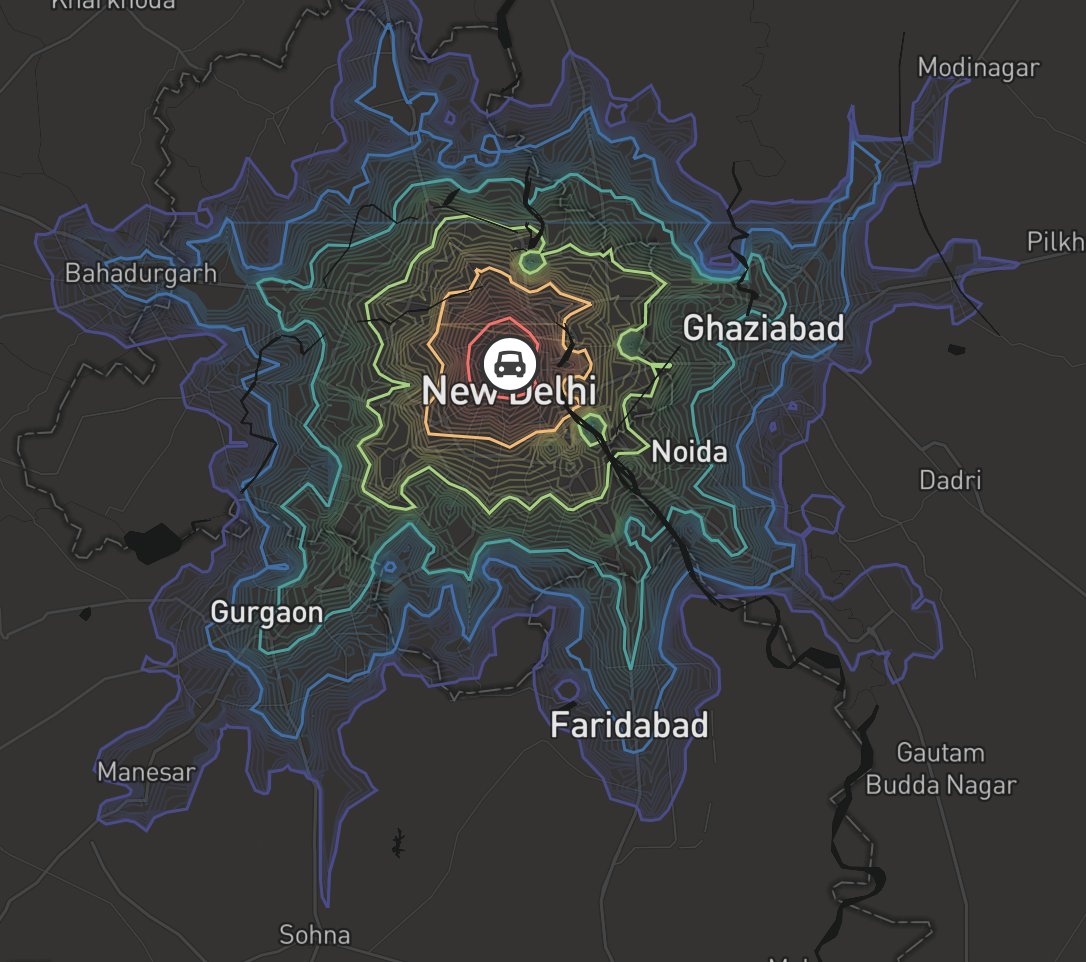
from heligeo import heliRouteService
apikey = ''
longtitude = [88.3639]
latitude = [22.5726]
transport_mode = "drive"
isochrone_data = heliRouteService.isochrone(apikey,latitude,longtitude,transport_mode)
Routing Service
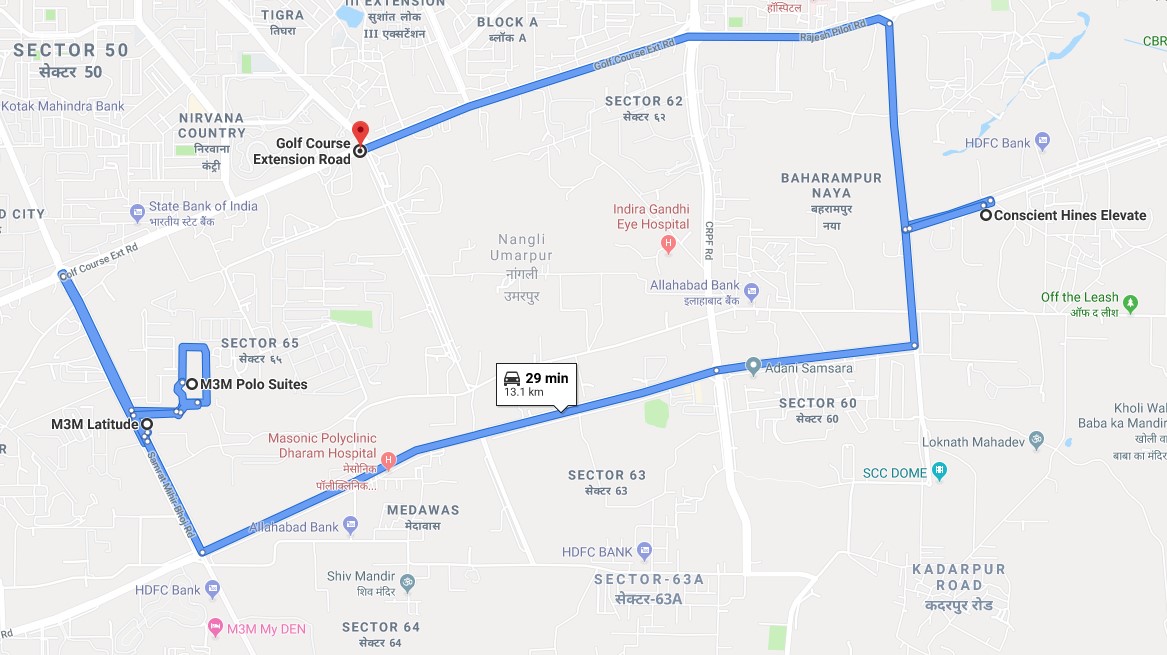
apikey = ''
transport_mode = "drive"
direction_coordinates = [[88.3639,22.5726],[72.8777,19.0760]] ### user can use multiple points
route_data = heliRouteService.route(apikey,direction_coordinates,transport_mode)
Basic Example Of Geoprocessing Service
heliGeoprocessingService.Union(),heliGeoprocessingService.Intersection()function accept multiple polygon data inside a list.- In this example we shown only 2 polygon data
Polygon Union Example
from heligeo import heliGeoprocessingService
apikey = ''
polygon1 = {"type": "FeatureCollection","features":[{
  "type": "Feature",
  "geometry": {
    "type": "Polygon",
    "coordinates": [[[77.4029103817493, 28.36918941103731, 0.0], [77.40184896262588, 28.3722403721131, 0.0][77.39922678901301, 28.37081966588294, 0.0], [77.40030856003351, 28.36816909494472, 0.0], [74029103817493, 28.36918941103731, 0.0]]]
  }}]}
polygon2 = {"type": "FeatureCollection","features":[{
      "type": "Feature",
      "geometry": {
        "type": "Polygon",
        "coordinates": [[[77.40486731638147, 28.36831967535351, 0.0], [77.40416140548453, 28.37080235923333, 0], [77.40218550684746, 28.    3699755298779, 0.0], [77.40187364471585, 28.36769815943599, 0.0], [740486731638147, 28.36831967535351, 0.0]]]
      }}]}
polygon_list = [polygon1,polygon2]
union_data = heliGeoprocessingService.Union(apikey,polygon_list)
Polygon Intersection Example
from heligeo import heliGeoprocessingService
apikey = ''
polygon1 = {"type": "FeatureCollection","features":[{
  "type": "Feature",
  "geometry": {
    "type": "Polygon",
    "coordinates": [[[77.4029103817493, 28.36918941103731, 0.0], [77.40184896262588, 28.3722403721131, 0.0][77.39922678901301, 28.37081966588294, 0.0], [77.40030856003351, 28.36816909494472, 0.0], [74029103817493, 28.36918941103731, 0.0]]]
  }}]}
polygon2 = {"type": "FeatureCollection","features":[{
      "type": "Feature",
      "geometry": {
        "type": "Polygon",
        "coordinates": [[[77.40486731638147, 28.36831967535351, 0.0], [77.40416140548453, 28.37080235923333, 0], [77.40218550684746, 28.    3699755298779, 0.0], [77.40187364471585, 28.36769815943599, 0.0], [740486731638147, 28.36831967535351, 0.0]]]
      }}]}
polygon_list = [polygon1,polygon2]
intersection_data = heliGeoprocessingService.Intersection(apikey,polygon_list)
PointBuffer Example
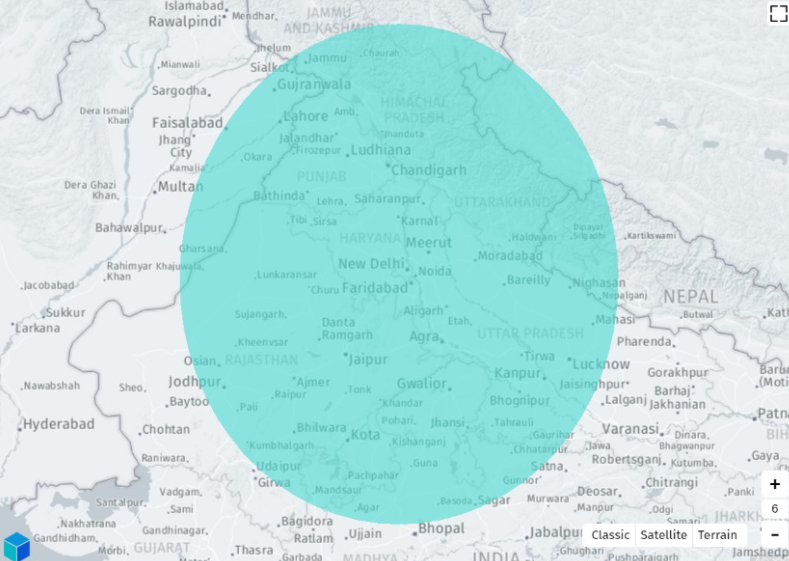
- point_list accept multiple points data
apikey = ''
point_list = [[88.3639,22.5726]] ### user can user multiple Point inside a list
area = 100  ### how area user want to conver from this point by default its meter
point_buffer_polygon=heliGeoprocessingService.PointBuffer(apikey,point_list,area)
CropPolygonusingLineString Example
- pp accept one polygon geojson data.
- ls accept only single LineString geojson data.
apikey = ''
pp = {"type":"FeatureCollection","features":[{"type":"Feature","geometry":{"type":"Polygon","coordinates":[[[73.1191291041643,25.952161948461686],[73.1200261730937,25.95228141045213],[73.11998606278118,25.95249650900002],[73.1205147037379,25.952710699675958],[73.12058570338387,25.952860896463314],[73.12191931762833,25.953218219496392],[73.12201576873873,25.95292092059184],[73.12389940677676,25.953301946008786],[73.12434583885353,25.952337442082705],[73.12331303549425,25.952100144258512],[73.12258837500113,25.952099041426823],[73.12231284277169,25.952120347130396],[73.12199795253532,25.952887517224518],[73.12231350066179,25.95207889035184],[73.12043239077273,25.951540309982462],[73.11918985318253,25.951225622673974],[73.1191291041643,25.952161948461686]]]},"properties":{"prop0":"value0","prop1":{"this":"that"}}}]

ls = {"type":"FeatureCollection","features":[{"type":"Feature","geometry":{"type":"LineString","coordinates":[[73.1200261730937,25.95228141045213],[73.12043239077273,25.951540309982462],[73.12043239077273,25.951540309982462]]},"properties":{"prop0":"value0","prop1":{"this":"that"}}}]}
linestring_buffer_polygon=heliGeoprocessingService.crop_polygon_using_linestring(apikey,pp,ls)
LineBuffer Example
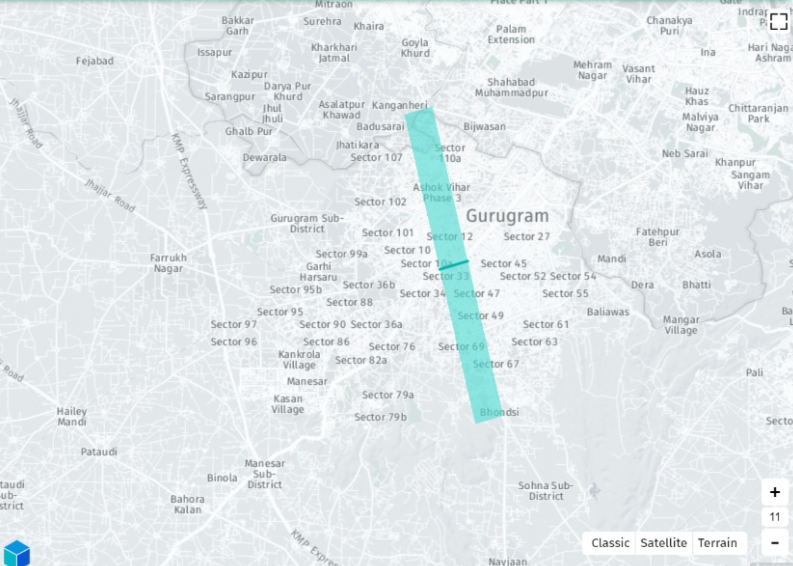
- linestring_point_list accept multiple linestring.
apikey = ''
linestring_point_list = [[[88.3639,22.5726],[88.4143,22.5797]],[[88.2636,22.5958],[88.4789,22.7248]]] ### usecan  user multiple Point inside a list
area = 100  ### how area user want to conver from this point by default its meter
linestring_buffer_polygon=heliGeoprocessingService.LineBuffer(apikey,linestring_point_list,area)
PointWithinPoly Example
apikey = ''
point_geojson_object = {"type":"FeatureCollection","features":[{"type":"Feature","geometry":                {"type":"Point","coordinates":[76.95513342,28.46301607]}}]}
polygon_list = [polygon1,polygon2]
point_inside_poly = heliGeoprocessingService.PointWithinPoly(apikey,point_geojson_object,polygon_list)
Polygon and Linestring WithinPoly Example
apikey = ''
pp = {} #polygon geojson data
cp = [{},{},{}] # list of multiple geometry data(Polygon,LineString)
res=heliGeoprocessingService.check_polygon_ls_within_poly(apikey,pp,cp)
LineBuffer Example
- linestring_point_list accept multiple linestring.
apikey = ''
linestring_point_list = [[[88.3639,22.5726],[88.4143,22.5797]],[[88.2636,22.5958],[88.4789,22.7248]]] ### usecan  user multiple Point inside a list
area = 100  ### how area user want to conver from this point by default its meter
linestring_buffer_polygon=heliGeoprocessingService.LineBuffer(apikey,linestring_point_list,area)
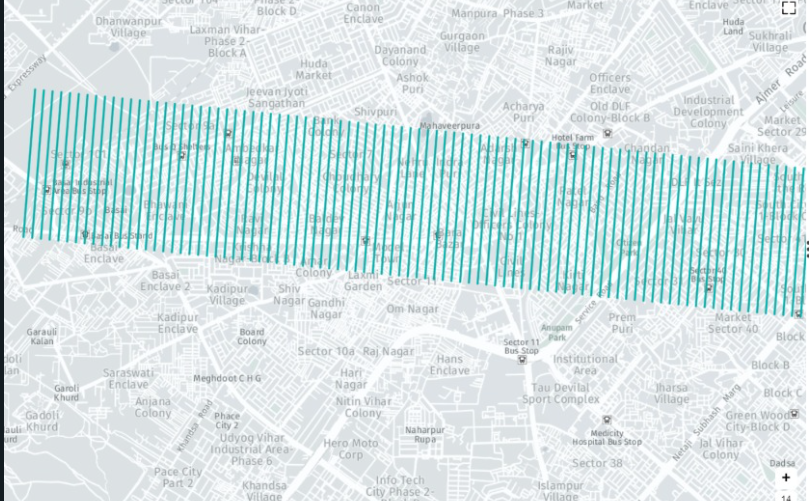
AliasLinestring Example
apikey = ''
linestring_geojson_object = {"type": "FeatureCollection","features":[{"type": "Feature","geometry{"type":"LineString",
    "coordinates": [
      [88.3639,22.5726],[88.4143,22.5797]
    ]}}]}
gap = 100 #gap between multiple linestring(meter)
quantity = 100 ## how many line string u need
alias_linestring_data = heliGeoprocessingService.AliasLinestring(apikey,linestring_geojson_object,gap,quantity)
CropGeometryData
CropGeofuction accept aPolygon GeoJsondata andcropother geometry data based on thePolygon Size.CropGeoacceptbb={}containPolygon Geojsondata in which size u want to crop other geometry andgd={[]}contain all the getometry data which u want tocropgdlistcontainPolygon,Linestringandpointdata. Data must beGeoJson format.CropGeosupported onlyPolygon,Linestringandpointdata inGeojsonformat
apikey = ''
bb = {"type":"FeatureCollection","features":[{"type":"Feature","geometry":{"type":"Polygon","coordinates":[[[76.76781345955712,30.524042786522788],[76.76658493660516,30.521411933136562],[76.76638374787312,30.520437335225605],[76.76812128413364,30.519991051100444],[76.76935817172217,30.5235212331106],[76.76781345955712,30.524042786522788]]]},"properties":{"PERIMETER":"1.166km","ENCLOSED_AREA":"0.0727sqkm"}}]}

gd = [{"type":"FeatureCollection","features":[{"type":"Feature","geometry":{"type":"LineString","coordinates":[[76.76605941690902,30.521077391710715],[76.76854013805993,30.52031431912859],[76.76854013805993,30.52031431912859]]},"properties":{"LENGTH":"252.68m","BEARING":"1093333.9"}},{"type":"Feature","geometry":{"type":"LineString","coordinates":[[76.76629027392768,30.521865657532633],[76.76849050129871,30.521044858531493],[76.768764809871,30.520962819202154],[76.768764809871,30.520962819202154]]},"properties":{"LENGTH":"257.8m","BEARING":"112514.9"}},{"type":"Feature","geometry":{"type":"LineString","coordinates":[[76.76897591153649,30.52205540468611],[76.76691180534269,30.522839498623096],[76.76691197785424,30.522849031168167]]},"properties":{"LENGTH":"217.4m","BEARING":"2935656.9"}},{"type":"Feature","geometry":{"type":"LineString","coordinates":[[76.76727709618594,30.523549659635112],[76.76936689485044,30.52278710560935],[76.76936689485044,30.52278710560935]]},"properties":{"LENGTH":"217.66m","BEARING":"1125115.1"}}]}]

crop_data = heliGeoprocessingService.CropGeo(apikey,bb,gd)
Polygon Grid Creation Example
PolyGridfunction acceptthreeparameterapikey,polygon_geo_json_dataandgrid-size.- Based on the grid size
PolyGridfunction break down theparent polyintosmall grids. PolyGridaccept onlypolygongeojson data.
apikey = ''

polygon_geo_json_data = {"type":"FeatureCollection","features":[{"type":"Feature","properties":{},"geometry":{"type":"Polygon","coordinates":[[[76.9720448,28.4914468],[76.9734664,28.490094],[76.9745038,28.4891069],[76.9777595,28.4865896],[76.9832406,28.4847617],[76.9877826,28.4817885],[76.9994099,28.4931639],[76.9958932,28.49571],[76.9958867,28.4995722],[76.993081,28.5026631],[76.9897562,28.5047863],[76.9854207,28.5071706],[76.979788,28.501845],[76.9762078,28.4984432],[76.9720448,28.4914468]]]}}]}

gridsize = 3 # in meter user change value as per user choice
poly_grid_data = heliGeoprocessingService.PolyGrid(apikey,polygon_geo_json_data,gridsize)
Find Polygon Center Point Example
-
PolyCenteraccepttwoparameterapikeyandlist_of_polygon_data=[polygeojson1,polygeojson1...n]. -
PolyCenterfunction accept onlymultiple polygon dataingeojsonformat. -
list_of_polygon_dataits a list of multiple polygon data that must be geojson format
apikey = ''

list_of_polygon_data = [{"type":"FeatureCollection","features":[{"type":"Feature","properties":{},"geometry":{"type":"Polygon","coordinates":[[[76.9720448,28.4914468],[76.9734664,28.490094],[76.9745038,28.4891069],[76.9777595,28.4865896],[76.9832406,28.4847617],[76.9877826,28.4817885],[76.9994099,28.4931639],[76.9958932,28.49571],[76.9958867,28.4995722],[76.993081,28.5026631],[76.9897562,28.5047863],[76.9854207,28.5071706],[76.979788,28.501845],[76.9762078,28.4984432],[76.9720448,28.4914468]]]}}]},{"type":"FeatureCollection","features":[{"type":"Feature","properties":{},"geometry":{"type":"Polygon","coordinates":[[[76.9720448,28.4914468],[76.9734664,28.490094],[76.9745038,28.4891069],[76.9777595,28.4865896],[76.9832406,28.4847617],[76.9877826,28.4817885],[76.9994099,28.4931639],[76.9958932,28.49571],[76.9958867,28.4995722],[76.993081,28.5026631],[76.9897562,28.5047863],[76.9854207,28.5071706],[76.979788,28.501845],[76.9762078,28.4984432],[76.9720448,28.4914468]]]}}]},{"type":"FeatureCollection","features":[{"type":"Feature","properties":{},"geometry":{"type":"Polygon","coordinates":[[[76.9720448,28.4914468],[76.9734664,28.490094],[76.9745038,28.4891069],[76.9777595,28.4865896],[76.9832406,28.4847617],[76.9877826,28.4817885],[76.9994099,28.4931639],[76.9958932,28.49571],[76.9958867,28.4995722],[76.993081,28.5026631],[76.9897562,28.5047863],[76.9854207,28.5071706],[76.979788,28.501845],[76.9762078,28.4984432],[76.9720448,28.4914468]]]}}]}]

poly_center_point = heliGeoprocessingService.PolyCenter(apikey,list_of_polygon_data)
Find distance between two Point Example
distance_between_pointaccept two parametersapikeyandlist of two pointdistance_between_pointsupport onlypointgeometry
apikey = ''
point1 = [23,45]
point2 = [24,46]
points = [point1,point2]
distance_btw = heliGeoprocessingService.distance_between_point(apikey,points)
Find bounding box geojson geometry Example
boundingbox_geojsonaccept two parametersapikeyandgeojson_data_of_geometryboundingbox_geojsonsupport all type of geometry Point, MultiPoint, LineString, MultiLineString, Polygon, MultiPolygon.- Output will be bounding box
Polygondata of geojson format
apikey = ''
geo_data = {
  "type": "FeatureCollection",
  "features": [
    {
      "type": "Feature",
      "geometry": {
        "type": "MultiPolygon",
        "coordinates": [
          [[[77.03171253204346, 28.45861799583438], [77.0447587966919, 28.458316159251893], [77.05158233642578, 28.451109554935286], [77.04231262207031, 28.444883558900028], [77.02840805053711, 28.450505838034935], [77.03171253204346, 28.45861799583438]]],[[[77.03707695007324, 28.455335476723302], [77.03630447387695, 28.452166051216853], [77.04136848449707, 28.45163780439558], [77.04145431518555, 28.455033630768483], [77.03707695007324, 28.455335476723302]]]
        ]
      },
      "properties": {
        "service_provider": "HELIWARE",
        "timestamp": "20",
        "color": "black",
        "stroke": "red",
        "stroke-opacity": 0.4,
        "stroke-width": 5,
        "rev":200000,
        "pop":20
      }
    }
  ]}
bounding_box_data = heliGeoprocessingService.boundingbox_geojson(apikey,geo_data)
Find area of multipolygons geometry Example
area_multipolygonaccept two parametersapikeyandgeojson_data_of_geometryarea_multipolygonsupported geometry Polygon, MultiPolygon.- output will be dictionary contain total area and unit of area, example: {"Area": poly_area,"Unit":"Meter Square(Sq m)"}
apikey = ''
geo_data = {
  "type": "FeatureCollection",
  "features": [
    {
      "type": "Feature",
      "geometry": {
        "type": "MultiPolygon",
        "coordinates": [
          [[[77.03171253204346, 28.45861799583438], [77.0447587966919, 28.458316159251893], [77.05158233642578, 28.451109554935286], [77.04231262207031, 28.444883558900028], [77.02840805053711, 28.450505838034935], [77.03171253204346, 28.45861799583438]]],[[[77.03707695007324, 28.455335476723302], [77.03630447387695, 28.452166051216853], [77.04136848449707, 28.45163780439558], [77.04145431518555, 28.455033630768483], [77.03707695007324, 28.455335476723302]]]
        ]
      },
      "properties": {
        "service_provider": "HELIWARE",
        "timestamp": "20",
        "color": "black",
        "stroke": "red",
        "stroke-opacity": 0.4,
        "stroke-width": 5,
        "rev":200000,
        "pop":20
      }
    }
  ]}
geo_area = heliGeoprocessingService.area_multipolygon(apikey,geo_data)
Find linear nearest neighour point from given point Example
linear_nearest_neighouraccept three parametersapikey,point_dataandmark_pointmark_pointis a point from which to find nearest point linearly frompoint_datapoint_datainlinear_nearest_neighouronly supportpointgeometry.- output will be geojson format data of nearest
pointgeometry with distance property
apikey = ''
point_data = {"type": "FeatureCollection",
  "features": [{"type": "Feature",
      "properties": {},
      "geometry": {
        "type": "Point",
        "coordinates": [
            40.8193359375,
            25.64152637306577]},
     "properties": {
        "name": 10
      }},
    {"type": "Feature",
      "properties": {},
      "geometry": {
        "type": "Point",
        "coordinates": [
            41.17968749994,
            23.644524198573688]},
     "properties": {
        "name": 20
      }},
    {"type": "Feature",
      "properties": {},
      "geometry": {
        "type": "Point",
        "coordinates": [
            44.4130859375,
            25.760319754713887]},
     "properties": {
        "name": 30
      }}]}
mark_point = [42.6160,24.7518]

nearest_point = heliGeoprocessingService.linear_nearest_neighour(apikey,point_data,mark_point)
Find points withen Polygon based on Polygon properties Example
point_within_polygonaccept three parametersapikey,polygon_dataandscale- Input is geojson data of polygon or multipolygon and property
scaleto render points based on properties scaleis ['{property name}':{scale_value}], same property name should also in polygon property, wherescale_valueinscaleandpolygon_datamust be integer.- output will be in geojson format data of all point geometry within a polygon/multipolygon with properties
polygon_dataonly supportPolygonandMultiPolygongeometry.
apikey = ''
polygon_data = {"type": "FeatureCollection",
  "features": [{"type": "Feature",
      "geometry": {
        "type": "Polygon",
        "coordinates": [
          [[77.03968405723572,
              28.448081502646776],
            [77.03970551490784,
              28.44760040224489],
            [77.04024195671082,
              28.447562668787487],
            [77.04019904136658,
              28.448090935966118],
            [77.03968405723572,
              28.448081502646776]
          ]]},
	  "properties": {
        "service_provider": "HELIWARE",
        "timestamp": "5",
        "color": "black",
        "stroke": "red",
        "stroke-opacity": 0.4,
        "stroke-width": 5,
        "rev":800000,
        "area":12
      }}]}
scale = {"area":5}
points_poly = heliGeoprocessingService.point_within_polygon(apikey,polygon_data,scale)
- output has 2 point in polygon, polygon has area 12 and scale provide area 5, points define numbers of parts in polygon with area 5
Create line arc from point Example
line_arc_from_pointaccept three parametersapikey,point_dataandmeasureline_arc_from_pointreturn geometry data to Creates a circular arc of the given radius and center point between angle1 and angle2, angle work in positive clockwise.- Input is geojson data of point and measurements of radius, angle1, angle2 in one list
- example of measurements will be measure=[{raduis},{angle1},{angle2}]
- output will be in geojson format of all linestring geometry data for creating line arc
point_dataonly supportPointgeometry.
apikey = ''
point_data = {"type": "FeatureCollection",
  "features": [{"type": "Feature",
      "geometry": {
        "type": "Polygon",
        "coordinates": [
          [[77.03968405723572,
              28.448081502646776],
            [77.03970551490784,
              28.44760040224489],
            [77.04024195671082,
              28.447562668787487],
            [77.04019904136658,
              28.448090935966118],
            [77.03968405723572,
              28.448081502646776]
          ]]},
	  "properties": {
        "service_provider": "HELIWARE",
        "timestamp": "5",
        "color": "black",
        "stroke": "red",
        "stroke-opacity": 0.4,
        "stroke-width": 5,
        "rev":800000,
        "area":12
      }}]}
measure = [0.1,10,20]
line_arc = heliGeoprocessingService.line_arc_from_point(apikey,point_data,measure)
Find nearest point along line Example
nearest_point_along_lineaccept three parametersapikey,line_dataandurlnearest_point_along_linereturn point geometry data of points which is nearest to line and also along to line, where line belongs toline_dataline_datais geojson ofLineStringand url containPointgeometry data- output will be in geojson format of all
pointgeometry data which is nearest and along toLineString
apikey = ''
line_data = {"type": "FeatureCollection",
  "features": [{"type": "Feature",
      "properties": {},
      "geometry": {
        "type": "LineString",
        "coordinates": [
        [78.0029296875,
            25.799891182088334],
          [77.51953125,
            19.269665296502332]]
      }}]}
url = "https://raw.githubusercontent.com/mukulsharma97/Heliware_Visualization/main/assets/point_along.geojson"
n_point = heliGeoprocessingService.nearest_point_along_line(apikey,line_data,url)
Basic Example of File conversion Service
shp_to_geojson Example
shp_fileinput shpe file name with complete pathgeojson_fileoutput geojson file name with complete path
from heligeo import heliconverter
shp_file = ".../heligeo_converter/lines.shp"
geojson_file = ".../heligeo_converter/shptogeo.geojson"
heliconverter.shp_to_geojson(shp_file,geojson_file)
kml_to_geojson Example
kmlfinput kml file name with complete pathgeofoutput geojson file path
kmlf = ".../heligeo_converter/kml.kml"
geof = ".../heligeo_converter/kmltogeo"
heliconverter.kml_to_geojson(kmlf,geof)
geojson_to_kml Example
geofinput geojson file name with complete pathkmlfoutput kml file name with complete path
kmlf = ".../heligeo_converter/geotokml.kml"
geof = ".../heligeo_converter/isochrone.geojson"
heliconverter.geojson_to_kml(geof,kmlf)
obj_to_geojson Example
objinput object file name with complete pathgeofoutput geojson file name with complete path
obj = ".../heligeo_converter/mesh.obj"
geof = ".../heligeo_converter/objtogeo.geojson"
heliconverter.obj_to_geojson(obj,geof)
geo_to_dxf Example
geofinput geojson file name with complete pathdwgfoutput dxf file name without extension and with complete path
geof = ".../heligeo_converter/multilinestring.geojson"
dwgf = ".../heligeo_converter/poly_line_point"
heliconverter.geo_to_dxf(geof,dwgf)
Basic Example Of Visualization Service
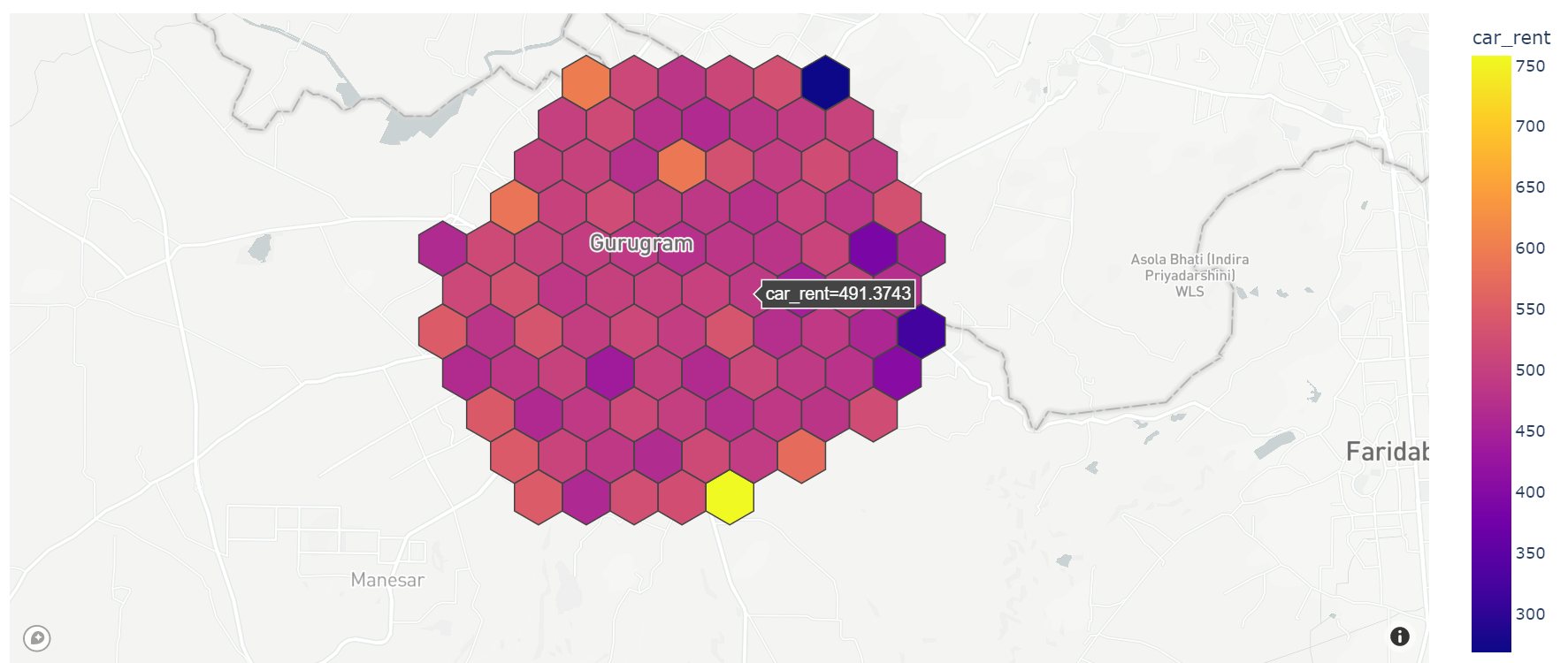
Hexagon Map
- User Can Select Different type of
BaseMapLikebasic,streets,outdoors,light,dark,satellite, orsatellite-streets - User can Create
hex_mapfrom.geojonand.csvfile - File Must be contain
geometrydata hex_map_from_geojsonfuntion accepty.geojsonfile with other parameter andhex_map_from_csvaccept.csvfile with other parameter.hex_map_from_geojsonacceptapikey,file_path,hover_properties,basemap_style,hexagon_quantity,zoom_levelhex_map_from_csvacceptapikey,file_path,column name from csv file that contain latitude value,column name from csv file that contain longtitude value,hover_properties,basemap_style,hexagon_quantity,zoom_level- As of Now
heligeomodule able to visualize onlyone propertiewith their corrospondingLat,Longvalue Base_map=''- Use
res.show()to visualize the data into web. - for
hex_map_from_geojsonuser dont need to pass this two parametercolumn name that contain latitude value,column name that contain longtitude valuewe create these two value as our own.
Example
from heligeo import heliVisualizationService
apikey=''
file_path = ''
latitude_value_col_name = ''
longtitude_value_col_name = ''
hover_properties = ''
base_map = ''
hexagan_quantity = 20
zoom_level = 16
h = heliVisualizationService.hex_map_from_csv(apikey,file_path,latitude_value_col_name,longtitude_value_col_name,hover_properties,base_map,hexagan_quantity,zoom_level)
h.show()

h = heliVisualizationService.hex_map_from_geojson(apikey,file_path,hover_properties,base_map,hexagan_quantity,zoom_level)
h.show()
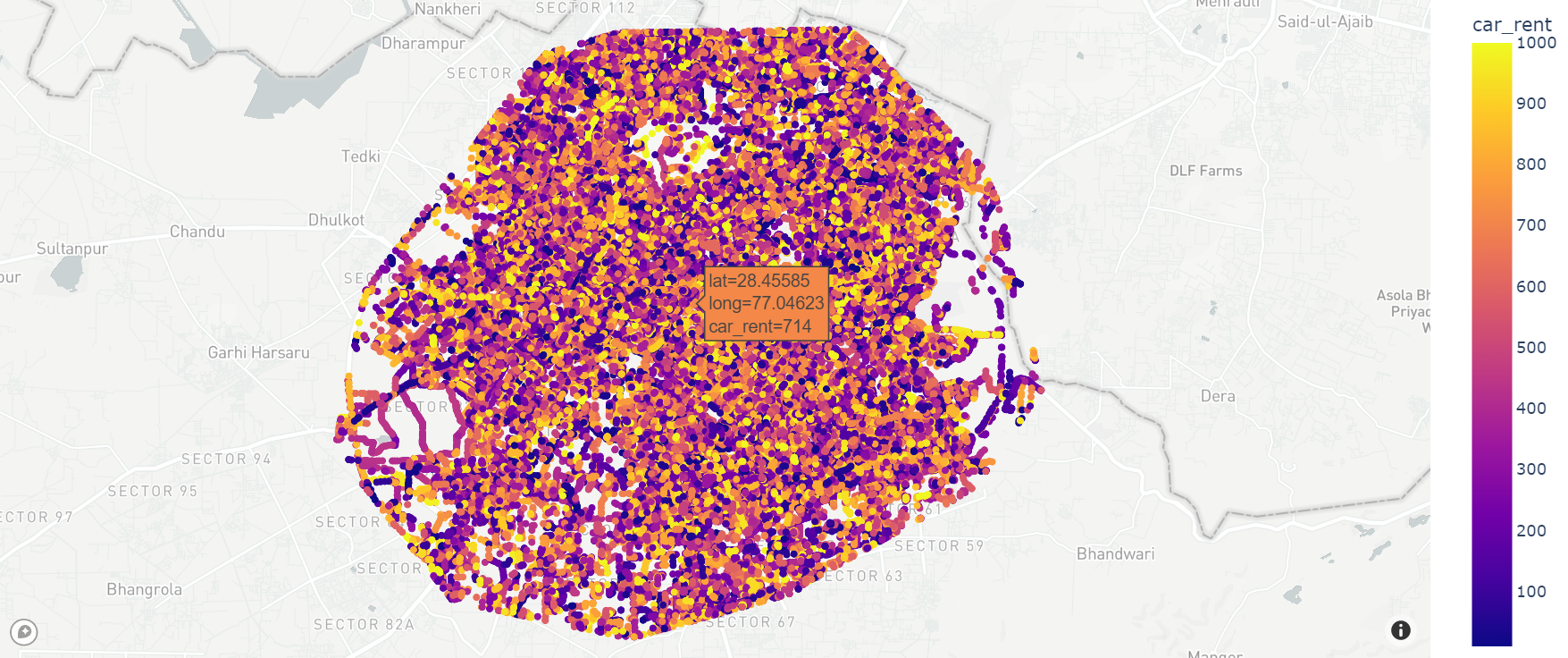
Scatter Map
-
User Can Select Different type of
BaseMapLikebasic,streets,outdoors,light,dark,satellite, orsatellite-streets -
User can Create
scatter_mapfrom.geojsonand.csvfile -
File Must be contain
geometrydata -
scatter_map_from_geojsonfuntion accept.geojsonfile with other parameter andscatter_map_from_csvaccept.csvfile with other parameter. -
scatter_map_from_geojsonacceptapikey,file_path,hover_properties,basemap_style,zoom_level -
scatter_map_from_csvacceptapikey,file_path,column name from csv file that contain latitude value,column name from csv file that contain longtitude value,hover_properties,basemap_style,zoom_level -
As of Now
heligeoVisualizationmodule able to visualize onlyone propertiewith their corrospondingLat,Longvalue -
Use
res.show()to visualize the data into web. -
for
scatter_map_from_geojsonuser dont need to pass this two parametercolumn name that contain latitude value,column name that contain longtitude valuewe create these two value as our own.
Example
from heligeo import heliVisualizationService
apikey=''
file_path = ''
latitude_value_col_name = ''
longtitude_value_col_name = ''
hover_properties = ''
base_map = ''
zoom_level = 16
h = heliVisualizationService.scatter_map_from_csv(apikey,file_path,latitude_value_col_name,longtitude_value_col_name,hover_properties,base_map,zoom_level)
h.show()

h = heliVisualizationService.scatter_map_from_geojson(apikey,file_path,hover_properties,base_map,zoom_level)
h.show()
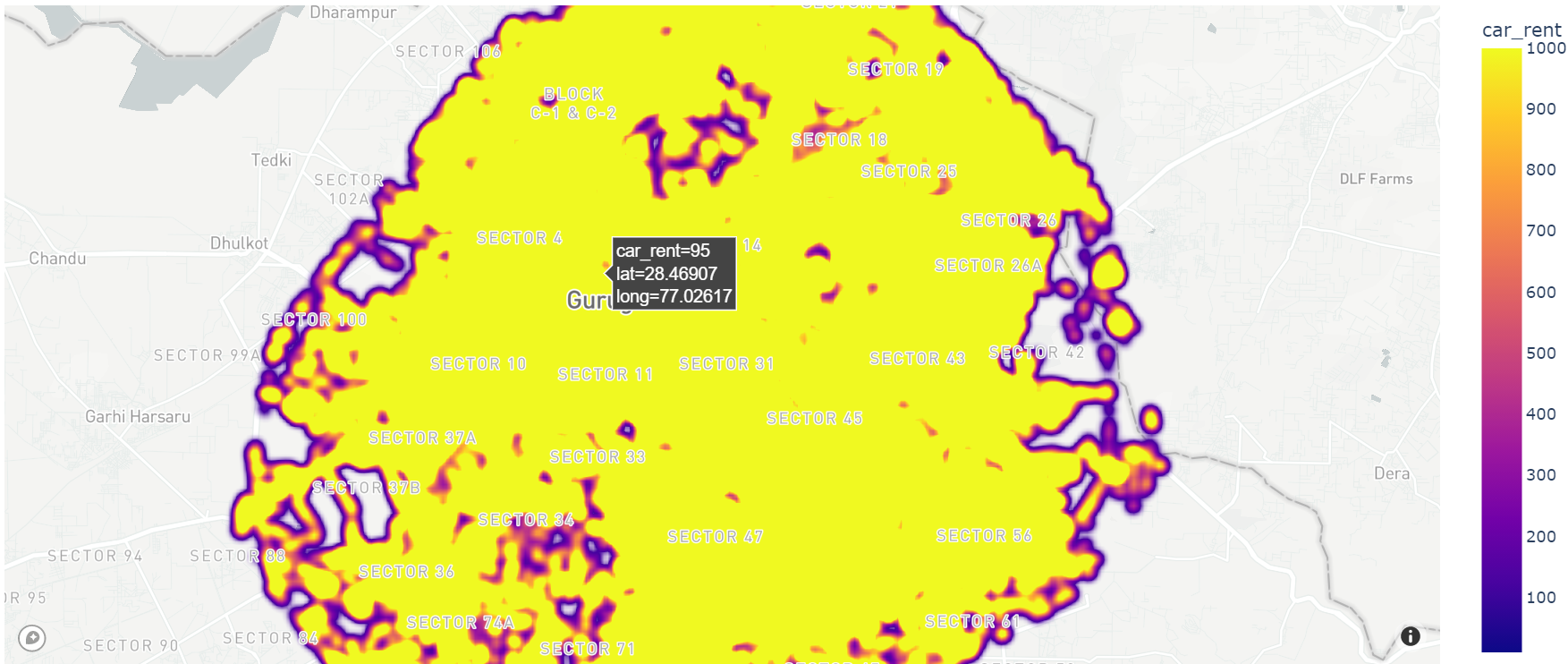
Density Map
-
User Can Select Different type of
BaseMapLikebasic,streets,outdoors,light,dark,satellite, orsatellite-streets -
User can Create
density_mapfrom.geojsonand.csvfile -
File Must be contain
geometrydata -
density_map_from_geojsonfuntion accept.geojsonfile with other parameter anddensity_map_from_csvaccept.csvfile with other parameter. -
density_map_from_geojsonacceptapikey,file_path,hover_properties,basemap_style,zoom_level -
density_map_from_csv
acceptapikey,file_path,column name from csv file that contain latitude value,column name from csv file that contain longtitude value,hover_properties,basemap_style,zoom_level` -
As of Now
heligeoVisualizationmodule able to visualize onlyone propertiewith their corrospondingLat,Longvalue -
Use
res.show()to visualize the data into web. -
for
density_map_from_geojsonuser dont need to pass this two parametercolumn name that contain latitude value,column name that contain longtitude valuewe create these two value as our own.
Example
from heligeo import heliVisualizationService
apikey=''
file_path = ''
latitude_value_col_name = ''
longtitude_value_col_name = ''
hover_properties = ''
base_map = ''
zoom_level = 16
h = heliVisualizationService.density_map_from_csv(apikey,file_path,latitude_value_col_name,longtitude_value_col_name,hover_properties,base_map,zoom_level)
h.show()

h = heliVisualizationService.density_map_from_geojson(apikey,file_path,hover_properties,base_map,zoom_level)
h.show()
Line Map
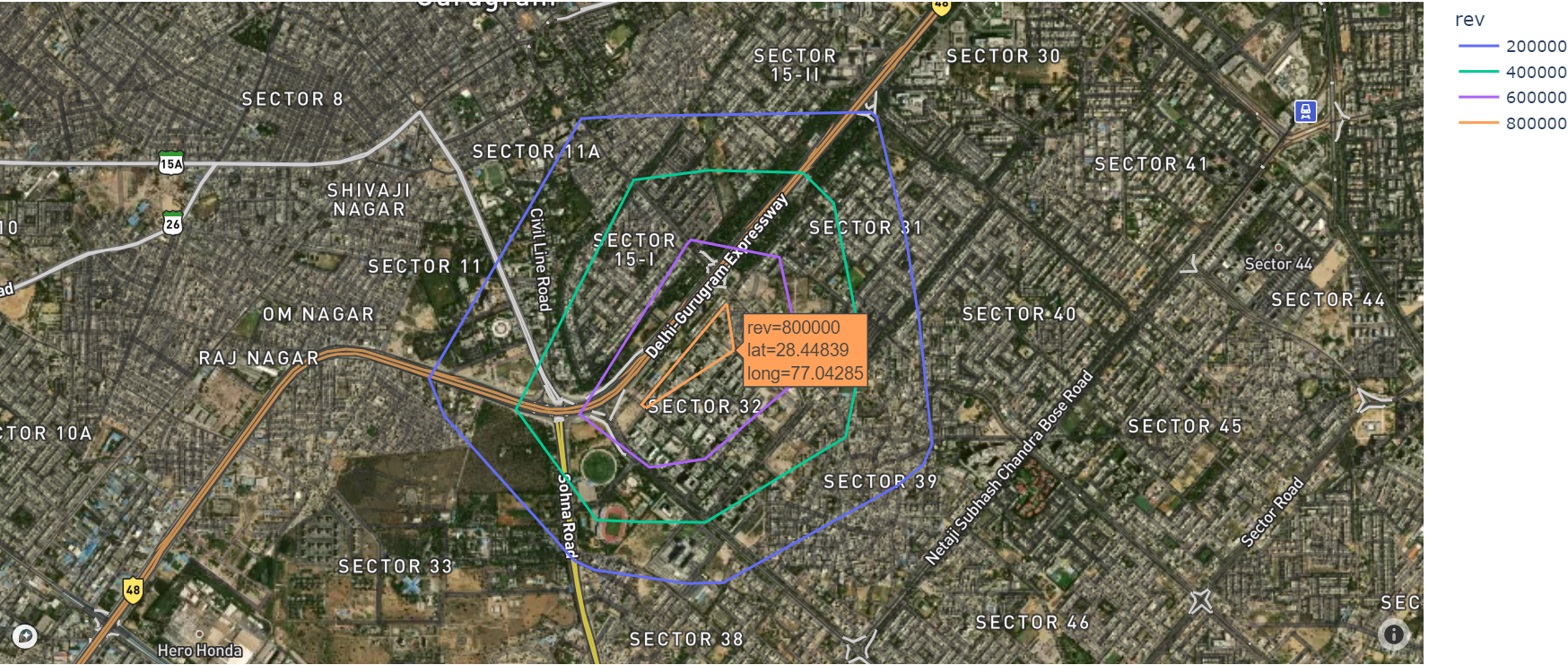
- User Can Select Different type of
BaseMapLikebasic,streets,outdoors,light,dark,satellite, orsatellite-streets - User can Create
line_mapfrom.geojson. line_map_from_geojsonfuntion accept.geojsonfile with other parameter.density_map_from_geojsonacceptapikey,file_path,hover_properties,basemap_style,zoom_level- As of Now
heligeoVisualizationmodule able to visualize onlyone propertiewith their corrospondingLat,Longvalue - Use
res.show()to visualize the data into web.
Example
from heligeo import heliVisualizationService
apikey=''
file_path = ''
hover_properties = ''
base_map = ''
zoom_level = 15
h = heliVisualizationService.line_map_from_geojson(apikey,file_path,hover_properties,base_map,zoom_level)
h.show()
Fill Geometry With Color
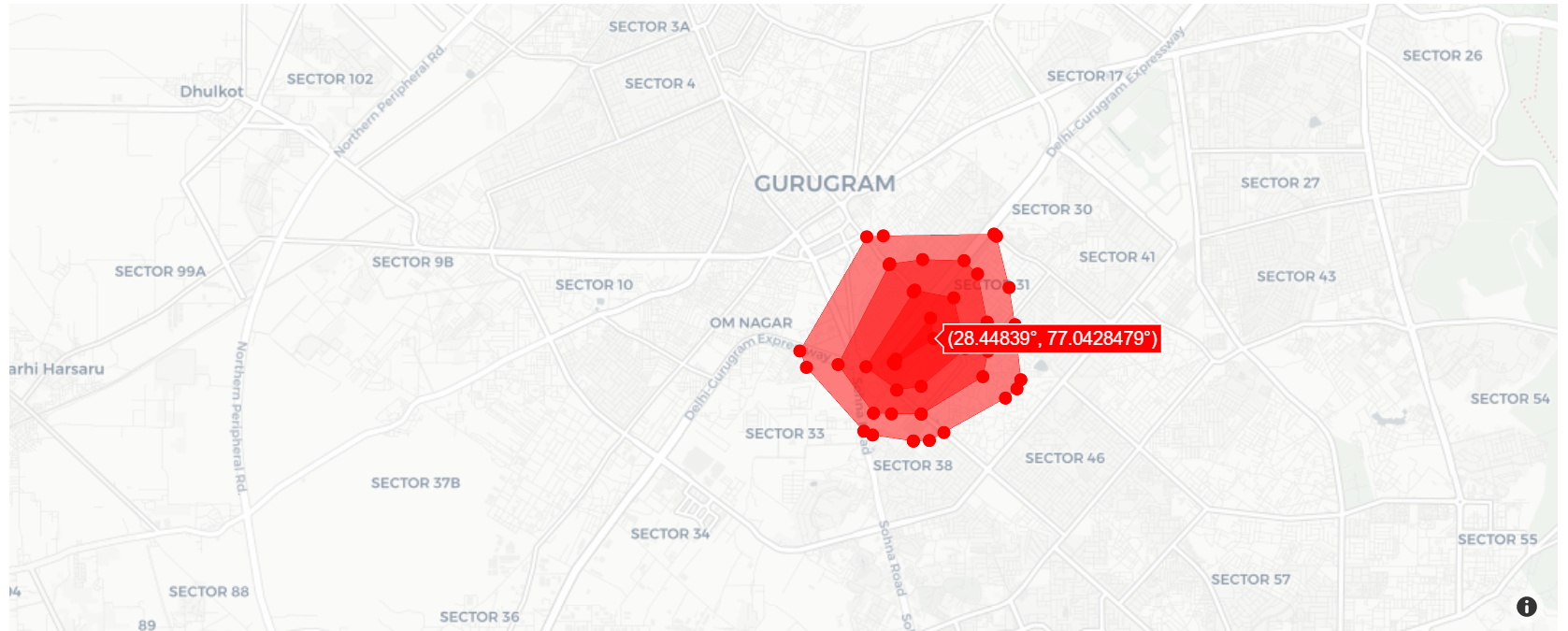
- User Can Select Different type of
BaseMapLikeopen-street-map,carto-positron,carto-darkmatter,stamen-terrain,stamen-tonerorstamen-watercolor - User can fill a
Geometrywith different color andVisualizeon map. fill_geo_map_from_geojsonfuntion accept.geojsonfile with other parameter.fill_geo_map_from_geojsonacceptapikey,file_path,color,basemap_style,zoom_level- As of Now
heligeoVisualizationmodule able to visualize onlyone propertiewith their corrospondingLat,Longvalue - Use
res.show()to visualize the data into web.
Example
from heligeo import heliVisualizationService
apikey=''
file_path = ''
color = ''
base_map = ''
zoom_level = 15
h = heliVisualizationService.fill_geo_map_from_geojson(apikey,file_path,color,base_map,zoom_level)
h.show()
Visualization with filteration
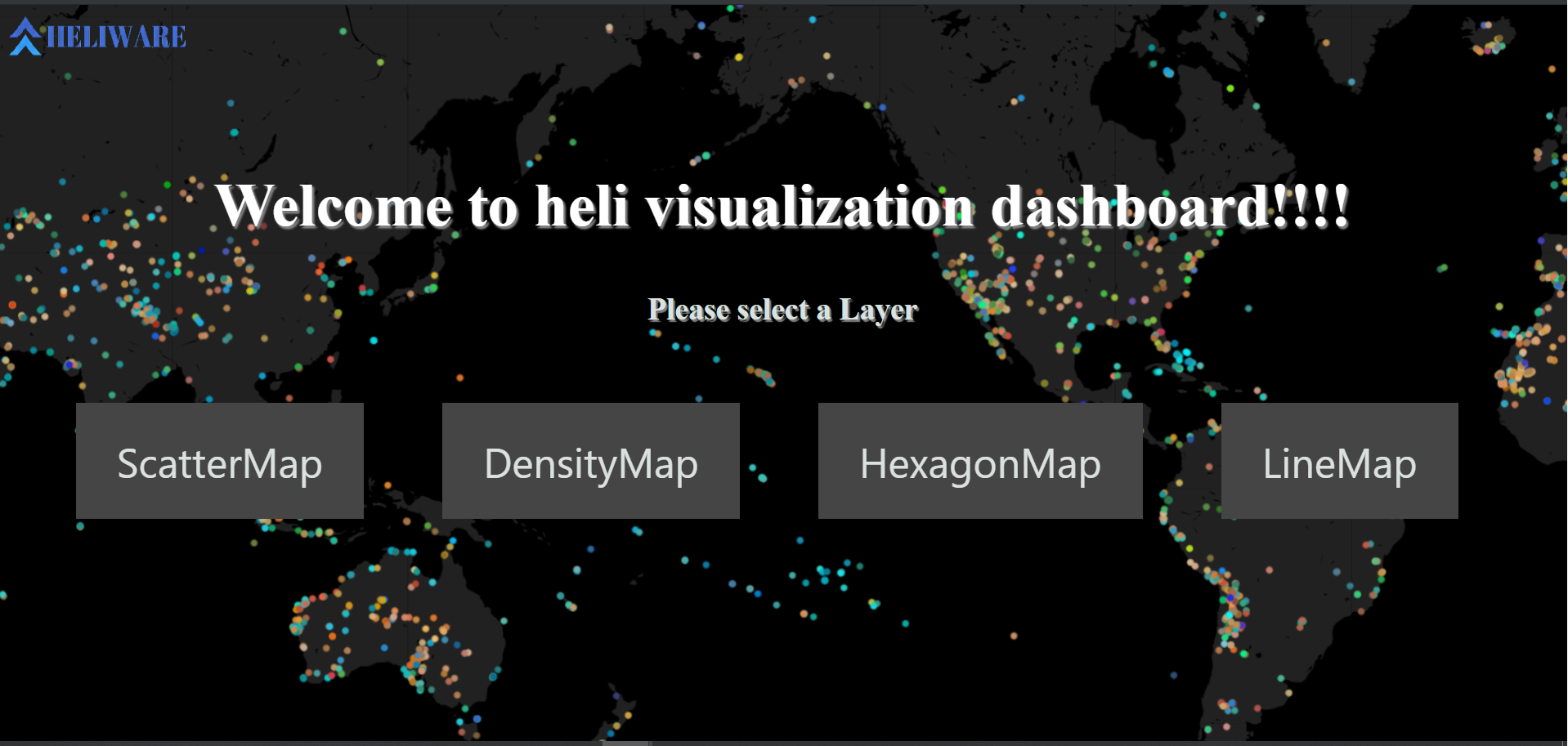
- As of now our module accept
10 features,filterationfunctionality - once you call the module its automatically create localserver localhost:8085
- Paste the local host address on browser
- Select a Map type
visualization from geojson
- User Can Select Different type of
BaseMapLikebasic,streets,outdoors,light,dark,satellite, orsatellite-streets - User can filter the data in real time
visualization_from_geojsonfunction acceptfile_path,hover_properties,BaseMap(optional)
Example
from heligeo import heliVisualizationWithFilteration
file_path = '' ## local csv file path
hover_properties = '' ## based on this property our module will create map
heliVisualizationWithFilteration.visualization_from_geojson(file_path,hover_properties)
visualization from csv
- User Can Select Different type of
BaseMapLikebasic,streets,outdoors,light,dark,satellite, orsatellite-streets - once you call the module its automatically create localserver localhost:8085
- User can filter the data in real time
visualization_from_geojsonfunction acceptfile_path,lat_column_name,long_column_name,hover_properties,BaseMap(optional)
Example
from heligeo import heliVisualizationWithFilteration
file_path = '' ## local csv file path
lat_column_name = ''
long_column_name = ''
hover_properties = '' ## based on this property map will create

heliVisualizationWithFilteration.visualization_from_csv(file_path,lat_column_name,long_column_name,hover_properties)
License
© 2021 HELIWARE
This repository is licensed under the MIT license. See LICENSE for details.
Release history Release notifications | RSS feed


Download files
Download the file for your platform. If you're not sure which to choose, learn more about installing packages.
Source Distribution
Built Distribution
Filter files by name, interpreter, ABI, and platform.
If you're not sure about the file name format, learn more about wheel file names.
Copy a direct link to the current filters
File details
Details for the file heligeo-1.1.10.tar.gz.
File metadata
- Download URL: heligeo-1.1.10.tar.gz
- Upload date:
- Size: 34.9 kB
- Tags: Source
- Uploaded using Trusted Publishing? No
- Uploaded via: twine/3.8.0 pkginfo/1.10.0 readme-renderer/34.0 requests/2.27.1 requests-toolbelt/1.0.0 urllib3/1.26.19 tqdm/4.64.1 importlib-metadata/4.8.3 keyring/23.4.1 rfc3986/1.5.0 colorama/0.4.5 CPython/3.6.13
File hashes
| Algorithm | Hash digest | |
|---|---|---|
| SHA256 |
0952b78b2ad3b571708ca2745599e0fb0b241d3eff79e272e1f203a6f24b8d3f
|
|
| MD5 |
97dd2bae96fa24f5bbf170866819413d
|
|
| BLAKE2b-256 |
5e225af5c2223f29bcab71d2e08020d21ab9063533a57fb2a8370c229f170c96
|
File details
Details for the file heligeo-1.1.10-py3-none-any.whl.
File metadata
- Download URL: heligeo-1.1.10-py3-none-any.whl
- Upload date:
- Size: 21.7 kB
- Tags: Python 3
- Uploaded using Trusted Publishing? No
- Uploaded via: twine/3.8.0 pkginfo/1.10.0 readme-renderer/34.0 requests/2.27.1 requests-toolbelt/1.0.0 urllib3/1.26.19 tqdm/4.64.1 importlib-metadata/4.8.3 keyring/23.4.1 rfc3986/1.5.0 colorama/0.4.5 CPython/3.6.13
File hashes
| Algorithm | Hash digest | |
|---|---|---|
| SHA256 |
46d51e63d1e15b7ff66cf14759e90da45c88b0d6265b60aa89725fe8bb83660b
|
|
| MD5 |
52f6ec1d679f66f424c5f3d19f8e8068
|
|
| BLAKE2b-256 |
d8966af20730f58dbc6afebfdde941975d0995e899dd6d078be11a603d356d00
|






