
higgsfield - multi node training without crying
Now you can setup LLaMa2 70b SFT in 5 minutes.

Install
$ pip install higgsfield
Why?
- easy to setup - 5 minutes to setup your environment and start training on your nodes.
- easy to use - 5 lines of code to define an experiment.
- easy to scale - 5 minutes to add a new node.
- easy to reproduce - 5 minutes to reproduce an experiment.
- easy to track - 5 minutes to track your experiments.
Train example
That's all you have to do in order to train LLaMa in a distributed setting:
from higgsfield.llama import Llama70b
from higgsfield.loaders import LlamaLoader
from higgsfield.experiment import experiment

import torch.optim as optim
from alpaca import get_alpaca_data

@experiment("alpaca")
def train(params):
    model = Llama70b(zero_stage=3, fast_attn=False, precision="bf16")

    optimizer = optim.AdamW(model.parameters(), lr=1e-5, weight_decay=0.0)

    dataset = get_alpaca_data(split="train")
    train_loader = LlamaLoader(dataset, max_words=2048)

    for batch in train_loader:
        optimizer.zero_grad()
        loss = model(batch)
        loss.backward()
        optimizer.step()

    model.push_to_hub('alpaca-70b')
How it's all done?
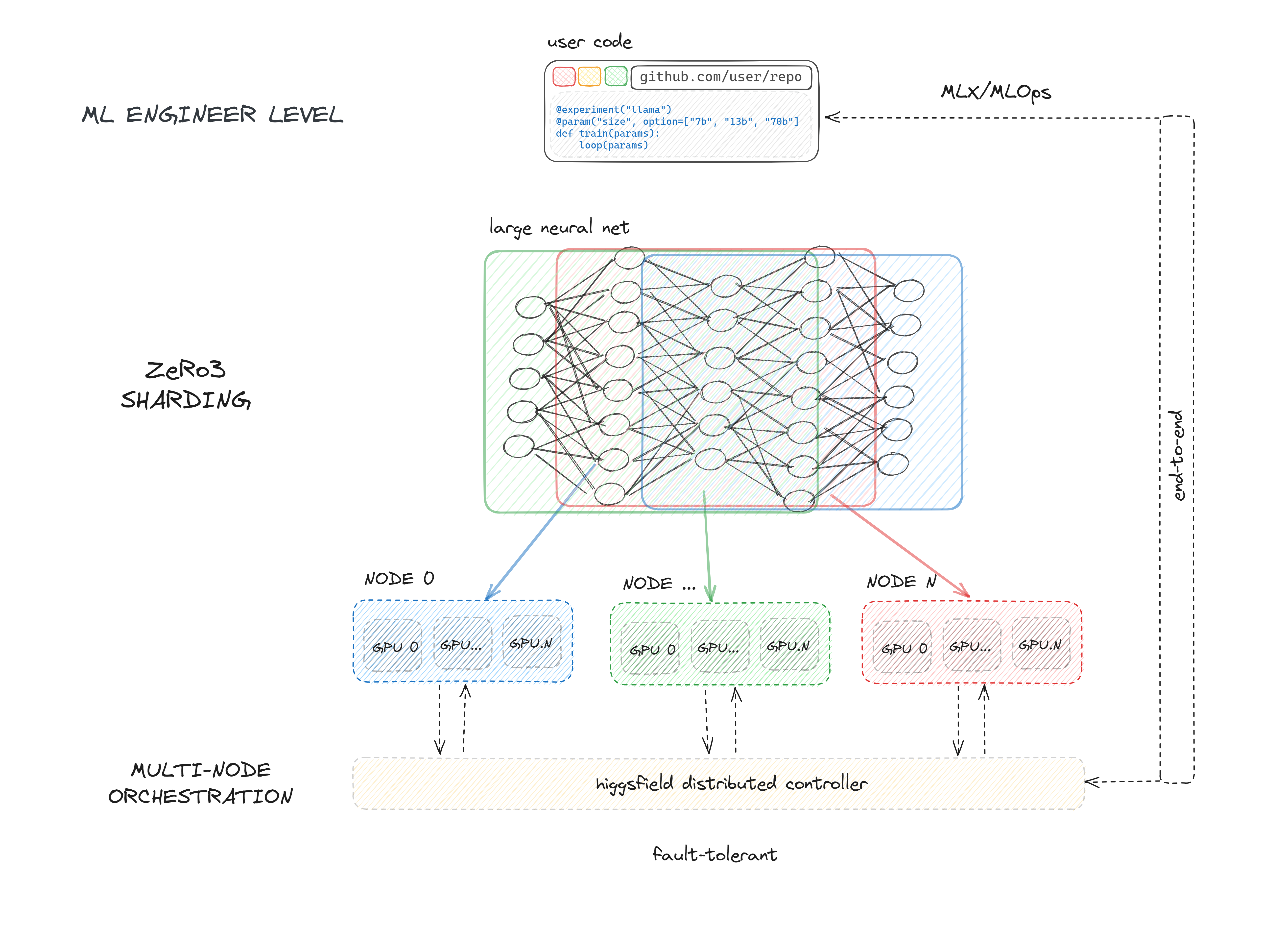
- We install all the required tools in your server (Docker, your project's deploy keys, higgsfield binary).
- Then we generate deploy & run workflows for your experiments.
- As soon as it gets into Github, it will automatically deploy your code on your nodes.
- Then you access your experiments' run UI through Github, which will launch experiments and save the checkpoints.
Design
We follow the standard pytorch workflow. Thus you can incorporate anything besides what we provide, deepspeed, accelerate, or just implement your custom pytorch sharding from scratch.
Enviroment hell
No more different versions of pytorch, nvidia drivers, data processing libraries. You can easily orchestrate experiments and their environments, document and track the specific versions and configurations of all dependencies to ensure reproducibility.
Config hell
No need to define 600 arguments for your experiment. No more yaml witchcraft. You can use whatever you want, whenever you want. We just introduce a simple interface to define your experiments. We have even taken it further, now you only need to design the way to interact.
Compatibility
We need you to have nodes with:
- Ubuntu
- SSH access
- Non-root user with sudo privileges (no-password is required)
Clouds we have tested on:
- LambdaLabs
- FluidStack
Feel free to open an issue if you have any problems with other clouds.
Getting started
Setup
Here you can find the quick start guide on how to setup your nodes and start training.
- Initialize the project
- Setup the environment
- Setup git
- Time to setup your nodes!
- Run your very first experiment
- Fasten your seatbelt, it's time to deploy!
Tutorial
API for common tasks in Large Language Models training.
- Working with distributed model
- Preparing Data
- Optimizing the Model Parameters
- Saving Model
- Training stabilization techniques
- Monitoring
| Platform | Purpose | Estimated Response Time | Support Level |
|---|---|---|---|
| Github Issues | Bug reports, feature requests, install issues, usage issues, etc. | < 1 day | Higgsfield Team |
| For staying up-to-date on new features. | Daily | Higgsfield Team | |
| Website | Discussion, news. | < 2 days | Higgsfield Team |
2 maintainers


Metadata
2 maintainers
Release files for higgsfield 0.0.2
For a detailed explanation of source distributions (sdists) and built distributions (wheels), please see the package formats documentation.
Source distribution (sdist)
| File | Size | Uploaded | Provenance | Actions |
|---|---|---|---|---|
| higgsfield-0.0.2.tar.gz | 318.1 kB | Without provenance | Details for higgsfield-0.0.2.tar.gz |
Built distribution (wheel)
| File | Interpreter | ABI | Platform | Actions Reset |
|---|---|---|---|---|
| higgsfield-0.0.2-py3-none-any.whl | Python 3 | none | any | Details for higgsfield-0.0.2-py3-none-any.whl |
Total release size: 651.4 kB
Release files / higgsfield-0.0.2.tar.gz
| Download URL | higgsfield-0.0.2.tar.gz |
|---|---|
| Size | 318.1 kB |
| Tags | Source |
|
SHA-256 checksum How to use checksums |
937c82d4f16851cdfe032fbfb43ef8e7921216b2580767cc3d702ed900623dba
|
|
BLAKE2b-256 checksum How to use checksums |
338e4d0773c44bc5ecd764ded713d23ba120fa2fd30bbf9813f3e56475635522
|
| Upload date | |
|
Uploaded using Trusted Publishing? What is trusted publishing? |
No |
| Uploaded via |
poetry/1.6.1 CPython/3.10.12 Linux/5.15.123.1-microsoft-standard-WSL2
|
Release files / higgsfield-0.0.2-py3-none-any.whl
| Download URL | higgsfield-0.0.2-py3-none-any.whl |
|---|---|
| Size | 333.3 kB |
| Tags | Python 3 |
|
SHA-256 checksum How to use checksums |
80dbf1bf9c0b513a0b3a325ff4df6d3e70dec50392ba526bcffdde1b39955032
|
|
BLAKE2b-256 checksum How to use checksums |
391c7ccf7e575281894f80e11eafbef7f67ff563a8e779273616ac7bea0763a2
|
| Upload date | |
|
Uploaded using Trusted Publishing? What is trusted publishing? |
No |
| Uploaded via |
poetry/1.6.1 CPython/3.10.12 Linux/5.15.123.1-microsoft-standard-WSL2
|
Security for higgsfield 0.0.2
Provenance
Provenance describes where a file came from. On PyPI, provenance is shared via attestations, which provide a verifiable record of the build or publishing details. View details, limitations and caveats.
No provenance found
None of the files in this release were uploaded with provenance metadata.
A note on package security
PyPI is a repository for distributing packages, not a service for auditing them. While third-party security researchers and our staff do their best to detect and remove malicious packages, PyPI cannot guarantee the quality, security or suitability of any given package.
To learn more about protecting yourself from malicious actors, visit our package security documentation.














