






Hikari-ChatExporter
Export Discord chats with your hikari bots!
Installation
To install the library to your virtual environment, for bot usage, run the command:
pip install hikari-chat-exporter
To clone the repository locally, run the command:
git clone https://github.com/EgehanKilicarslan/Hikari-ChatExporter
Usage
There are currently 3 methods (functions) to chat-exporter which you can use to export your chat.
Expand the blocks below to learn the functions, arguments and usages.
Basic Usage
.quick_export() is the simplest way of using chat-exporter.
Using the quick_export function will gather the history of the channel you give, build the transcript then post the file and embed directly to the channel - returning a message object gathered from the message it posted.
This is mostly seen as a demo function, as opposed to a command you should actually use.
Required Argument(s):
channel: hikari.channels.PartialChannel object, whether ctx.channel or any channel you gather.
Optional Argument(s):
bot: commands.Bot object to gather members who are no longer in your guild.
Return Argument:
hikari.messages.Message: The message quick_export will send, containing the embed and exported chat file.
Example:
import hikari
import lightbulb
import chat_exporter


bot = hikari.GatewayBot(token="...")
client = lightbulb.client_from_app(bot)
bot.subscribe(hikari.StartingEvent, client.start)

...

@client.register
class Save(
    lightbulb.SlashCommand,
    name="save",
    description="Saves current chat transcript."
):
    @lightbulb.invoke
    async def invoke(self, ctx: lightbulb.Context) -> None:
        await chat_exporter.quick_export(ctx.interaction.get_channel())
        await ctx.respond("Transcript created!")

...
Customisable Usage
.export() is the most efficient and flexible method to export a chat using chat-exporter.
Using the export function will generate a transcript using the channel you pass in, along with using any of the custom kwargs passed in to set limits, timezone, 24h formats and more (listed below).
This would be the main function to use within chat-exporter.
Required Argument(s):
channel: hikari.channels.PartialChannel object, whether ctx.channel or any channel you gather.
Optional Argument(s):
limit: Integer value to set the limit (amount of messages) the chat exporter gathers when grabbing the history (default=unlimited).
tz_info: String value of a TZ Database name to set a custom timezone for the exported messages (default=UTC)
military_time: Boolean value to set a 24h format for times within your exported chat (default=False | 12h format)
fancy_times: Boolean value which toggles the 'fancy times' (Today|Yesterday|Day)
bot: commands.Bot object to gather members who are no longer in your guild.
Return Argument:
transcript: The HTML build-up for you to construct the HTML File with Discord.
Example:
import io
import hikari
import lightbulb
import chat_exporter


bot = hikari.GatewayBot(token="...")
client = lightbulb.client_from_app(bot)
bot.subscribe(hikari.StartingEvent, client.start)

...

@client.register
class Save(
    lightbulb.SlashCommand,
    name="save",
    description="Saves current chat transcript."
):
    @lightbulb.invoke
    async def invoke(self, ctx: lightbulb.Context) -> None:
        limit: int = 100
        tz_info: str = "UTC"
        military_time: bool = True
        channel = ctx.interaction.get_channel()

        transcript = await chat_exporter.export(
            channel,
            limit=limit,
            tz_info=tz_info,
            military_time=military_time,
            bot=bot
        )

        if transcript is None:
            return

        transcript_file = hikari.files.Bytes(io.BytesIO(transcript.encode()), f"transcript-{channel.name}.html")

        await ctx.respond(transcript_file)
Raw Usage
.raw_export() is for the crazy people who like to do their own thing when using chat-exporter.
Using the raw_export function will generate a transcript using the list of messages you pass in, along with using any of the custom kwargs passed in to set limits, timezone, 24h formats and more (listed below).
This would be for people who want to filter what content to export.
Required Argument(s):
channel: hikari.channels.PartialChannel object, whether ctx.channel or any channel you gather (this is just for padding the header).
messages: A list of Message objects which you wish to export to an HTML file.
Optional Argument(s):
tz_info: String value of a TZ Database name to set a custom timezone for the exported messages (default=UTC)
military_time: Boolean value to set a 24h format for times within your exported chat (default=False | 12h format)
fancy_times: Boolean value which toggles the 'fancy times' (Today|Yesterday|Day)
bot: commands.Bot object to gather members who are no longer in your guild.
Return Argument:
transcript: The HTML build-up for you to construct the HTML File with Discord.
Example:
import io
import hikari
import lightbulb
import chat_exporter


bot = hikari.GatewayBot(token="...")
client = lightbulb.client_from_app(bot)
bot.subscribe(hikari.StartingEvent, client.start)

...

@client.register
class Save(
    lightbulb.SlashCommand,
    name="save",
    description="Saves current chat transcript."
):
    @lightbulb.invoke
    async def invoke(self, ctx: lightbulb.Context) -> None:
        tz_info: str = "UTC"
        military_time: bool = True
        channel = ctx.interaction.get_channel()
        messages = bot.rest.fetch_messages(channel)

        transcript = await chat_exporter.raw_export(
            channel,
            messages=messages,
            tz_info=tz_info,
            military_time=military_time,
            bot=bot
        )

        if transcript is None:
            return

        transcript_file = hikari.files.Bytes(io.BytesIO(transcript.encode()), f"transcript-{channel.name}.html")

        await ctx.respond(transcript_file)
Screenshots
General
Discord
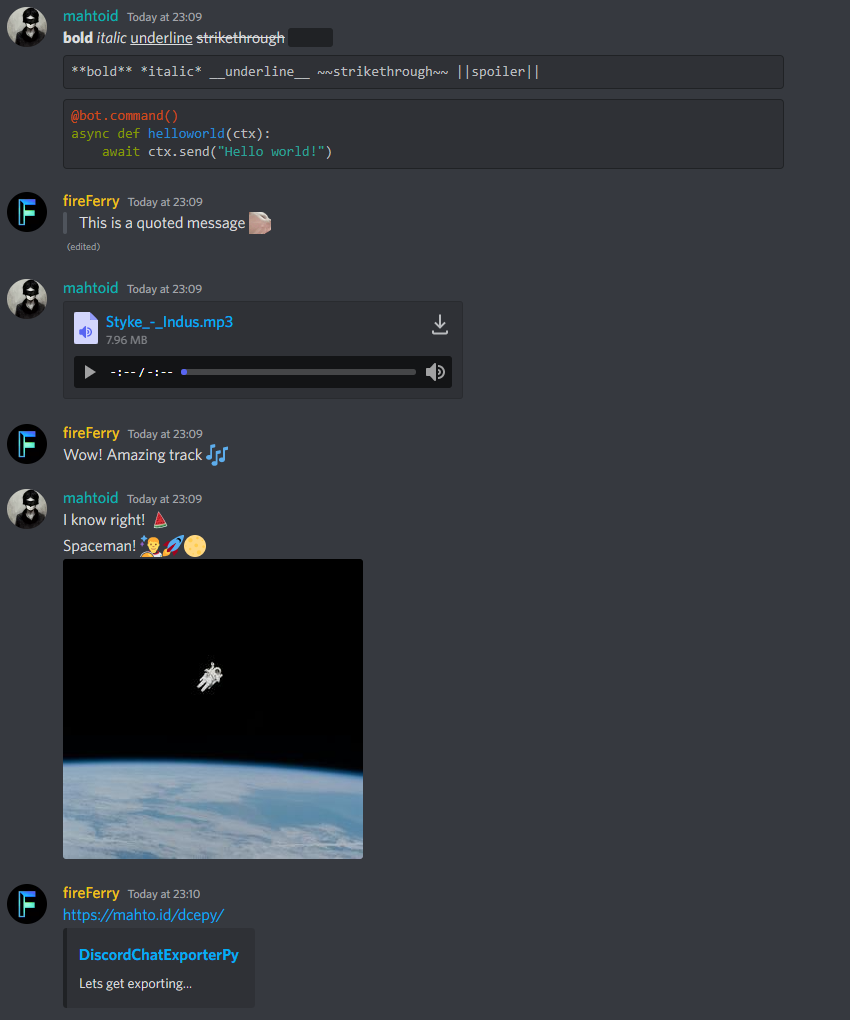
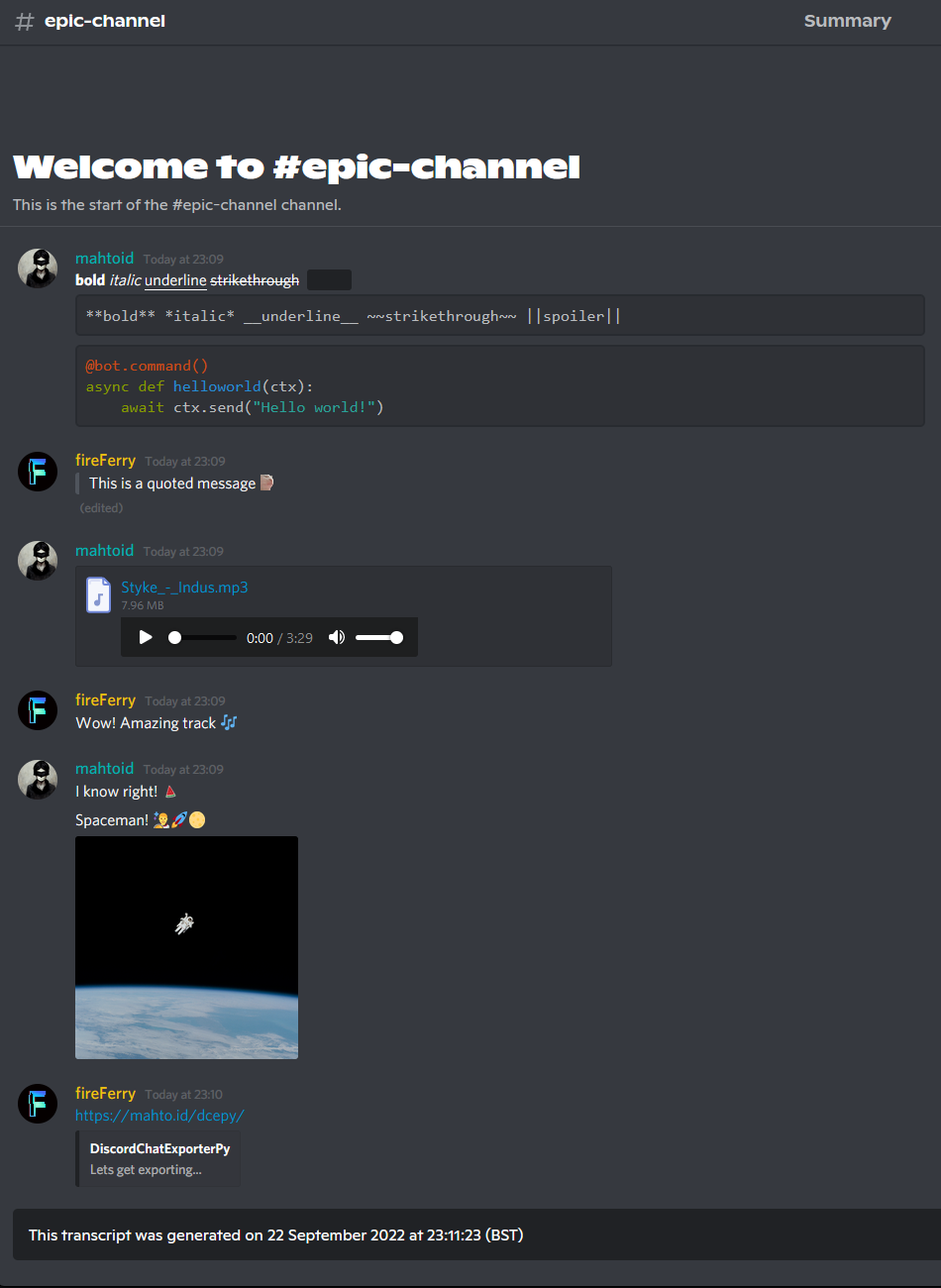
Chat-Exporter
Additional Functions
Link Function
Downloading exported chats can build up a bunch of unwanted files on your PC which can get annoying, additionally - not everyone wants to download content from Discord.Due to these pain, and many requests - I have built a fancy PHP script which will show the transcript file within a browser.
quick_link
Similar in design to `.quick_export()` this is a bit of a demo function to produce a link and to give you an embed.Required Argument(s):
channel: hikari.channels.PartialChannel object, whether ctx.channel or any channel you gather.
message: The Discord message containing the transcript file
Return Argument:
hikari.messages.Message: The message quick_link will send, containing the embed.
Example:
import hikari
import lightbulb
import chat_exporter


bot = hikari.GatewayBot(token="...")
client = lightbulb.client_from_app(bot)
bot.subscribe(hikari.StartingEvent, client.start)

...

@client.register
class Save(
    lightbulb.SlashCommand,
    name="save",
    description="Saves current chat transcript."
):
    @lightbulb.invoke
    async def invoke(self, ctx: lightbulb.Context) -> None:
        channel = ctx.interaction.get_channel()
        message = await chat_exporter.quick_export(channel)
        await chat_exporter.quick_link(channel, message)
link
A simple function to return the link you will need to view the transcript online.Required Argument(s):
message: The Discord message containing the transcript file
Return Argument:
link: The link to view the transcript file online
Example:
import io
import hikari
import lightbulb
import chat_exporter


bot = hikari.GatewayBot(token="...")
client = lightbulb.client_from_app(bot)
bot.subscribe(hikari.StartingEvent, client.start)

...

@client.register
class Save(
    lightbulb.SlashCommand,
    name="save",
    description="Saves current chat transcript."
):
    @lightbulb.invoke
    async def invoke(self, ctx: lightbulb.Context) -> None:
        channel = ctx.interaction.get_channel()
        transcript = await chat_exporter.export(channel)

        if transcript is None:
            return

        transcript_file = hikari.File(
            io.BytesIO(transcript.encode()),
            filename=f"transcript-{channel.name}.html",
        )

        message = await ctx.respond(attachment=transcript_file)
        link = await chat_exporter.link(message)

        await ctx.respond("Click this link to view the transcript online: " + link)
Please note that the PHP script does NOT store any information.
It simply makes a request to the given URL and echos (prints) the content for you to be able to view it.
Attributions
This project borrows CSS and HTML code from Tyrrrz's C# DiscordChatExporter repository.
This project is based on DiscordChatExporterPy, the work of mahtoid.
1 maintainer

Metadata
1 maintainer
Release files for hikari_chat_exporter 0.0.4
For a detailed explanation of source distributions (sdists) and built distributions (wheels), please see the package formats documentation.
Source distribution (sdist)
| File | Size | Uploaded | Provenance | Actions |
|---|---|---|---|---|
| hikari_chat_exporter-0.0.4.tar.gz | 52.6 kB | Without provenance | Details for hikari_chat_exporter-0.0.4.tar.gz |
Built distribution (wheel)
| File | Interpreter | ABI | Platform | Actions Reset |
|---|---|---|---|---|
| hikari_chat_exporter-0.0.4-py3-none-any.whl | Python 3 | none | any | Details for hikari_chat_exporter-0.0.4-py3-none-any.whl |
Total release size: 116.9 kB
Release files / hikari_chat_exporter-0.0.4.tar.gz
| Download URL | hikari_chat_exporter-0.0.4.tar.gz |
|---|---|
| Size | 52.6 kB |
| Tags | Source |
|
SHA-256 checksum How to use checksums |
1ddf5ee4c742d42332fecb9106b872a6cddb4772117198e7828e792a9f7241fe
|
|
BLAKE2b-256 checksum How to use checksums |
3f67b576199e94d67352dae6bfbee8feb2f530e262108340e34abd129922d93c
|
| Upload date | |
|
Uploaded using Trusted Publishing? What is trusted publishing? |
No |
| Uploaded via |
uv/0.7.13
|
Release files / hikari_chat_exporter-0.0.4-py3-none-any.whl
| Download URL | hikari_chat_exporter-0.0.4-py3-none-any.whl |
|---|---|
| Size | 64.3 kB |
| Tags | Python 3 |
|
SHA-256 checksum How to use checksums |
6b5e23d2cea1899c5fa50032e3ca954b9a76392d963007684703677ab56cd69f
|
|
BLAKE2b-256 checksum How to use checksums |
16e53919b79b4681fbf9142ef28cdb7b19bb5c6faea5251b3bce8859d48ecd5f
|
| Upload date | |
|
Uploaded using Trusted Publishing? What is trusted publishing? |
No |
| Uploaded via |
uv/0.7.13
|
Security for hikari_chat_exporter 0.0.4
Provenance
Provenance describes where a file came from. On PyPI, provenance is shared via attestations, which provide a verifiable record of the build or publishing details. View details, limitations and caveats.
No provenance found
None of the files in this release were uploaded with provenance metadata.
A note on package security
PyPI is a repository for distributing packages, not a service for auditing them. While third-party security researchers and our staff do their best to detect and remove malicious packages, PyPI cannot guarantee the quality, security or suitability of any given package.
To learn more about protecting yourself from malicious actors, visit our package security documentation.














