
HTTP Transaction Profile
Series of tools to profile HTTP interactions in Python scripts. It can be used for understanding impact of slow web API's on an application.
How It Works
The httptime.enable_logging function redirects the debug output of the http.client module (common module responsible for all HTTP communication in python) to the Python logging framework. The output is then saved to a file.
Tools are provided for parsing and visualizing the output.
Usage (Save Data)
Insert the following block of code at the beginning of your script. That's it.
import httptime
httptime.enable_logging()
The enable_logging function does the following:
- Redirects
http.clientdebug output into theloggingmodule. - Save all debug output to a file. Note that currently all
logging.DEBUGoutput is saved to this file, including from other modules.
The output file path can be specified via the outfile parameter to the enable_logging function. If not specified, then the output is saved to ~/.httptime/{prog}-{date}.txt, where {prog} is the name of script being executed and {date} is the current date/time in the format %Y-%m-%d %H:%M:%SZ%z.
Usage (View Data)
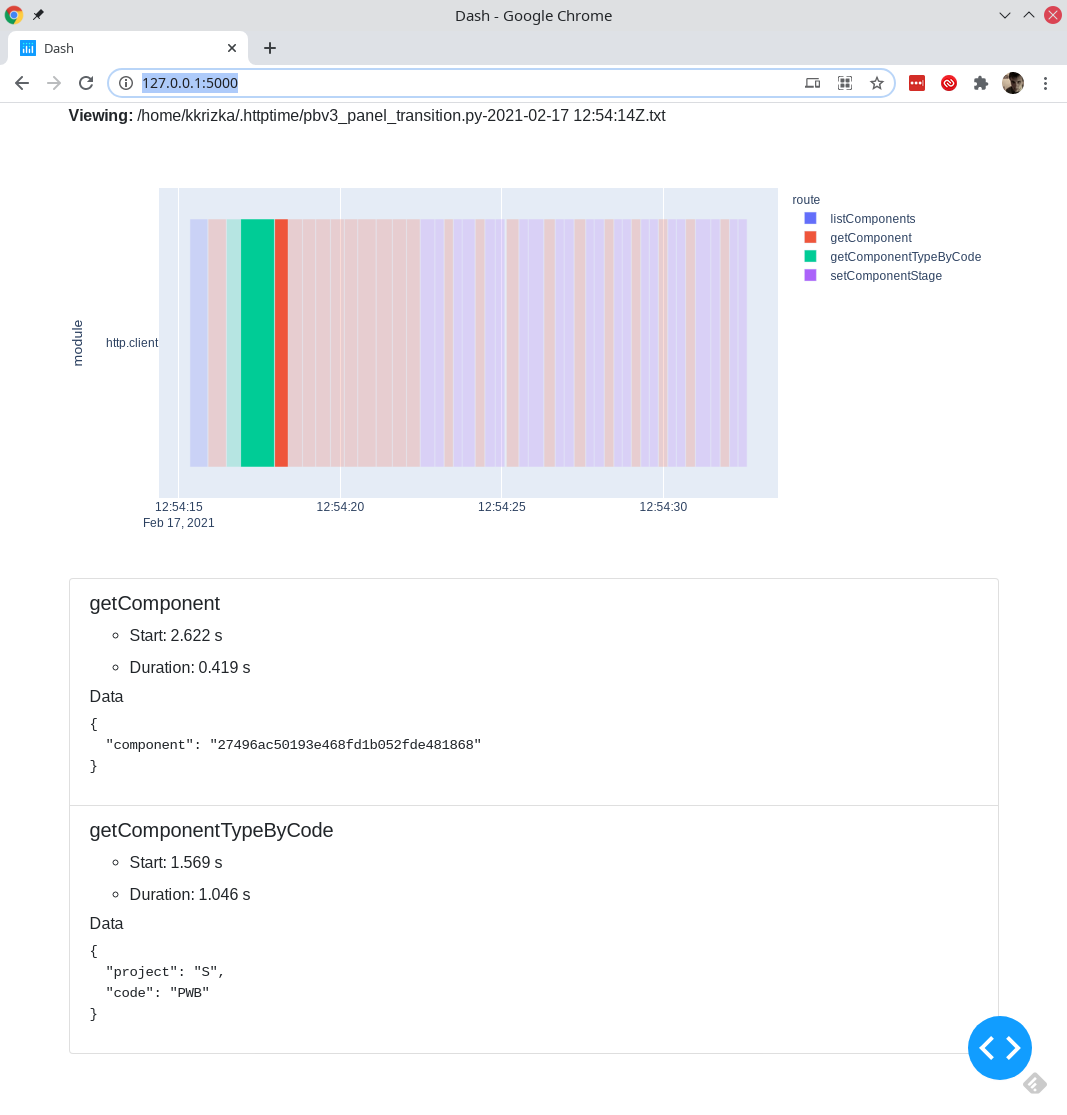
The data can be visualized using the Dash-based app app.py. The following command opens a server at localhost:5000. You can client on invidiual blocks in the graph to get more details.
python app.py path/to/example/outfile.txt
TODO
- Options to
enable_loggingto better steer saved data. - Module that saves data to a dataframe for custom analysis code.
1 maintainer

Metadata
1 maintainer
Release files for httptime 0.2.0
For a detailed explanation of source distributions (sdists) and built distributions (wheels), please see the package formats documentation.
Source distribution (sdist)
| File | Size | Uploaded | |
|---|---|---|---|
| httptime-0.2.0.tar.gz | 17.6 kB | Details |
Release files / httptime-0.2.0.tar.gz
| Download URL | httptime-0.2.0.tar.gz |
|---|---|
| Size | 17.6 kB |
| Tags | Source |
|
SHA-256 checksum How to use checksums |
db58a9b5d03efdfa82c4425a1e1b9ff531c9f6feb9738a2034d430476ffe38d0
|
|
BLAKE2b-256 checksum How to use checksums |
3be5a7fd265562706e79c007fae47dd37a4c12a52d78c70825b66d6f310e861c
|
| Upload date | |
|
Uploaded using Trusted Publishing? What is trusted publishing? |
No |
| Uploaded via |
twine/3.3.0 pkginfo/1.7.0 requests/2.25.1 setuptools/53.0.0 requests-toolbelt/0.9.1 tqdm/4.57.0 CPython/3.8.8
|














