
Hunter










Hunter is a flexible code tracing toolkit, not for measuring coverage, but for debugging, logging, inspection and other nefarious purposes.
API is considered unstable until 1.0 is released.
Free software: BSD license
Installation
pip install hunter
Documentation
Overview
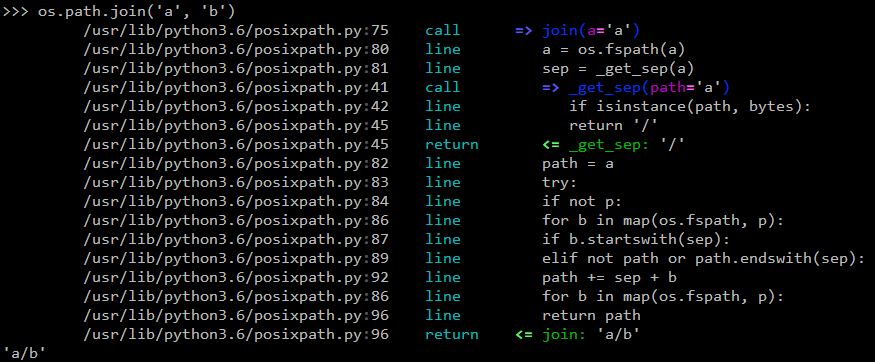
The default action is to just print the code being executed. Example:
import hunter
hunter.trace(module='posixpath')

import os
os.path.join('a', 'b')
Would result in:
python2.7/posixpath.py:60    call      def join(a, *p):
python2.7/posixpath.py:64    line          path = a
python2.7/posixpath.py:65    line          for b in p:
python2.7/posixpath.py:66    line              if b.startswith('/'):
python2.7/posixpath.py:68    line              elif path == '' or path.endswith('/'):
python2.7/posixpath.py:71    line                  path += '/' + b
python2.7/posixpath.py:65    line          for b in p:
python2.7/posixpath.py:72    line          return path
python2.7/posixpath.py:72    return        return path
                             ...       return value: 'a/b'
or in a terminal:
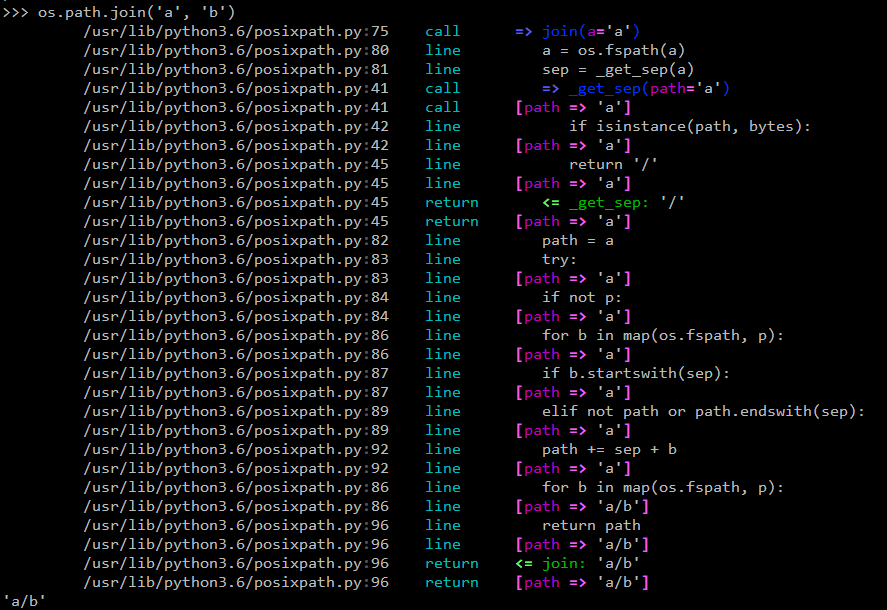
You can have custom actions, like a variable printer - example:
import hunter
hunter.trace(hunter.Q(module='posixpath', action=hunter.VarsPrinter('path')))

import os
os.path.join('a', 'b')
Would result in:
python2.7/posixpath.py:60    call      def join(a, *p):
python2.7/posixpath.py:64    line          path = a
                             vars      path => 'a'
python2.7/posixpath.py:65    line          for b in p:
                             vars      path => 'a'
python2.7/posixpath.py:66    line              if b.startswith('/'):
                             vars      path => 'a'
python2.7/posixpath.py:68    line              elif path == '' or path.endswith('/'):
                             vars      path => 'a'
python2.7/posixpath.py:71    line                  path += '/' + b
                             vars      path => 'a/b'
python2.7/posixpath.py:65    line          for b in p:
                             vars      path => 'a/b'
python2.7/posixpath.py:72    line          return path
                             vars      path => 'a/b'
python2.7/posixpath.py:72    return        return path
                             ...       return value: 'a/b'
or in a terminal:
You can give it a tree-like configuration where you can optionally configure specific actions for parts of the tree (like dumping variables or a pdb set_trace):
TODO: More examples.
Environment variable activation
For your convenience environment variable activation is available. Just run your app like this:
PYTHONHUNTER="module='os.path'" python yourapp.py
On Windows you’d do something like:
set PYTHONHUNTER=module='os.path'
python yourapp.py
The activation works with a clever .pth file that checks for that env var presence and before your app runs does something like this:
from hunter import *
trace(<whatever-you-had-in-the-PYTHONHUNTER-env-var>)
That also means that it will do activation even if the env var is empty, eg: PYTHONHUNTER="".
Development
To run the all tests run:
tox
Changelog
0.3.1 (2015-03-29)
Forgot to merge some commits …
0.3.0 (2015-03-29)
Added handling for internal repr failures.
Fixed issues with displaying code that has non-ascii characters.
Implemented better display for call frames so that when a function has decorators the function definition is shown (instead of just the first decorator). See: #8.
0.2.1 (2015-03-28)
Added missing color entry for exception events.
Added Event.line property. It returns the source code for the line being run.
0.2.0 (2015-03-27)
Added color support (and colorama as dependency).
Added support for expressions in VarsPrinter.
Breaking changes:
Renamed F to Q. And Q is now just a convenience wrapper for Query.
Renamed the PYTHON_HUNTER env variable to PYTHONHUNTER.
Changed When to take positional arguments.
Changed output to show 2 path components (still not configurable).
Changed VarsPrinter to take positional arguments for the names.
Improved error reporting for env variable activation (PYTHONHUNTER).
Fixed env var activator (the .pth file) installation with setup.py install (the “egg installs”) and setup.py develop/pip install -e (the “egg links”).
0.1.0 (2015-03-22)
First release on PyPI.
1 maintainer

Metadata
1 maintainer
Release files for hunter 0.3.1
For a detailed explanation of source distributions (sdists) and built distributions (wheels), please see the package formats documentation.
Source distribution (sdist)
| File | Size | Uploaded | Provenance | |
|---|---|---|---|---|
| hunter-0.3.1.tar.gz | 26.0 kB | Without provenance | Details |
Built distribution (wheel)
| File | Interpreter | ABI | Platform | Reset |
|---|---|---|---|---|
| hunter-0.3.1-py2.py3-none-any.whl | Python 2, Python 3 | none | any | Details |
Total release size: 38.0 kB
Release files / hunter-0.3.1.tar.gz
| Download URL | hunter-0.3.1.tar.gz |
|---|---|
| Size | 26.0 kB |
| Tags | Source |
|
SHA-256 checksum How to use checksums |
0f4d04789d20ed34067e8dceeea041e8a40b213065b8432d1c21e3b001cd747f
|
|
BLAKE2b-256 checksum How to use checksums |
cc07e8d200ad06426d561210ab98acfde92d9a7f8278f522432983818d6e4aae
|
| Upload date | |
|
Uploaded using Trusted Publishing? What is trusted publishing? |
No |
Release files / hunter-0.3.1-py2.py3-none-any.whl
| Download URL | hunter-0.3.1-py2.py3-none-any.whl |
|---|---|
| Size | 12.0 kB |
| Tags | Python 2 Python 3 |
|
SHA-256 checksum How to use checksums |
3f68800f6ea21aef3b783f63a9a2f2b0b568e033a9c9c0a61938da94d053a044
|
|
BLAKE2b-256 checksum How to use checksums |
23ec8f45689e5a3e889f2424fa13953dc96633dccb62f3e0f6c3d9a4ab112dfb
|
| Upload date | |
|
Uploaded using Trusted Publishing? What is trusted publishing? |
No |
Security for hunter 0.3.1
Provenance
Provenance describes where a file came from. On PyPI, provenance is shared via attestations, which provide a verifiable record of the build or publishing details. View details, limitations and caveats.
No provenance found
None of the files in this release were uploaded with provenance metadata.
A note on package security
PyPI is a repository for distributing packages, not a service for auditing them. While third-party security researchers and our staff do their best to detect and remove malicious packages, PyPI cannot guarantee the quality, security or suitability of any given package.
To learn more about protecting yourself from malicious actors, visit our package security documentation.














