
idfkit




A fast, modern EnergyPlus IDF/epJSON toolkit for Python.
idfkit lets you load, create, query, and modify EnergyPlus models with an intuitive Python API. It is designed as a drop-in replacement for eppy with better performance, built-in reference tracking, and native support for both IDF and epJSON formats.
Key Features
- O(1) object lookups — Collections are indexed by name, so
doc["Zone"]["Office"]is a dict lookup, not a linear scan. - Automatic reference tracking — A live reference graph keeps track of every cross-object reference. Renaming an object updates every field that pointed to the old name.
- IDF + epJSON — Read and write both formats; convert between them in a single call.
- Schema-driven validation — Validate documents against the official EnergyPlus epJSON schema with detailed error messages.
- Built-in 3D geometry —
Vector3DandPolygon3Dclasses for surface area, zone volume, and coordinate transforms without external dependencies. - EnergyPlus simulation — Run simulations as subprocesses with structured
result parsing (SQLite, CSV, HTML, and a fast pure-Python
.eso/.mtrreader), batch processing, and content-addressed caching. - Weather data — Search ~17,300 weather stations (~70,000 TMYx datasets), download EPW/DDY files, and apply ASHRAE design day conditions.
- Async & batch simulation — Run simulations concurrently with
async_simulateor process parameter sweeps withsimulate_batch. - 3D visualization — Render building geometry to interactive 3D views or static SVG images with no external tools.
- Schedule evaluation — Parse and evaluate EnergyPlus compact, weekly, and holiday schedules to time-series values.
- Thermal properties — Gas mixture and material thermal calculations for glazing and construction analysis.
- Broad version support — Bundled schemas for every EnergyPlus release from v8.9 through v26.2.
Performance
idfkit is designed from the ground up for speed. On a 1,700-object IDF, looking up a single object by name is over 3000x faster than eppy and opyplus thanks to O(1) dict-based indexing:
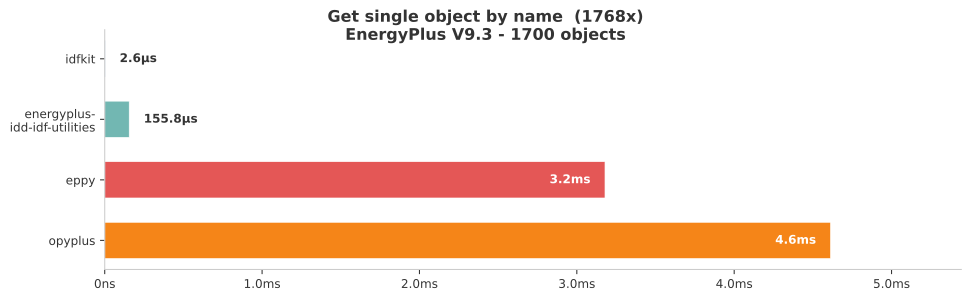
See full benchmark results for all six operations (load, get by type, get by name, add, modify, write) across four tools.
Installation
Requires Python 3.10+.
pip install idfkit
Or with uv:
uv add idfkit
Optional extras
| Extra | Install command | What it adds |
|---|---|---|
weather |
pip install idfkit[weather] |
Refresh weather station indexes from source (openpyxl) |
dataframes |
pip install idfkit[dataframes] |
DataFrame result conversion (pandas) |
s3 |
pip install idfkit[s3] |
S3 cloud storage backend (boto3) |
plot |
pip install idfkit[plot] |
Matplotlib plotting |
plotly |
pip install idfkit[plotly] |
Plotly interactive charts |
progress |
pip install idfkit[progress] |
tqdm progress bars for simulations |
all |
pip install idfkit[all] |
Everything above |
Quick Example
from idfkit import load_idf, save_idf

# Load an existing IDF file
doc = load_idf("in.idf")

# Query objects with O(1) lookups
zone = doc["Zone"]["Office"]
print(zone.x_origin, zone.y_origin)

# Modify a field
zone.x_origin = 10.0

# See what references the zone
for obj in doc.get_referencing("Office"):
    print(obj.obj_type, obj.name)

# Write back to IDF (or epJSON)
save_idf(doc, "out.idf")
Note:
load_idf()defaults to strict parsing (strict=True) and raisesIDFParseErroron malformed objects. Usestrict=Falseonly as a tolerant migration/compatibility fallback for legacy or noisy files.
Creating a model from scratch
from idfkit import new_document, save_idf

doc = new_document()
doc.add("Zone", "Office", x_origin=0.0, y_origin=0.0)
save_idf(doc, "new_building.idf")
Simulation
from idfkit.simulation import simulate

result = simulate(doc, "weather.epw", design_day=True)

# Query results from the SQLite output
ts = result.sql.get_timeseries(
    variable_name="Zone Mean Air Temperature",
    key_value="Office",
)
print(f"Max temp: {max(ts.values):.1f}°C")
Note:
result.sqlrequires EnergyPlus to produce SQLite output (the default). See the Simulation Guide for details on output configuration.
Weather
from idfkit.weather import StationIndex, geocode

index = StationIndex.load()
results = index.nearest(*geocode("Chicago, IL"))
print(results[0].station.display_name)
CLI
pip install idfkit ships an idfkit command with three subcommands:
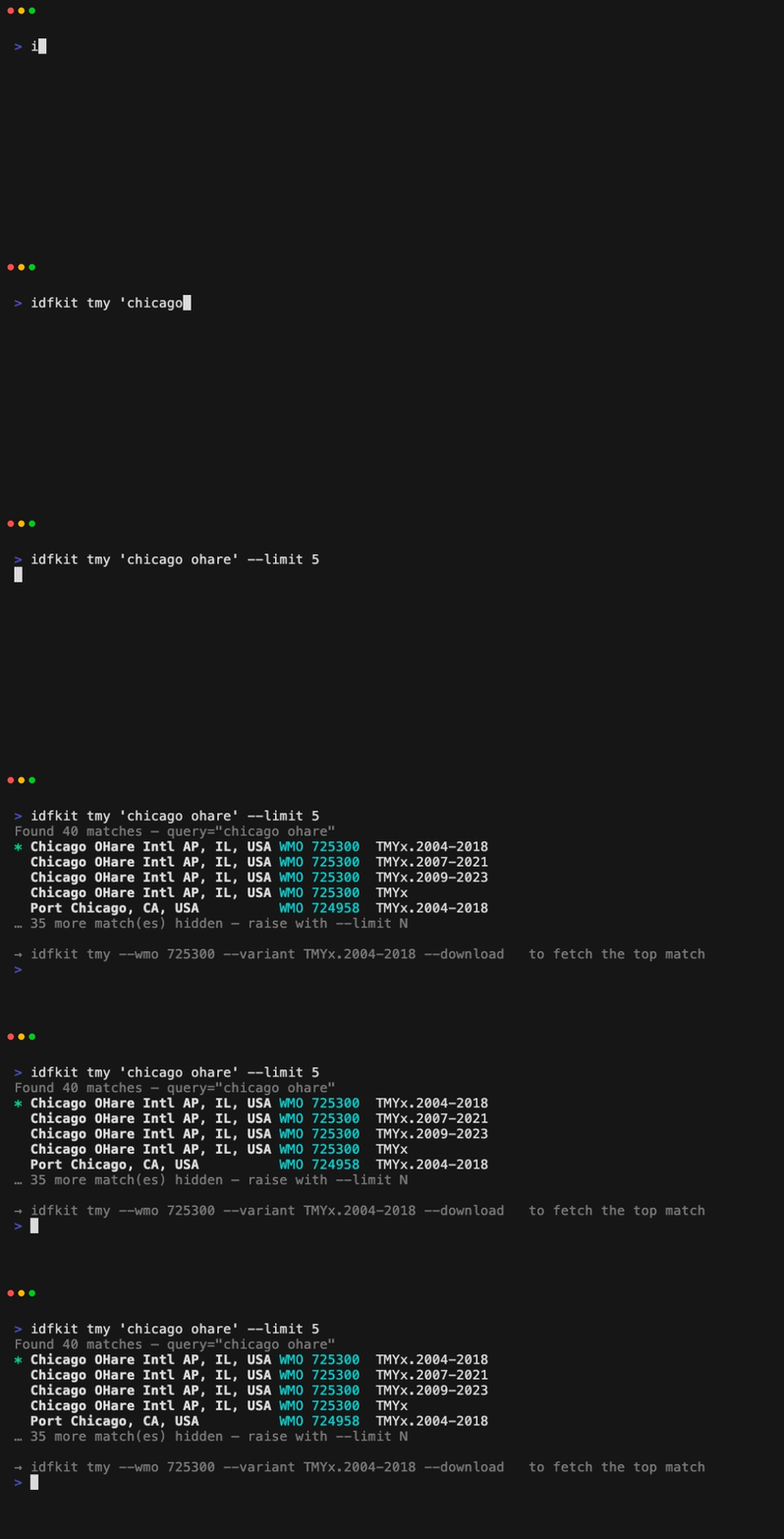
idfkit check— static lint for cross-version EnergyPlus breakage (docs)idfkit migrate— forward-migrate an IDF throughIDFVersionUpdater(docs)idfkit tmy— search and download TMYx weather data from the shell (docs)
The JavaScript sibling
idfkit has a sibling library for JavaScript and TypeScript,
idfkit-js, published as @idfkit/core.
The two share a vocabulary and are held to a
conformance corpus
that proves they read and write the same files the same way.
They are not equivalent, and this page will not imply that they are. All thirteen first-tier capabilities exist in both: parsing, the object model, references, writers, schema access, validation, introspection, documentation addresses, generated object types, parse diagnostics, the weather station index, weather file retrieval, and geocoding. Almost everything else on this page is Python-only today, including running EnergyPlus locally, reading simulation results, geometry authoring, zoning, schedules, thermal properties, and migration. Some of that is a port not yet done; some of it, such as driving a locally installed EnergyPlus, is permanent.
Capability parity is the record. It lists every public capability, its state in each language, and whether an absence is temporary or permanent, and a check blocks any change that lands or removes a capability without updating it. Read it rather than inferring from the shared name.
Matching version numbers between the two are never evidence of agreement: they
release independently. What each release states is the conformance level it
passes, readable as idfkit.CONFORMANCE_LEVEL.
Documentation
Full documentation is available at
developers.idfkit.com, which teaches both
languages from one navigation. py.idfkit.com is retired and redirects there.
The site's source is not in this repository. It lives at idfkit/idfkit-developers, which belongs to neither language: a page about loading a model is one page with two idioms on it, and the maintainers of both libraries hold the same standing over it. That repository pins this library to an exact version and generates the Python reference from it, so a documentation change goes there and a release here reaches it as a pull request.
Key sections:
- Getting Started — Installation, quick start, interactive tutorial
- Simulation Guide — Run EnergyPlus, parse results, batch processing
- Weather Guide — Station search, downloads, design days
- API Reference — Complete API documentation
- Migrating from eppy — Side-by-side comparison
For AI coding assistants
idfkit ships agent-readable reference docs in
src/idfkit/.agents/skills/developing-with-idfkit/.
The directory is packaged in the wheel, so it's also accessible from an
installed copy via importlib.resources.files("idfkit") / ".agents".
The idfkit plugin packages them as
the developing-with-idfkit skill for Claude Code, Cursor, Copilot, Gemini, and
Codex: it resolves the idfkit installed in your project and loads the references
baked into that exact version.
Development
make install    # Install dependencies and pre-commit hooks
make check      # Run linting, formatting, and type checks
make test       # Run tests with coverage
make docs       # Serve documentation locally
Contributing
Contributions are welcome! Please see CONTRIBUTING.md for guidelines.
License
This project is licensed under the MIT License — see LICENSE for details.
1 maintainer

Metadata
1 maintainer
Release files for idfkit 1.1.1
For a detailed explanation of source distributions (sdists) and built distributions (wheels), please see the package formats documentation.
Source distribution (sdist)
| File | Size | Uploaded | Provenance | |
|---|---|---|---|---|
| idfkit-1.1.1.tar.gz | 15.6 MB | Without provenance | Details |
Built distribution (wheel)
| File | Interpreter | ABI | Platform | Reset |
|---|---|---|---|---|
| idfkit-1.1.1-py3-none-any.whl | Python 3 | none | any | Details |
Total release size: 30.4 MB
Release files / idfkit-1.1.1.tar.gz
| Download URL | idfkit-1.1.1.tar.gz |
|---|---|
| Size | 15.6 MB |
| Tags | Source |
|
SHA-256 checksum How to use checksums |
313eaf61075e1654f9e77f9022616f9ef3b1aa295cda71e87c5912220f371144
|
|
BLAKE2b-256 checksum How to use checksums |
a5527c50c4acbade88c180d0e868e88ef155b33a625e3ed9e44827918a9c954f
|
| Upload date | |
|
Uploaded using Trusted Publishing? What is trusted publishing? |
Yes |
| Uploaded via |
uv/0.9.30 {"installer":{"name":"uv","version":"0.9.30","subcommand":["publish"]},"python":null,"implementation":{"name":null,"version":null},"distro":{"name":"Ubuntu","version":"24.04","id":"noble","libc":null},"system":{"name":null,"release":null},"cpu":null,"openssl_version":null,"setuptools_version":null,"rustc_version":null,"ci":true}
|
Release files / idfkit-1.1.1-py3-none-any.whl
| Download URL | idfkit-1.1.1-py3-none-any.whl |
|---|---|
| Size | 14.8 MB |
| Tags | Python 3 |
|
SHA-256 checksum How to use checksums |
0428785eb49697396ad4e0b3a0100850162d4b05fd57c8d1334fbdd0e4188df8
|
|
BLAKE2b-256 checksum How to use checksums |
40efcff9f624a472318fb0f982ca89c401e0e4011f9e05151a0228e9870fee14
|
| Upload date | |
|
Uploaded using Trusted Publishing? What is trusted publishing? |
Yes |
| Uploaded via |
uv/0.9.30 {"installer":{"name":"uv","version":"0.9.30","subcommand":["publish"]},"python":null,"implementation":{"name":null,"version":null},"distro":{"name":"Ubuntu","version":"24.04","id":"noble","libc":null},"system":{"name":null,"release":null},"cpu":null,"openssl_version":null,"setuptools_version":null,"rustc_version":null,"ci":true}
|
Security for idfkit 1.1.1
Provenance
Provenance describes where a file came from. On PyPI, provenance is shared via attestations, which provide a verifiable record of the build or publishing details. View details, limitations and caveats.
No provenance found
None of the files in this release were uploaded with provenance metadata.
A note on package security
PyPI is a repository for distributing packages, not a service for auditing them. While third-party security researchers and our staff do their best to detect and remove malicious packages, PyPI cannot guarantee the quality, security or suitability of any given package.
To learn more about protecting yourself from malicious actors, visit our package security documentation.














