
AWS Documentation MCP Server
Model Context Protocol (MCP) server for AWS Documentation
This MCP server provides tools to access AWS documentation, search for content, and get recommendations.
Features
- Read Documentation: Fetch and convert AWS documentation pages to markdown format
- Search Documentation: Search AWS documentation using the official search API (global only)
- Recommendations: Get content recommendations for AWS documentation pages (global only)
- Get Available Services List: Get a list of available AWS services in China regions (China only)
Prerequisites
Installation Requirements
- Install
uvfrom Astral or the GitHub README - Install Python 3.10 or newer using
uv python install 3.10(or a more recent version)
Installation
| Cursor | VS Code |
|---|---|
 |
 |
Configure the MCP server in your MCP client configuration:
{
  "mcpServers": {
    "awslabs.aws-documentation-mcp-server": {
      "command": "uvx",
      "args": ["awslabs.aws-documentation-mcp-server@latest"],
      "env": {
        "FASTMCP_LOG_LEVEL": "ERROR",
        "AWS_DOCUMENTATION_PARTITION": "aws",
        "MCP_USER_AGENT": "Mozilla/5.0 (Windows NT 10.0; Win64; x64) AppleWebKit/537.36 (KHTML, like Gecko) Chrome/131.0.0.0 Safari/537.36"
      },
      "disabled": false,
      "autoApprove": []
    }
  }
}
For Amazon Q Developer CLI, add the MCP client configuration and tool command to the agent file in ~/.aws/amazonq/cli-agents.
Example, ~/.aws/amazonq/cli-agents/default.json
{
  "mcpServers": {
    "awslabs.aws-documentation-mcp-server": {
      "command": "uvx",
      "args": ["awslabs.aws-documentation-mcp-server@latest"],
      "env": {
        "FASTMCP_LOG_LEVEL": "ERROR",
        "AWS_DOCUMENTATION_PARTITION": "aws"
      },
      "disabled": false,
      "autoApprove": []
    }
  },
  "tools": [
    // .. other existing tools
    "@awslabs.aws-documentation-mcp-server"
  ],
}
Windows Installation
For Windows users, the MCP server configuration format is slightly different:
{
  "mcpServers": {
    "awslabs.aws-documentation-mcp-server": {
      "disabled": false,
      "timeout": 60,
      "type": "stdio",
      "command": "uv",
      "args": [
        "tool",
        "run",
        "--from",
        "awslabs.aws-documentation-mcp-server@latest",
        "awslabs.aws-documentation-mcp-server.exe"
      ],
      "env": {
        "FASTMCP_LOG_LEVEL": "ERROR",
        "AWS_DOCUMENTATION_PARTITION": "aws"
      }
    }
  }
}
Note: Set
AWS_DOCUMENTATION_PARTITIONtoaws-cnto query AWS China documentation instead of global AWS documentation.Corporate Networks: If you're behind a corporate proxy or firewall that blocks certain User-Agent strings, set
MCP_USER_AGENTto match your browser's User-Agent to an allowable string.
or docker after a successful docker build -t mcp/aws-documentation .:
{
  "mcpServers": {
    "awslabs.aws-documentation-mcp-server": {
      "command": "docker",
      "args": [
        "run",
        "--rm",
        "--interactive",
        "--env",
        "FASTMCP_LOG_LEVEL=ERROR",
        "--env",
        "AWS_DOCUMENTATION_PARTITION=aws",
        "mcp/aws-documentation:latest"
      ],
      "env": {},
      "disabled": false,
      "autoApprove": []
    }
  }
}
Environment Variables
| Variable | Description | Default |
|---|---|---|
FASTMCP_LOG_LEVEL |
Logging level (DEBUG, INFO, WARNING, ERROR, CRITICAL) | WARNING |
AWS_DOCUMENTATION_PARTITION |
AWS partition (aws or aws-cn) |
aws |
MCP_USER_AGENT |
Custom User-Agent string for HTTP requests | Chrome-based default |
Corporate Network Support
For corporate environments with proxy servers or firewalls that block certain User-Agent strings:
{
  "env": {
    "MCP_USER_AGENT": "Mozilla/5.0 (Windows NT 10.0; Win64; x64) AppleWebKit/537.36 (KHTML, like Gecko) Chrome/131.0.0.0 Safari/537.36"
  }
}
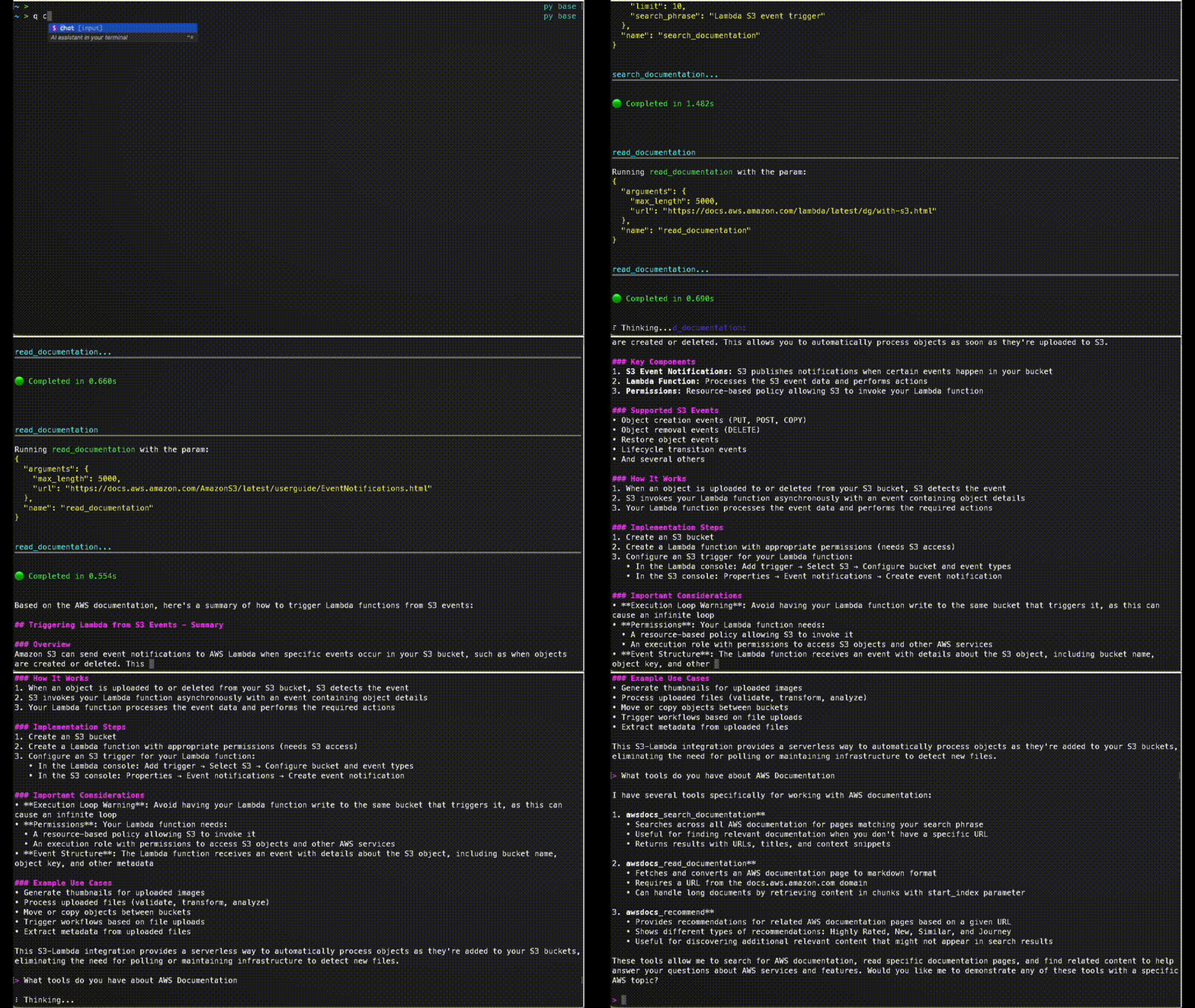
Basic Usage
Example:
- "look up documentation on S3 bucket naming rule. cite your sources"
- "recommend content for page https://docs.aws.amazon.com/AmazonS3/latest/userguide/bucketnamingrules.html"
Tools
read_documentation
Fetches an AWS documentation page and converts it to markdown format.
read_documentation(url: str) -> str
search_documentation (global only)
Searches AWS documentation using the official AWS Documentation Search API.
search_documentation(ctx: Context, search_phrase: str, limit: int, product_types: Optional[List[str]], guide_types: Optional[List[str]]) -> SearchResponse
recommend (global only)
Gets content recommendations for an AWS documentation page.
recommend(url: str) -> list[dict]
get_available_services (China only)
Gets a list of available AWS services in China regions.
get_available_services() -> str
Development
For getting started with development on the AWS Documentation MCP server, please refer to the awslabs/mcp DEVELOPER_GUIDE first. Everything below this is specific to AWS Documentation MCP Server development.
Running tests
Unit tests: uv run --frozen pytest --cov --cov-branch --cov-report=term-missing
Unit tests with integration tests: uv run --frozen pytest --cov --cov-branch --cov-report=term-missing --run-live
1 maintainer

Metadata
1 maintainer
Release files for iflow-mcp_awslabs_aws-documentation-mcp-server 1.1.14
For a detailed explanation of source distributions (sdists) and built distributions (wheels), please see the package formats documentation.
Source distribution (sdist)
| File | Size | Uploaded | |
|---|---|---|---|
| iflow_mcp_awslabs_aws_documentation_mcp_server-1.1.14.tar.gz | 3.9 MB | Details |
Built distribution (wheel)
| File | Interpreter | ABI | Platform | Reset |
|---|---|---|---|---|
| iflow_mcp_awslabs_aws_documentation_mcp_server-1.1.14-py3-none-any.whl | Python 3 | none | any | Details |
Total release size: 3.9 MB
Release files / iflow_mcp_awslabs_aws_documentation_mcp_server-1.1.14.tar.gz
| Download URL | iflow_mcp_awslabs_aws_documentation_mcp_server-1.1.14.tar.gz |
|---|---|
| Size | 3.9 MB |
| Tags | Source |
|
SHA-256 checksum How to use checksums |
389e1e199be30fcebd18a5bd8342cbf7f3da27a8d2b31804237120a4bc8c37d4
|
|
BLAKE2b-256 checksum How to use checksums |
2db3c2411dd293d3fa6f8f2743b4f6003b5f7c382bfb117b0ad0a4b405430e57
|
| Upload date | |
|
Uploaded using Trusted Publishing? What is trusted publishing? |
No |
| Uploaded via |
uv/0.9.17 {"installer":{"name":"uv","version":"0.9.17","subcommand":["publish"]},"python":null,"implementation":{"name":null,"version":null},"distro":{"name":"macOS","version":null,"id":null,"libc":null},"system":{"name":null,"release":null},"cpu":null,"openssl_version":null,"setuptools_version":null,"rustc_version":null,"ci":null}
|
Release files / iflow_mcp_awslabs_aws_documentation_mcp_server-1.1.14-py3-none-any.whl
| Download URL | iflow_mcp_awslabs_aws_documentation_mcp_server-1.1.14-py3-none-any.whl |
|---|---|
| Size | 25.5 kB |
| Tags | Python 3 |
|
SHA-256 checksum How to use checksums |
2a6644720f87c3c75a309dadffbbbb42754ceb7078efa2690fdb2c21618caccc
|
|
BLAKE2b-256 checksum How to use checksums |
8854fd1869aa11b20bd03fe80a9c58ce2ca4e9fffa4cba903412e1e0122370a4
|
| Upload date | |
|
Uploaded using Trusted Publishing? What is trusted publishing? |
No |
| Uploaded via |
uv/0.9.17 {"installer":{"name":"uv","version":"0.9.17","subcommand":["publish"]},"python":null,"implementation":{"name":null,"version":null},"distro":{"name":"macOS","version":null,"id":null,"libc":null},"system":{"name":null,"release":null},"cpu":null,"openssl_version":null,"setuptools_version":null,"rustc_version":null,"ci":null}
|














