





Scaffold is a specialized RAG (Retrieval-Augmented Generation) system designed to revolutionize how development teams interact with large codebases. Born from real-world frustrations with traditional documentation and AI-assisted development, Scaffold provides the structural foundation AI agents need to effectively construct, maintain, and repair complex software projects.
The Challenge
Modern development teams face three critical problems:
- Documentation Decay: Maintaining accurate and up-to-date technical documentation requires unsustainable manual effort.
- AI Context Blindness: LLMs lack awareness of project-specific architecture and business logic, requiring inefficient manual context provisioning.
- Knowledge Fragmentation: Critical system understanding exists only in tribal knowledge that's lost when team members leave.
Our Solution
Scaffold transforms your source code into a living knowledge graph stored in a graph database. This creates an intelligent context layer that:
- Captures structural relationships between code entities.
- Maintains both vector and graph representations of your codebase.
- Enables precise context injection for LLMs and AI agents.
- Supports construction, maintenance, and refactoring workflows.
Like its physical namesake, Scaffold provides the temporary support structure needed to build something great - then disappears when the work is done.
Getting Started
There are two primary ways to run Scaffold. Choose the one that best fits your needs.
Option 1: Run with Pre-built Docker Image (Recommended for Users)
This is the fastest method to get Scaffold running. It uses the official pre-built image from the GitHub Container Registry and does not require you to clone the source code repository. You only need to create two configuration files.
This is the fastest method to get Scaffold running. It uses the official pre-built image from the GitHub Container Registry and does not require you to clone the source code repository. You only need to create two configuration files.
1. Prepare Your Project Directory
Create a new folder for your project setup.
mkdir my-scaffold-server
cd my-scaffold-server
2. Create Configuration Files
In the my-scaffold-server directory, create the following two files.
docker-compose.yaml:
services:
  scaffold-mcp:
    image: ghcr.io/beer-bears/scaffold:latest
    container_name: scaffold-mcp-prod
    env_file:
      - .env
    tty: true
    ports:
      - "8000:8080"
    depends_on:
      - neo4j
    volumes:
      - ./codebase:/app/codebase

  chromadb:
    image: chromadb/chroma:1.0.13
    container_name: scaffold-chromadb
    restart: unless-stopped
    volumes:
      - chroma_data:/data

  neo4j:
    image: neo4j:5
    container_name: scaffold-neo4j
    restart: unless-stopped
    environment:
      NEO4J_AUTH: "${NEO4J_USER:-neo4j}/${NEO4J_PASSWORD:-password}"
    volumes:
      - neo4j_data:/data
    ports:
      - "7474:7474"
      - "7687:7687"

volumes:
  chroma_data:
  neo4j_data:
.env:
# ChromaDB Settings
CHROMA_SERVER_HOST=chromadb
CHROMA_SERVER_PORT=8000
CHROMA_COLLECTION_NAME=scaffold_data

# Neo4j Credentials
NEO4J_USER=neo4j
NEO4J_PASSWORD=password
NEO4J_URI=bolt://neo4j:password@neo4j:7687

# Absolute path to your codebase
PROJECT_PATH=<ABSOLUTE_PATH_TO_YOUR_CODEBASE>
3. Run the Application
Start all services using Docker Compose.
docker-compose up -d
Scaffold will now start and begin analyzing the code of your codebase.
Option 2: Build from Source (For Developers)
This method is for developers who have cloned the repository and want to build the Docker image locally. This is ideal for contributing to Scaffold or making custom modifications, or just run all containers at once in self-hosting mode.
This method is for developers who have cloned the repository and want to build the Docker image locally. This is ideal for contributing to Scaffold or making custom modifications, or just run all containers at once in self-hosting mode.
1. Set Up The Project
First, clone the repository and navigate into the project directory.
git clone https://github.com/Beer-Bears/scaffold.git
cd scaffold
Next, create your environment file from the example provided.
cp .env.example .env
2. Add Your Codebase
Place the Python project you want to analyze into the codebase directory.
# Create the directory if it doesn't exist
mkdir -p codebase

# Copy your project files into it
cp -r /path/to/your/python/project/* ./codebase/
Alternatively, you can edit the .env file and set the PROJECT_PATH variable to the absolute path of your project on your host machine.
3. Run the Application
Start the entire application stack using Docker Compose. The --build flag will compile your local source code into a new Docker image.
docker-compose up --build -d
Interact with Scaffold
Once the containers are running (using either method), you can interact with the system.
A. Configure your MCP Client (e.g., Cursor)
Add the Scaffold server to your client's mcp.json file.
{
  "mcpServers": {
    "scaffold-mcp": {
      "url": "http://localhost:8000/mcp"
    }
  }
}
B. Explore the Knowledge Graph
Access the Neo4j web UI to visually explore the graph of your codebase. Use the credentials from your .env file (default: neo4j / password).
URL: http://localhost:7474/
C. Send a Direct API Request
You can also test the MCP endpoint directly using curl.
curl -N -X POST http://localhost:8000/mcp/ \
  -H "Content-Type: application/json" \
  -H "Accept: application/json, text/event-stream" \
  -d '{
    "jsonrpc": "2.0",
    "id": "1",
    "method": "tools/call",
    "params": {
      "name": "get_code_entity_information",
      "arguments": {
        "entity_name": "MyClassName"
      }
    }
  }'
You also can check out mcp description and get docker cmd configuration
How It Works
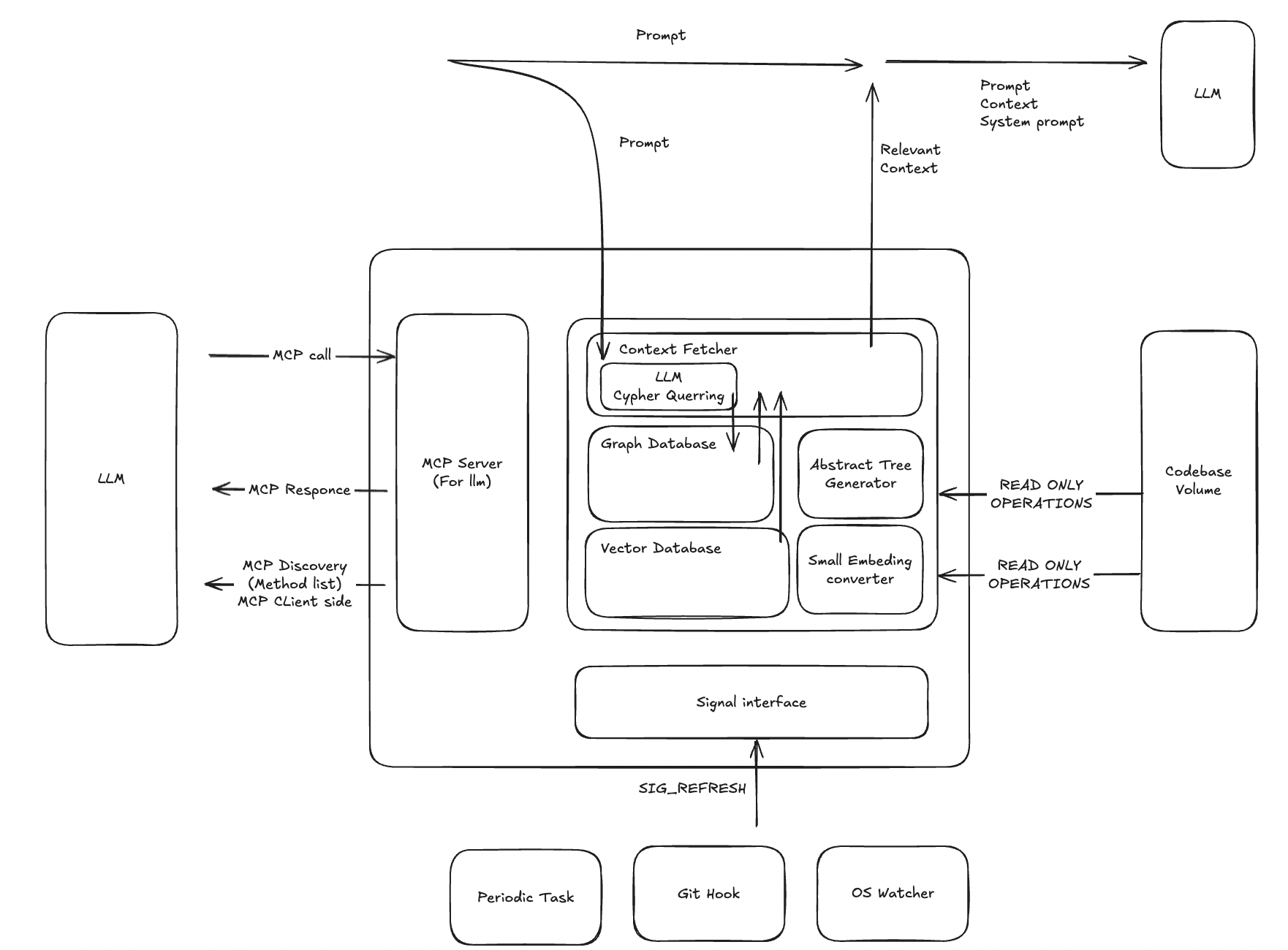
High-Level Architecture
View Architecture Schema
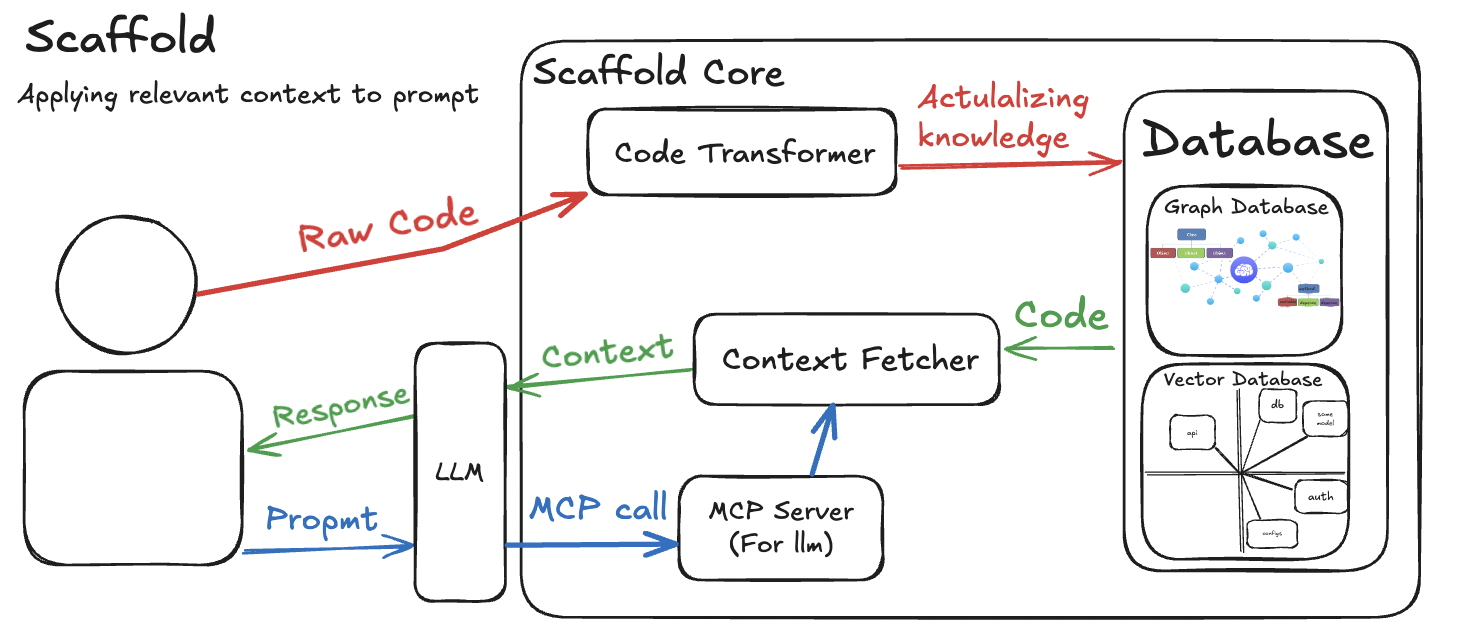
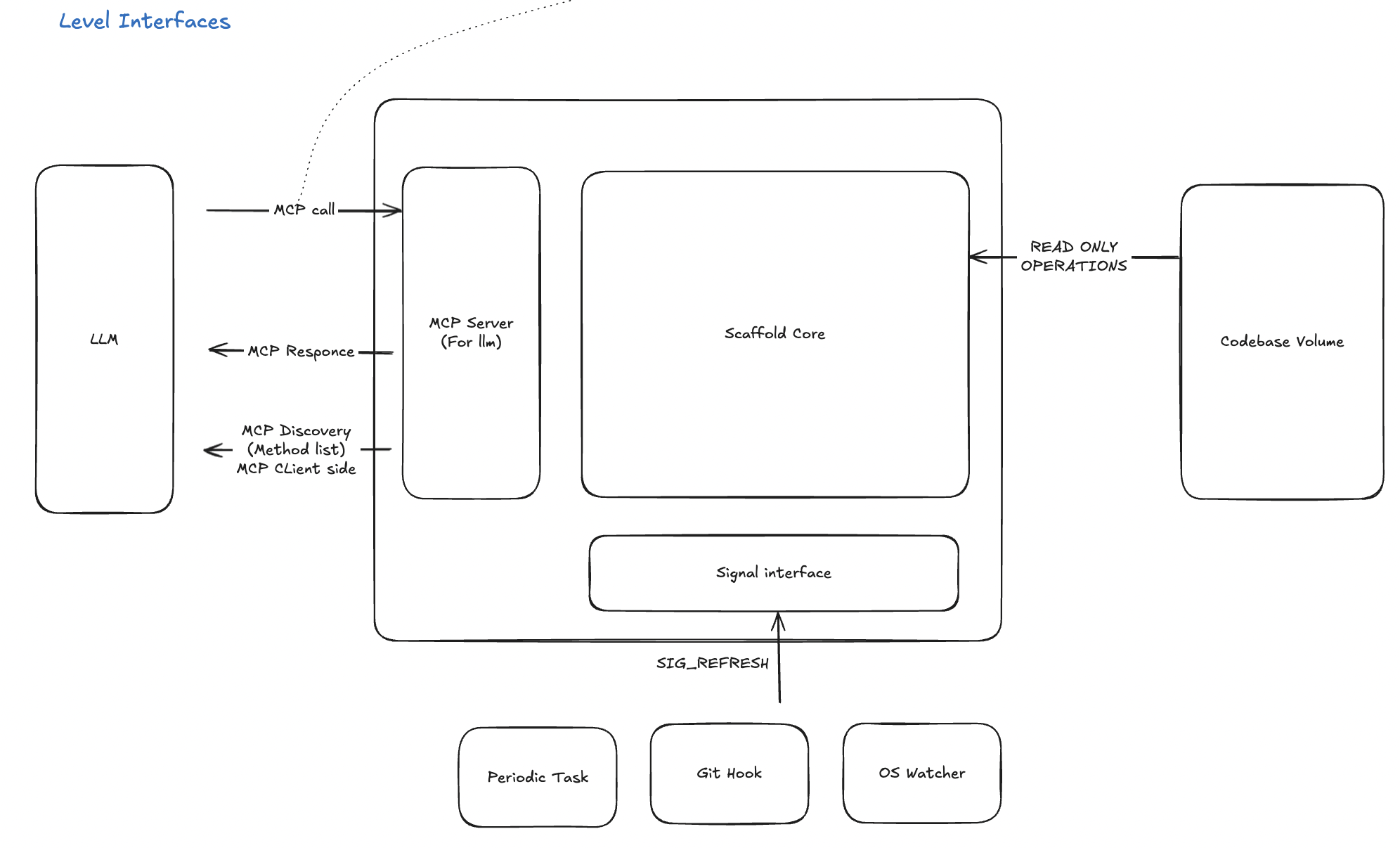
Usecase & Interface Diagrams
View More Diagrams
Usecase Schema
Interfaces Schema
Project Structure
.
├── docs
│   ├── img       # Static Images
│   └── research  # Research reports
└── src
    ├── core      # RAG Context Fetching Algorithms
    ├── database  # Graph/Vector Database Logic
    ├── generator # Abstract Tree Generator
    ├── mcp       # MCP Interface
    └── parsers   # AST Parcers
FAQ
What is RAG (Retrieval-Augmented Generation)?
RAG (Retrieval-Augmented Generation) is a technique that enhances large language models (LLMs) by:
- Retrieving relevant information from external knowledge sources
- Augmenting the LLM's context with this retrieved information
- Generating more accurate, context-aware responses
Unlike traditional LLMs that rely solely on their training data, RAG systems access up-to-date project-specific information and reduce hallucinations by grounding responses in actual codebase context.
How does Graph RAG work?
Graph RAG extends traditional RAG by representing knowledge as interconnected entities in a graph database. This allows the system to understand and retrieve not just chunks of text, but also the structural relationships between them (e.g., this function calls another function, this class inherits from another class). This structural context is invaluable for complex software engineering tasks.
Resources
- What is Retrieval-Augmented Generation (RAG)?
- GraphRAG vs. Traditional RAG: Higher Accuracy & Insight with LLM
- What is MCP? Integrate AI Agents with Databases & APIs
Contributing

Scaffold is an open-source project and we welcome contributions from the community! Whether it's reporting a bug, discussing features, or submitting code, your help is valued.
To get started, please read our Contributing Guidelines for details on how to set up your development environment, run tests, and submit a pull request.
License
This project is licensed under the MIT License. See the LICENSE file for details.
1 maintainer

Metadata
1 maintainer
Release files for iflow-mcp_beer-bears-scaffold 0.1.2
For a detailed explanation of source distributions (sdists) and built distributions (wheels), please see the package formats documentation.
Source distribution (sdist)
| File | Size | Uploaded | |
|---|---|---|---|
| iflow_mcp_beer_bears_scaffold-0.1.2.tar.gz | 25.4 kB | Details |
Built distribution (wheel)
| File | Interpreter | ABI | Platform | Reset |
|---|---|---|---|---|
| iflow_mcp_beer_bears_scaffold-0.1.2-py3-none-any.whl | Python 3 | none | any | Details |
Total release size: 52.3 kB
Release files / iflow_mcp_beer_bears_scaffold-0.1.2.tar.gz
| Download URL | iflow_mcp_beer_bears_scaffold-0.1.2.tar.gz |
|---|---|
| Size | 25.4 kB |
| Tags | Source |
|
SHA-256 checksum How to use checksums |
10d46ed9559b51f18798d841f9727c1cb713c54113c54e06d102892e90ca17fb
|
|
BLAKE2b-256 checksum How to use checksums |
aef4fd6d6937cb58b3f69003fbe4a2f8e6f207054e52d75b5cc7203ece769d51
|
| Upload date | |
|
Uploaded using Trusted Publishing? What is trusted publishing? |
No |
| Uploaded via |
uv/0.10.2 {"installer":{"name":"uv","version":"0.10.2","subcommand":["publish"]},"python":null,"implementation":{"name":null,"version":null},"distro":{"name":"Debian GNU/Linux","version":"13","id":"trixie","libc":null},"system":{"name":null,"release":null},"cpu":null,"openssl_version":null,"setuptools_version":null,"rustc_version":null,"ci":null}
|
Release files / iflow_mcp_beer_bears_scaffold-0.1.2-py3-none-any.whl
| Download URL | iflow_mcp_beer_bears_scaffold-0.1.2-py3-none-any.whl |
|---|---|
| Size | 26.9 kB |
| Tags | Python 3 |
|
SHA-256 checksum How to use checksums |
a58c24a4b66f86939de5a18e8eb590fdfbf5d9f23b18bbb12a1b24d8d2319f06
|
|
BLAKE2b-256 checksum How to use checksums |
331fcf2bddefc4bc354df0451a07ad86450846d7e05b038972ea9dc9c8ad652b
|
| Upload date | |
|
Uploaded using Trusted Publishing? What is trusted publishing? |
No |
| Uploaded via |
uv/0.10.2 {"installer":{"name":"uv","version":"0.10.2","subcommand":["publish"]},"python":null,"implementation":{"name":null,"version":null},"distro":{"name":"Debian GNU/Linux","version":"13","id":"trixie","libc":null},"system":{"name":null,"release":null},"cpu":null,"openssl_version":null,"setuptools_version":null,"rustc_version":null,"ci":null}
|













