
mcp-serverman: A MCP Server Configuration Manager





A command-line tool to manage Claude MCP servers configuration with version control and profiling. Now also has a companion mcp server to let llms config for you.
[!IMPORTANT]
I always recommend making a manual backup of the mcp configuration before making any changes. Although I tried to cover some error handling in the code, it is definitely not inclusive.
:floppy_disk:Installation
pip install mcp-serverman
or from GitHub for the latest debug version:
pip install git+https://github.com/benhaotang/mcp-serverman.git
Should be available on Windows, Linux(tested) and MacOS. If the path for a certain platform is wrong, open an issue.
:computer: Cli usage
After installation, you can use the mcp-serverman command directly in terminal:
# Display help message
mcp-serverman
# Initialize Client configuration(one time and must be done before using other commands, since 0.1.9)
mcp-serverman client init
# List servers
mcp-serverman list
mcp-serverman list --enabled
# Enable/disable/remove server/server version
mcp-serverman enable <server_name>
mcp-serverman disable <server_name>
mcp-serverman remove <server_name>
# Version control
mcp-serverman save <server_name> --comment <comment>
mcp-serverman change <server_name> --version <version>
# Preset/Profile management
mcp-serverman preset save <preset_name>
mcp-serverman preset load <preset_name>
mcp-serverman preset delete <preset_name>
# Multiple client support(since 0.1.9)
mcp-serverman client list
mcp-serverman client add <short_name> --name "Display Name" --path "/path/to/config.json" --key "mcpServers" [--default]
mcp-serverman client remove <short_name>
mcp-serverman client modify <short_name> --default
mcp-serverman client copy --from <short_name> --to <short_name> --merge
# Register companion mcp server to let Claude/LLM manage for you(since 0.2.1)
mcp-serverman companion [--client <client>]
For detailed usage instructions, see the manual.
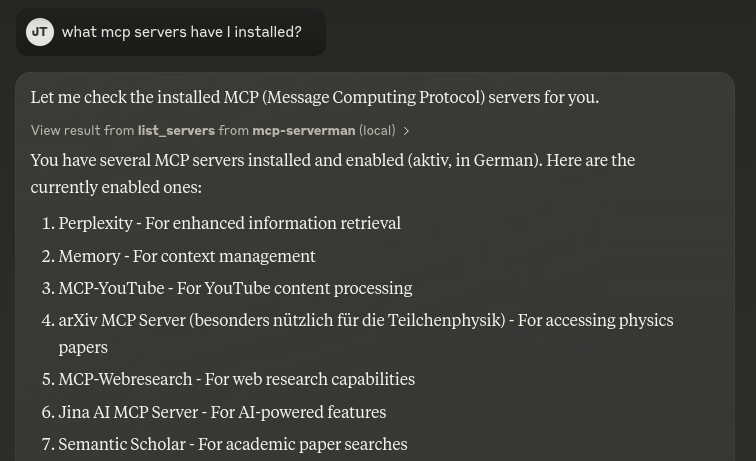
:robot: Install as a mcp server
# Install companion (since 0.2.1)
mcp-serverman companion [--client <client>]
Example:
- What mcp servers do I have?
- Disable xxx, xxx server for me.
:wrench:Development
To install the package in development mode, clone the repository and run:
pip install -e .
:checkered_flag:Roadmap
- Add support for other MCP-Clients, e.g. Cline and MCP-Bridge (since 0.1.9)
- Update the code to be more modular and easier to maintain (since v0.2.0)
- Added our own mcp-server to let Claude/LLM manage for you (since 0.2.1)
- Better error handling tests
Integration with other MCP server install tools, e.g. Smithery, or with predefined installation templates (should iron out safety issues first)We have so many mcp marketplaces now, just use mcp-installer package and instruct the model to install it for you.Maybe a Web UI via Flask?
License
MIT License (LICENSE)
1 maintainer

Metadata
1 maintainer
Release files for iflow-mcp_benhaotang_mcp-serverman 0.2.4
For a detailed explanation of source distributions (sdists) and built distributions (wheels), please see the package formats documentation.
Source distribution (sdist)
| File | Size | Uploaded | |
|---|---|---|---|
| iflow_mcp_benhaotang_mcp_serverman-0.2.4.tar.gz | 16.1 kB | Details |
Built distribution (wheel)
| File | Interpreter | ABI | Platform | Reset |
|---|---|---|---|---|
| iflow_mcp_benhaotang_mcp_serverman-0.2.4-py3-none-any.whl | Python 3 | none | any | Details |
Total release size: 35.0 kB
Release files / iflow_mcp_benhaotang_mcp_serverman-0.2.4.tar.gz
| Download URL | iflow_mcp_benhaotang_mcp_serverman-0.2.4.tar.gz |
|---|---|
| Size | 16.1 kB |
| Tags | Source |
|
SHA-256 checksum How to use checksums |
7c7760f01c4ac36117403a35739c71221b5e49cfd43fc770ecf4874fcf286813
|
|
BLAKE2b-256 checksum How to use checksums |
82a1d07e52206d454ae6ac4191579b01454c470191ac36f7ce7d2a02c5c63485
|
| Upload date | |
|
Uploaded using Trusted Publishing? What is trusted publishing? |
No |
| Uploaded via |
uv/0.9.26 {"installer":{"name":"uv","version":"0.9.26","subcommand":["publish"]},"python":null,"implementation":{"name":null,"version":null},"distro":{"name":"Debian GNU/Linux","version":"13","id":"trixie","libc":null},"system":{"name":null,"release":null},"cpu":null,"openssl_version":null,"setuptools_version":null,"rustc_version":null,"ci":null}
|
Release files / iflow_mcp_benhaotang_mcp_serverman-0.2.4-py3-none-any.whl
| Download URL | iflow_mcp_benhaotang_mcp_serverman-0.2.4-py3-none-any.whl |
|---|---|
| Size | 18.9 kB |
| Tags | Python 3 |
|
SHA-256 checksum How to use checksums |
d4e1b646df8e6ee2ddb9550dc922e40c103ba6552b3ac5278d94a3a01b7b0f4c
|
|
BLAKE2b-256 checksum How to use checksums |
773c1f6904b72cdbf3d344f97e56b5ac734110a38477dc9fd56f480b55b85bec
|
| Upload date | |
|
Uploaded using Trusted Publishing? What is trusted publishing? |
No |
| Uploaded via |
uv/0.9.26 {"installer":{"name":"uv","version":"0.9.26","subcommand":["publish"]},"python":null,"implementation":{"name":null,"version":null},"distro":{"name":"Debian GNU/Linux","version":"13","id":"trixie","libc":null},"system":{"name":null,"release":null},"cpu":null,"openssl_version":null,"setuptools_version":null,"rustc_version":null,"ci":null}
|














