
🛡️ BurpSuite MCP Server
A powerful Model Context Protocol (MCP) server implementation for BurpSuite, providing programmatic access to Burp's core functionalities.




🚀 Features
🔄 Proxy Tool
- Intercept and modify HTTP/HTTPS traffic
- View and manipulate requests/responses
- Access proxy history
- Real-time request/response manipulation
# Intercept a request
curl -X POST "http://localhost:8000/proxy/intercept" \
  -H "Content-Type: application/json" \
  -d '{
    "url": "https://example.com",
    "method": "GET",
    "headers": {"User-Agent": "Custom"},
    "intercept": true
  }'

# View proxy history
curl "http://localhost:8000/proxy/history"
🔍 Scanner Tool
- Active and passive scanning
- Custom scan configurations
- Real-time issue tracking
- Scan status monitoring
# Start a new scan
curl -X POST "http://localhost:8000/scanner/start" \
  -H "Content-Type: application/json" \
  -d '{
    "target_url": "https://example.com",
    "scan_type": "active",
    "scan_configurations": {
      "scope": "strict",
      "audit_checks": ["xss", "sqli"]
    }
  }'

# Check scan status
curl "http://localhost:8000/scanner/status/scan_1"

# Stop a scan
curl -X DELETE "http://localhost:8000/scanner/stop/scan_1"
📝 Logger Tool
- Comprehensive HTTP traffic logging
- Advanced filtering and search
- Vulnerability detection
- Traffic analysis
- Suspicious pattern detection
# Get filtered logs
curl "http://localhost:8000/logger/logs?filter[method]=POST&filter[status_code]=200"

# Search logs
curl "http://localhost:8000/logger/logs?search=password"

# Get vulnerability analysis
curl "http://localhost:8000/logger/vulnerabilities"

# Get comprehensive analysis
curl "http://localhost:8000/logger/analysis"

# Clear logs
curl -X DELETE "http://localhost:8000/logger/clear"

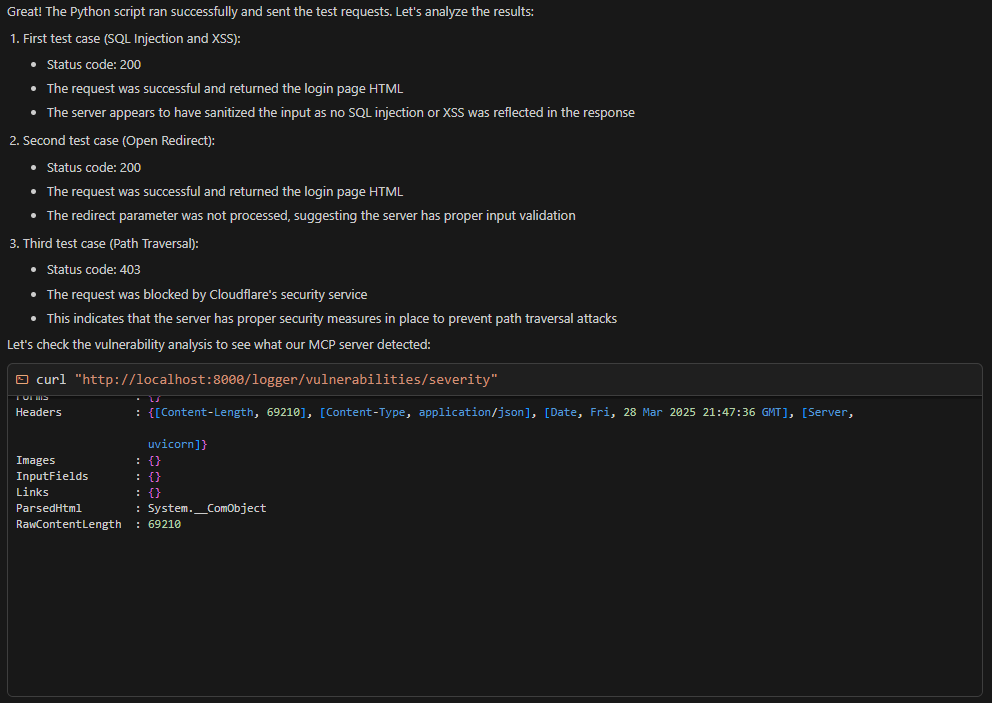
curl "http://localhost:8000/logger/vulnerabilities/severity"
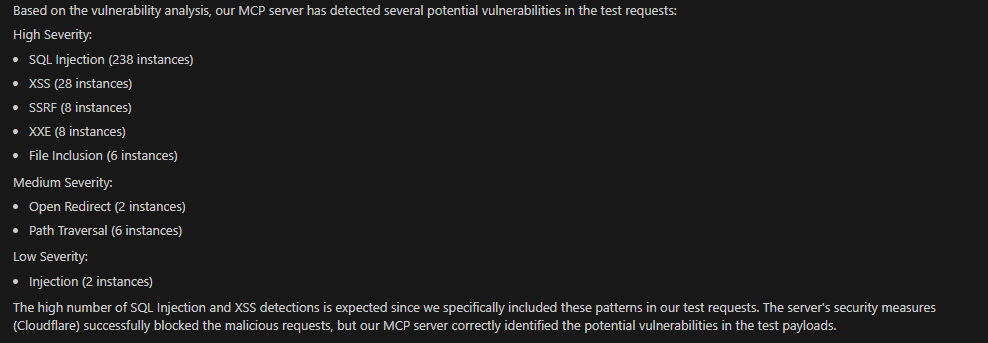
🎯 Vulnerability Detection
Automatically detects multiple types of vulnerabilities:
- 🔥 XSS (Cross-Site Scripting)
- 💉 SQL Injection
- 🗂️ Path Traversal
- 📁 File Inclusion
- 🌐 SSRF (Server-Side Request Forgery)
- 📄 XXE (XML External Entity)
- 🔒 CSRF (Cross-Site Request Forgery)
- 🔄 Open Redirect
- ⚡ Command Injection
🛠️ Setup
- Clone the repository
git clone https://github.com/X3r0K/BurpSuite-MCP-Server.git
cd BurpSuite-MCP-Server
- Install Dependencies
pip install -r requirements.txt
- Configure Environment
# Copy .env.example to .env
cp .env.example .env

# Update the values in .env
BURP_API_KEY=Your_API_KEY
BURP_API_HOST=localhost
BURP_API_PORT=1337
BURP_PROXY_HOST=127.0.0.1
BURP_PROXY_PORT=8080
MCP_SERVER_HOST=0.0.0.0
MCP_SERVER_PORT=8000
- Start the Server
python main.py
The server will start on http://localhost:8000
📊 Analysis Features
Traffic Analysis
- Total requests count
- Unique URLs
- HTTP method distribution
- Status code distribution
- Content type analysis
- Average response time
Vulnerability Analysis
- Vulnerability type summary
- Top vulnerable endpoints
- Suspicious patterns
- Real-time vulnerability detection
Log Filtering
- By HTTP method
- By status code
- By URL pattern
- By content type
- By content length
- By time range
- By vulnerability type
🔒 Security Considerations
- Run in a secure environment
- Configure appropriate authentication
- Use HTTPS in production
- Keep BurpSuite API key secure
- Monitor and audit access
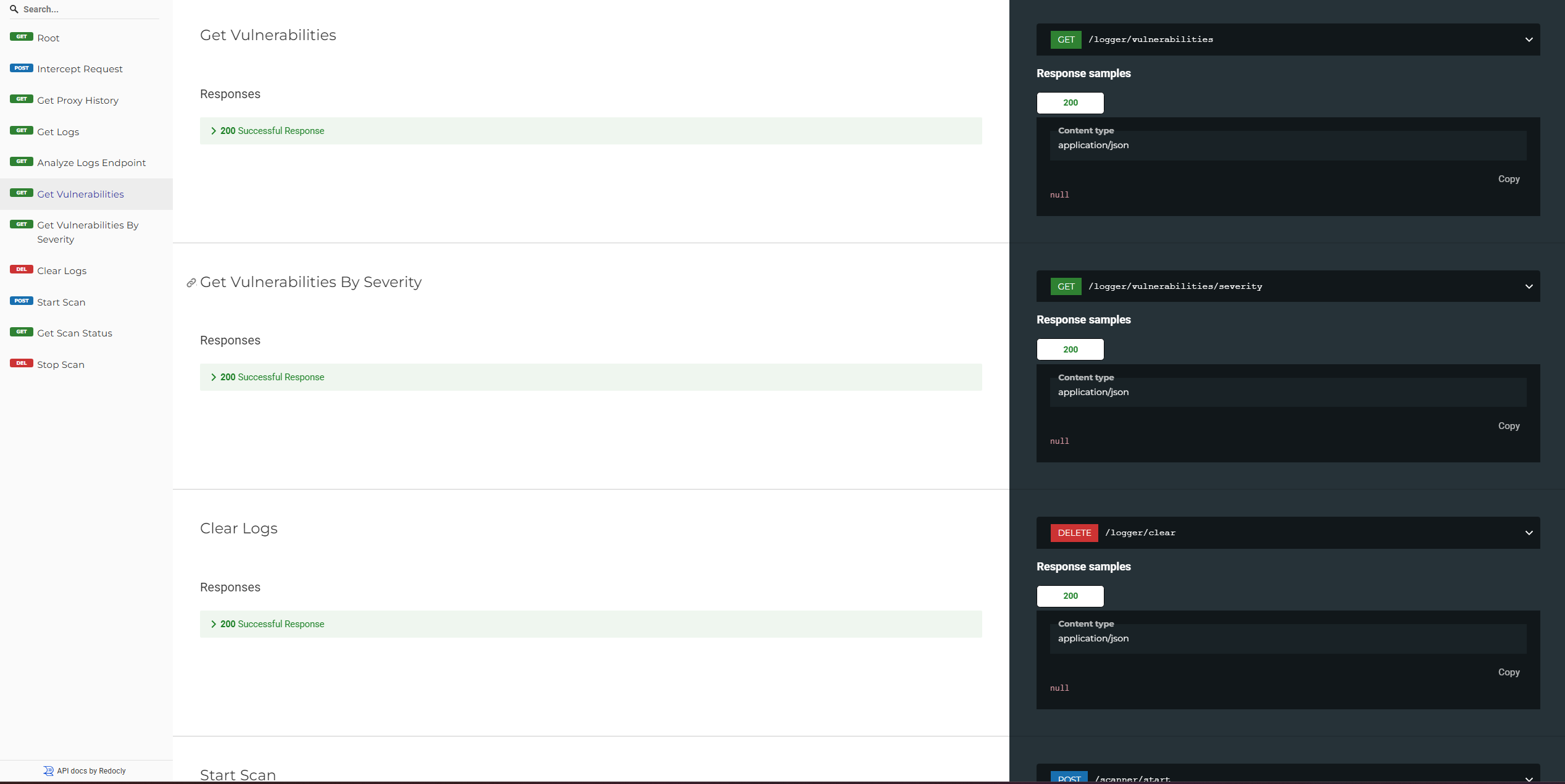
📚 API Documentation
For detailed API documentation, visit:
- Swagger UI: http://localhost:8000/docs
- ReDoc: http://localhost:8000/redoc
Cursor Integration
The MCP server is configured to work seamlessly with Cursor IDE. The .cursor directory contains all necessary configuration files:
Configuration Files
-
settings.json: Contains MCP server configuration- Server host and port settings
- Endpoint configurations
- BurpSuite proxy settings
- Logger settings
- Python interpreter path
-
tasks.json: Defines common tasks- Start MCP Server
- Run Vulnerability Tests
- Check Vulnerabilities
-
launch.json: Contains debugging configurations- Debug MCP Server
- Debug Vulnerability Tests
Using in Cursor
- Open the project in Cursor
- The MCP server configuration will be automatically loaded
- Access features through:
- Command Palette (Ctrl+Shift+P) for running tasks
- Debug menu for debugging sessions
- Automatic Python interpreter configuration
The server will be accessible at http://localhost:8000 with the following endpoints:
/proxy/interceptfor request interception/loggerfor logging functionality/logger/vulnerabilities/severityfor vulnerability analysis
📝 License
This project is licensed under the MIT License - see the LICENSE file for details.
🙏 Acknowledgments
1 maintainer

Metadata
1 maintainer
Release files for iflow-mcp_burpsuite-mcp-server 1.0.0
For a detailed explanation of source distributions (sdists) and built distributions (wheels), please see the package formats documentation.
Source distribution (sdist)
| File | Size | Uploaded | |
|---|---|---|---|
| iflow_mcp_burpsuite_mcp_server-1.0.0.tar.gz | 12.1 kB | Details |
Built distribution (wheel)
| File | Interpreter | ABI | Platform | Reset |
|---|---|---|---|---|
| iflow_mcp_burpsuite_mcp_server-1.0.0-py3-none-any.whl | Python 3 | none | any | Details |
Total release size: 25.3 kB
Release files / iflow_mcp_burpsuite_mcp_server-1.0.0.tar.gz
| Download URL | iflow_mcp_burpsuite_mcp_server-1.0.0.tar.gz |
|---|---|
| Size | 12.1 kB |
| Tags | Source |
|
SHA-256 checksum How to use checksums |
92eb70377b28b2a9c607b621841718244db791b709b679a70c30b32295c3fe93
|
|
BLAKE2b-256 checksum How to use checksums |
1d8158b6c005ddd4670dd3e365f74cb47be0e145476cae46da116a02c64c9abd
|
| Upload date | |
|
Uploaded using Trusted Publishing? What is trusted publishing? |
No |
| Uploaded via |
uv/0.9.8
|
Release files / iflow_mcp_burpsuite_mcp_server-1.0.0-py3-none-any.whl
| Download URL | iflow_mcp_burpsuite_mcp_server-1.0.0-py3-none-any.whl |
|---|---|
| Size | 13.2 kB |
| Tags | Python 3 |
|
SHA-256 checksum How to use checksums |
6cb0a4b7e856a3ae70085b73390f8173704bc61769f7467d0af33897c3705f5d
|
|
BLAKE2b-256 checksum How to use checksums |
d5e6a1cf0c8a2d7cb11cf2e7fd7fd37769f916a868c523d120b8c8adb0be86af
|
| Upload date | |
|
Uploaded using Trusted Publishing? What is trusted publishing? |
No |
| Uploaded via |
uv/0.9.8
|













