
MCP-File-Generation-Tool – Export Files Directly from Open WebUI
A lightweight, MCPO-integrated tool that lets you generate, edit and review real files (PDF, Excel, PowerPoint, Word, ZIP, etc.) directly from Open WebUI — just like ChatGPT or Claude.
✅ Supports both Docker and Python ✅ Fully configurable ✅ Ready for production workflows ✅ Open source & MIT licensed
🚀 Create and export files easily from Open WebUI!
This tool allows seamless file generation and export directly from your Open WebUI environment using Python and FastAPI.
Multi files
https://github.com/user-attachments/assets/41dadef9-7981-4439-bf5f-3b82fcbaff04
Single archive
https://github.com/user-attachments/assets/1e70a977-62f1-498c-895c-7db135ded95b
Table of Contents
- Quick Start
- Using Docker (Recommended)
- For Python Users
- Notes
- Project Structure
- 📬 Need help?
- Quick Start for Development Versions
Quick Start
Best practices here
Prompt examples here
How to use the tool here
How configure the tool here
Supported File Types
- ✅
.xlsx(Excel) - ✅
.pdf(PDF) - ✅
.csv(CSV) - ✅
.pptx(PowerPoint) - ✅
.docx(Word) - ✅
.zipntar.gzand.7z(Archives) - ✅ Any other file type
Using Docker (Recommended)
For SSE - http streamable file export server
This image is dedicated for entreprise grade usecases and advanced users
Endpoints :
- SSE => /sse
- streamable-http => /mcp
Use
docker pull ghcr.io/glissemantv/owui-file-export-server:latest
docker pull ghcr.io/glissemantv/file-gen-sse-http:latest
SSE HTTP ENV VARIABLES
FILE_EXPORT_BASE_URL: URL of your file export server (default ishttp://localhost:9003/files)FILE_EXPORT_DIR: Directory where files will be saved (must match the server's export directory) (default is/output) path must be mounted as a volumePERSISTENT_FILES: Set totrueto keep files after download,falseto delete after delay (default isfalse)FILES_DELAY: Delay in minut to wait before checking for new files (default is 60)UNSPLASH_ACCESS_KEY: Your Unsplash API key (no default value, not mandatory but advised) see herePEXELS_ACCESS_KEY: Your Pexels API key (no default value, not mandatory) see hereIMAGE_SOURCE: "pexels" to use pexels, "unsplash" to use Unsplash or "local_sd" to use your local Stable Diffusion instance (default is "unsplash")LOCAL_SD_URL: URL of your local Stable Diffusion instance (if using local_sd) (no default value, mandatory if local_sd is used above)LOCAL_SD_USERNAME: Username of your local Stable Diffusion instance (if any) (no default value, not mandatory)LOCAL_SD_PASSWORD: Password of your local Stable Diffusion instance (if any) (no default value, not mandatory)LOCAL_SD_DEFAULT_MODEL: Default model to use (if any) (defaultsd_xl_base_1.0.safetensors, not mandatory)LOCAL_SD_STEPS: Number of steps to use (default 20, not mandatory)LOCAL_SD_WIDTH: Width of the image to generate (default 512, not mandatory)LOCAL_SD_HEIGHT: Height of the image to generate (default 512, not mandatory)LOCAL_SD_CFG_SCALE: CFG scale to use (default 1.5, not mandatory)LOCAL_SD_SCHEDULER: Scheduler to use (defaultKarras, not mandatory)LOCAL_SD_SAMPLE: Sampler to use (defaultEuler a, not mandatory)OWUI_URL: URL of your OWUI instance (no default value, mandatory to use edit/review)JWT_TOKEN: Token to access your OWUI instance (only for edit/review used behind an external mcpo server / no longer used if you are SSE/HTTP direct in OWUI)MODE: "sse" or "http"
For OWUI-FILE-EXPORT-SERVER
FILE_EXPORT_DIR: Directory where files will be saved (must match the MCPO's export directory) (default is/output) path must be mounted as a volume
✅ This ensures File server can correctly reach the file export server. ❌ If not set, file export will fail with a 404 or connection error.
For OWUI-MCPO (Builtin MCPO server)
This image is dedicated for novice or simple setup, more logs, more docs, etc.
Use
docker pull ghcr.io/glissemantv/owui-file-export-server:latest
docker pull ghcr.io/glissemantv/owui-mcpo:latest
MCPO ENV VARIABLES
FILE_EXPORT_BASE_URL: URL of your file export server (default ishttp://localhost:9003/files)FILE_EXPORT_DIR: Directory where files will be saved (must match the server's export directory) (default is/output) path must be mounted as a volumePERSISTENT_FILES: Set totrueto keep files after download,falseto delete after delay (default isfalse)FILES_DELAY: Delay in minut to wait before checking for new files (default is 60)UNSPLASH_ACCESS_KEY: Your Unsplash API key (no default value, not mandatory but advised) see herePEXELS_ACCESS_KEY: Your Pexels API key (no default value, not mandatory) see hereIMAGE_SOURCE: "pexels" to use pexels, "unsplash" to use Unsplash or "local_sd" to use your local Stable Diffusion instance (default is "unsplash")LOCAL_SD_URL: URL of your local Stable Diffusion instance (if using local_sd) (no default value, mandatory if local_sd is used above)LOCAL_SD_USERNAME: Username of your local Stable Diffusion instance (if any) (no default value, not mandatory)LOCAL_SD_PASSWORD: Password of your local Stable Diffusion instance (if any) (no default value, not mandatory)LOCAL_SD_DEFAULT_MODEL: Default model to use (if any) (defaultsd_xl_base_1.0.safetensors, not mandatory)LOCAL_SD_STEPS: Number of steps to use (default 20, not mandatory)LOCAL_SD_WIDTH: Width of the image to generate (default 512, not mandatory)LOCAL_SD_HEIGHT: Height of the image to generate (default 512, not mandatory)LOCAL_SD_CFG_SCALE: CFG scale to use (default 1.5, not mandatory)LOCAL_SD_SCHEDULER: Scheduler to use (defaultKarras, not mandatory)LOCAL_SD_SAMPLE: Sampler to use (defaultEuler a, not mandatory)OWUI_URL: URL of your OWUI instance (no default value, mandatory to use edit/review)
For OWUI-FILE-EXPORT-SERVER
FILE_EXPORT_DIR: Directory where files will be saved (must match the MCPO's export directory) (default is/output) path must be mounted as a volume
✅ This ensures MCPO can correctly reach the file export server. ❌ If not set, file export will fail with a 404 or connection error.
DOCKER EXAMPLE
Here is an example of a docker run script file to run both the file export server and the MCPO server:
docker run -d --name file-export-server --network host -e FILE_EXPORT_DIR=/data/output -p 9003:9003 -v /path/to/your/export/folder:/data/output ghcr.io/glissemantv/owui-file-export-server:latest
docker run -d --name owui-mcpo --network host -e FILE_EXPORT_BASE_URL=http://192.168.0.100:9003/files -e FILE_EXPORT_DIR=/output -e MCPO_API_KEY=top-secret -e PERSISTENT_FILES=True -e FILES_DELAY=1 -e -e LOG_LEVEL=INFO -e UNSPLASH_ACCESS_KEY=top-secret -p 8000:8000 -v /path/to/your/export/folder:/output ghcr.io/glissemantv/owui-mcpo:latest
or
docker run -d --name file-gen-sse-http --network host -e FILE_EXPORT_BASE_URL=http://192.168.0.100:9003/files -e FILE_EXPORT_DIR=/output -e PERSISTENT_FILES=True -e FILES_DELAY=1 -e LOG_LEVEL=DEBUG -e UNSPLASH_ACCESS_KEY=top-secret -p 8000:9004 -v /path/to/your/export/folder:/output ghcr.io/glissemantv/file-gen-sse-http:latest
Here is an example of a docker-compose.yaml file to run both the file export server and the MCPO server:
services:
  file-export-server:
    image: ghcr.io/glissemantv/owui-file-export-server:latest
    container_name: file-export-server
    environment:
      - FILE_EXPORT_DIR=/output
    ports:
      - "9003:9003"
    volumes:
      - /your/export-data:/output

  owui-mcpo:
    image: ghcr.io/glissemantv/owui-mcpo:latest
    container_name: owui-mcpo
    environment:
      - FILE_EXPORT_BASE_URL=http://file-export-server:9003/files
      - FILE_EXPORT_DIR=/output
      - PERSISTENT_FILES=true
      - FILES_DELAY=1
      - LOG_LEVEL=INFO
      - UNSPLASH_ACCESS_KEY=top-secret
      - IMAGE_SOURCE=local_sd
      - LOCAL_SD_URL=http://localhost:7860
      - LOCAL_SD_USERNAME=local_user
      - LOCAL_SD_PASSWORD=local_password
      - LOCAL_SD_DEFAULT_MODEL=sd_xl_base_1.0.safetensors
      - LOCAL_SD_STEPS=20
      - LOCAL_SD_WIDTH=512
      - LOCAL_SD_HEIGHT=512
      - LOCAL_SD_CFG_SCALE=1.5
      - LOCAL_SD_SCHEDULER=Karras
      - LOCAL_SD_SAMPLE=Euler a
      - OWUI_URL=http://localhost:8000
    ports:
      - "8000:8000" # Use this port instead of the other only if you want to use the MCPO server
      - "9004:9004" # Use this port instead of the other only if you want to use the SSE HTTP server
    restart: unless-stopped
    volumes:
      - /your/export-data:/output
    depends_on:
      - file-export-server
Notes
- File output paths must match between
file_serverandMCPO - Always use absolute paths for volume mounts
⚠️Some users are experiencing trouble with the MCPO server, please use this fix⚠️
{
  "mcpServers": {
		"file_export": {
			"command": "python", <==== HERE change "python" to "python3", "python3.11" or "python3.12"
			"args": [
				"-m",
				"tools.file_export_mcp"
			],
			"env": {
				"PYTHONPATH": "C:\\temp\\LLM_Export" <==== HERE set the path to your LLM_Export folder (this one is Mandatory)
        ........... other env variables
			},
			"disabled": false,
			"autoApprove": []
		}
}
For Python Users
-
Clone the repo:
git clone https://github.com/GlisseManTV/MCPO-File-Generation-Tool.git
-
Update env variables in
config.json: These ones only concerns the MCPO partPYTHONPATH: Path to yourLLM_Exportfolder (e.g.,C:\temp\LLM_Export) <=== MANDATORY no default valueFILE_EXPORT_BASE_URL: URL of your file export server (default ishttp://localhost:9003/files)FILE_EXPORT_DIR: Directory where files will be saved (must match the server's export directory) (default isPYTHONPATH\output)PERSISTENT_FILES: Set totrueto keep files after download,falseto delete after delay (default is false)FILES_DELAY: Delay in minut to wait before checking for new files (default is 60)LOG_LEVEL: Set the log level (DEBUG, INFO, WARNING, ERROR, CRITICAL) (default is INFO)MCPO_API_KEY: Your MCPO API key (no default value, not mandatory but advised)PEXELS_ACCESS_KEY: Your Pexels API key (no default value, not mandatory) see hereUNSPLASH_ACCESS_KEY: Your Unsplash API key (no default value, not mandatory but advised) see hereIMAGE_SOURCE: "pexels" to use Pexels, "unsplash" to use Unsplash for image generation or "local_sd" to use your local Stable Diffusion instance (default is "unsplash")LOCAL_SD_URL: URL of your local Stable Diffusion instance (if using local_sd) (no default value, mandatory if local_sd is used above)LOCAL_SD_USERNAME: Username of your local Stable Diffusion instance (if any) (no default value, not mandatory)LOCAL_SD_PASSWORD: Password of your local Stable Diffusion instance (if any) (no default value, not mandatory)LOCAL_SD_DEFAULT_MODEL: Default model to use (if any) (defaultsd_xl_base_1.0.safetensors, not mandatory)LOCAL_SD_STEPS: Number of steps to use (default 20, not mandatory)LOCAL_SD_WIDTH: Width of the image to generate (default 512, not mandatory)LOCAL_SD_HEIGHT: Height of the image to generate (default 512, not mandatory)LOCAL_SD_CFG_SCALE: CFG scale to use (default 1.5, not mandatory)LOCAL_SD_SCHEDULER: Scheduler to use (defaultKarras, not mandatory)LOCAL_SD_SAMPLE: Sampler to use (defaultEuler a, not mandatory)OWUI_URL: URL of your OWUI instance (no default value, mandatory to use edit/review)JWT_TOKEN: JWT token to use for authentication (no default value, mandatory to use edit/review behind an external mcpo tool)
-
Install dependencies:
pip install openpyxl reportlab py7zr fastapi uvicorn python-multipart mcp
-
Run the file server:
set FILE_EXPORT_DIR=C:\temp\LLM_Export\output
start "File Export Server" python "YourPATH/LLM_Export/tools/file_export_server.py"
-
Use it in Open WebUI — your AI can now generate and export files in real time!
PYTHON EXAMPLE
This file only concerns the MCPO part, you need to run the file server separately as shown above
This is an example of a minimal config.json for MCPO to enable file export but you can add other (or to other) MCP servers as needed.
{
  "mcpServers": {
		"file_export": {
			"command": "python",
			"args": [
				"-m",
				"tools.file_export_mcp"
			],
			"env": {
				"PYTHONPATH": "C:\\temp\\LLM_Export", <==== HERE set the path to your LLM_Export folder (this one is Mandatory)
				"FILE_EXPORT_BASE_URL": "http://localhost:9003/files", <==== HERE set the URL of your file export server
				"FILE_EXPORT_DIR": "C:\\temp\\LLM_Export\\output", <==== HERE set the directory where files will be saved (must match the server's export directory)
				"PERSISTENT_FILES": "false", <==== HERE set to true to keep files after download, false to delete after delay
				"FILES_DELAY": "60", <==== HERE set the delay in minut to wait before checking for new files
                "LOG_LEVEL": "INFO", <==== HERE set the log level (DEBUG, INFO, WARNING, ERROR, CRITICAL)"
                "MCPO_API_KEY": "", <== Your MCPO API key (no default value, not mandatory but advised)"
                "PEXELS_ACCESS_KEY":"", <== Your Pexels API key (no default value, not mandatory) see [here](https://www.pexels.com/api/)
                "UNSPLASH_ACCESS_KEY":"", <== Your Unsplash API key (no default value, not mandatory but advised) see [here](https://unsplash.com/documentation#creating-a-developer-account)
				"IMAGE_SOURCE": "local_sd", <==== HERE set to "pexels" to use Pexels, "unsplash" to use Unsplash for image generation or "local_sd" to use your local Stable Diffusion instance>
				"LOCAL_SD_URL": "http://localhost:7860", <==== HERE set to the URL of your local Stable Diffusion instance>
                "LOCAL_SD_USERNAME": "local_user", <==== HERE set to the username of your local Stable Diffusion instance (if any)>
                "LOCAL_SD_PASSWORD": "local_password", <==== HERE set to the password of your local Stable Diffusion instance (if any)>
                "LOCAL_SD_DEFAULT_MODEL": "sd_xl_base_1.0.safetensors", <==== HERE set to the default model to use (if any)>
                "LOCAL_SD_STEPS": "20", <==== HERE set to the number of steps to use (if any)>
                "LOCAL_SD_WIDTH": "512", <==== HERE set to the width of the image to generate (if any)>
                "LOCAL_SD_HEIGHT": "512", <==== HERE set to the height of the image to generate (if any)>
                "LOCAL_SD_CFG_SCALE": "1.5", <==== HERE set to the CFG scale to use (if any)>
                "LOCAL_SD_SCHEDULER": "Karras", <==== HERE set to the scheduler to use (if any)>
                "LOCAL_SD_SAMPLE": "Euler a", <==== HERE set to the sampler to use (if any)>
                "OWUI_URL": "http://localhost:3000", <== HERE set to the OWUI URL>
                "JWT_TOKEN": "topsecret" <== HERE set to the JWT token to use to connect to your OWUI instance (only for edit/review used behind an external mcpo server)>
			},
			"disabled": false,
			"autoApprove": []
		}
  }
}
Project Structure
MCPO-File-Generation-Tool/
├───Documentation
│       Best_Practices.md
│       HowToConfigure.md
│       HowToUse.md
│       Prompt_Examples.md
│
└───LLM_Export
    │   Example_docker-compose.yaml
    │   requirements.txt
    │
    ├───docker
    │   │   File_Server.txt
    │   │   mcp_Server.txt
    │   │
    │   ├───file_server
    │   │       dockerfile.server
    │   │       file_export_server.py
    │   │
    │   ├───mcpo
    │   │   │   config.json
    │   │   │   dockerfile
    │   │   │   requirements.txt
    │   │   │
    │   │   ├───functions
    │   │   │       files_metadata_injector.py
    │   │   │
    │   │   ├───templates
    │   │   │       Default_Template.docx
    │   │   │       Default_Template.pptx
    │   │   │       Default_Template.xlsx
    │   │   │
    │   │   └───tools
    │   │           file_export_mcp.py
    │   │           __init__.py
    │   │
    │   └───sse_http
    │       │   config.json
    │       │   dockerfile
    │       │   requirements.txt
    │       │
    │       ├───functions
    │       │       files_metadata_injector.py
    │       │
    │       ├───templates
    │       │       Default_Template.docx
    │       │       Default_Template.pptx
    │       │       Default_Template.xlsx
    │       │
    │       └───tools
    │               file_export_mcp.py
    │               __init__.py
    │
    ├───functions
    │       files_metadata_injector.py
    │
    ├───output
    ├───templates
    │       Default_Template.docx
    │       Default_Template.pptx
    │       Default_Template.xlsx
    │
    └───tools
            file_export_mcp.py
            file_export_server.py
            __init__.py
🌟 Why This Matters
This tool turns Open WebUI into a true productivity engine — where AI doesn’t just chat, but delivers usable, downloadable files.
📄 License
MIT License – Feel free to use, modify, and distribute.
📬 Need help? Open an issue or start a discussion on GitHub!
Credits
A big thank you to the contributors and open-source projects that made this work possible:
-
tjbck for creating Open WebUI and mcpo, foundational pillars of this integration.
-
modelcontextprotocol/servers for high-quality tools and architectural inspiration that guided the development of MCP servers and file generation workflows.
-
gentoorax for close collaboration, technical rigor, and invaluable contributions to the quality and stability of this project.
-
MarouaneZhani and his colleague for deep integration and daily follow up in documents treatment
Thank you to everyone for your passion, expertise, and dedication to the open-source community. 🙌
Quick Start for Development Versions
Using development versions of libraries is at your own risk. Always test in a safe environment first.
Development Workflow
We follow a structured, Git-based release pipeline to ensure stability, transparency, and smooth deployments.
Branching Strategy
| Branch | Purpose | Docker Tag |
|---|---|---|
dev |
Active development | dev-latest |
alpha |
Post-approval testing (basic validation) | alpha-latest |
beta |
Optimization & in-depth testing | beta-latest |
release-candidate |
Final validation before production | rc-latest |
main |
Stable, production-ready code | latest |
Workflow Flow
- Develop → Work in the
devbranch - Review & Approve → Pull request to
alpha - Test → Validate in
alpha→ Merge tobeta - Optimize → Refine in
beta→ Merge torelease-candidate - Deploy → Final verification → Merge to
main
✅ Each branch has its own dedicated Docker image tag
✅ Ensures clean, traceable, and safe releases
✅ Ideal for contributors, testers, and CI/CD automation
For SSE - http streamable file export server !!New!!
Endpoints :
SSE => /sse streamable-http => /mcp
Use
docker pull ghcr.io/glissemantv/owui-file-export-server:dev-latest
docker pull ghcr.io/glissemantv/file-gen-sse-http:dev-latest
DEV SSE HTTP ENV VARIABLES
FILE_EXPORT_BASE_URL: URL of your file export server (default ishttp://localhost:9003/files)FILE_EXPORT_DIR: Directory where files will be saved (must match the server's export directory) (default is/output) path must be mounted as a volumePERSISTENT_FILES: Set totrueto keep files after download,falseto delete after delay (default isfalse)FILES_DELAY: Delay in minut to wait before checking for new files (default is 60)UNSPLASH_ACCESS_KEY: Your Unsplash API key (no default value, not mandatory but advised) see herePEXELS_ACCESS_KEY: Your Pexels API key (no default value, not mandatory) see hereIMAGE_SOURCE: "pexels" to use pexels, "unsplash" to use Unsplash or "local_sd" to use your local Stable Diffusion instance (default is "unsplash")LOCAL_SD_URL: URL of your local Stable Diffusion instance (if using local_sd) (no default value, mandatory if local_sd is used above)LOCAL_SD_USERNAME: Username of your local Stable Diffusion instance (if any) (no default value, not mandatory)LOCAL_SD_PASSWORD: Password of your local Stable Diffusion instance (if any) (no default value, not mandatory)LOCAL_SD_DEFAULT_MODEL: Default model to use (if any) (defaultsd_xl_base_1.0.safetensors, not mandatory)LOCAL_SD_STEPS: Number of steps to use (default 20, not mandatory)LOCAL_SD_WIDTH: Width of the image to generate (default 512, not mandatory)LOCAL_SD_HEIGHT: Height of the image to generate (default 512, not mandatory)LOCAL_SD_CFG_SCALE: CFG scale to use (default 1.5, not mandatory)LOCAL_SD_SCHEDULER: Scheduler to use (defaultKarras, not mandatory)LOCAL_SD_SAMPLE: Sampler to use (defaultEuler a, not mandatory)OWUI_URL: URL of your OWUI instance (no default value, mandatory to use edit/review)MODE: "sse" or "http"
For OWUI-FILE-EXPORT-SERVER
FILE_EXPORT_DIR: Directory where files will be saved (must match the MCPO's export directory) (default is/output) path must be mounted as a volume
✅ This ensures File server can correctly reach the file export server. ❌ If not set, file export will fail with a 404 or connection error.
For OWUI-MCPO (Builtin MCPO server)
Use
docker pull ghcr.io/glissemantv/owui-file-export-server:dev-latest
docker pull ghcr.io/glissemantv/owui-mcpo:dev-latest
DEV MCPO ENV VARIABLES
FILE_EXPORT_BASE_URL: URL of your file export server (default ishttp://localhost:9003/files)FILE_EXPORT_DIR: Directory where files will be saved (must match the server's export directory) (default is/output) path must be mounted as a volumePERSISTENT_FILES: Set totrueto keep files after download,falseto delete after delay (default isfalse)FILES_DELAY: Delay in minut to wait before checking for new files (default is 60)UNSPLASH_ACCESS_KEY: Your Unsplash API key (no default value, not mandatory but advised) see herePEXELS_ACCESS_KEY: Your Pexels API key (no default value, not mandatory) see hereIMAGE_SOURCE: "pexels" to use pexels, "unsplash" to use Unsplash or "local_sd" to use your local Stable Diffusion instance (default is "unsplash")LOCAL_SD_URL: URL of your local Stable Diffusion instance (if using local_sd) (no default value, mandatory if local_sd is used above)LOCAL_SD_USERNAME: Username of your local Stable Diffusion instance (if any) (no default value, not mandatory)LOCAL_SD_PASSWORD: Password of your local Stable Diffusion instance (if any) (no default value, not mandatory)LOCAL_SD_DEFAULT_MODEL: Default model to use (if any) (defaultsd_xl_base_1.0.safetensors, not mandatory)LOCAL_SD_STEPS: Number of steps to use (default 20, not mandatory)LOCAL_SD_WIDTH: Width of the image to generate (default 512, not mandatory)LOCAL_SD_HEIGHT: Height of the image to generate (default 512, not mandatory)LOCAL_SD_CFG_SCALE: CFG scale to use (default 1.5, not mandatory)LOCAL_SD_SCHEDULER: Scheduler to use (defaultKarras, not mandatory)LOCAL_SD_SAMPLE: Sampler to use (defaultEuler a, not mandatory)OWUI_URL: URL of your OWUI instance (no default value, mandatory to use edit/review)
For OWUI-FILE-EXPORT-SERVER
FILE_EXPORT_DIR: Directory where files will be saved (must match the MCPO's export directory) (default is/output) path must be mounted as a volume
✅ This ensures MCPO can correctly reach the file export server. ❌ If not set, file export will fail with a 404 or connection error.
DEV DOCKER EXAMPLE
Here is an example of a docker run script file to run both the file export server and the MCPO server:
docker run -d --name file-export-server --network host -e FILE_EXPORT_DIR=/data/output -p 9003:9003 -v /path/to/your/export/folder:/data/output ghcr.io/glissemantv/owui-file-export-server:dev-latest
docker run -d --name owui-mcpo --network host -e FILE_EXPORT_BASE_URL=http://192.168.0.100:9003/files -e FILE_EXPORT_DIR=/output -e MCPO_API_KEY=top-secret -e PERSISTENT_FILES=True -e FILES_DELAY=1 -e LOG_LEVEL=DEBUG -e UNSPLASH_ACCESS_KEY=top-secret -p 8000:8000 -v /path/to/your/export/folder:/output ghcr.io/glissemantv/owui-mcpo:dev-latest
or
docker run -d --name file-gen-sse-http --network host -e FILE_EXPORT_BASE_URL=http://192.168.0.100:9003/files -e FILE_EXPORT_DIR=/output -e PERSISTENT_FILES=True -e FILES_DELAY=1 -e LOG_LEVEL=DEBUG -e UNSPLASH_ACCESS_KEY=top-secret -p 8000:8000 -v /path/to/your/export/folder:/output ghcr.io/glissemantv/file-gen-sse-http:dev-latest
Here is an example of a docker-compose.yaml file to run both the file export server and the MCPO server:
services:
  file-export-server:
    image: ghcr.io/glissemantv/owui-file-export-server:dev-latest
    container_name: file-export-server
    environment:
      - FILE_EXPORT_DIR=/output
    ports:
      - "9003:9003"
    volumes:
      - /your/export-data:/output

  owui-mcpo:
    image: ghcr.io/glissemantv/owui-mcpo:dev-latest
    container_name: owui-mcpo
    environment:
      - FILE_EXPORT_BASE_URL=http://file-export-server:9003/files
      - FILE_EXPORT_DIR=/output
      - PERSISTENT_FILES=true
      - FILES_DELAY=1
      - LOG_LEVEL=DEBUG
      - UNSPLASH_ACCESS_KEY=top-secret
      - IMAGE_SOURCE=local_sd
      - LOCAL_SD_URL=http://localhost:7860
      - LOCAL_SD_USERNAME=local_user
      - LOCAL_SD_PASSWORD=local_password
      - LOCAL_SD_DEFAULT_MODEL=sd_xl_base_1.0.safetensors
      - LOCAL_SD_STEPS=20
      - LOCAL_SD_WIDTH=512
      - LOCAL_SD_HEIGHT=512
      - LOCAL_SD_CFG_SCALE=1.5
      - LOCAL_SD_SCHEDULER=Karras
      - LOCAL_SD_SAMPLE=Euler a
      - OWUI_URL=http://localhost:3000
    ports:
      - "8000:8000" # Use this port instead of the other only if you want to use the MCPO server
      - "9004:9004" # Use this port instead of the other only if you want to use the SSE HTTP server
    restart: unless-stopped
    volumes:
      - /your/export-data:/output
    depends_on:
      - file-export-server
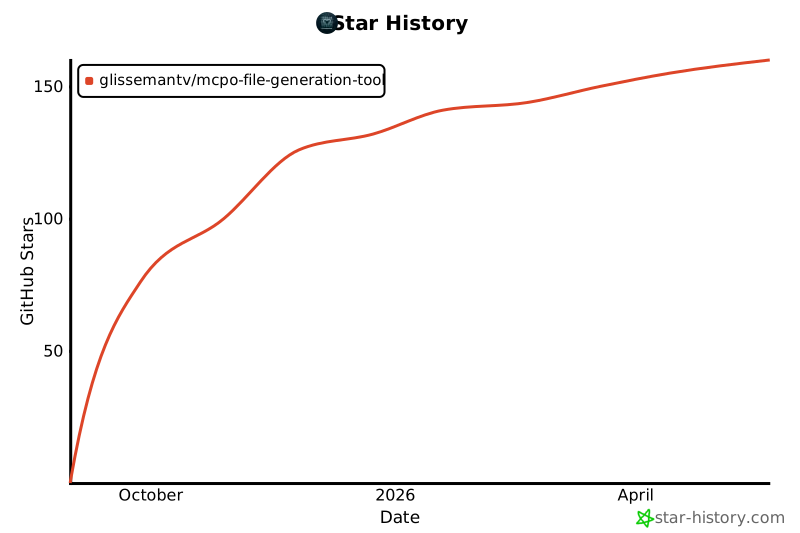
✨ Star History
1 maintainer

Metadata
1 maintainer
Release files for iflow-mcp_glissemantv-mcpo-file-generation-tool 0.8.1
For a detailed explanation of source distributions (sdists) and built distributions (wheels), please see the package formats documentation.
Source distribution (sdist)
| File | Size | Uploaded | |
|---|---|---|---|
| iflow_mcp_glissemantv_mcpo_file_generation_tool-0.8.1.tar.gz | 901.5 kB | Details |
Built distribution (wheel)
| File | Interpreter | ABI | Platform | Reset |
|---|---|---|---|---|
| iflow_mcp_glissemantv_mcpo_file_generation_tool-0.8.1-py3-none-any.whl | Python 3 | none | any | Details |
Total release size: 1.8 MB
Release files / iflow_mcp_glissemantv_mcpo_file_generation_tool-0.8.1.tar.gz
| Download URL | iflow_mcp_glissemantv_mcpo_file_generation_tool-0.8.1.tar.gz |
|---|---|
| Size | 901.5 kB |
| Tags | Source |
|
SHA-256 checksum How to use checksums |
214527935efc47a73b4310aa96c2d6c626f170f6177cabe7d502b27784955d37
|
|
BLAKE2b-256 checksum How to use checksums |
5f4bc5c1ccd462f882ea30771377b92c7d7647a10151bb437acb1037bc9b74c2
|
| Upload date | |
|
Uploaded using Trusted Publishing? What is trusted publishing? |
No |
| Uploaded via |
uv/0.10.0 {"installer":{"name":"uv","version":"0.10.0","subcommand":["publish"]},"python":null,"implementation":{"name":null,"version":null},"distro":{"name":"Debian GNU/Linux","version":"13","id":"trixie","libc":null},"system":{"name":null,"release":null},"cpu":null,"openssl_version":null,"setuptools_version":null,"rustc_version":null,"ci":null}
|
Release files / iflow_mcp_glissemantv_mcpo_file_generation_tool-0.8.1-py3-none-any.whl
| Download URL | iflow_mcp_glissemantv_mcpo_file_generation_tool-0.8.1-py3-none-any.whl |
|---|---|
| Size | 898.1 kB |
| Tags | Python 3 |
|
SHA-256 checksum How to use checksums |
126e5aa6eb08803e54d1dc01e1396a00940dad14b9528ec1f7fc53a1c9cb589f
|
|
BLAKE2b-256 checksum How to use checksums |
b5f8aca681907dd8444ec21305694debdd526dfd09c2e5c5d8a01477a33d0fca
|
| Upload date | |
|
Uploaded using Trusted Publishing? What is trusted publishing? |
No |
| Uploaded via |
uv/0.10.0 {"installer":{"name":"uv","version":"0.10.0","subcommand":["publish"]},"python":null,"implementation":{"name":null,"version":null},"distro":{"name":"Debian GNU/Linux","version":"13","id":"trixie","libc":null},"system":{"name":null,"release":null},"cpu":null,"openssl_version":null,"setuptools_version":null,"rustc_version":null,"ci":null}
|













