
Safe Local Python Executor
An MCP server (stdio transport) that wraps Hugging Face's LocalPythonExecutor
(from the smolagents framework). It is a custom Python runtime that
provides basic isolation/security when running Python code generated by LLMs locally. It does not require Docker or VM.
This package allows to expose the Python executor via MCP (Model Context Protocol) as a tool for LLM apps like Claude Desktop, Cursor or any other MCP compatible client.
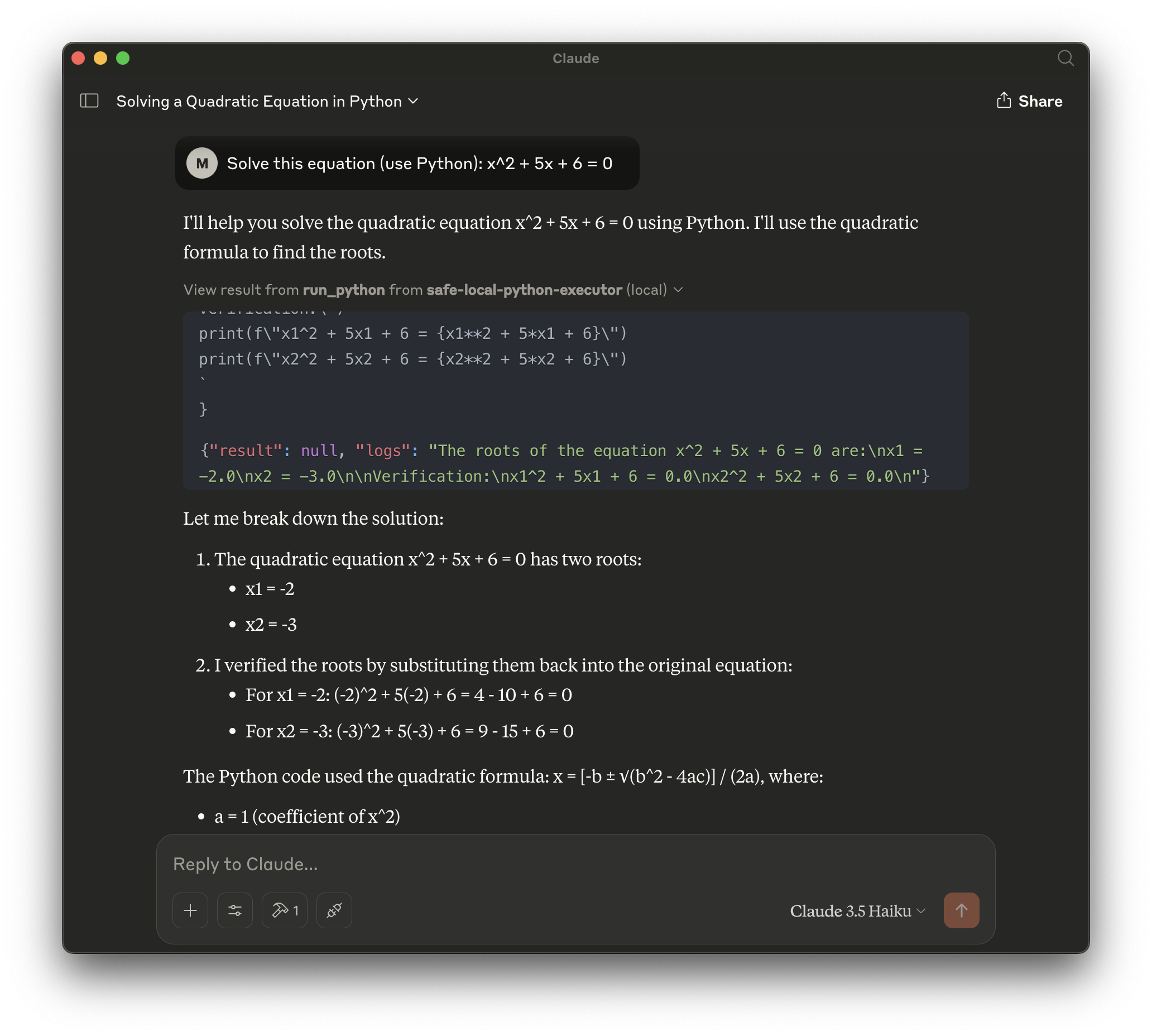
In case of Claude Desktop this tool is an easy way to add a missing Code Interpreter (available as a plugin in ChatGPT for quite a while already).
Features
- Exposes
run_pythontool - Safer execution of Python code compared to direct use of Python
eva()l - Ran via uv in Python venv
- No file I/O ops are allowed
- Restricted list of imports
- collections
- datetime
- itertools
- math
- queue
- random
- re
- stat
- statistics
- time
- unicodedata
Security
Be careful with execution of code produced by LLM on your machine, stay away from MCP servers that run Python via command line or using eval(). The safest option is using a VM or a docker container, though it requires some effort to set-up, consumes resources/slower. There're 3rd party servcices providing Python runtime, though they require registration, API keys etc.
LocalPythonExecutor provides a good balance between direct use of local Python environment (which is easier to set-up) AND remote execution in Dokcer container or a VM/3rd party service (which is safe). Hugginng Face team has invested time into creating a quick and safe option to run LLM generated code used by their code agents. This MCP server builds upon it:
To add a first layer of security, code execution in smolagents is not performed by the vanilla Python interpreter. We have re-built a more secure LocalPythonExecutor from the ground up.
Read more here.
Installation and Execution
Installing via Smithery
To install Safe Local Python Executor for Claude Desktop automatically via Smithery:
npx -y @smithery/cli install @maxim-saplin/mcp_safe_local_python_executor --client claude
Installing Manually
- Install
uv(e.h.brew install uvon macOS or use official docs) - Clone the repo, change the directory
cd mcp_safe_local_python_executor - The server can be started via command line
uv run mcp_server.py, venv will be created automatically, depedencies (smollagents, mcp) will be installed
Configuring Claude Desktop
-
Make sure you have Claude for Desktop installed (download from claude.ai)
-
Edit your Claude for Desktop configuration file:
- macOS:
~/Library/Application Support/Claude/claude_desktop_config.json - Windows:
%APPDATA%\Claude\claude_desktop_config.json - Or open Claude Desktop -> Settings -> Developer -> click "Edit Config" button
- macOS:
-
Add the following configuration:
{
    "mcpServers": {
        "safe-local-python-executor": {
            "command": "uv",
            "args": [
                "--directory",
                "/path/to/mcp_local_python_executor/",
                "run",
                "mcp_server.py"
            ]
        }
    }
}
- Restart Claude for Desktop
- The Python executor tool will now be available in Claude (you'll see hammer icon in the message input field)
Example Prompts
Once configured, you can use prompts like:
- "Calculate the factorial of 5 using Python"
- "Create a list of prime numbers up to 100"
- "Solve this equation (use Python): x^2 + 5x + 6 = 0"
Development
Clone the repo. Use uv to create venv, install dev dependencies, run tests:
uv venv .venv
uv sync --group dev
python -m pytest tests/

1 maintainer

Metadata
1 maintainer
Release files for iflow-mcp_mcp_safe_local_python_executor 0.1.0
For a detailed explanation of source distributions (sdists) and built distributions (wheels), please see the package formats documentation.
Source distribution (sdist)
| File | Size | Uploaded | |
|---|---|---|---|
| iflow_mcp_mcp_safe_local_python_executor-0.1.0.tar.gz | 5.7 kB | Details |
Built distribution (wheel)
| File | Interpreter | ABI | Platform | Reset |
|---|---|---|---|---|
| iflow_mcp_mcp_safe_local_python_executor-0.1.0-py3-none-any.whl | Python 3 | none | any | Details |
Total release size: 12.3 kB
Release files / iflow_mcp_mcp_safe_local_python_executor-0.1.0.tar.gz
| Download URL | iflow_mcp_mcp_safe_local_python_executor-0.1.0.tar.gz |
|---|---|
| Size | 5.7 kB |
| Tags | Source |
|
SHA-256 checksum How to use checksums |
8ef4a021827a847a3b4701ce72c1473f43143e2c40c6950873a1a1b567d7ac3d
|
|
BLAKE2b-256 checksum How to use checksums |
6d775844dced37cd353e14908158a2128f0b077f22564024d66a3ae06cec14fa
|
| Upload date | |
|
Uploaded using Trusted Publishing? What is trusted publishing? |
No |
| Uploaded via |
uv/0.6.9
|
Release files / iflow_mcp_mcp_safe_local_python_executor-0.1.0-py3-none-any.whl
| Download URL | iflow_mcp_mcp_safe_local_python_executor-0.1.0-py3-none-any.whl |
|---|---|
| Size | 6.5 kB |
| Tags | Python 3 |
|
SHA-256 checksum How to use checksums |
87ebdeea56c7510b47daeee631cedc04176b87ebeaa8f4d75f6fa8a1e31f7135
|
|
BLAKE2b-256 checksum How to use checksums |
45b22115cb62054b856be608c14c59f358126cc37bdc518e5c0af1cece599fc4
|
| Upload date | |
|
Uploaded using Trusted Publishing? What is trusted publishing? |
No |
| Uploaded via |
uv/0.6.9
|













