






Official Mobvoi Model Context Protocol (MCP) server that enables interaction with Mobvoi powerful Text to Speech, Voice Clone, Photo-Driven Avatar, Video Dubbing, Video Translation APIs. This server allows MCP clients like Cursor, Claude Desktop, Cline , Windsurf and other Client to call tools to generate speech, clone voices, photo drive avatar, video dubbing, video translation and more. The mobvoi-mcp server is built based on Python, our PyPI package is published at Pypi, you can click on Pypi to view the latest version.
Prerequisite
- python 3.10+;
- Get your app_key and app_secret:
- For users in mainland China: you can get your APP_KEY and APP_SECRET from Mobvoi Sequence Monkey open platform. New users can claim a free quota.
- For overseas users: we will launch it soon.
- Configure environment variables such as APP_KEY, APP_SECRET, MOBVOI_MCP_REGION, and MOBVOI_MCP_BASE_PATH. I will provide example explanations later.
- MOBVOI_MCP_REGION:"mainland" by default. Overseas users need to configure "global"(coming soon).
- MOBVOI_MCP_BASE_PATH:The storage path for tool invocation results.
- Install
uv(Python package manager), install withpip install uvor see theuvrepo for additional install methods.
What can Mobvoi MCP do?
Mobvoi MCP now provides the following tools for Clients to invoke.
| tool | description |
|---|---|
| get_speaker_list | List all voices available |
| text_to_speech | Convert text to speech with a given speaker |
| voice_clone | Clone a voice from a given url or local audio file |
| play_audio | Play an local audio file |
| photo_drive_avatar | Generate a video from a given image URL and an audio URL |
| query_photo_drive_avatar | Query the result of the photo drive avatar task |
| video_dubbing | Aims to perform the voice over task, which generates a video from a given video URL and an audio URL |
| query_video_dubbing | Query the result of the video dubbing task |
Quickstart with Cursor
Go to Cursor -> Cursor Settings -> MCP, click Add new global MCP server, and mcp.json will open, paste the following config content:
"Mobvoi": {
        "command": "uvx",
        "args": [
          "mobvoi-mcp"
        ],
        "env": {
          "APP_KEY": "<insert-your-APP_KEY-here>",
          "APP_SECRET": "<insert-your-APP_SECRET-here>",
          "MOBVOI_MCP_REGION": "optional, mainland is default, choose from mainland | global",
          "MOBVOI_MCP_BASE_PATH": "optional, ~/Desktop is default"
        },
      },
Quickstart with Claude Desktop
Go to Claude Desktop -> Settings -> Developer, click Edit Config and open claude_desktop_config.json, paste the following config content:
"Mobvoi": {
        "command": "uvx",
        "args": [
          "mobvoi-mcp"
        ],
        "env": {
          "APP_KEY": "<insert-your-APP_KEY-here>",
          "APP_SECRET": "<insert-your-APP_SECRET-here>",
          "MOBVOI_MCP_REGION": "optional, mainland is default, choose from mainland | global",
          "MOBVOI_MCP_BASE_PATH": "optional, ~/Desktop is default"
        },
      },
Quickstart with Cline
Install Cline extension on VSCode EXTENSIONS, and go to Cline -> MCP Servers -> Installed, click Config MCP Servers and cline_mcp_settings.json will be opened, paste the following config content:
"Mobvoi": {
        "command": "uvx",
        "args": [
          "mobvoi-mcp"
        ],
        "env": {
          "APP_KEY": "<insert-your-APP_KEY-here>",
          "APP_SECRET": "<insert-your-APP_SECRET-here>",
          "MOBVOI_MCP_REGION": "optional, mainland is default, choose from mainland | global",
          "MOBVOI_MCP_BASE_PATH": "optional, ~/Desktop is default"
        },
        "transportType": "stdio"
      },
For MacOS and Linux systems, you can refer to the above for configuration. We haven't tested the Windows system yet.
Source Code Test
If you want to conduct tests based on the source code or perform secondary development based on this repository, you can configure it in the following way:
"MobvoiLocal": {
      "disabled": false,
      "timeout": 60,
      "command": "uv",
      "args": [
        "--directory",
        "<path-to-mobvoi-mcp>/mobvoi_mcp",
        "run",
        "server.py"
      ],
      "env": {
          "APP_KEY": "<insert-your-APP_KEY-here>",
          "APP_SECRET": "<insert-your-APP_SECRET-here>",
          "MOBVOI_MCP_REGION": "optional, mainland is default, choose from mainland | global",
          "MOBVOI_MCP_BASE_PATH": "optional, ~/Desktop is default"
      },
      "transportType": "stdio"
    },
Take Cline as an example, and the configuration of other clients is similar.
Example usage
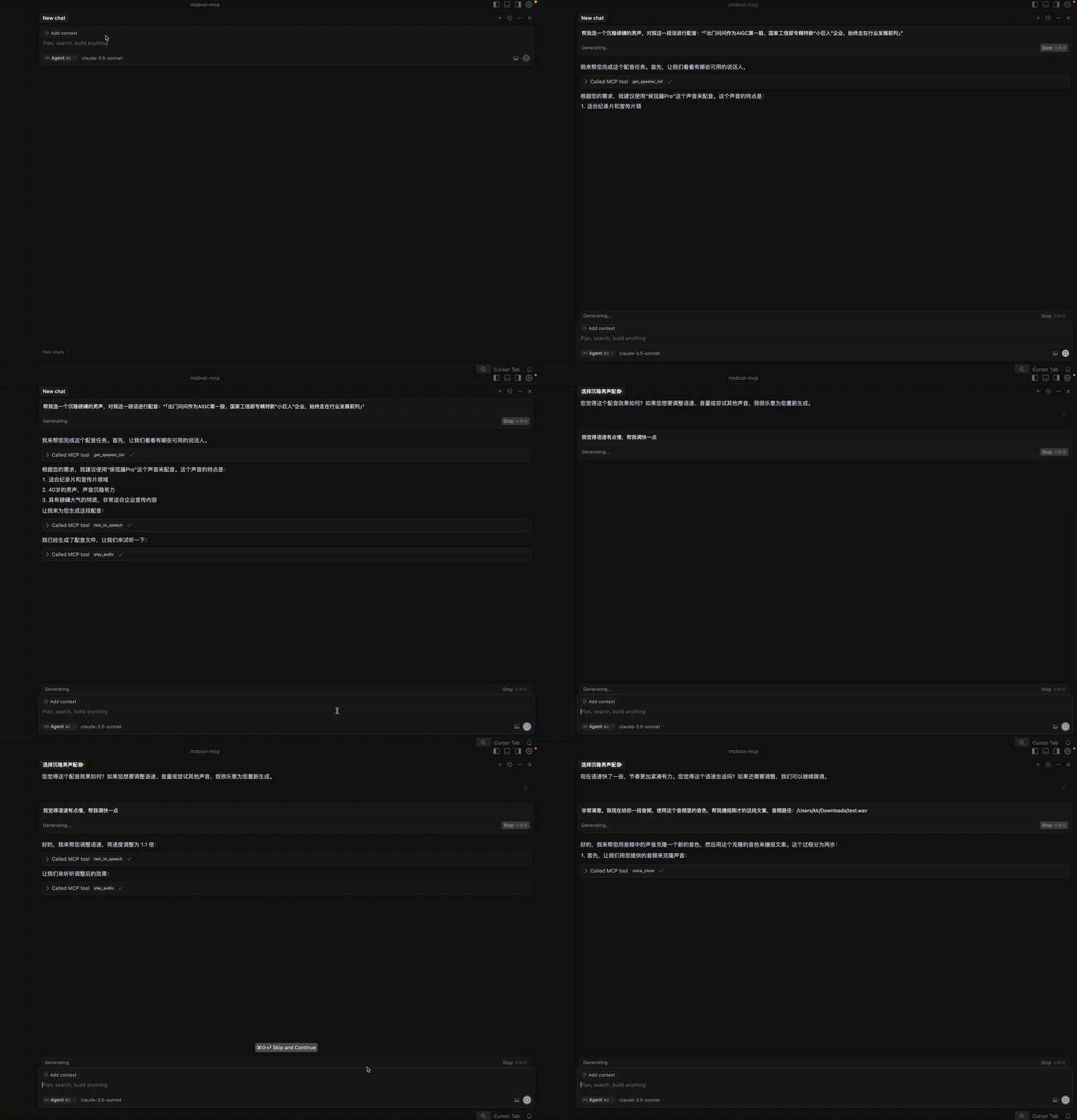
- TTS Demo video:
Troubleshooting
spawn uvx ENOENT
If you encounter the error "MCP Mobvoi: spawn uvx ENOENT", confirm its absolute path by running this command in your terminal:
which uvx
Once you obtain the absolute path (e.g., /usr/local/bin/uvx), update your configuration to use that path (e.g., "command": "/usr/local/bin/uvx"). This ensures that the correct executable is referenced.
MCP error -32001: Request timed out
If you encounter this error, this indicates that there is a problem with your network. If you are in mainland China, we strongly recommend that you configure extra pypi sources in the following way:
"Mobvoi": {
        ...
        "args": [
          "--index",
          "https://pypi.tuna.tsinghua.edu.cn/simple",
          "mobvoi-mcp"
        ],
       ...
      },
Note that the extra pypi source needs to be configured at the very front of the args.
Unable to synchronize the latest PyPI package
If you encounter this situation, it may be caused by the following reasons: 1) Network problems; 2) Cache problems; 3) The specified mirror source has not synchronized the mobvoi-mcp package.
If you are using a mirror source, you should first check whether the mobvoi-mcp package is synchronized on the mirror source you are using, in the following way:
pip index versions --index-url https://pypi.tuna.tsinghua.edu.cn/simple mobvoi-mcp
If you can see that the LATEST version number is consistent with that on PyPI, you can use the mirror source to update the latest mobvoi-mcp package. Otherwise, you can only use https://pypi.org/simple for the update. Usually, after a new package is released on PyPI, there will be a delay of dozens of minutes for the mirror source to synchronize.
At the same time, you can refer to the following configuration to update and clear the cache.
"Mobvoi": {
        ...
        "args": [
          "--upgrade",
          "--no-cache-dir",
          "--index",
          "https://pypi.tuna.tsinghua.edu.cn/simple",
          "mobvoi-mcp"
        ],
       ...
      },
1 maintainer

Metadata
1 maintainer
Release files for iflow-mcp_mobvoi-mcp 0.1.0
For a detailed explanation of source distributions (sdists) and built distributions (wheels), please see the package formats documentation.
Source distribution (sdist)
| File | Size | Uploaded | |
|---|---|---|---|
| iflow_mcp_mobvoi_mcp-0.1.0.tar.gz | 13.4 kB | Details |
Built distribution (wheel)
| File | Interpreter | ABI | Platform | Reset |
|---|---|---|---|---|
| iflow_mcp_mobvoi_mcp-0.1.0-py3-none-any.whl | Python 3 | none | any | Details |
Total release size: 29.4 kB
Release files / iflow_mcp_mobvoi_mcp-0.1.0.tar.gz
| Download URL | iflow_mcp_mobvoi_mcp-0.1.0.tar.gz |
|---|---|
| Size | 13.4 kB |
| Tags | Source |
|
SHA-256 checksum How to use checksums |
5cf357ed6958233c5e44cb4bdc32f9be7e756216b9e66e8c2f2bf9fff0b53f57
|
|
BLAKE2b-256 checksum How to use checksums |
17a92221ba91c048054c41ac927df040249c2e411afcaaa4e147d7833a7ac9d4
|
| Upload date | |
|
Uploaded using Trusted Publishing? What is trusted publishing? |
No |
| Uploaded via |
uv/0.8.3
|
Release files / iflow_mcp_mobvoi_mcp-0.1.0-py3-none-any.whl
| Download URL | iflow_mcp_mobvoi_mcp-0.1.0-py3-none-any.whl |
|---|---|
| Size | 15.9 kB |
| Tags | Python 3 |
|
SHA-256 checksum How to use checksums |
7ae1a04db070a9dfddd0085ab48065ed5c98abc873784d2d4a756326d01a9b36
|
|
BLAKE2b-256 checksum How to use checksums |
4c7e9445e757093eb14adf5c630540e2249a72b92d91b1179cce3c6d3e422c66
|
| Upload date | |
|
Uploaded using Trusted Publishing? What is trusted publishing? |
No |
| Uploaded via |
uv/0.8.3
|













