
BeeMCP - A Bee MCP Server


Unofficial Model Context Protocol (MCP) server for interacting with your Bee wearable lifelogging data. More context on my blog.
This server acts as a bridge, allowing Large Language Models (LLMs) like Claude or custom AI agents to access and interact with your personal data stored in Bee, including conversations, facts, to-dos, and location history.
Disclaimer: This is an unofficial project and is not affiliated with Bee. Use it at your own risk. Ensure you understand the security implications of granting AI access to your personal data via the API key.
Core Concept
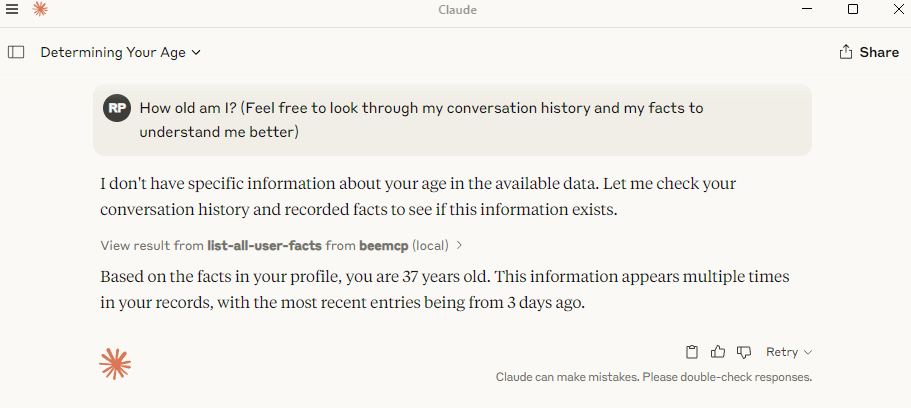
Bee.computer helps you capture moments from your life (conversations, places visited, notes). beemcp makes this data available to your AI assistant through the Model Context Protocol. This means you can ask your AI questions like:
- "What important things did I discuss last week?"
- "Remind me about Brad's dietary preferences."
- "Where was I last Tuesday afternoon?"
- "Add 'Book flight tickets' to my reminders."
The AI, using beemcp, can securely fetch or modify this information from your Bee.computer account.
Prerequisites
- Python: Version 3.10 or higher.
- Bee.computer API Key: You need an API key from your Bee account settings.
Installation
You can install and run beemcp using uv (recommended) or pip.
Using uv (recommended)
uv is a fast Python package installer and resolver. If you have uv installed, you don't need to install beemcp separately. You can run it directly using uvx:
# Example of running directly (requires API key configured, see below)
uvx beemcp
Using PIP
Alternatively, you can install beemcp using pip:
pip install beemcp
After installation, you can run it as a Python module:
python -m beemcp.beemcp
Or, if the entry point is correctly added to your system's PATH during installation, you might be able to run it directly:
beemcp
Configuration
1. API Key Setup (required)
beemcp requires your Bee API key to function. Never share this key publicly or commit it to version control.
Get your API key from the Bee developer website here.
If running in Claude or another MCP client, you will likely provide the BEE_API_TOKEN environment variable in the client's configuration.
If running directly from the command line, provide the key is using a .env file in the directory where you run the beemcp server:
-
Create a file named
.envin the same directory you intend to runbeemcpfrom. -
Add the following line to the
.envfile, replacingyour_actual_bee_api_key_herewith your real key:BEE_API_TOKEN="your_actual_bee_api_key_here"
Alternatively, you can set the BEE_API_TOKEN environment variable directly in your system or shell:
export BEE_API_TOKEN="your_actual_bee_api_key_here"
# Now run the server in the same shell session
uvx beemcp
The server will exit with an error if the BEE_API_TOKEN is not found.
2. Connecting to LLM Clients
You need to tell your LLM client (like Claude.app or Zed) how to start and communicate with the beemcp server.
Configure for Claude.app
Add the following to your Claude settings (settings.json):
Using uvx (Recommended):
"mcpServers": {
  "beemcp": {
    "command": "uvx",
    "args": ["beemcp"],
    "env": {"BEE_API_TOKEN": "<YOUR API KEY HERE>"}
  }
}
Using pip installation
"mcpServers": {
  "bee": {
    "command": "python",
    "args": ["-m", "beemcp.beemcp"],
    "env": {"BEE_API_TOKEN": "<YOUR API KEY HERE>"}
  }
}
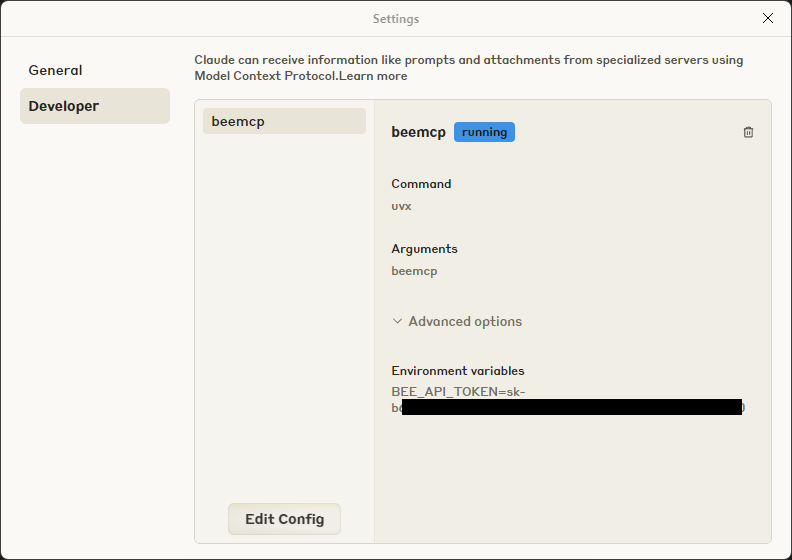
If you go to the Settings window in Claude Desktop and open the Developer tab, you should see something like this:
Configure for Zed
Add the following to your Zed settings.json:
Using uvx (Recommended)
"context_servers": [
  {
    "name": "beemcp",
    "command": "uvx",
    "args": ["beemcp"],
    "env": {"BEE_API_TOKEN": "<YOUR API KEY HERE>"}
  }
],
Using pip installation
"context_servers": [
  {
    "name": "beemcp",
    "command": "python",
    "args": ["-m", "beemcp.beemcp"],
    "env": {"BEE_API_TOKEN": "<YOUR API KEY HERE>"}
  }
],
Available Tools
These are the actions the LLM can request from beemcp.
Conversations
list-all-conversations- Description: List all conversations the user has had including short summaries. Use this to get an overview of the user's conversation history for context. Then you can use the get-conversation tool to get the full details of a specific conversation.
get-conversation- Description: Get the full details of a conversation by its ID. Use this to retrieve specific conversation details when the user asks about a particular conversation. You can use the list-all-conversations tool to get the id of the conversation you want to look up.
- Arguments:
id(integer): The ID of the conversation.
Facts
list-all-user-facts- Description: List all facts the user has recorded. Use this to get an overview of the user's recorded facts for context. Then you can use the get-user-fact tool to get the full details of a specific fact.
get-user-fact- Description: Get the full details of a fact by its ID. Use this to retrieve specific fact details when the user asks about a particular fact. You can use the list-all-user-facts tool to get the id of the fact you want to look up.
- Arguments:
id(integer): The ID of the fact.
record-user-fact- Description: Create a new fact. Use this to record new information about the user, their preferences, and other details that might be relevant to answering other questions.
- Arguments:
text(string): The content of the fact.
update-user-fact- Description: Update an existing fact. Use this to update information about the user, their preferences, and other details that might be relevant to answering other questions. Set confirmed to true if the user has explicitly confirmed the fact, otherwise if it's just an implied fact gathered from context then set confirmed to false.
- Arguments:
id(integer): The ID of the fact to update.text(string): The new content for the fact.confirmed(boolean): Whether the user has confirmed this fact.
confirm-user-fact- Description: Mark a fact as confirmed. Use this to update the confirmation status of a fact based on user feedback. Set confirmed to true if the user has explicitly confirmed the fact, otherwise if it's just an implied fact gathered from context then set confirmed to false.
- Arguments:
id(integer): The ID of the fact to confirm/unconfirm.confirmed(boolean): The new confirmation status.
delete-user-fact- Description: Delete an existing fact. Use this to forget information about the user, their preferences, and other details. Only call this if the user explicitly says to.
- Arguments:
id(integer): The ID of the fact to delete.
Todos (Reminders)
list-all-todos- Description: List all todos (reminders) the user has created. Use this to get a comprehensive view of all the user's tasks, both completed and pending.
list-incomplete-todos- Description: List all incomplete todos (reminders) the user still has to do. Use this proactively to see pending tasks that still need to be completed.
create-todo- Description: Create a new todo for the user. Set
alarm_atto an ISO 8601 formatted date-time string if the todo has a specific deadline or reminder time. - Arguments:
text(string): The content of the todo.alarm_at(string, optional): ISO 8601 datetime string (e.g., "2024-12-31T23:59:00Z").
- Description: Create a new todo for the user. Set
update-todo- Description: Update an existing todo. You can modify the text, completion status, or alarm time. Only include parameters you want to change.
- Arguments:
id(integer): The ID of the todo to update.text(string, optional): New text for the todo.completed(boolean, optional): New completion status.alarm_at(string, optional): New ISO 8601 alarm time.
delete-todo- Description: Delete an existing todo. Only call this if the user explicitly says to delete a todo.
- Arguments:
id(integer): The ID of the todo to delete.
mark-todo-completed- Description: Mark a todo as completed. Call this when a user explicitly says they've completed a task.
- Arguments:
id(integer): The ID of the todo to mark as complete.
Locations
Some of these convenience functions are redundant but are added to make usage with current large language models more practical
list-all-locations- Description: List all locations the user has recorded. Use this to get a comprehensive view of all the user's location history.
get-locations-today- Description: Get locations the user visited in the last 24 hours. Use this when the user asks about where they were today or in the last day.
get-locations-week- Description: Get locations the user visited in the last 7 days. Use this when the user asks about where they were this week or in the last few days.
get-locations-month- Description: Get locations the user visited in the last 30 days. Use this when the user asks about where they were this month or in the last few weeks.
get-locations-by-time- Description: Get locations within a specific time range. Use this when the user asks about where they were during a particular period.
start_timeandend_timeshould be ISO 8601 formatted date-time strings, in this format: 2025-12-31T00:00:00Z - Arguments:
start_time(string, optional): Start time in ISO 8601 format.end_time(string, optional): End time in ISO 8601 format.
- Description: Get locations within a specific time range. Use this when the user asks about where they were during a particular period.
Available Resources
MCP Resources provide direct access to data, often used for context or caching by the LLM client. many LLm clients do not support resources very well, so the "Tools" listed above are provided even when they may be redundant.
bee://conversations: List summaries of all conversations.bee://conversations/{id}: Get full details for a specific conversation.bee://facts: List summaries of all confirmed facts.bee://facts/{id}: Get full details for a specific fact.bee://todos: List summaries of all todos.bee://todos/incomplete: List summaries of incomplete todos.bee://todos/{id}: Get full details for a specific todo.bee://locations: List summaries of all recorded locations (combined sequentially).bee://locations/today: List locations from the last 24 hours.bee://locations/week: List locations from the last 7 days.bee://locations/month: List locations from the last 30 days.
Example Interactions
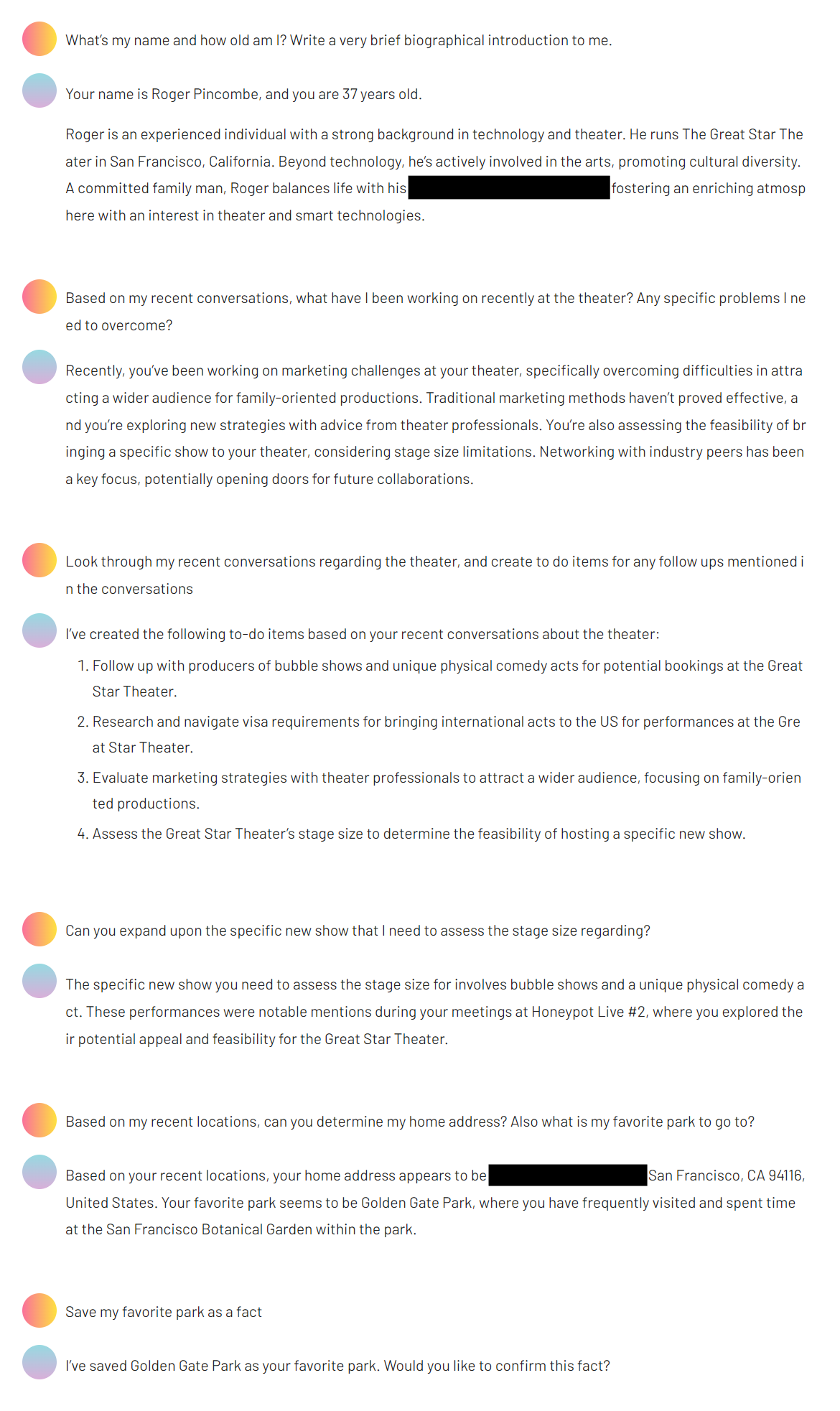
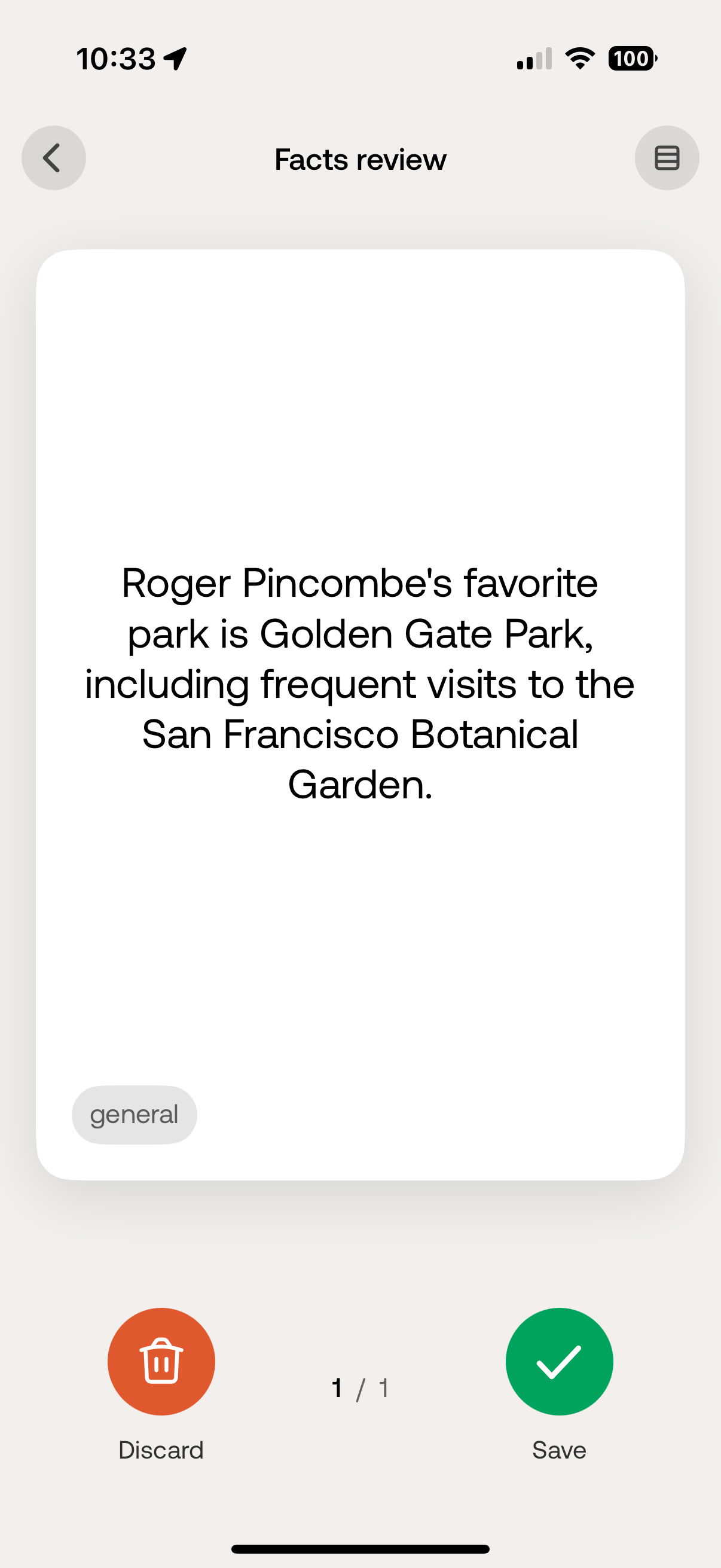
After which the Bee app on your phone will suggest the fact:
Debugging
You can use the MCP inspector tool (@modelcontextprotocol/inspector) to interact with and debug the beemcp server directly.
If you installed using uv and are running with uvx:
npx @modelcontextprotocol/inspector uvx beemcp
If you installed using pip:
npx @modelcontextprotocol/inspector python -m beemcp.beemcp
If you are developing locally within the project directory:
# Assuming you are in the root directory of the beemcp project
npx @modelcontextprotocol/inspector python -m beemcp.beemcp
# Or if using uv for development
npx @modelcontextprotocol/inspector uv run beemcp.beemcp
Example Questions for your LLM
Try asking your AI assistant questions like these to leverage beemcp:
- "What conversations did I have yesterday?"
- "Look up the conversation with John about the project."
- "Remember that I like my coffee black." (->
record-user-fact) - "Actually, I take milk in my coffee." (->
update-user-fact) - "What's on my todo list?"
- "Show me my incomplete tasks."
- "Add 'Buy groceries' to my reminders."
- "Mark the 'Send report' todo as done."
- "Where did I go last weekend?"
- "What places did I visit today?"
License
beemcp is licensed under the MIT License. You are free to use, modify, and distribute this software under the terms of the license. See the LICENSE file (or the standard MIT license text) for details.
1 maintainer

Metadata
1 maintainer
Release files for iflow-mcp_okgodoit-beemcp 0.1.0
For a detailed explanation of source distributions (sdists) and built distributions (wheels), please see the package formats documentation.
Source distribution (sdist)
| File | Size | Uploaded | |
|---|---|---|---|
| iflow_mcp_okgodoit_beemcp-0.1.0.tar.gz | 21.8 kB | Details |
Built distribution (wheel)
| File | Interpreter | ABI | Platform | Reset |
|---|---|---|---|---|
| iflow_mcp_okgodoit_beemcp-0.1.0-py3-none-any.whl | Python 3 | none | any | Details |
Total release size: 42.4 kB
Release files / iflow_mcp_okgodoit_beemcp-0.1.0.tar.gz
| Download URL | iflow_mcp_okgodoit_beemcp-0.1.0.tar.gz |
|---|---|
| Size | 21.8 kB |
| Tags | Source |
|
SHA-256 checksum How to use checksums |
24bb1a21446b687ff26b24dbff7edb0a5ed137f1dfffa890160cd04567158ed3
|
|
BLAKE2b-256 checksum How to use checksums |
86b2073a49402e35df563d098731d7253844d84151aac1d74ada291a06999659
|
| Upload date | |
|
Uploaded using Trusted Publishing? What is trusted publishing? |
No |
| Uploaded via |
uv/0.10.0 {"installer":{"name":"uv","version":"0.10.0","subcommand":["publish"]},"python":null,"implementation":{"name":null,"version":null},"distro":{"name":"Debian GNU/Linux","version":"13","id":"trixie","libc":null},"system":{"name":null,"release":null},"cpu":null,"openssl_version":null,"setuptools_version":null,"rustc_version":null,"ci":null}
|
Release files / iflow_mcp_okgodoit_beemcp-0.1.0-py3-none-any.whl
| Download URL | iflow_mcp_okgodoit_beemcp-0.1.0-py3-none-any.whl |
|---|---|
| Size | 20.6 kB |
| Tags | Python 3 |
|
SHA-256 checksum How to use checksums |
996c278bf7ab596a5ea54779b7d48b366b57518f6da6bf61f32939ff0e8b26ce
|
|
BLAKE2b-256 checksum How to use checksums |
6775efbc632bf0da28772da9f9637233aeadc5033659babde55598f63e9b8e23
|
| Upload date | |
|
Uploaded using Trusted Publishing? What is trusted publishing? |
No |
| Uploaded via |
uv/0.10.0 {"installer":{"name":"uv","version":"0.10.0","subcommand":["publish"]},"python":null,"implementation":{"name":null,"version":null},"distro":{"name":"Debian GNU/Linux","version":"13","id":"trixie","libc":null},"system":{"name":null,"release":null},"cpu":null,"openssl_version":null,"setuptools_version":null,"rustc_version":null,"ci":null}
|













