
CyberChef API MCP Server
This model context protocol (MCP) server interfaces with the CyberChef Server API. Allowing you to use any LLM/MCP client of your choosing to utilise the tools and resources within CyberChef.
🧰 Available Tools and Resources
get_cyberchef_operations_categories: resource - gets updated Cyber Chef categories for additional context / selection of the correct operationsget_cyberchef_operation_by_category: resource - gets list of Cyber Chef operations for a selected categorybake_recipe: tool - bake (execute) a recipe (a list of operations) in order to derive an outcome from the input databatch_bake_recipe: tool - bake (execute) a recipe (a list of operations) in order to derive an outcome from a batch of input dataperform_magic_operation: tool - perform CyberChef's magic operation which is designed to automatically detect how your data is encoded and which operations can be used to decode it
📝 Usage
Start the server using the default stdio transport and specifying an environment variable pointing to a CyberChef API
CYBERCHEF_API_URL="your-cyberchef-api-url" uv run cyberchef_api_mcp_server
🧑💻Usage (Development)
Start the server and test it with the MCP inspector
uv add "mcp[cli]"
mcp dev server.py
📚 Client Configuration
The following commands will generate a client configuration file, the location will depend on your operating system
uv add "mcp[cli]"
mcp install server.py --name "CyberChef API MCP Server"
[!TIP] After running the above command you can then tweak the client configuration to include the environment variable for the CyberChef API URL
{
 "mcpServers": {
   "CyberChef API MCP Server": {
     "command": "uv",
     "args": [
       "run",
       "--with",
       "mcp[cli]",
       "--directory",
       "cyberchef-api-mcp-server/cyberchef_api_mcp_server/",
       "mcp",
       "run",
       "server.py"
     ],
     "env": {
       "CYBERCHEF_API_URL": "your-cyberchef-api-url"
     }
   }
 }
}
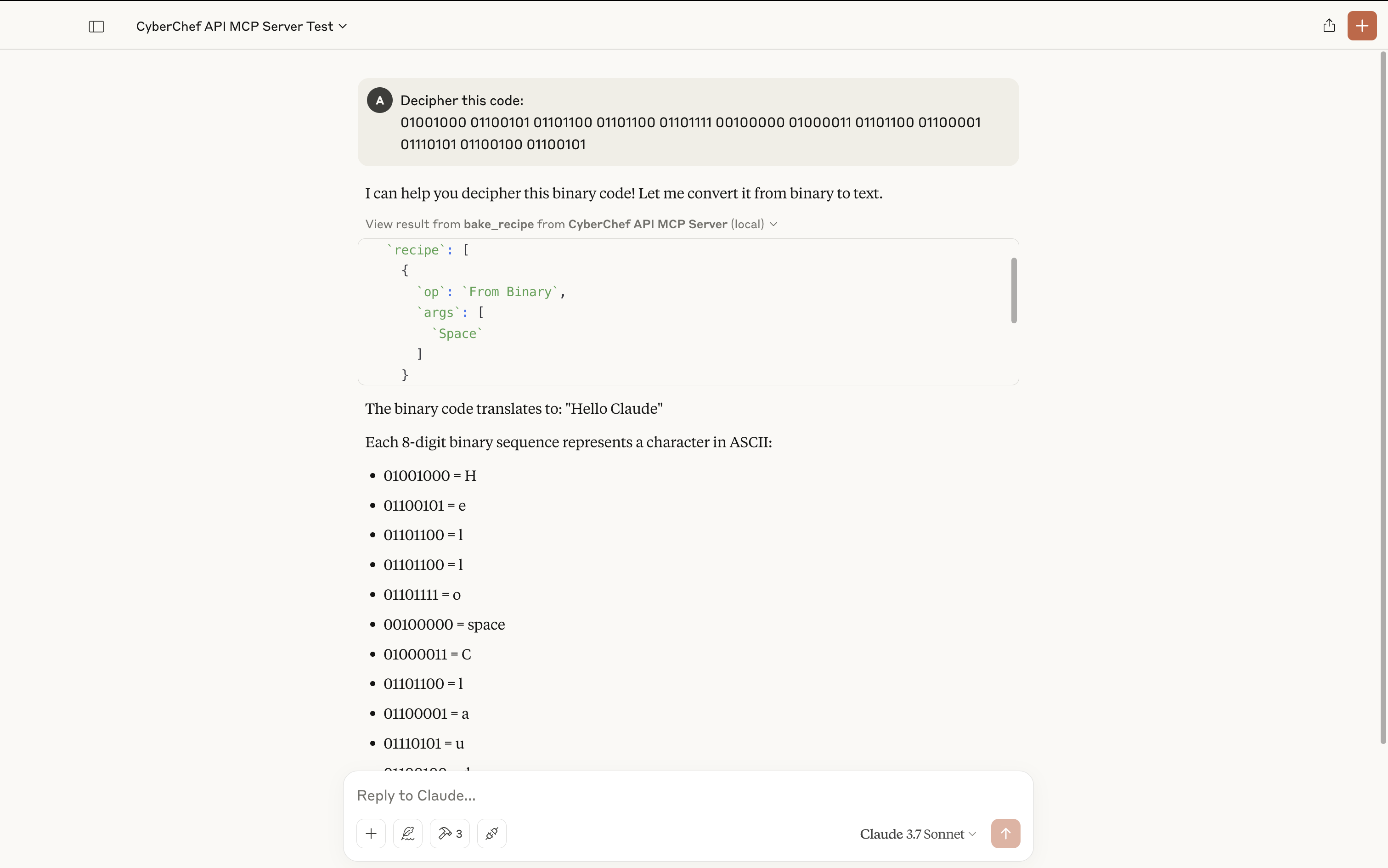
🔍 Demo
Using the MCP server in this example use case, the following prerequisites apply:
- You must have Claude desktop installed
- Have a running CyberChef API instance or one you are able to use
Here is a basic prompt being solved using the MCP server tools:
🙇 References
🪪 License
MIT License
1 maintainer

Metadata
1 maintainer
Release files for iflow-mcp_slouchd-cyberchef-api-mcp-server 0.1.0
For a detailed explanation of source distributions (sdists) and built distributions (wheels), please see the package formats documentation.
Source distribution (sdist)
| File | Size | Uploaded | |
|---|---|---|---|
| iflow_mcp_slouchd_cyberchef_api_mcp_server-0.1.0.tar.gz | 18.9 kB | Details |
Built distribution (wheel)
| File | Interpreter | ABI | Platform | Reset |
|---|---|---|---|---|
| iflow_mcp_slouchd_cyberchef_api_mcp_server-0.1.0-py3-none-any.whl | Python 3 | none | any | Details |
Total release size: 26.1 kB
Release files / iflow_mcp_slouchd_cyberchef_api_mcp_server-0.1.0.tar.gz
| Download URL | iflow_mcp_slouchd_cyberchef_api_mcp_server-0.1.0.tar.gz |
|---|---|
| Size | 18.9 kB |
| Tags | Source |
|
SHA-256 checksum How to use checksums |
5ee7f4d20c45a61e96a19635d178db6e02b35b0d942cfbc24b57f4ce836a8349
|
|
BLAKE2b-256 checksum How to use checksums |
28b42b7a20afdbc4ddb03306f8dcdc62b36e9da1c62ce8cc0599c7e7f7a078eb
|
| Upload date | |
|
Uploaded using Trusted Publishing? What is trusted publishing? |
No |
| Uploaded via |
uv/0.10.0 {"installer":{"name":"uv","version":"0.10.0","subcommand":["publish"]},"python":null,"implementation":{"name":null,"version":null},"distro":{"name":"Debian GNU/Linux","version":"13","id":"trixie","libc":null},"system":{"name":null,"release":null},"cpu":null,"openssl_version":null,"setuptools_version":null,"rustc_version":null,"ci":null}
|
Release files / iflow_mcp_slouchd_cyberchef_api_mcp_server-0.1.0-py3-none-any.whl
| Download URL | iflow_mcp_slouchd_cyberchef_api_mcp_server-0.1.0-py3-none-any.whl |
|---|---|
| Size | 7.2 kB |
| Tags | Python 3 |
|
SHA-256 checksum How to use checksums |
67ac2ce1faaac7def197fb2257d3a61ef6351bb2cb907d01dbf0e3a1c4ea60ec
|
|
BLAKE2b-256 checksum How to use checksums |
2c9a86149e299ac47aeb6a7930a940b6ee6150cf64e2b93314bf77c0d208d1e8
|
| Upload date | |
|
Uploaded using Trusted Publishing? What is trusted publishing? |
No |
| Uploaded via |
uv/0.10.0 {"installer":{"name":"uv","version":"0.10.0","subcommand":["publish"]},"python":null,"implementation":{"name":null,"version":null},"distro":{"name":"Debian GNU/Linux","version":"13","id":"trixie","libc":null},"system":{"name":null,"release":null},"cpu":null,"openssl_version":null,"setuptools_version":null,"rustc_version":null,"ci":null}
|













