
🪟 Windows-MCP






Windows MCP is a lightweight, open-source project that enables seamless integration between AI agents and the Windows operating system. Acting as an MCP server bridges the gap between LLMs and the Windows operating system, allowing agents to perform tasks such as file navigation, application control, UI interaction, QA testing, and more.
Updates
- Try out 🪟Windows-Use!!, an agent built using Windows-MCP.
- Windows-MCP is now featured as Desktop Extension in
Claude Desktop.
Supported Operating Systems
- Windows 7
- Windows 8, 8.1
- Windows 10
- Windows 11
🎥 Demos
https://github.com/user-attachments/assets/d0e7ed1d-6189-4de6-838a-5ef8e1cad54e
https://github.com/user-attachments/assets/d2b372dc-8d00-4d71-9677-4c64f5987485
✨ Key Features
-
Seamless Windows Integration
Interacts natively with Windows UI elements, opens apps, controls windows, simulates user input, and more. -
Use Any LLM (Vision Optional) Unlike many automation tools, Windows MCP doesn't rely on any traditional computer vision techniques or specific fine-tuned models; it works with any LLMs, reducing complexity and setup time.
-
Rich Toolset for UI Automation
Includes tools for basic keyboard, mouse operation and capturing window/UI state. -
Lightweight & Open-Source
Minimal dependencies and easy setup with full source code available under MIT license. -
Customizable & Extendable
Easily adapt or extend tools to suit your unique automation or AI integration needs. -
Real-Time Interaction
Typical latency between actions (e.g., from one mouse click to the next) ranges from 0.7 to 2.5 secs, and may slightly vary based on the number of active applications and system load, also the inferencing speed of the llm.
Prerequisites
- Python 3.13+
- Anthropic Claude Desktop app or other MCP Clients
- UV (Package Manager) from Astra, install with
pip install uv - DXT (Desktop Extension) from Antropic, install with
npm install -g @anthropic-ai/dxt Englishas the default language in Windows or disable theLaunch-ToolandResize-Toolin the MCP Server for Windows with other languages.
🏁 Getting Started
Gemini CLI
-
Navigate to
%USERPROFILE%/.geminiin File Explorer and opensettings.json. -
Add the
windows-mcpconfig in thesettings.jsonand save it.
{
  "theme": "Default",
  ...
//MCP Server Config
  "mcpServers": {
    "windows-mcp": {
      "command": "uv",
      "args": [
        "--directory",
        "<path to the windows-mcp directory>",
        "run",
        "main.py"
      ]
    }
  }
}
- Rerun Gemini CLI in terminal. Enjoy 🥳
Claude Desktop
- Clone the repository.
git clone https://github.com/CursorTouch/Windows-MCP.git
cd Windows-MCP
- Build Desktop Extension
DXT:
npx @anthropic-ai/dxt pack
- Open Claude Desktop:
Go to Claude Desktop: Settings->Extensions->Install Extension (locate the .dxt file)-> Install
Finally Enjoy 🥳.
For additional Claude Desktop integration troubleshooting, see the MCP documentation. The documentation includes helpful tips for checking logs and resolving common issues.
🛠️MCP Tools
Claude can access the following tools to interact with Windows:
Click-Tool: Click on the screen at the given coordinates.Type-Tool: Type text on an element (optionally clears existing text).Clipboard-Tool: Copy or paste using the system clipboard.Scroll-Tool: Scroll vertically or horizontally on the window or specific regions.Drag-Tool: Drag from one point to another.Move-Tool: Move mouse pointer.Shortcut-Tool: Press keyboard shortcuts (Ctrl+c,Alt+Tab, etc).Key-Tool: Press a single key.Wait-Tool: Pause for a defined duration.State-Tool: Combined snapshot of default language, browser, active apps and interactive, textual and scrollable elements along with screenshot of the desktop.Resize-Tool: Used to change the window size or location of an app.Launch-Tool: To launch an application from the start menu.Shell-Tool: To execute PowerShell commands.Scrape-Tool: To scrape the entire webpage for information.
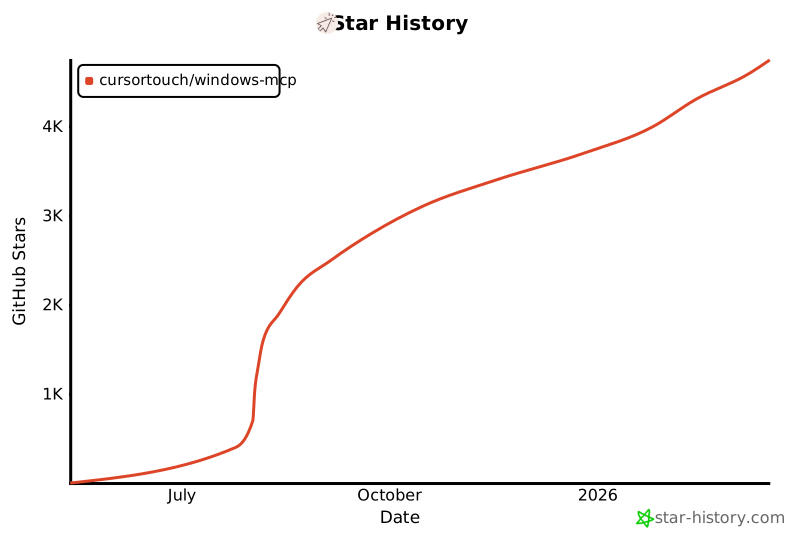
Star History
⚠️Caution
This MCP interacts directly with your Windows operating system to perform actions. Use with caution and avoid deploying it in environments where such risks cannot be tolerated.
📝 Limitations
- Selecting specific sections of the text in a paragraph, as the MCP is relying on a11y tree. (⌛ Working on it.)
Type-Toolis meant for typing text, not programming in IDE because of it types program as a whole in a file. (⌛ Working on it.)
🪪License
This project is licensed under the MIT License - see the LICENSE file for details.
🤝Contributing
Contributions are welcome! Please see CONTRIBUTING for setup instructions and development guidelines.
Made with ❤️ by Jeomon George
Citation
@software{
  author       = {George, Jeomon},
  title        = {Windows-MCP: Lightweight open-source project for integrating LLM agents with Windows},
  year         = {2024},
  publisher    = {GitHub},
  url={https://github.com/CursorTouch/Windows-MCP}
}
1 maintainer

Metadata
1 maintainer
Release files for iflow-mcp_windows-mcp 0.1.1
For a detailed explanation of source distributions (sdists) and built distributions (wheels), please see the package formats documentation.
Source distribution (sdist)
| File | Size | Uploaded | |
|---|---|---|---|
| iflow_mcp_windows_mcp-0.1.1.tar.gz | 15.5 kB | Details |
Built distribution (wheel)
| File | Interpreter | ABI | Platform | Reset |
|---|---|---|---|---|
| iflow_mcp_windows_mcp-0.1.1-py3-none-any.whl | Python 3 | none | any | Details |
Total release size: 33.9 kB
Release files / iflow_mcp_windows_mcp-0.1.1.tar.gz
| Download URL | iflow_mcp_windows_mcp-0.1.1.tar.gz |
|---|---|
| Size | 15.5 kB |
| Tags | Source |
|
SHA-256 checksum How to use checksums |
117835032e0bb105a216e3a7c3251e713e7698cccb49492d629073ce7437e7ee
|
|
BLAKE2b-256 checksum How to use checksums |
4c9baea70d1b24192224c6045af61f5efeb10f70301441b4f51d8d2fcd96ba4c
|
| Upload date | |
|
Uploaded using Trusted Publishing? What is trusted publishing? |
No |
| Uploaded via |
uv/0.8.3
|
Release files / iflow_mcp_windows_mcp-0.1.1-py3-none-any.whl
| Download URL | iflow_mcp_windows_mcp-0.1.1-py3-none-any.whl |
|---|---|
| Size | 18.4 kB |
| Tags | Python 3 |
|
SHA-256 checksum How to use checksums |
0c94375b0ebbbde16e2af6ee29958f1306dfc9bd05543c490a5d9a8f1cbe81e8
|
|
BLAKE2b-256 checksum How to use checksums |
7dc9f42b35c091ef932d803c9411df1b3c4881889957983f500e185e7fdc643c
|
| Upload date | |
|
Uploaded using Trusted Publishing? What is trusted publishing? |
No |
| Uploaded via |
uv/0.8.3
|














