




mcp_mysql_server_pro
Introduction
mcp_mysql_server_pro is not just about MySQL CRUD operations, but also includes database anomaly analysis capabilities and makes it easy for developers to extend with custom tools.
- Supports all Model Context Protocol (MCP) transfer modes (STDIO, SSE, Streamable Http)
- Supports OAuth2.0
- Supports multiple SQL execution, separated by ";"
- Supports querying database table names and fields based on table comments
- Supports SQL execution plan analysis
- Supports Chinese field to pinyin conversion
- Supports table lock analysis
- Supports database health status analysis
- Supports permission control with three roles: readonly, writer, and admin
"readonly": ["SELECT", "SHOW", "DESCRIBE", "EXPLAIN"], # Read-only permissions "writer": ["SELECT", "SHOW", "DESCRIBE", "EXPLAIN", "INSERT", "UPDATE", "DELETE"], # Read-write permissions "admin": ["SELECT", "SHOW", "DESCRIBE", "EXPLAIN", "INSERT", "UPDATE", "DELETE", "CREATE", "ALTER", "DROP", "TRUNCATE"] # Administrator permissions - Supports prompt template invocation
Tool List
| Tool Name | Description |
|---|---|
| execute_sql | SQL execution tool that can execute ["SELECT", "SHOW", "DESCRIBE", "EXPLAIN", "INSERT", "UPDATE", "DELETE", "CREATE", "ALTER", "DROP", "TRUNCATE"] commands based on permission configuration |
| get_chinese_initials | Convert Chinese field names to pinyin initials |
| get_db_health_running | Analyze MySQL health status (connection status, transaction status, running status, lock status detection) |
| get_table_desc | Search for table structures in the database based on table names, supporting multi-table queries |
| get_table_index | Search for table indexes in the database based on table names, supporting multi-table queries |
| get_table_lock | Check if there are row-level locks or table-level locks in the current MySQL server |
| get_table_name | Search for table names in the database based on table comments and descriptions |
| get_db_health_index_usage | Get the index usage of the currently connected mysql database, including redundant index situations, poorly performing index situations, and the top 5 unused index situations with query times greater than 30 seconds |
| optimize_sql | Professional SQL performance optimization tool, providing expert optimization suggestions based on MySQL execution plans, table structure information, table data volume, and table indexes. |
| use_prompt_queryTableData | Use built-in prompts to let the model construct a chain call of tools in mcp (not a commonly used fixed tool, you need to modify the code to enable it, see this class for details) |
Prompt List
| Prompt Name | Description |
|---|---|
| analyzing-mysql-prompt | This is a prompt for analyzing MySQL-related issues |
| query-table-data-prompt | This is a prompt for querying table data using tools. If description is empty, it will be initialized as a MySQL database query assistant |
Usage Instructions
Installation and Configuration
- Install Package
pip install mysql_mcp_server_pro
- Configure Environment Variables
Create a
.envfile with the following content:
# MySQL Database Configuration
MYSQL_HOST=localhost
MYSQL_PORT=3306
MYSQL_USER=your_username
MYSQL_PASSWORD=your_password
MYSQL_DATABASE=your_database
# Optional, default is 'readonly'. Available values: readonly, writer, admin
MYSQL_ROLE=readonly
- Run Service
# SSE mode
mysql_mcp_server_pro --mode sse --envfile /path/to/.env

## Streamable Http mode (default)
mysql_mcp_server_pro --envfile /path/to/.env

# Streamable Http  oauth Authentication
mysql_mcp_server_pro --oauth true
- mcp client
go to see see "Use uv to start the service" ^_^
Note:
- The
.envfile should be placed in the directory where you run the command or use --envfile parameter to specify the path - You can also set these variables directly in your environment
- Make sure the database configuration is correct and can connect
Run with uvx, Client Configuration
- This method can be used directly in MCP-supported clients, no need to download the source code. For example, Tongyi Qianwen plugin, trae editor, etc.
{
	"mcpServers": {
		"mysql": {
			"command": "uvx",
			"args": [
				"--from",
				"mysql_mcp_server_pro",
				"mysql_mcp_server_pro",
				"--mode",
				"stdio"
			],
			"env": {
				"MYSQL_HOST": "192.168.x.xxx",
				"MYSQL_PORT": "3306",
				"MYSQL_USER": "root",
				"MYSQL_PASSWORD": "root",
				"MYSQL_DATABASE": "a_llm",
				"MYSQL_ROLE": "admin"
			}
		}
	}
}
Local Development with Streamable Http mode
- Use uv to start the service
Add the following content to your mcp client tools, such as cursor, cline, etc.
mcp json as follows:
{
  "mcpServers": {
    "mysql_mcp_server_pro": {
      "name": "mysql_mcp_server_pro",
      "type": "streamableHttp",
      "description": "",
      "isActive": true,
      "url": "http://localhost:3000/mcp/"
    }
  }
}
Modify the .env file content to update the database connection information with your database details:
# MySQL Database Configuration
MYSQL_HOST=192.168.xxx.xxx
MYSQL_PORT=3306
MYSQL_USER=root
MYSQL_PASSWORD=root
MYSQL_DATABASE=a_llm
MYSQL_ROLE=admin
Start commands:
# Download dependencies
uv sync

# Start
uv run -m mysql_mcp_server_pro.server

# Custom env file location
uv run -m mysql_mcp_server_pro.server --envfile /path/to/.env

# oauth Authentication
uv run -m mysql_mcp_server_pro.server --oauth true
Local Development with SSE Mode
- Use uv to start the service
Add the following content to your mcp client tools, such as cursor, cline, etc.
mcp json as follows:
{
  "mcpServers": {
    "mysql_mcp_server_pro": {
      "name": "mysql_mcp_server_pro",
      "description": "",
      "isActive": true,
      "url": "http://localhost:9000/sse"
    }
  }
}
Modify the .env file content to update the database connection information with your database details:
# MySQL Database Configuration
MYSQL_HOST=192.168.xxx.xxx
MYSQL_PORT=3306
MYSQL_USER=root
MYSQL_PASSWORD=root
MYSQL_DATABASE=a_llm
MYSQL_ROLE=admin
Start commands:
# Download dependencies
uv sync

# Start
uv run -m mysql_mcp_server_pro.server --mode sse

# Custom env file location
uv run -m mysql_mcp_server_pro.server --mode sse --envfile /path/to/.env
Local Development with STDIO Mode
Add the following content to your mcp client tools, such as cursor, cline, etc.
mcp json as follows:
{
  "mcpServers": {
      "operateMysql": {
        "isActive": true,
        "name": "operateMysql",
        "command": "uv",
        "args": [
          "--directory",
          "/Volumes/mysql_mcp_server_pro/src/mysql_mcp_server_pro",    # Replace this with your project path
          "run",
          "-m",
          "mysql_mcp_server_pro.server",
          "--mode",
          "stdio"
        ],
        "env": {
          "MYSQL_HOST": "localhost",
          "MYSQL_PORT": "3306",
          "MYSQL_USER": "root",
          "MYSQL_PASSWORD": "123456",
          "MYSQL_DATABASE": "a_llm",
          "MYSQL_ROLE": "admin"
       }
    }
  }
}
Custom Tool Extensions
-
Add a new tool class in the handles package, inherit from BaseHandler, and implement get_tool_description and run_tool methods
-
Import the new tool in init.py to make it available in the server
OAuth2.0 Authentication
- Start the authentication service. By default, it uses the built-in OAuth 2.0 password mode authentication. You can modify your own authentication service address in the env file.
uv run -m mysql_mcp_server_pro.server --oauth true
-
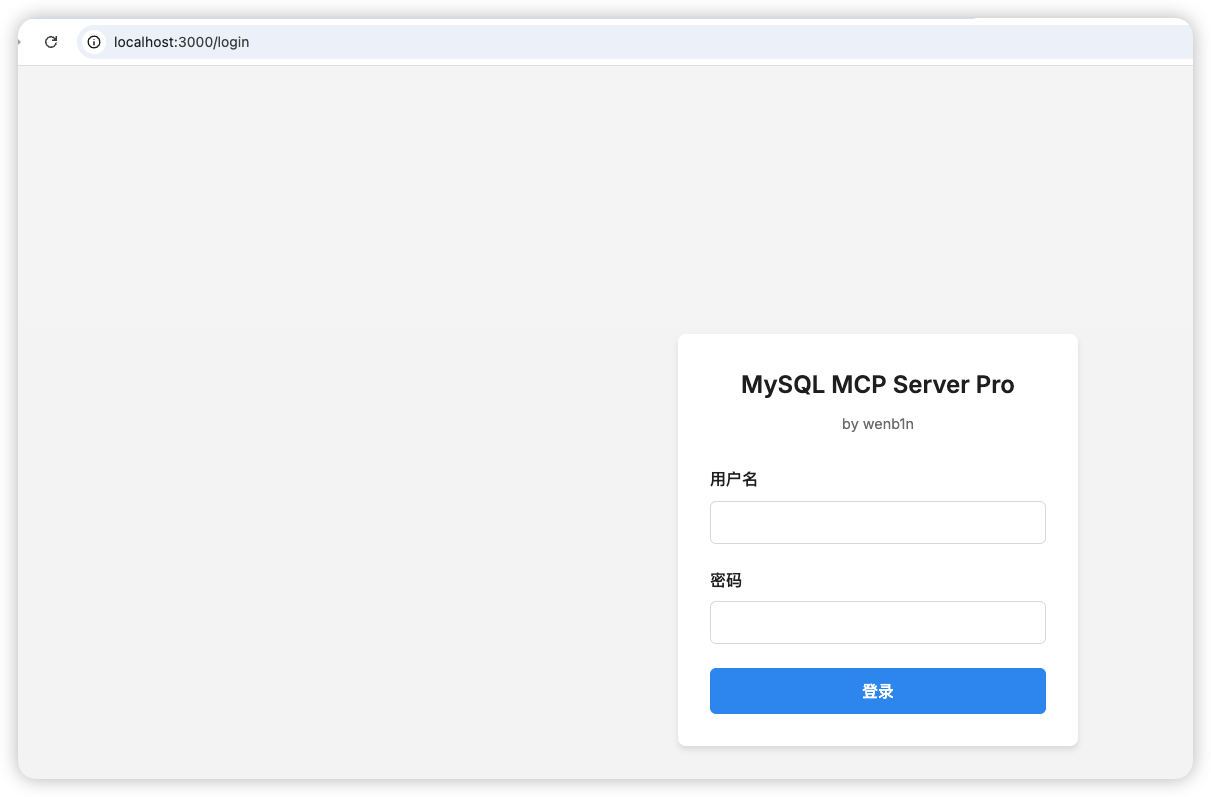
Visit the authentication service at http://localhost:3000/login. Default username and password are configured in the env file.
-
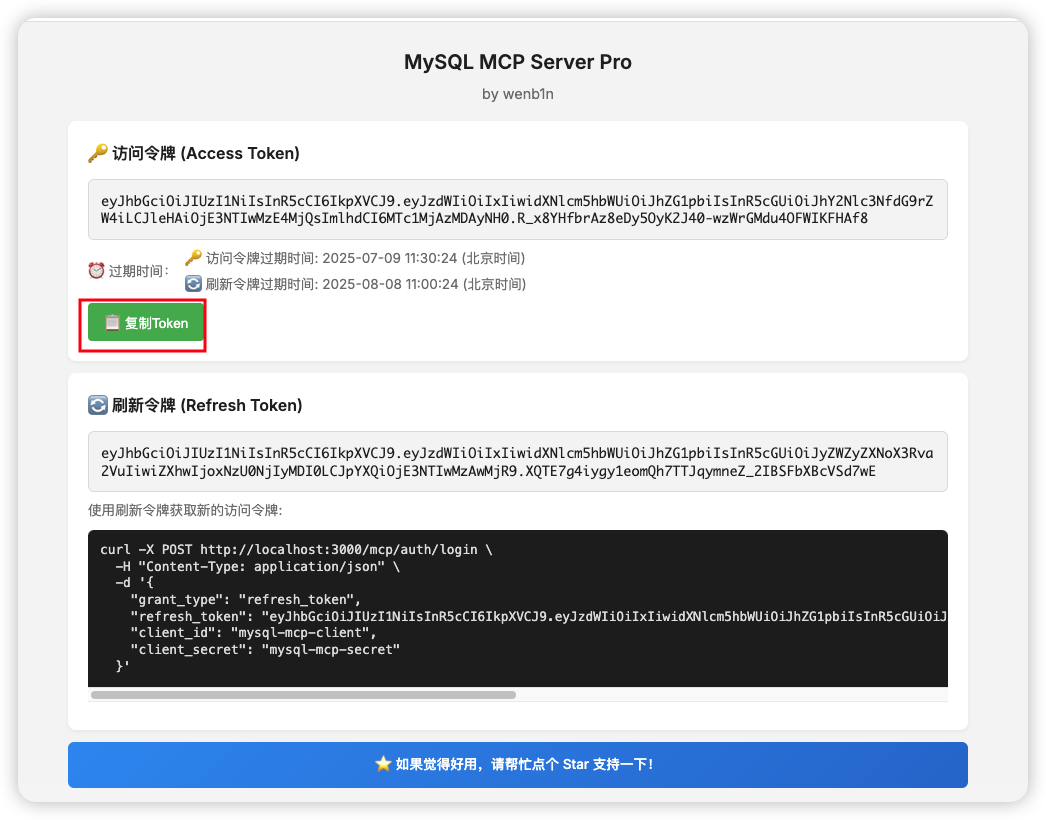
Copy the token and add it to the request headers, for example:
{
  "mcpServers": {
    "mysql_mcp_server_pro": {
      "name": "mysql_mcp_server_pro",
      "type": "streamableHttp",
      "description": "",
      "isActive": true,
      "url": "http://localhost:3000/mcp/",
      "headers": {
        "authorization": "bearer TOKEN_VALUE"
      }
    }
  }
}
Examples
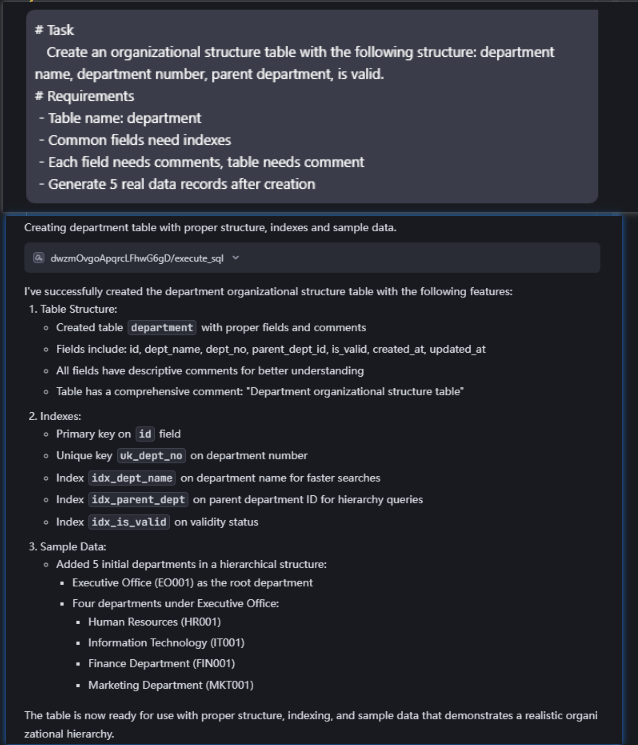
- Create a new table and insert data, prompt format as follows:
# Task
   Create an organizational structure table with the following structure: department name, department number, parent department, is valid.
# Requirements
 - Table name: department
 - Common fields need indexes
 - Each field needs comments, table needs comment
 - Generate 5 real data records after creation

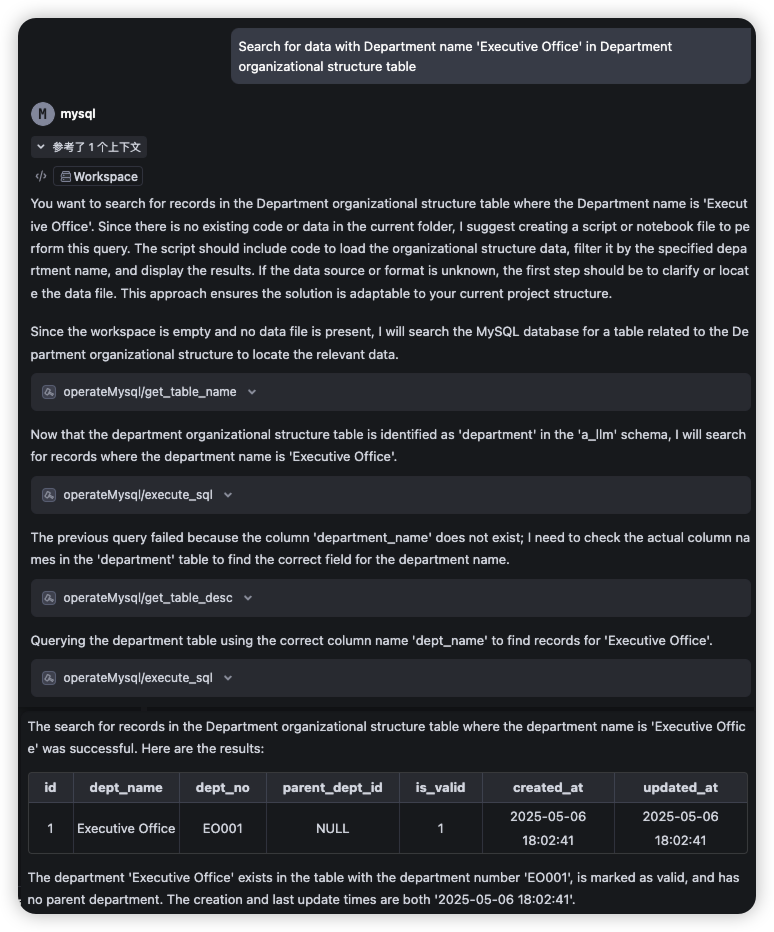
- Query data based on table comments, prompt as follows:
Search for data with Department name 'Executive Office' in Department organizational structure table
- Analyze slow SQL, prompt as follows:
select * from t_jcsjzx_hjkq_cd_xsz_sk xsz
left join t_jcsjzx_hjkq_jcd jcd on jcd.cddm = xsz.cddm
Based on current index situation, review execution plan and provide optimization suggestions in markdown format, including table index status, execution details, and optimization recommendations
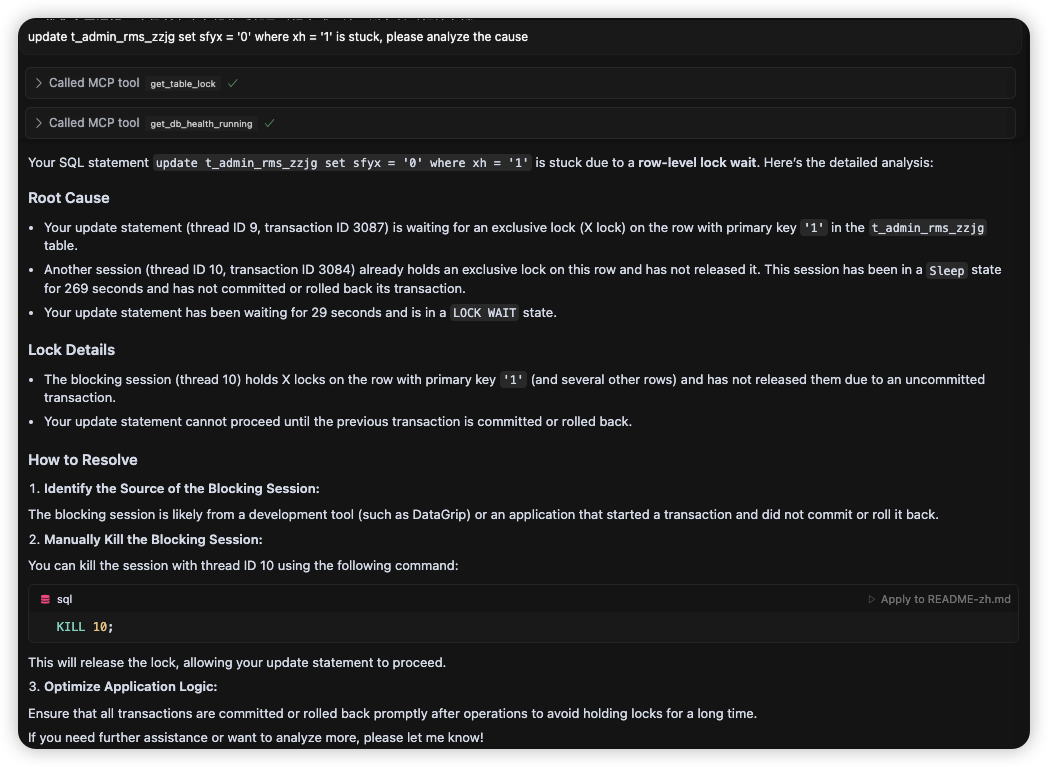
- Analyze SQL deadlock issues, prompt as follows:
update t_admin_rms_zzjg set sfyx = '0' where xh = '1' is stuck, please analyze the cause
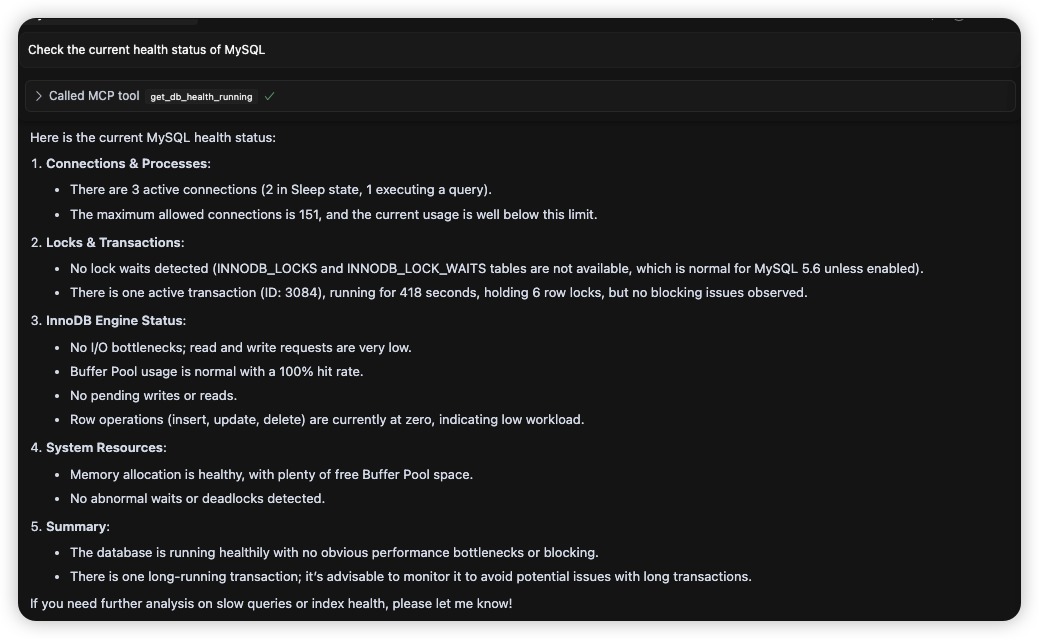
- Analyze the health status prompt as follows
Check the current health status of MySQL
1 maintainer

Metadata
1 maintainer
Release files for iflow-mcp_xwb602625136_mysql_mcp_server_pro 0.2.1
For a detailed explanation of source distributions (sdists) and built distributions (wheels), please see the package formats documentation.
Source distribution (sdist)
| File | Size | Uploaded | |
|---|---|---|---|
| iflow_mcp_xwb602625136_mysql_mcp_server_pro-0.2.1.tar.gz | 35.8 kB | Details |
Built distribution (wheel)
| File | Interpreter | ABI | Platform | Reset |
|---|---|---|---|---|
| iflow_mcp_xwb602625136_mysql_mcp_server_pro-0.2.1-py3-none-any.whl | Python 3 | none | any | Details |
Total release size: 89.2 kB
Release files / iflow_mcp_xwb602625136_mysql_mcp_server_pro-0.2.1.tar.gz
| Download URL | iflow_mcp_xwb602625136_mysql_mcp_server_pro-0.2.1.tar.gz |
|---|---|
| Size | 35.8 kB |
| Tags | Source |
|
SHA-256 checksum How to use checksums |
0c57f367888eb16e4a1eca27cdf941abdfb937932e5046886f7b464cb0aafb04
|
|
BLAKE2b-256 checksum How to use checksums |
f241c1e6c2329222965eb6dd46978ff5ee918f9ca2858883ec03ed40a310e0f7
|
| Upload date | |
|
Uploaded using Trusted Publishing? What is trusted publishing? |
No |
| Uploaded via |
uv/0.9.8
|
Release files / iflow_mcp_xwb602625136_mysql_mcp_server_pro-0.2.1-py3-none-any.whl
| Download URL | iflow_mcp_xwb602625136_mysql_mcp_server_pro-0.2.1-py3-none-any.whl |
|---|---|
| Size | 53.5 kB |
| Tags | Python 3 |
|
SHA-256 checksum How to use checksums |
7c7e1040840f5fb692e8ae34aea6b822295f3859896a994575fa986def4ee9ed
|
|
BLAKE2b-256 checksum How to use checksums |
ae71d1e3d1f836962ea35b1198b78175a609ee8aed5a585be353085283b232ec
|
| Upload date | |
|
Uploaded using Trusted Publishing? What is trusted publishing? |
No |
| Uploaded via |
uv/0.9.8
|













