
Elektron MCP
A Model Context Protocol (MCP) server that allows Claude and other MCP-compatible LLMs to interact with and control Elektron synthesizers via MIDI.
If you have a Moog Sub37/Subsequent37, check out our dedicated MCP server for it at moog-sub37-mcp.
A web-based version of this MCP server can be found at senthgenie.com. (You can ask for API key for free on discord)
If you want help or would like to contribute to development, please join our Discord community.
Prompt examples
"Use Digitone MCP to design an evolving dark pad using the Wavetone machine on track 1."
"Use Digitone MPC to design a Dark thick pad using Wavetone machine on track 1."
Only Wavetone machine is supported for now, other machines will be added soon, stay tuned!
Features
- Complete MIDI control interface for the Elektron Digitone synthesizer
- Structured controllers for all Digitone sound engines:
- Wavetone (waveshaping synthesis)
- FM Tone (FM synthesis)
- FM Drum (percussive FM synthesis)
- Swarmer (unison/swarm synthesis)
- Comprehensive parameter control for:
- All filter types
- MultiMode
- Lowpass4
- Equalizer
- LegacyLpHp
- CombMinus
- CombPlus
- BaseWidth
- Amplitude and envelope settings
- Effects processing (delay, reverb, chorus, bit reduction, etc.)
- LFOs control
- All filter types
- MCP server exposing all synth parameters as tools for LLMs
- Type-safe parameter validation using Pydantic
- Modular architecture for easy extension to other Elektron devices
Demo
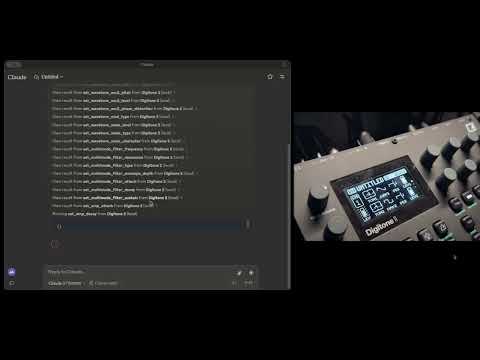
Watch Claude control the Elektron Digitone synthesizer in real-time:
Installation and Usage
Prerequisites
- Python 3.10+
- uv for package management
- An Elektron Digitone connected via USB
- Claude Desktop app (for full integration)
Installing Dependencies
uv is mandatory for this project so start by installing it:
For macOS:
brew install uv
For Windows:
Follow the instructions here
3. Installing with Claude Desktop
To use with Claude AI, add the MCP server configuration in Claude Desktop:
⚠️ Important: You don't need to clone the repository or install the packages, all you need is to add the MCP server configuration to your claude_desktop_config.json file the MPC server is already published on pypi.
Go to Claude > Settings > Developer > Edit Config > claude_desktop_config.json to include the following:
{
  "mcpServers": {
    "Digitone 2": {
      "command": "uvx",
      "args": ["elektron-mcp"]
    }
  }
}
Architecture
- Base Controllers: Common functionality abstracted into base classes
- Specialized Controllers: Dedicated controllers for each synth engine and module
- MCP Tools: Direct interface between LLMs and the synth's parameters
- MIDI Interface: Reliable communication with Digitone hardware
Implementation Details
This library uses:
- FastMCP: For exposing synth controls to LLMs
- Pydantic models: For data validation, serialization, and type safety
- mido: For MIDI communication
Use Cases
- Allow Claude and other LLMs to create and modify sounds on the Digitone
- Programmatically control Digitone parameters for automated sound design
- Bridge between AI-generated music and hardware synthesis
Future Extensions
- Support for additional Elektron devices (Analog Four, Octatrack, etc.)
- Pattern sequencing and automation
- Sound preset management
- Additional synthesis parameters
1 maintainer

Metadata
1 maintainer
Release files for iflow-mcp_zerubeus-elektron-mcp 0.2.4
For a detailed explanation of source distributions (sdists) and built distributions (wheels), please see the package formats documentation.
Source distribution (sdist)
| File | Size | Uploaded | |
|---|---|---|---|
| iflow_mcp_zerubeus_elektron_mcp-0.2.4.tar.gz | 41.7 kB | Details |
Built distribution (wheel)
| File | Interpreter | ABI | Platform | Reset |
|---|---|---|---|---|
| iflow_mcp_zerubeus_elektron_mcp-0.2.4-py3-none-any.whl | Python 3 | none | any | Details |
Total release size: 73.9 kB
Release files / iflow_mcp_zerubeus_elektron_mcp-0.2.4.tar.gz
| Download URL | iflow_mcp_zerubeus_elektron_mcp-0.2.4.tar.gz |
|---|---|
| Size | 41.7 kB |
| Tags | Source |
|
SHA-256 checksum How to use checksums |
6b2c6ddef6c55c366e5d1ca108ab9c96983d9c0eec67587495cbed16a5b8f2a4
|
|
BLAKE2b-256 checksum How to use checksums |
90e14c29eb21cac103d9dc782d9a77100f224c47049635e942fd19e76f1390e4
|
| Upload date | |
|
Uploaded using Trusted Publishing? What is trusted publishing? |
No |
| Uploaded via |
uv/0.10.2 {"installer":{"name":"uv","version":"0.10.2","subcommand":["publish"]},"python":null,"implementation":{"name":null,"version":null},"distro":{"name":"Debian GNU/Linux","version":"13","id":"trixie","libc":null},"system":{"name":null,"release":null},"cpu":null,"openssl_version":null,"setuptools_version":null,"rustc_version":null,"ci":null}
|
Release files / iflow_mcp_zerubeus_elektron_mcp-0.2.4-py3-none-any.whl
| Download URL | iflow_mcp_zerubeus_elektron_mcp-0.2.4-py3-none-any.whl |
|---|---|
| Size | 32.2 kB |
| Tags | Python 3 |
|
SHA-256 checksum How to use checksums |
f1299ffce969759903a8fd860b5f3d49e7770fca3b70c7523cf4439c45e6fbff
|
|
BLAKE2b-256 checksum How to use checksums |
9cf3932698597da658290e0604cce3c8cd90914b93099e331d65d585f0c4fb9a
|
| Upload date | |
|
Uploaded using Trusted Publishing? What is trusted publishing? |
No |
| Uploaded via |
uv/0.10.2 {"installer":{"name":"uv","version":"0.10.2","subcommand":["publish"]},"python":null,"implementation":{"name":null,"version":null},"distro":{"name":"Debian GNU/Linux","version":"13","id":"trixie","libc":null},"system":{"name":null,"release":null},"cpu":null,"openssl_version":null,"setuptools_version":null,"rustc_version":null,"ci":null}
|













