
IKernel Remote
All your Jupyter kernels, on all your machines, in one place. This is a fork of abandonned package remote_ikernel by Tom Daff <tdd20@cam.ac.uk>.
Launch Jupyter kernels on remote systems and through batch queues so that they can be used within a local Jupyter noteboook.
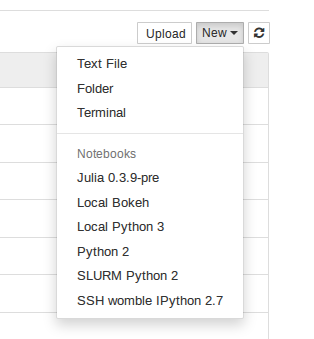
Jupyter compatible Kernels start through interactive jobs in batch queue systems (SGE, SLURM, PBS…) or through SSH connections. Once the kernel is started, SSH tunnels are created for the communication ports are so the notebook can talk to the kernel as if it was local.
Commands for managing the kernels are included. It is also possible to use ikr script to manage kernels from different virtual environments or different python implementations.
Install with pip install ikernel_remote. Requires notebook (as part of Jupyter), version 4.0 or greater and pexpect. Passwordless ssh to the all the remote machines is also required (e.g. nodes on a cluster).
# Install the module ('python setup.py install' also works)

pip install ikernel_remote
# Set up the kernels you'd like to use
ikr# Add a new kernel running through GrideEngine
ikr --add \
--kernel_cmd="ipython kernel -f {connection_file}" \
--name="Python 2.7" --cpus=2 --pe=smp --interface=sge# Add an SSH connection to a remote machine running IJulia
ikr --add \
--kernel_cmd="/home/me/julia-79599ada44/bin/julia -i -F /home/me/.julia/v0.3/IJulia/src/kernel.jl {connection_file}" \
--name="IJulia 0.3.8" --interface=ssh \
--host=me@remote.machine --workdir='/home/me/Workdir' --language=julia# Set up kernels for your local virtual environments that can be run
# from a single notebook server.
ikr --add \
--kernel_cmd="/home/me/Virtualenvs/dev/bin/ipython kernel -f {connection_file}" \
--name="Python 2 (venv:dev)" --interface=local# Connect to a SLURM cluster through a gateway machine (to get into a
# local network) and cluster frontend machine (where the sqsub runs from).
ikr --add \
--kernel_cmd="ipython kernel -f {connection_file}" \
--name="Python 2.7" --cpus=4 --interface=slurm \
--tunnel-hosts gateway.machine cluster.frontendThe kernel spec files will be installed so that the new kernel appears in the drop-down list in the notebook. ikernel_remote manage also has options to show and delete existing kernels.
Changes for v1.0
Setup update.
Changes for v0.6
Renamed to ikernel_remote.
Changed kernel name base to kernel-remote.
Changes for v0.5
Options --mem and --time to specify required resources for batch jobs.
Bugfixes.
Changes for v0.4
Option --tunnel-hosts. When given, the software will try to create an ssh tunnel through all the hosts before starting the final connection. Allows using batch queues on remote systems.
Preliminary support for dealing with passwords. If a program is defined in the environment variable SSH_ASKPASS it will be used to ask the user for a password.
Changes for v0.3
Updated pip requirements to pull in the notebook package. Use an earlier version if you need to use IPython 3.
Remote process is polled for output which will show up when --verbose if used as a kernel option.
Changes for v0.2
Version 0.2.11 is the last version to support IPython notebook version 3. pip requirements enforce versions less than 4. Use a more recent version to ensure compatibility with the Jupyter split.
Support for PBS/Torque through qsub -I.
Tunnels are kept alive better, if something is not responding try waiting 20 seconds to see if a tunnel had dies. (Tunnels no longer depend on pyzmq, instead they are launched through pexpect and monitored until they die.)
--remote-launch-args can be used to set qlogin parameters or similar.
--remote-precmd allows execution of an extra command on the remote host before launching a kernel.
Better compatibility with Python 3.
Kernel output on terminals with --verbose option for debugging.
Connect to a host with ssh, slurm, or local kernels.
Changed prefix to rik_.
kernel_cmd now requires the {connection_file} argument.
ikernel_remote manage --show command to show existing kernels.
Specify the working directory on the remote machine with --workdir.
kernel-uuid.json is copied to the working director for systems where there is no access to the frontend filesystem.
Added compatibility layer to get rid of Jupyter warnings.
1 maintainer

Metadata
1 maintainer
Release files for ikernel-remote 1.0.2
For a detailed explanation of source distributions (sdists) and built distributions (wheels), please see the package formats documentation.
Source distribution (sdist)
| File | Size | Uploaded | Provenance | Actions |
|---|---|---|---|---|
| ikernel_remote-1.0.2.tar.gz | 32.8 kB | Without provenance | Details for ikernel_remote-1.0.2.tar.gz |
Release files / ikernel_remote-1.0.2.tar.gz
| Download URL | ikernel_remote-1.0.2.tar.gz |
|---|---|
| Size | 32.8 kB |
| Tags | Source |
|
SHA-256 checksum How to use checksums |
d454ed2177b430d5674028b8f6cdd3e1bb4b8ff55fc7b0bd6723d049182b1192
|
|
BLAKE2b-256 checksum How to use checksums |
1994d3c4f0ab8f94f3ac9a4a82f3283f6c9ce98d7084a6b48708a51f1e56c2e8
|
| Upload date | |
|
Uploaded using Trusted Publishing? What is trusted publishing? |
No |
| Uploaded via |
twine/3.6.0 importlib_metadata/4.8.1 pkginfo/1.8.3 requests/2.28.1 requests-toolbelt/0.9.1 tqdm/4.64.0 CPython/3.10.5
|
Security for ikernel-remote 1.0.2
Provenance
Provenance describes where a file came from. On PyPI, provenance is shared via attestations, which provide a verifiable record of the build or publishing details. View details, limitations and caveats.
No provenance found
None of the files in this release were uploaded with provenance metadata.
A note on package security
PyPI is a repository for distributing packages, not a service for auditing them. While third-party security researchers and our staff do their best to detect and remove malicious packages, PyPI cannot guarantee the quality, security or suitability of any given package.
To learn more about protecting yourself from malicious actors, visit our package security documentation.














